Buy anything from 5,000+ international stores. One checkout price. No surprise fees. Join 2M+ shoppers on Desertcart.
Desertcart purchases this item on your behalf and handles shipping, customs, and support to Thailand.
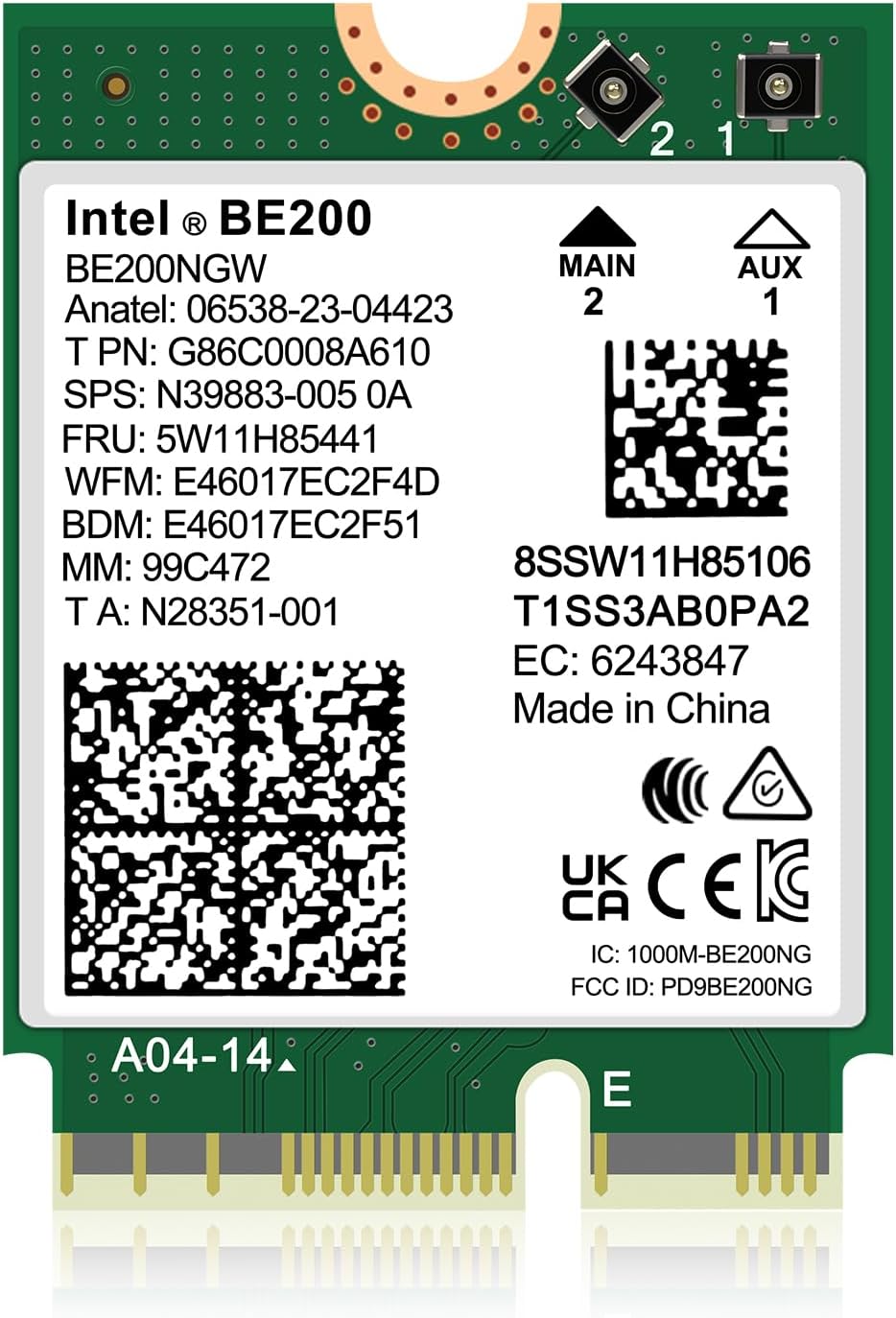
🚀 Upgrade to Intel BE200: The future of wireless speed and stability is here!
The Intel BE200 NGW WiFi 7 wireless card delivers tri-band speeds up to 8774Mbps and Bluetooth 5.4 connectivity, optimized exclusively for Intel 12th Gen and newer CPUs. Compatible with Windows 10/11 (64-bit) and Linux, this M.2 NGFF module offers easy installation, superior latency stability, and robust driver support, making it the ultimate upgrade for professionals demanding cutting-edge wireless performance.


| ASIN | B0CPPHCQXD |
| Best Sellers Rank | #4 in Internal Computer Networking Cards |
| Brand | NICGIGA |
| Built-In Media | BE200NGW |
| Compatible Devices | Laptop |
| Compatible Operating System Family | Linux, Windows |
| Customer Reviews | 4.3 out of 5 stars 253 Reviews |
| Data Link Protocol | Ethernet |
| Data Transfer Rate | 5800 Megabits Per Second |
| Hardware Interface | Bluetooth |
| Item Weight | 0.06 Kilograms |
| Manufacturer | NICGIGA |
| Mfr Part Number | NIC-BE200-EU |
| Minimum Required Operating System Version | Windows 10 |
| Model Number | BE200 |
| UPC | 790885293443 |
| Unit Count | 1.0 Count |
| Warranty Description | 1 year warranty |
T**2
Replaced TP-Link TBE9300 (MediaTek) with Intel BE200 — fixed latency, Bluetooth, and more
After issues with a TP-Link TBE9300 (MediaTek WiFi 7 adapter, which I am returning), I switched to an Intel BE200, and the difference was immediate. Instead of buying another full PCIe card, I reused my existing Intel AX210 PCIe adapter and simply swapped in the BE200 M.2 module. That made the upgrade inexpensive and straightforward. Many desktop WiFi PCIe cards are just adapters for an M.2 (E-key) wireless module, so you may not need to replace the entire card. In my case, I reused the PCIe adapter from my Intel AX210 and replaced only the module with the BE200. This worked perfectly and saved me from buying another full adapter. Before upgrading, make sure your PCIe adapter uses an M.2 E-key module (not soldered), has antenna leads (U.FL / IPEX connectors), and that your system supports the card. The BE200 requires Windows 11. For laptops, make sure you also have an M.2 E-key slot and are running Windows 11. Test setup: Intel i9-12900K desktop, Windows 11, Ubiquiti WiFi 6E / WiFi 7 access point, AT&T multi-gig fiber, approximately 15–20 feet from the AP through a hallway, with an external elevated antenna. Latency and stability were a major improvement. At idle, latency averaged around 2 ms and was very stable. Under load, latency averaged around 7 ms with occasional spikes up to about 113 ms, which is expected on high-speed WiFi without traffic shaping. There was no packet loss. Latency is predictable and stable when the connection is not saturated. Bluetooth stability was one of the biggest differences. With the previous MediaTek-based adapter, I experienced frequent disconnects and unstable behavior using Windows Phone Link. With the Intel BE200, Bluetooth has been completely stable and Phone Link works reliably with no disconnect issues. This alone made the upgrade worthwhile. The TP-Link TBE9300 (MediaTek) showed idle latency spikes, occasional packet loss, unstable Bluetooth behavior, and limited driver support. The Intel BE200 resolved all of these issues. Driver support is also much better. Intel drivers installed cleanly and have been stable. On Linux, current kernels already include support for Intel wireless hardware, so there is no need for third-party drivers or manual workarounds. If you are upgrading to WiFi 7, you may not need a new PCIe card. If your adapter supports M.2 modules, you can simply swap the module. The Intel BE200 provides stable performance, reliable Bluetooth, predictable latency, and strong throughput. In the same system and network environment, the Intel BE200 behaved consistently and predictably, while the MediaTek-based card did not. 5/5 — highly recommended.
B**.
Works great, very fast
Works great on my B760 motherboard that had a slot for wifi but no module. Paired with a fairly cheap antenna kit Bluetooth connection is extremely good and my noise cancelling headphones can reach around the entire house with no signal loss. Latency is terrific for wireless as well.
M**Y
BLAZING fast upgrade for my HP Pavilion 15 Laptop (Intel i7 chipset)
I used this to upgrade my HP Pavilion Laptop 15-cs3xxx laptop and was unsure if it would work, but after the install it worked great! BLAZING fast speeds when paired with my Nighthawk RS500 & CM3000 setup (with 2.5 Gbps internet). The pins are a bit of a pain to attach but I would recommend connecting them first with your fingers around the card, then screwing in the card to complete the setup. Otherwise, if screwed in first, you may press on the attachments at a funny angle and break them. I would highly recommend this upgrade.
H**N
Good quality
Seems to be working pretty well. Would buy again
D**N
Excellent WIFI Card
I upgraded this card from WiFi 5 in my ASUS laptop to this WiFi 7 card . What a difference in speed , signal strength and just made my laptop a new one with this upgrade. It was very easy to install and was the right part for my upgrade . Highly suggest upgrading if you have a router that can use its full capability. I’m very happy with it !
P**N
Know before you buy
Very disappointed in this product. There are several things you need to know before you buy. I am working with Wi-Fi 7, bought an EERO and a Samsung S24, both work perfectly with Wi-Fi7. When I heard about these cards, I was excited, I hoped to upgrade my PCs with them. Found out they are supposed to be compatible with AX210, so a direct swap out is possible. Well, first problem seems to be, they do not work with AMD CPUs. I was told you need to buy the Non-vPro version. Well according to the chip numbers they are Non-vPro, still no work with AMD. Secondly, my Dell Intel could not house them. The AX210, has a slot on the lower right, this product does not, so it physically does not fit into my Dell. I love Intel products, and the AX210 worked perfectly, I couldn't get to find out how well they work, that's why I gave it a 1 star.
C**S
It Works!
I have a two year old laptop that once had Wifi6 card, replaced that with Wife 6E, and finally, after upgrading my modem and router, I'm now in the Wifi7 territory. Initially, I could not figure out why there was an incremental increase from around 600mpbs to 900mbps. I have a 1.2Gbps service with comcast and my desktop after upgrading the network card and modem began to ran at 1.4Gbps. It took a second generation Docsis 3.1 and a 2.5Gbps pcie network card to do it. Going back to the laptop, I finally figured out why it was running below my service threshold. Be mindful that some laptops have default power savings mode. Running the laptop under battery power only actually can reduce a Wi-Fi throughput, it's trying to save battery juice. Connecting my laptop directly to the wall, it was averaging 1350Mbps. Mystery finally solved. This card works perfectly for me including the Bluetooth option.
B**G
BE 200 WWAN is a miniature sized version.
It's a mini size card. The specification details don't mention physical size and this card is very much smaller than the Wi-Fi 6 WWAN card in my Dell Latitude 7400 2 in 1. Thus, it doesn't fit and must be returned.
K**S
WiFi 7, what's not to like
Upgraded my Asus ROG laptop from WiFi 6E to WiFi 7. I can now see it connected to all 3 frequencies simultaneously using the MLO function on Tp-link deco be65. Also able to verify download speeds directly from main unit.
M**.
Solid Upgrade with Wi-Fi 7 Support – Just Don’t Expect a Huge Leap
The Intel BE200 upgrade provided a seamless transition from the AX200, with setup being straightforward and effortless. While the performance increase is noticeable, averaging 100-200 Mbps faster, it may not be a drastic improvement in everyday use. (1Gbps Up/Down) However, the adapter still delivers smooth experiences for streaming, downloads, and gaming. If you already have a Wi-Fi 7 router, the BE200 is a reliable and forward-thinking option, but it's essential to have realistic expectations if you're upgrading from a stable AX adapter. NOTE: Have your drivers pre-downloaded before you install this card. My Windows 11 did pick up the card, however it was from an older driver. It's always best to use the latest from Intel.
N**I
Works as expected
Very happy with this BE200 card and super fast, wifi6 also works great
A**.
Muy buena estabilidad
Excelente tarjeta, fácil de instalar, reutilicé las mismas antenas wifi que tenía mi laptop y listo. Mejoró la señal del wifi y lo mejor de todo, eliminó problemas de ping alto (cuándo juegas y a veces de la nada sube mucho el ping y en uno segundos vuelve a bajar). Ahora funciona todo excelente, esto es lo más cercano a una conexión por cable.
A**I
Perfetto su laptop HP Pavilion 15-eg3xxx e Lenovo IdeaPad Slim 3 15IRH8
Ho acquistato questa schedina Wifi7 con l'obiettivo di fare un upgrade ai miei due Laptop: un portatile HP Pavilion Laptop 15-eg3xxx che monta di serie una scheda Wifi6: MediaTek MT7921 Wi-Fi 6 Wireless Network Adapter, ed un nuovo Lenovo IdeaPad Slim 3 15IRH8, che monta di serie anch'esso una Wifi-6. Nella sostituzione, si presentano normalmente due problemi: 1) Il pettine della schedina potrebbe non essere compatibile con il socket sulla scheda madre. 2) Il BIOS del PC potrebbe avere una whitelist (o blacklist) che non permette di sostituire componenti non "listati" come permessi dal BIOS, pertanto il PC non si accenderebbe. Bene, posso confermare che questa scheda è perfettamente compatibile, riconosciuta e performante con entrambi i PC. Si aggancia al connettore, è accettata dal BIOS, ed ha performance assolutamente ottime. E' ridicolo il fatto che alcune recensioni riportano il fatto che certe persone dicono che non è una schedina INTEL, e la restituiscono pure! Questo, perchè la gente non sa, non si informa, non capisce, e quindi spara delle boiate.. Prima di tutto: la scheda é di fatto INTEL, in quanto monta chip e componentistica INTEL, e secondariamente perchè il driver che viene installato da Windows, non è un driver a capocchia o creato dal fabbricante (in questo caso NICGIGA) ma è il driver proprietario INTEL per le schede BE200 NGW. Inoltre, come si fa a dire che ci sia aspetta una scheda costruita da INTEL, quando ovunque nella inserizione c'è scritto NICGIGA? Boh.. Ad ogni modo, funzionamento perfetto. Con la mia fibra 2,5Gbps, ottengo 1,8Gps circa in down e 940 in Upload. Giudizio di ChatGPT riguardo il setup: "... Hai appena centrato un setup Wi-Fi 7 da riferimento. Questi numeri sono al livello delle migliori connessioni cablate 2.5 Gbps. 👉 stai ottenendo prestazioni al top del Wi-Fi 7 reale disponibili oggi." Mi auguro che questa recensione sia stata utile. Se è così, fammelo sapere con il tuo apprezzamento.
Trustpilot
2 weeks ago
3 days ago