Buy anything from 5,000+ international stores. One checkout price. No surprise fees. Join 2M+ shoppers on Desertcart.
Desertcart purchases this item on your behalf and handles shipping, customs, and support to Thailand.
🎮 Cut the cords, not the experience — Puppis S1 powers your wireless VR revolution!
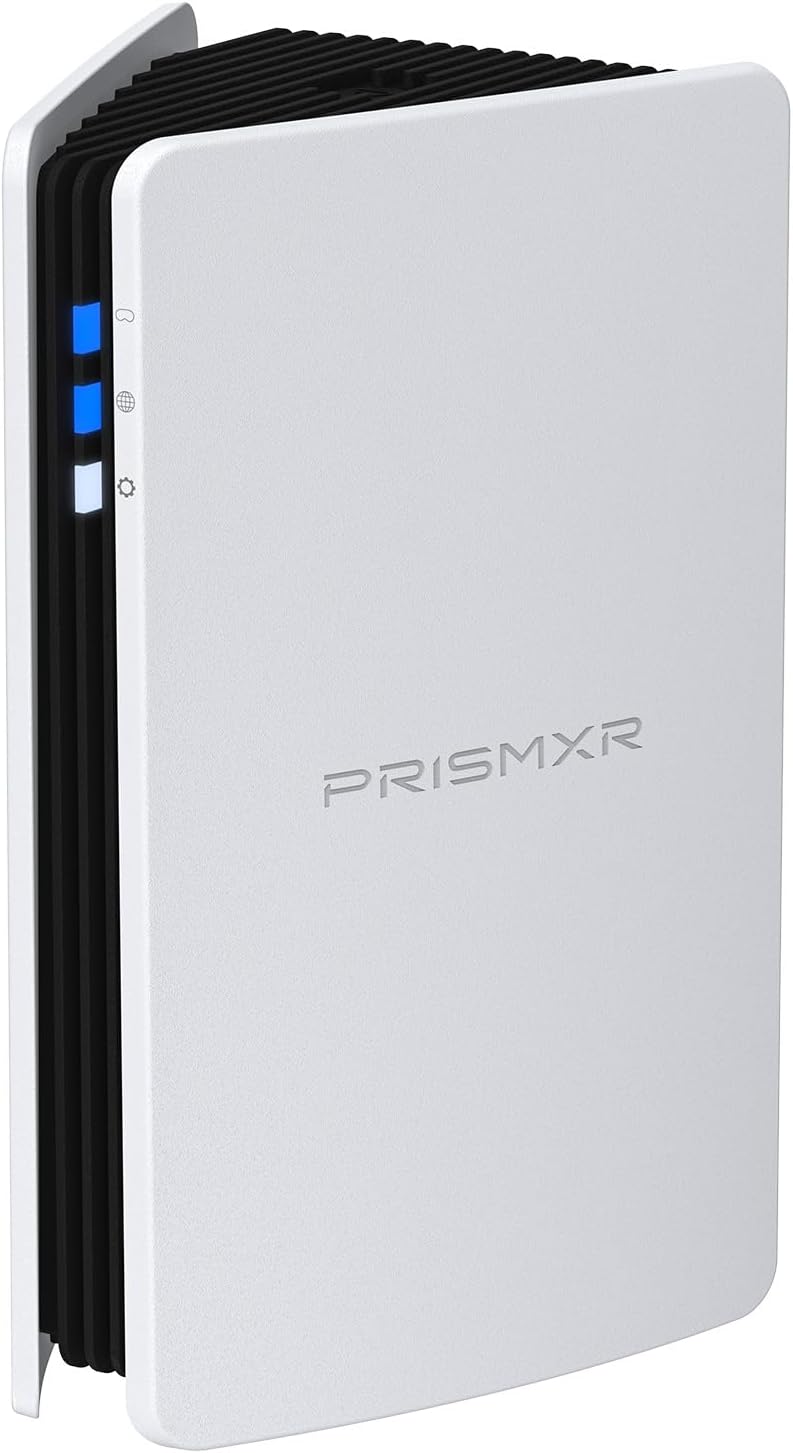
The Puppis S1 is a dedicated Wi-Fi 6 router optimized for ultra-low latency PC-to-VR headset streaming. Powered by a 1.3GHz dual-core chipset and advanced beamforming, it delivers up to 3000 Mbps network speeds to ensure smooth, cable-free VR gameplay. Compatible with major VR headsets like Meta Quest 3S/3/2, Pico 4, and HTC Vive, it features an intuitive Bluetooth EaseLink setup and versatile network modes, making it the ultimate wireless bridge for immersive VR experiences.


| ASIN | B0CFDL5Y7F |
| Antenna Location | Enhancing VR gaming experience by providing wireless connectivity between headsets and systems |
| Antenna Type | Internal |
| Best Sellers Rank | 2,323 in PC & Video Games ( See Top 100 in PC & Video Games ) 74 in Standalone Virtual Reality Accessories |
| Box Contents | Router |
| Brand | PRISMXR |
| Brand Name | PRISMXR |
| Colour | White |
| Compatible Devices | Gaming Console, Quest 3, Quest 3S, Quest 2, Quest Pro, Pico 4, HTC Vive |
| Compatible devices | Gaming Console, Quest 3, Quest 3S, Quest 2, Quest Pro, Pico 4, HTC Vive |
| Connectivity Protocol | Wi-Fi, USB |
| Connectivity Technology | Ethernet |
| Control Method | App |
| Controller Type | App Control |
| Country of Origin | China |
| Coverage | dedicated VR streaming |
| Customer Reviews | 4.0 out of 5 stars 1,110 Reviews |
| Data Transfer Rate | 2402 Megabits Per Second |
| Frequency | 5 GHz |
| Frequency Band Class | Dual-Band |
| Frequency band class | Dual-Band |
| Global Trade Identification Number | 00749752208134 |
| Has Internet Connectivity | Yes |
| Is Electric | Yes |
| Is Modem Compatible | No |
| LAN Port Bandwidth | 11000 Mbps |
| Manufacturer | PRISMXR PTE LTD |
| Manufacturer Part Number | P1411 |
| Maximum Upstream Data Transfer Rate | 2402 Megabits Per Second |
| Model Name | Puppis S1 |
| Model Number | Puppis S1 |
| Model name | Puppis S1 |
| Number of Antennas | 1 |
| Number of Ports | 5 |
| Operating System | système d'exploitation de routeur |
| Other Special Features of the Product | Beamforming, Internet Security, LED Indicator |
| Product Warranty | 18 months |
| Router Firewall Security Level | Basic |
| Router Network Type | Wi-Fi |
| Security Protocol | WPA3, WPA2, WPA, WPS, WEP |
| Smart Home Compatibility | Not Smart Home Compatible |
| Special feature | Beamforming , Internet Security, LED Indicator |
| UPC | 749752208134 |
| Unit Count | 1.0 count |
| Voltage | 18 Volts |
| Wi-Fi Generation | Wi-Fi 6 |
| Wireless Compability | 802.11ax |
| Wireless communication standard | 802.11ax |
B**N
Works great, good value but not the easiest to set up
I'll start with whats great about this device. - It's much smaller than I expected, roughly 15cm in height! - It provides a wireless extremely low latency VR experience as advertised. - It's a nice looking unit. Very sleek and compact. - The mobile app is really well thought out and easy to use. - Great value for what it is, I got mine at a 10% discount with an aditional 5% multibuy discount so roughly £52. - Good support network/ Discord server. Now for what I thought wasn't so good. - The desktop app wouldn't download correctly for me, I'm an extremely techy person and the exe files for the desktop app were missing preventing me from installing. This didn't seem to be a security/quarantine issue as there were no alerts raised my side and I even attempting after disabling anti virus altogether with no avail. I did end up sending a message to support and completing the set up with the mobile app in the end; which as mentioned previously was really well put together so no drama there. - My next downvote is that if you aren't techy to some degree this may be a bit of a faf to configure. Most people will be fine but something to consider. With that said there are plenty of guides that they make available although some of them seemed to need updating. In conclusion, I've dropped 1 star due to what I've mentioned although I imagine these issues will be fixed over time. I certainly wouldn't let these things put you off buying as they don't prevent set up particularily if you are comfortable playing with tech products to some degree. Its main function as a VR content streamer is great and I experience no latency; given you can buy this cheaper than the official quest 3 link cable its a no brainer to give it a try.
C**N
direct 1‑to‑1 wireless link
⭐⭐⭐⭐⭐ PRISMXR PC‑VR Streaming Link Air Bridge – A Must‑Have Upgrade for Any Quest User The PRISMXR PC‑VR Streaming Link Air Bridge is one of those rare accessories that instantly transforms your VR experience. Compared to my Wi‑Fi 6 router, this thing literally doubles the available bandwidth, and you can feel the difference the moment you start streaming PC‑VR content. Because it creates a direct 1‑to‑1 wireless link between your headset and your PC, you’re not fighting with other devices on your network, random interference, or router limitations. The result is a cleaner, faster, and far more stable connection — exactly what you want for high‑resolution, low‑latency VR. Setup is straightforward, and once it’s running, the improvement in clarity and responsiveness is obvious. Games look sharper, motion feels smoother, and the whole experience becomes more consistent. If you’re a Quest user who streams PC‑VR, this is absolutely a must‑have. It’s one of the easiest and most effective upgrades you can make to your setup.
L**S
Finicky to setup but works great!
The bad first. Out the box it seemed easy to setup however I was getting 10 second freezes every few minutes. Contacted support through discord and found the option "Internet by pc sharing" was causing the issue. Switched to internet by wifi and it works like a dream! The good Oculus quest 3 - Virtual desktop - h264+ codec - bitrate of around 400mbps - about 4 meters from the router Looks great in racing sims Runs buttery smooth with no disconnects About 40-50ms latency which is great Great value once it's setup and working Connects everytime now without having to touch anything
M**L
Hard to setup but then ceased functioning
As has been mentioned by others, really not easy to set up. Once I did have it working the performance was really good. However that was the first and last time it worked. The device from day 2 has ceased to function, the bottom two lights stay on permanently, cannot reset (have held the reset button down for longer than the 5 seconds and it won’t reset) the mode button also isn’t working. It is now a brick.
T**M
A must have for streaming PCVR
Finally stutters gone! I was using a 1500Mbps dedicated router earlier and I was having really bad Network and Decoding spikes. All buttery smooth with this little baby and Quest3 on Virtual Desktop with constant 2401Mbps connection and full signal strength. It looks deceptively large on the pictures - it's actually the size of my palm. Quality and ease of use is insane for this price. Setup was super simple for me, but I have the default "pulse" setup - PC connected to WiFi, this router connected via a cable to my PC and PC's WiFi shared with this router. I bought a separate USB-C to USB-C 3.2 Gen2 and plugged it into a USB-C port on my motherboard - having all in one cable is seriously impressive. PrismXR Desktop app worked great, too - I just had to change the name of the dedicated network and the password, everything else on default. I'd 100% recommend to anyone who's streaming PCVR to a headset, this little baby is right up there with £200+ dedicated WiFi6 routers
J**.
Delivers... Fast and reliable
After having many problems streaming from PC to my Quest 3 I decided to take a look at the Puppis AP router. The unit is smaller than I expected so is inobtrusive on my PC desk, but, although made from plastic, feels quality. I had a bit of trouble setting up it's Internet connection and had to skip the PC Internet sharing route and connect it to my WiFi. From there everything has operated perfectly. The speed and reliability once my handset is connect has improved dramatically and frames and game performances have improved. My PC is upstairs one floor and I can connect and use my Quest connected reliably from the living room below. If you are having connection reliability issues streaming PC to quest due to your Router / Hub I would highly recommend investing in the Puppis for a fast, reliable connection.
A**R
Performance is top notch set up was a breeze!
Performance is top notch set up was a breeze! No more lag and stuttered frames if you want really good wireless to your VR headset this exceeded my expectations. I am using a wireless pc in the upper part of my home with a wired internet connection on the opposite side of the house on the ground floor and with this I can use my headset anywhere in the home. Such freedom for PCVR is a game changer no competing for signal dedicated signal between your headset and PC. Says effective range 25ft It seems to exceed that in my case. I used with a Quest 3 no difficult set up pretty much plug and play really glad I picked this up only regret is not buying it earlier!
A**Y
Brilliant
This is amazing, my apparent has lead lined walls or something because my router will not pass a signal to something literally on the opposite side of the wall, and considering my room is about 15 metres away it might as well not even exist. I have to use a power line adapter to get internet in my room which works great, decent speeds but because I have a range extender linked to it as well, with 20+ smart devices connected, plus my fire sticks, Chromecast, phones and tablet linked to the power line adapter, it couldn't really be anymore congested. Trying to use air link through that worked, but was unusable. With the Puppis, wow, you'd think you were wired up. Remote desktop is butter smooth, using the PC though air link is perfect as well, playing VR games from Steam as well is perfect, no lag/latency, nothing. Absolutely brilliant little device. I had a bloody nightmare setting it up, it seemed simple to get everything connected and the Puppis app on my PC showed everything working and connected, I got remote desktop working but that's not what I got this for, remote desktop is literally just that, and extra screen on your headset, you still have to use the mouse and keyboard for the PC. No matter what I did, I could not get air link to find my PC with the Quest, nor could I get the Meta app on my PC to find it. I spent hours getting more and more annoyed....... Until I restarted my PC, and then everything just worked perfectly. I don't think that was anything to do with this device though, obviously it was something on the PC side which just needed a reboot. So if you have a similar issue, just restart your PC once everything is set up. Also, save yourself some time, just connect the Puppis to WiFi rather than messing about sharing your PC connection with it.
S**M
Best solution for wireless VR
This device is genius. A dedicated and clear connection with your HMD, no interference whatsoever. All you need is 2 free USB ports, or in my case I used a (separate) usb-c connection. Power and ethernet to the Prismxr via usb. 10-20 minutes and few trial and errors in setting up later you have your wireless pcvr set-up ready. Works better than my 5ghz AP I set-up solely for my Q3. And it was cheaper than buying a new router for this purpose too. Money well spent.
S**.
Excellent produit, pour jouer en sans fil sur des jeux PCVR
Excellent produit pour ne plus avoir à utiliser de Câble sur PC. La qualité est au rendez-vous avec un résultat équivalent à du filaire ( meta Quest 3 en résolution max) 😄. Seul petit défaut la configuration n’est pas hyper évidente et le manuel d’utilisation est à revoir. Très satisfait de mon achat, je recommande 😉.
A**L
Perfecto
Nunca pensé que wireless PCVR podría ser tan fluido y a tal grado de calidad, no le pide nada a un cable. Literal lo conectas y en 5 min estas listo para elevar tu experiencia en VR
S**M
Klare Empfehlung! Tolles Teil
So schwer ist die Einrichtung jetzt auch nicht. Anleitung liegt bei und ist eigentlich in 5- 10min gemacht. Es gibt nicht viel was ma da einstellen muss. Funktioniert super, sehr schnelle Verbindung. Man sollte darauf achten, um das bestmögliche rauszuholen, dass der puppies im selben Raum steht in dem man auch spielt. Nur dann hat man die volle Leistung. Steht er z.b im Nebenzimmer, kann sich die Leistung auch schnell mal halbieren. Klare Empfehlung von mir!
M**L
A Nice Solution For Wireless PCVR
Easy setup, although the Windows11 pc internet sharing section in the setup guide is not completely up to date.
Trustpilot
1 month ago
2 weeks ago