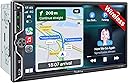
![[QLED Screen Upgrade] 7" Double Din Car Stereo with Wireless Apple CarPlay and Android Auto, 240W Powerful Sound, 4.2-Channel Audio Output, Bluetooth, MirrorLink, Backup Camera, AM/FM Car Radio](https://m.media-amazon.com/images/I/71dmmWFMGQL._AC_SL3840_.jpg)


Buy anything from 5,000+ international stores. One checkout price. No surprise fees. Join 2M+ shoppers on Desertcart.
Desertcart purchases this item on your behalf and handles shipping, customs, and support to Thailand.
🚗 Elevate your drive with next-level sound, vision, and wireless freedom!
This 7" Double Din Car Stereo by SJOYBRING features a vibrant QLED HD display, wireless Apple CarPlay and Android Auto for seamless smartphone integration, and a powerful 240W 4.2-channel audio system. It includes a waterproof HD night vision backup camera with a 170° viewing angle and supports steering wheel controls for safer, hands-free operation. Designed to fit most car models with optional installation accessories, it offers a premium in-car entertainment and safety upgrade at an unbeatable price.


| ASIN | B0CWRM74FR |
| Audio Output Mode | Stereo |
| Audio Output Type | Speakers |
| Best Sellers Rank | #6,367 in Electronics ( See Top 100 in Electronics ) #43 in Car Audio Receivers |
| Brand | SJOYBRING |
| Built-In Media | 7inch double din Head unit, Frames and Brackets, ISO Stereo Harness, Rear camera, Remote control |
| Color | Black W021 |
| Compatible Devices | Smartphone |
| Connectivity Technology | Bluetooth |
| Connector Type | RCA |
| Control Method | Touch |
| Controller Type | Apple Carplay |
| Customer Reviews | 4.2 out of 5 stars 904 Reviews |
| Format | Unknown format |
| Item Dimensions D x W x H | 3.66"D x 7"W x 3.93"H |
| Manufacturer | SJOYBRING |
| Mfr Part Number | JOY-W021 |
| Model Number | JOY-W021 |
| Number of Channels | 4 |
| Other Special Features of the Product | Android Auto, Apple CarPlay, Built-In Bluetooth, DSP, Screen Mirroring |
| Output Power | 240 Watts |
| Output Wattage | 240 Watts |
| Special Feature | Android Auto, Apple CarPlay, Built-In Bluetooth, DSP, Screen Mirroring |
| Supported Internet Services | Pandora, YouTube, iTunes |
| Surround Sound Channel Configuration | 4.2 |
| Video Encoding | MPEG-4, RMVB, DivX, AVI, 1080P, MP3, WMA, JPEG |
| Warranty Description | 1 Year Warranty |
| Wattage | 240 watts |
| Wireless Technology | Bluetooth, Wi-Fi |
K**O
Very pleased with this purchase
I installed this unit in my 2008 Jeep Wrangler 4dr. Amazon says it won't fit, but it does. A Metra 95-6511 dash kit, Crux SOOCR-26 harness kit and Metra 40-EU10 antenna adapter are required for this application. Installation is not difficult for someone with mechanical experience and a bit of patience to remove the center dash panel. It isn't necessary to completely remove the panel and disconnect all of the climate control switches. Once the panel is loosened by removing two screws at the top and two at the bottom behind the trim panel, it pops out with a little bit of controlled force. I decided to mount the rear camera on top of the license plate holder light fixture. It had to be near the outer end to make room for the LR taillight assembly which must be removed to tap in the power and ground for the camera. Just run the cable behind the holder and through the existing hole in the body into the cavity behind the taillight. The camera cable will be routed up through the rubber grommet under the carpet and then along the edge (also under carpet) past the rear door and front door. Removing the plastic trim panels is required along with replacement plastic clips. Route the cable around behind the brake and accelerator pedals. It is a little difficult to get the camera cable up through the dash into position behind the stereo but I used a flexible fiberglass rod. Once the cable and harness adapter are in place the rest is just connecting the wires as shown in the manual. I used closed end cap connectors then zip tied the bundles together to keep it neat and tucked in. It is recommended that before you go through all of the trouble, first connect just the red and yellow power wire, ground and one speaker (I used green) to make sure the unit is functional and correctly connected to power. If so, you're good to go. After installation, I found that this unit does everything I need it to do. Sound quality is good (I have replaced the Jeep factory speakers with Kicker) and all of the functions work well. Setting up Bluetooth and Android Auto is easy. There are several display settings and everything operates smoothly. Depending upon how you mount the camera, there are settings to change the up/down and L/R orientation. It will probably be necessary to update the firmware after installation. The company website does not have download links for this. You must email them and include a photo of the version screen and a copy of the Amazon invoice and they will send back instructions for the update. A nice added feature is the ability to customize the boot screen with the manufacturer's logo of your car. This is available with the update package. Just tell them what you want. All in all, this appears to be a good choice. Lots of features and a low price point for a vehicle I use as an off-road toy. I've no doubt this unit will do well for a daily driver. Time will tell about the long-term durability but for now, it's all good.
D**N
Worth every penny. Great Quality for a great price!
Finally took the dive and bought this aftermarket head unit. It looks and works great, and installation is really easy! I had some power/electrical issues, but was solved by re-soldering all the wires thoroughly. I love the functionality of the Carplay, it connects quickly and pretty flawlessly. Since then, I’ve only had one small issue, but it may have been due to heat. The unit sounded like a broken record for about 2 minutes and wouldn’t respond to touch or input on the phone. It restarted itself after about 2-3 minutes, and all has been well since. I’ve noticed a difference in sound quality from my stock radio, the sound felt more “flat” than stock. I don’t play around with any EQ settings, so it could be due to the EQ profile. I bought a $100 sub-amp combo and it sounds great! I also noticed that with no amp, the volume loses starts to crackle and really lose quality once you hit “30” on the volume (it goes to 40). This was also solved with my amp install. Install might be difficult or intimidating for a newbie to cars, electrical or install stuff, but anyone with a modicum of handiness will have no problem installing this unit! Price point is incredibly low, and performance gives these high-dollar units a run for their money!
G**G
Perfect upgrade for my Xterra
2006 Nissan Xterra (w/Rockford Fosgate system). So let me say that this unit is awesome and just what I was looking for to upgrade the factory head unit. Packaging (5/5) *Everything was nicely packaged and secure. No loose items or damage. All items were in the box and labeled clearly. Quality (5/5) After doing a lot of research and scouring forums, I was a little skeptical like a lot of others buying a fairly inexpensive head unit online. Many folks said just go with the major brands and stay away from off brands. To be honest, reviews say a lot and I took the plunge due to the positive reviews, price range, features, and backing of Amazon. I'm glad I did. I was very pleased to find the screen, finish, connectors, harness, rear camera all seemed top notch and fitment was great. I've only used it for a few weeks so hopefully we'll see on the longevity. Navigating the menus, options, features were a breeze with no issues. Instructions/Installation (5/5) The instructions that came with the unit were very clear and helpful. I will admit that I didn't use one of the harnesses (speaker wires one) due to the fact that I have the optional RF factory amp that powers the speakers and sub. I purchased this harness specifically for this setup (# 70-7551). What I really liked about this unit was the fact that it had the separate SWC harness included. This made it extremely easy to connect my SW to the unit. On my Xterra, there were 3 SWC wires (Red, Blue, Grey) on a 16pin connector (only had 3 cables connected so I knew it was the right one). SWC1 was Red, SWC2 was Grey, and Ground was Blue. I did NOT have to buy one of the adapters or special kits for the SWC to work (PAC or Axxess). This saved time and money. SWC matchup: OEM SWC1 (Red) ---- Headunit (SWC 1 Grey) OEM SWC2 (Grey) ---- Headunit (SWC 2 Green) OEM Ground (Blue) ---- Headunit (SWC Black Ground) I ended up grounding the brown brake detect wire also... RF Specific setup: Everything is simple, just make sure to connect AMP Power (blue/white cable) from the 70-7551 harness to the Blue cable on the harness coming from the unit. **You won't use the Blue only wire from 70-7551) Function (5/5) Haven't gone through all the features but everything works great (love the wireless Android Auto/Carplay), Waze, phone calls (I did purchase a separate MIC for the bluetooth mounted on the A-pillar). haven't really tested out the remote control but a fun bonus. Rear Camera install (4/5) Connections were easy. Every car is different when running the wires. Just take your time and ensure you properly wire to the "reverse" light wires. The camera cable is long but if you have a really large SUV, you may need to get a 4pin extension cable for the last few feet....just for awareness. I actually needed to do that with mine unfortunately which is why the 4 of 5 stars. I wouldn't been nice to have it longer for longer vehicles. Customer Service (5/5) Although you have to reach out to the company as they don't provide the specific firmware upgrades online with instructions, they were extremely quick to response (being a 12 hour difference) and provided all the instructions and files. I asked for the Nissan logo and they were able to provide that which was super cool. Please follow the INSTRUCTIONS exactly (re-read the instructions and take your time). You don't want to brink your device. Overall, very satisfied with the purchase for under $200.
G**A
So far so good
TL/DR I’m happy with this unit, and it’s def better than what I had. There have been a few glitches but overall works great and sounds great. Customer service was very helpful and install was reasonable. I recommend giving it a shot. The longer version. Installed this in a Nissan Frontier using the Metra wiring harness. Install was pretty easy- it’s the first time I’ve done this. The actual vehicle was more difficult to deal with than the radio. All the colors on the wiring harness matched the radio and I was able to connect an existing backup camera to the system. I used snap down wiring connectors which let me change wiring around without re-crimping. Pros CarPlay is nice- takes a minute to boot. Bluetooth is pretty consistent. Touch screen has a brief delay, so at first I was double tapping and skipping what I wanted to hear. Sound quality is great. The stereo cranks. Rock, jazz, musicals, etc. handled it all. Love the analog volume knob. Tbh it’s one of the reasons I got this unit. Customer service hooked me up with the Nissan logo for the boot screen. That install was pretty simple too. Cons. Not too many, but I think if I try and backup before everything has fully booted, I throw it off. Once CarPlay didn’t connect at all and recently CarPlay went black and I had to hit the analog home button to get to the main screen. Ended up having to turn the car off and on to get it to reset, which it did. Not sure if it’s a software or hardware glitch, but it’s inconvenient. I’m not impressed with the microphone. I may need to see about installing an aftermarket mic to see if that makes an improvement, otherwise making calls will be limited. All in all, it’s an upgrade from what I had and the price is right. Like others I noticed the two sets of backup lines but I was able to shut off the radio’s native line in setup. Hopefully I can adapt to the glitches I associate with putting it in reverse too quickly and as long as that’s all it is it’s something I can deal with. So yea! I recommend it! YMMV
P**S
This is a fantastic unit!
I bought this to put in a 2012 Toyota Rav4 that we bought new. The Rav4 wasn't built with a backup camera, and the stereo was kind of awful, so I wanted to give it an upgrade. I installed it myself and it was not difficult, although I do have an electronics background. I used a different backup camera that was made specifically for the Rav4, instead of the generic one that comes with this unit because I wanted to have a stock look. Everything on the unit works really well. The audio is way better than the factory stereo, even though I'm using the factory speakers. It boots up quickly and wireless Carplay works flawlessly. The FM radio sounds awesome. I bought harnesses here on Amazon that allowed me to go directly from the car's plugs to the unit without soldering or wire nuts. I didn't have to cut any wires in the car, and the steering wheel controls work great, although I did have to buy a harness to make that work in my case. Also, don't forget to also order an antenna adapter, you will probably need it unless you have a very old vehicle. The screen is high quality, and the touch interface works great. The backup camera is great too. I'm so glad I now have navigation now that I have Carplay. I also used a dash kit that I bought here on Amazon to adapt this to my car. Also, their customer support was awesome. I emailed them to get a Toyota boot logo, and also a MCU software update and they were quick to respond with links to download the files and instructions on how to do it. So now I have a fully upgraded unit with the logo I wanted! Overall, I'm really impressed with this unit, especially for the price. I strongly recommend it!
S**P
KILLER BANG FOR YOUR BUCK!!
I got this stereo on a gamble and it's paid off. I don't normally write reviews, in fact less than 10 over the past decade, but this one deserves it. For starters, the unit is exactly as described. The quality feels better than expected, with a bright/hi resolution display. If I had one suggestion to the manufacturer, it would be to add a metal sleeve that most stereos come with for a universal install... Other than that, it's great. I wanted an affordable option to replace a stereo from 2004 in my Fleetwood RV. Wanting wireless android auto, like the one I have on my $500 Kenwood in my Jeep, but not wanting to spend the money on my RV, I opted for this unit. The unit installs easy and has arguably the easiest to follow install manual I've seen with it being a color step by step, a nice touch for sure! The sound instantly surprised me when I first turned it on.... It's great! Then I connected Android auto and found it to operate fast and smooth, again, better than expected at this price point. Menus are easy to navigate and intuitive. After playing with my stereo for a bit, I decided to contact the company via Facebook messenger for the free software update they offer with a custom startup screen and background I wanted to use. I had a response within 5 minutes with the reply my update would be ready within 10 hours. I received the email earlier than expected, completed the super easy update and they nailed it.... More than I expected.... a full custom stereo that has an appearance and feel of something in a much higher price range. The ONLY other suggestion I may have at this time, would be the ability to use the USB to change/update the background at will without bothering them for an update. I'm super pleased with the outcome, and doubt I'll ever change it, but thought it would be worth mentioning if they read this. This was a killer purchase at this price point, and so long as it holds up, I'll be back for my next double din purchase.
R**L
Installation is a chore and best to have done professionally if you are not comfortable with wiring.
I installed this radio in a 2006 Honda CR-V as my wife has a neck issue and wanted a backup camera. The installation was pretty much as expected requiring an adapter cable between the car's radio connector and the connectors on the radio. I requested updated firmware and a Honda boot screen and found the tech support to be responsive and they go back to me within 48 hours. Be sure to include a screen shot of your current firmware version and purchase receipt in your request. I think they could have made this process easier if the necessary files were directly available from the website rather than by email. Installing the backup camera was a bit of a chore requiring the removal of the trim panels on the tailgate door and in the rear of the car to get access to the backup light wiring (to activate the camera). There are several good YouTube videos that show the process of installing the camera and wiring. The radio manual stated that a steering wheel adapter was required so I ordered the PAC SWI CP-2. I set it up as per the PAC app installation instructions, but the Volume Down steering wheel button always functioned as volume up. After trying multiple CP-2 settings and several emails with PAC tech support, I finally connected the car's steering wheel control line directly to the radio's steering wheel control input and was able to program the steering wheel buttons using the radio's setup menu. I have yet to find a trim kit (bezel) that correctly fits my 2006 Honda CR-V and (any) aftermarket radio (this is the second double-din radio I have installed). The trim kits are either too big to fit in the console opening at all, and/or leave a gap on the sides of the radio. My wife likes the sound of the radio and loves the backup camera, but we have not had this radio long enough to speak to its longevity. I gave this three stars because of the issue with the manual's instructions regarding the steering wheel control.
H**E
This is exactly what we were looking for at a price lower than we expected
This is a fantastic upgrade from the stock CD/radio in my daughter's 2009 base-model Toyota Corolla. Once you are used to having a backup camera, navigating by GPS audio/video map directions, streaming music from your phone, and hearing/sending text messages by voice, those conveniences can be sorely missed. I worried she would try to mess with her phone while she was driving (especially for navigation), so this was a birthday present for both my daughter and us parents. The wireless CarPlay connection is fast and (so far) solidly reliable, so she can plug in her phone to charge and tuck it away before she starts to drive. To prep for the install, I also purchased a 2009-2013 Toyota Corolla stereo double DIN dash kit and a Toyota wire harness (2 pieces), making the connections to the wire leads from this new unit to the OEM plugs used by the original stereo literally plug-and-play. No steering wheel controls in her base model, so I didn't have that complication to deal with, but even that didn't seem too hard based on the directions, just one more adapter to possibly purchase. Fishing the wires to support the backup camera was the hardest part of the install and between the printed instructions and the videos, there weren't really any outstanding questions about how everything should go. My total install time was probably 2.5 hours, but I'm the methodical detail-oriented type, so probably spent an hour tucking away the wires and lining up the trim in the dash "just right". Once it was all connected, the setup and bluetooth connection were straight-forward and easy, and we were ready to go in no time. As others have stated, the customer service is very responsive, and they quickly sent over instructions for updating the unit to the latest firmware versions and adding a nice OEM-looking boot screen, which was a very professional touch. Some of the nicer settings available for this unit are the home/call button backlight colors, a digital equalizer to tune the speaker sound, adjusting the audio attenuation to turn down music volume when audio like driving directions play over it, and setting a default volume when the stereo first comes on. There is also a screen brightness control which may be important if you drive at night. While the screen is very easy to read in the daytime, it can be distractingly bright in your field of vision at night. I think we found a good balance that works for both day and night, but I was happy to see that setting was available. Overall, very happy with this purchase, and would buy it again if I had it to do over. The only feature that would be nice to add would be an auto-dimmer of the screen (and maybe button backlight) based on the ambient light inside the vehicle. Apps like maps flip to dark mode based on sunset times, and that helps, but having the screen itself dim automatically would be a great feature to at least make available as a setting in some future version.
Trustpilot
2 months ago
1 month ago