Buy anything from 5,000+ international stores. One checkout price. No surprise fees. Join 2M+ shoppers on Desertcart.
Desertcart purchases this item on your behalf and handles shipping, customs, and support to Thailand.
🎬 Elevate your smartphone storytelling—because your feed deserves pro-level smoothness!
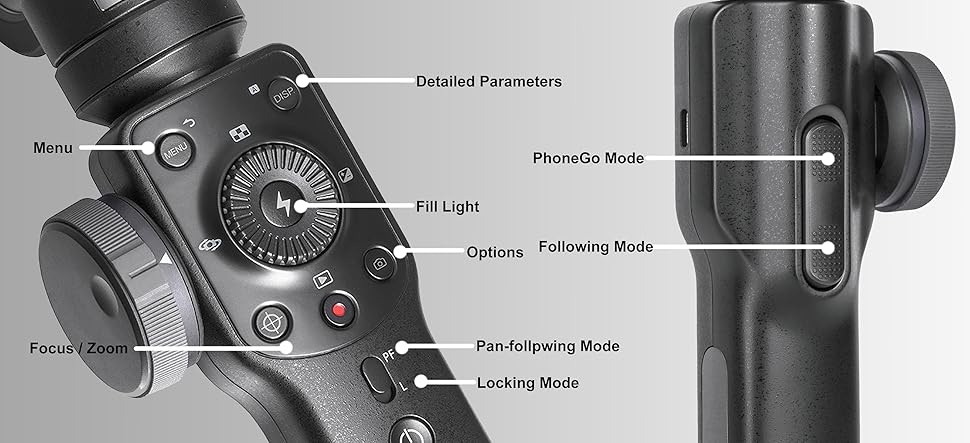
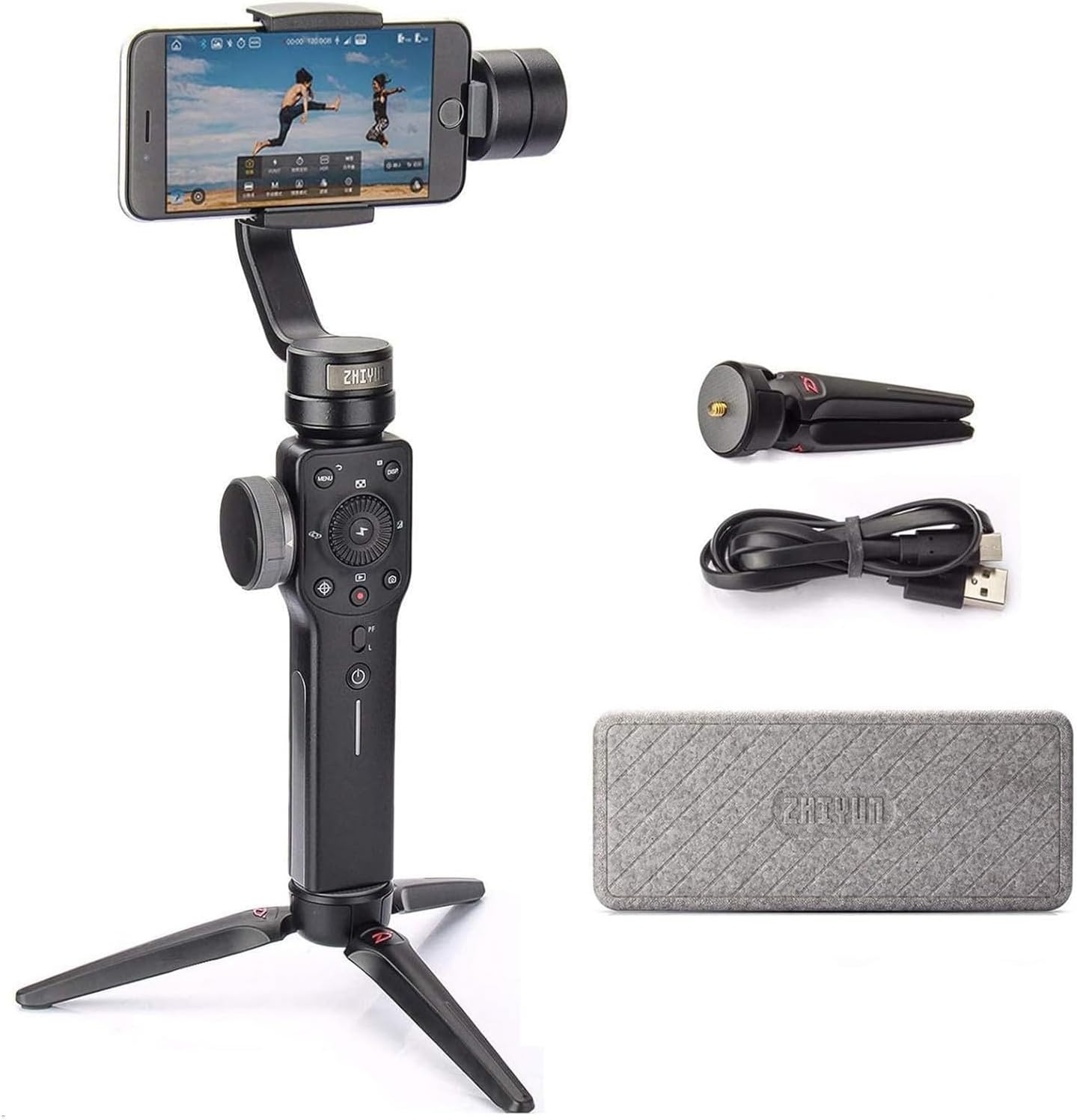
The Zhiyun Smooth 4 is a professional-grade 3-axis handheld gimbal stabilizer designed for smartphones up to 210g. Featuring an integrated control panel with focus and zoom capabilities, PhoneGo mode for quick scene transitions, and long-lasting battery life with two-way charging, it empowers content creators to shoot ultra-smooth videos for vlogging, TikTok, Instagram, and YouTube. Compatible with popular apps like Filmic Pro and ZY Play, it’s the go-to tool for millennial pros seeking cinematic quality on the go.


| ASIN | B07BHCC3BV |
| Best Sellers Rank | #96,489 in Cell Phones & Accessories ( See Top 100 in Cell Phones & Accessories ) #181 in Cell Phone Handheld Gimbals & Stabilizers |
| Brand | ZHIYUN |
| Color | Black |
| Compatible Devices | iPhone 12/11 pro/mini【not for pro max】, iPhone 13 pro/mini 【not for pro max】 |
| Customer Reviews | 4.2 out of 5 stars 6,663 Reviews |
| Item Weight | 0.5 Kilograms |
| Manufacturer | Zhi yun |
| Manufacturer Part Number | Smooth 4 Black with EACHSHOT tripod |
| Model Number | Smooth 4 Black with EACHSHOT tripod |
| UPC | 600346554115 |
S**N
1st TIME COMMERCIAL USE Experience & Tech/Usage Insights
Researched many YT videos that compared handheld gimbals vs steadicams. Attempting to use more mobile phone shooting moving forward (instead of my DSLR), and wanting an affordable yet effective unit on my first gimbal, and glad ZY Smooth 4 caught my attention. It beat DJI's Osmo due to price point, functionality and availability. I'm glad I picked up the ZY Smooth 4 about a couple of months prior to my first commercial production with it, which was purely unintentional. My local client, who's a speaker, who's also a very active person, felt uncomfortable/nervous sitting in front of a camera. To give her peace of mind, I suggested a walk on the river, while we talked and I would shoot the video on the gimbal. She loved the idea and settled on a date and early morning meetup at the river so we would have less foot traffic at that time. Both of us preferred this "walk and talk" video style. For her, it was natural to do this as an active person, much like speaking to a girlfriend while out for a walk. For me, I knew this would get her blood flow moving, reduce nerves, and the natural morning light (vs afternoon harsh light) was good for the shoot. Believe it or not, we shot 2 videos (one was a Welcome video, and the other was an About video), both only required 1 take each! LOL! We produced the first video walking the river one way, then turned back and shot the 2nd video going the other way 😁 Here's some insights on the Smooth 4: - The ZY Smooth 4 build is impressive. Has weight in your hands, but not so heavy to strain your hands/arms on a longer shoot. - The ZY company is consistently working on upgrades to the ZY App, which is good to see - ZY does provide information in the booklet on setup and usage, however, I found most value in YT videos from other users showcasing functionality and use cases - Key Tip: Balance your iPhone in the bracket BEFORE powering on the Smooth 4 unit. - Recent News: Filmic Pro app now works well with the Smooth 4. Check out YT for how to use it with Smooth 4. - Battery life is solid and long-lasting. Since my first charge of the Smooth 4 unit, the battery has held strong. In fact, my iPhone battery dies much faster, naturally due to shooting video. If you can, get the lightning cable to connect your iPhone to the Smooth 4, so you can keep your iPhone charged while shooting video. - I appreciate the screw on tripod legs that come with the Smooth 4, for laying on a flat surface. I'm about to get an Insta360 ONE panoramic camera, and I can envision sitting my iPhone in the Smooth 4 phone bracket, and setting the Smooth 4 on a taller tripod, so I can shoot the 360 away and out of sight. This way, I have both my Pano camera, and my ZY for video shooting if the client calls for that added service. Here's some insights on the videoshoot with the Smooth 4: - Until I started playing with the Smooth 4 video quality settings, I didn't clue in that my iPhone 6S could shoot in 4K. - Tried shooting in 4K, but its a storage hog. Will shoot 1080p next time. - The video footage will store in the ZY app, and you'll need to then transfer it from ZY app to your iPhone's media library. As such, I highly recommend dumping as much "stuff" off your iPhone prior to the shoot for more storage room. - In shooting with 4K, I only had room for 2-3 videos before I ran out of room and phone battery. Hence no B-roll in the above videos. - Had troubles exporting from ZY app library to iPhone Photo Library due to space shortage. After dumping more media and apps, I could transfer 1 x 4K video, import to Macbook Air, delete it off ZY & Photo Library, then transfer/import the next 4K video. May also try shooting 1080p next time. Or a bigger capacity iPhone. 😜 - Highly recommend you get the lightning charge cable to continually charge your iPhone while shooting. - Bring along your laptop or external drive to dump footage off your iPhone, so you can continue shooting more footage. Unless you only care about a short shooting window. - My Zoom audio with Sennheisser wireless lav was unusable due to fabric shifting sounds from walking. So what you hear is my iPhone audio, not too shabby. Hope this helps you in your decision whether to grab your own unit of the Smooth 4 :-)
S**M
Still loving this!
This is my first gimbal and I am impressed with the built, features and functions. I was going to purchase the Smooth Q until I heard about the Smooth 4 coming out soon. The price is great! Lower than previous model. I am glad that I waited for a few weeks. It is a must-have for all video makers if you record on your smartphone. It feels good in your hands and operating is very simple. The 4 modes provide want I need. It is packaged well in a nice protective lightweight case. One bonus free gift not mentioned in the description but in the box with a note saying to choose a charging cable depending on what phone you have. ( update: I was told that the charging cable is under development and will be sent out once it is available). Just send them a message thru Facebook with your choice of USB Type C or Micro USB or Lightning. I heard some have issues with ZY Play app for Android devices. I have tested this on my Samsung S7 for 2 days and it has worked great. I also have the LG V30 which I will try later. I can not comment on battery life yet since its too soon. I will continue to update my experience once I learn more about its features and capabilities. I want to add that I got excellent support from Zhi Yun team on Facebook. They said for me to notified them when I have any issues. This tells me they really care as a customer and wants their customers to be satisfied with the product and service. Below are photos taken by me. Update: May 2020. Still loving this device. I have switched my phones and have used it on my Samsung S10 (see photo added), Note 10 and Huawei P20 Pro. These phones have better cameras that complement this gimbal. There were some software hic-ups like freezes or app closes but most are addressed with updates. I also received the bonus charging cable by mail. Good quality cable and it was used to keep me shooting longer. Having this gimbal for almost 2 years, I would say it's been great. However, I would like a new model to be smaller and lighter. I like to pack things light as I travel. I can't wait to give that a try.
R**S
Worth buying. Intuitive and Feature-Rich. Some Minor Drawbacks.
Used this puppy to shoot a music video in Japan. I loved all the features. It's very intuitive once you get the hang of it. Sturdy. Durable. Threw it in a hiking backpack day after day (no case, no nothing). Never got damaged. PROS - battery life is great - controls/modes are great and intuitive—many different features. CONS - once in a while, the gimbal goes limp and stops stabilizing in the middle of shooting. hopefully a firmware/software update will stop this. i will say it happened RARELY. not enough to really interfere with my process. - I find the app a little frustrating - the shooting part is great but the way it archives videos is annoying. It’s hard to get them onto the computer—they sync to Photo Library relatively easily, but if I shoot 4K/60fps, the video’s don’t transfer to Photo library in full quality. If I want the full quality videos I have to use 3rd party software to find them on the iPhone and pull them off. - also I wish it would connect to the phone more quickly via Bluetooth. In those last-minute moments, it's frustrating to have to wait. Sometimes I'd just keep the device in "standby" (by folding the gimbal shut) just so it'd be ready to go. - in a future software revision, i very much hope they eliminate the pop-ups the show up when the app is running but closed. Any time i jostle the gimbal when in standby, i'd get a popup asking me to open the ZYPlay app (often when i was trying to use some other app on my phone). This may be a setting I can change... OVERALL Despite my complaints, I'm very happy with this product. I recommend it. TIPS - leave OIS turned ON (in settings) - at least on my iPhone X, the iPhone optical stabilization is a benefit, not a drawback, in combination with the stabilization that the gimbal provides. - message them on FB for a free phone charging cable—if they're still offering that. the gimbal battery lasts way longer than the battery on your phone. :)
J**G
Good product!
I like this gimbal a lot. It produces nice stable video, and having the controls right by your hand is pretty sweet. It's very responsive. When I originally set out to buy a gimbal, I didn't know that a digitally controlled motorized gimbal was even available, I just thought I'd get a gravity-controlled one, but I'm really happy with how well this thing works. Pros: Overall, many pros *Pretty much everything in terms of being a gimbal is well done, and well made. *I've used this thing for several hours and the battery is still going strong *Good price for this functionality Cons: Overall, fairly minor cons * You are supposed to be able to charge your phone while it's in the gimbal, but that is impossible, at least with a Samsung G8. The charging port on a G8 is at the bottom of the phone, and that part of the phone MUST be snugly pressed against the rubber stopper on the gimbal in order to be balanced correctly. So that completely blocks the charging port. You can't flip the phone over either, because in that direction, the clamps that hold the phone into the gimbal would hold in the buttons on the side of the phone. * Wasn't too impressed by the software. It's okay, but not great, and it sometimes fails to connect to the gimbal via bluetooth--it can see it but when you try to connect it waits for a couple minutes then says it can't connect. Sometimes it connects fine. I ended up buying FilmicPro and that software is pretty great, although it doesn't seem to have some of the features like "vertigo" advertised by the Smooth 4. I wish: * There's only one wheel to control manual zoom and focus--you have to select one or the other function. I wish zoom and focus had their own manual controls. Long term: I've only had the Smooth 4 for a couple of weeks and used it about 3 times. It's been great so far. The construction seems pretty rugged so I'm guessing it should last for a long time. I'm a little concerned that the battery doesn't appear to be replaceable. Overall, great product.
S**B
[-] Certainly better than the DJI Osmo2 at least when it comes ...
[-] Certainly better than the DJI Osmo2 at least when it comes to easily changing between lock mode and pan-follow mode. You can keep a smooth video capture with the easy trigger in the back to toggle these 2 important modes. The DJI Osmo2 STUPIDLY made it so you have to double tap the front mode button with your thumb which causes you to jerk the gimble, in addition to just be awkward to control. The rear trigger for the Smooth-4 is just intuitive, easy, and awesome. [-] The fact it comes with wide & sturdy a tripod is equally as awesome. The included case is sturdy and protective, and can be easily secured shut with a velcro strap around it. [-] I have a Android Samsung Galaxy S8+, and balances well only if removed from the case. I wish it allowed for a little bit more horizontal movement on the adjustment arm so I can keep the case on the phone. [-] I accept that I have to use the native phone app instead of the ZY app if I want a quality video capture (i.e. 60fps). Personally, I cannot tolerate less than 60fps video recordings. Unfortunately this means that I forfeit the two front buttons for taking video and pictures, so I just tap on the phone screen to start & stop the video, no biggie for now. The hardware gimble does an excellent job at stabilization and being controlled with the rear trigger. But, being an Android user, I am sad that I am not able to use some of the cool features the ZY app can do as compared to iOS phones. I was told this was mainly due to a restriction with the Android phone API, and not the fault of the Zhiyun software developers. As soon as Google/Android allows more access through its API, then the ZY app will function great again. [-] Take away: don't judge this gimble based on the ZY software app alone. Judge it by the hardware at at large.
D**E
Personal Safety and Security Risks and Unethical Behavior
Anyone following the CIA's breaches in security and Wiki Leaks exposure of hardware and software being inserted in Apple and other phones to allow them to be hijacked will have some awareness that the biggest game in town in security agencies all around the world is this: The ability to control phones to use them in Intelligence gathering, information manipulation, identity theft and more. The ability to control another countries cell-phones is a more useful form of power in today's world than the ability to lock up an entire country because of the cost-benefit ratio. If you can gather information about another for $1. vs. spend $100,000. on a prison per person per year to extract information or influence it is simply more efficient. Here is what that means for you and I: 1) A cool new app is developed that we have come to feel entitled to be available for free. 2) It costs tens of thousands to develop. If the developer charges for it we will go to the free app. 3) So security agencies approach individuals and companies with a proposition: "We will under-write your entire app and you can use our money to make it the best app around. All you have to do is secure for us permission to make phone calls, permission to turn their phone on and off, permission to know their location, permission to look through their contacts and in most cases we won't use this. But if we have an urgent need to see what 100,000 Americans are talking about to gauge the American response to an invasion of Taiwan or we want to manipulate their politics, we will use this loophole and have access to their phones. 100,000 from this app. Another 200,000 from this other app. Another million on this app. And we will pay you an additional $100,000 in bribe money to be quiet and no one will be hurt." In short, intelligence and government agencies are subsidizing cool features in exchange for buying covert influence and intelligence. This can then be used to further weaken an individual and family through blackmail if need be. "We need someone working in this factory. Let's look at all the photos of the people working there and find an affair. Then we have who we need to steal a factory secret, or get someone to sabotage someone or an industry." This is more efficient than war, re-naming, conquering and arguing because it co-opts the fears and unconsciousness of individuals willingly. So where do you find the suspects in this war to control and influence via the smart phone: In the permissions an app says that it needs to run. It is those permissions that allow it to sell access and influence. I keep my phone in airplane mode most of the time and use it mainly as a camera. Turning on blutooth for pairing with a gimbal makes sense and requires no special permission. I pair with all kinds of devices without issue. Zhiun wants to take a lot of phone control or it says it will not and cannot function even to act as a zoom button. 1) It refuses to work if my location is not on (does someone need to know where I am in the world with a camera on or is that something the customer needs?) 2) They want access to all my photos and videos. (I cannot imagine a scenario where I need this for my use of a gimbal, so who wants access to all my media on my phone). 3) They want access to my phone and the ability to make calls. While this could come in handy for China or the CIA or another country to suddenly call in information or reach out to my contacts, why do I need a Gimbal that knows who my friends are? 4) Why do I need to grant the app permission to make separate audio and video recordings? The crux for me comes when the gimbal refuses to do the most basic function until I not only grant the app location information but it refuses to pair until I go into my settings and turn on my application so that the app can send my location to someone else in real time. Here are some possibilities to be aware of: 1) An app can be safe when installed, then be sent an update that is not safe. 2) An app company can sell information or access that is only utilized once. It's like giving a key to the house that is not used by a thief until the perfect moment and only once - the moment needed to steal 100,000 identities and dis-orient a country or unsettle it as a tactic in the biggest war, which is economic and political. 3) A government can bribe/seize/ manipulate a company to expose their clients at the last minute and then exploit these permissions and no one knows about it as it's happening, which the U.S. government has done with all the major U.S. companies including Apple and Microsoft. Microsoft would not let me use outlook on my phone unless I gave Microsoft permission to turn on my phone remotely and make changes to the phone. If that is not a key then I don't know what is. The two powers vying for dominance are China and U.S., each of which has shown a willingness to violate the human and ethical rights of it's people and break the law in the race for ongoing dominance globally. Do you want them using your phone for their games? Every smart device, every permission, every absurd permission, allows remote interests that do not put your personal well-being first to influence the device that influences us to an alarming degree. This can be done unconsciously or systematically: A stranger shows up to your son and offers them the drug of choice if they will just do this one thing they are in a unique position to do. A pattern unfolds that is not in anyone's interest but a "security agencies" twisted sense of power. A company goes bankrupt that would not have. The balance of power shifts. No one knows why, or what it would have meant if information had come to light. The press gets distracted by a murder created to distract them and enabled by the real-time location access of a phone: "Shoot pointing in this direction. We will tell you when his phone has been hit and you will know you got him." You never have to see the target. Please ask your companies why pan and tilt can't work without access to your address book? Or why zoom can't work without knowing your location? Or why an immediate update is needed when it could be added to the app itself that is checked by play store? It is simply a reality that people all around the world are bidding for your information and most of them are not doing so with the primary goal to improve your life, and will sell you out for a buck even if it ruins your relationship with your child, husband or job.
S**S
Android users beware, basic functions don't work as expected.
Does it hold your phone steady and produce smooth pans? Sure. It seems like a solid piece of hardware but using it with the Android app is going to result in disappointment. I've had about 3 hours of (attempted) use of it, so far, all with my Galaxy S7. Here's what I've noticed: - Photos are affected by weird exposure/artifacts and just simply don't look right. The Samsung camera app produces much better results, but, obviously, can't be controlled by the buttons on the gimbal. - 180 pano and 3x3 photo modes always orient the "centre" of the image somewhere between magnetic north and east, regardless of the orientation of the gimbal. Taking panorama photos was the main use I wanted this for. - 3x3 photo mode seems to (inconsistently) only save the "middle" row of images, throwing away the top and bottom rows. The result is just a 90(?) degree pano. - When starting or stopping video recording, in the app, there's always a weird pause and it's not clear just when the recording has started or stopped. I hardly bother using the app for this any more and stick with the Samsung camera app. - Documentation is lacking and, in several places, refers to other documents that either don't exist or are beyond my 25 years of Internet using experience to find. I had to watch 3rd party videos to learn how to update firmware and how to calibrate the gimbal. - The (official) tutorial video says that videos and pics taken with the app must be "transferred" to the phone. If this is true, it's broken. The save interface doesn't allow the selection of a folder to save to. Thankfully, the Samsung Gallery app finds the videos and photos in the Zhiyun folder. - The "Online Customer Service" site (Udesk) is in Chinese. Facebook messages appear to be read but not answered. TL;DR: decent hardware, not-ready-for-prime-time Android software, poor support
J**R
Iphone X works like a dream!
I just received my gimble yesterday. I have played with it quite a bit already and so far so good. Actually great!! Many if not all of the issues from negative reviews have been taken care of through software updates. Some of the reviews I am sure are because of operator error. It balances very easy. I would suggest that the knob you use to adjust the arm for balancing could be designed as more like the focus knob. A dial to fine tune instead of a unlock. It loosens completely and its time consuming to get it just right. Definately not a deal breaker. I dont expect this kind if reature for this price. It does what it need it to for me and that is to take steady video when on the move. I am looking forward to playing with all the bells and whistles and will update review. My only suggestion would be the instructions. There are lots of great videos on you tube that work well for some people. I am one of those people who has to preform the task to get it to stick. Its a pain and disruptive and time consuming for me to have to stop the video, rewind and replay, pause and repeat. I would prefer a written manual. But, producing that is expensive and I would rather have videos if it means keeping the price point the same. If the instruction videos were all loaded into the main site and indexed as tutorials. It would be a much better experience. You tube can be difficult to navigate bc it is always suggesting other product videos. Sifting through reviews to find instructions is not fun. This would be tremenously helpful for those of us learning to use for the first time. Honestly, I am super excited to do business with a company that cares enough to put out a product that is affordable for anyone, With so many features, made strudy with high quality materials, and also has a record of dedication product improvement and customer service.
V**E
Ist ganz cool für einen anfänger
Ist sehr nice
N**C
いい
とても満足しています
I**P
Fantastic device. It's a game changer for smartphone videography
Fantastic device. It's a game changer for smartphone videography. Anyone with a smartphone can now confidently produce high quality professional looking video for vloggers, businesses etc... Great value for the money, there is no competition for this product in my opinion.
F**E
ÓTIMA QUALIDADE
ÓTIMA QUALIDADE, FILMA E TIRA FOTO VOM QUALIDADE SUPERIOR, SÓ QUESTÃO DE APRENDER A MEXER
C**9
Incredibile
Non volevo comprarlo perché alcuni amici miei hanno un altro gimbal di un'altra marca e ho pensato che fosse una follia. Invece alla fine ho ceduto e devo ammettere che questo prodotto è incredibile!
Trustpilot
3 weeks ago
1 week ago