


Buy anything from 5,000+ international stores. One checkout price. No surprise fees. Join 2M+ shoppers on Desertcart.
Desertcart purchases this item on your behalf and handles shipping, customs, and support to Thailand.
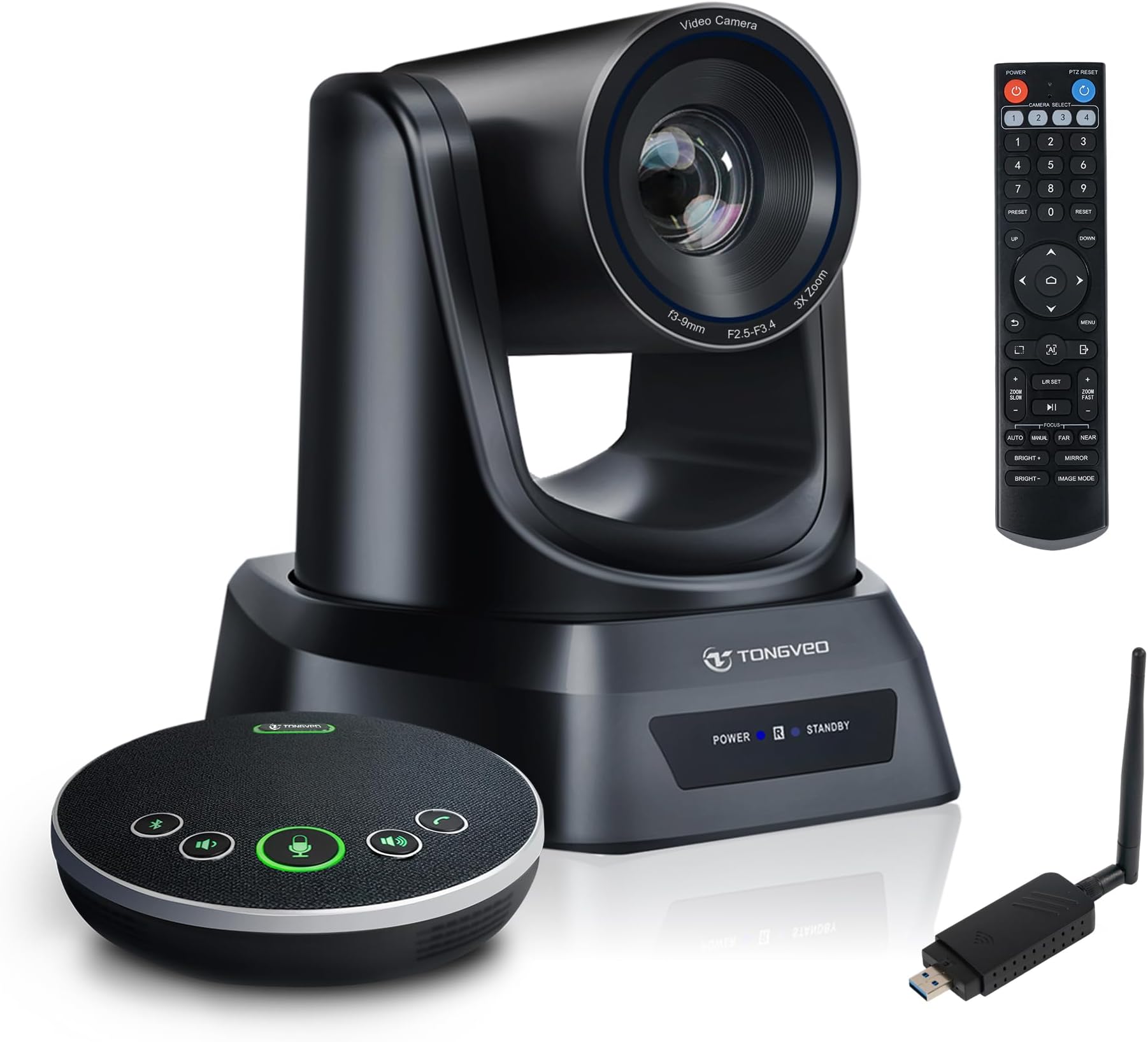
🚀 Elevate Your Meetings: Wireless, Crystal-Clear, and Effortlessly Professional
The TONGVEO 5.8GHz Wireless Conference Room Camera System is a cutting-edge solution featuring three 1080p 60fps PTZ cameras with a 50ft wireless range, paired with a 360° Bluetooth speakerphone that cancels background noise. Designed for seamless integration with Zoom, OBS, and other platforms, it offers plug-and-play setup and versatile mounting options, making it ideal for professional hybrid meetings, live streaming, and online worship services.


| ASIN | B0CSN445GY |
| Are Batteries Included | Yes |
| Battery Average Life | 4 Hours |
| Best Sellers Rank | #174 in Webcams |
| Brand | TONGVEO |
| Built-In Media | DC 12 V Power adapter,IR remote control,Manual,USB 2.0 cable, Ceiling brackets & screws. |
| Camcorder Type | Video Camera |
| Color | black |
| Compatible Devices | Mac and PC. System Requirements:Windows 7,8 or 10,Mac OS X 10.7 or higher,Android,Linux. |
| Connectivity Technology | USB |
| Customer Reviews | 4.4 4.4 out of 5 stars (253) |
| Display Resolution Maximum | FHD |
| Effective Still Resolution | 2.1 MP |
| Effective Video Resolution | 1080 Pixels |
| Exposure Control Type | Automatic |
| Features | Anti-Shake |
| File Format | MP4 |
| Flash Memory Speed Class | V60 |
| Flash Memory Type | Micro SD |
| Flash Memory Video Speed Class | V60 |
| Focus Type | Auto Focus |
| Form Factor | Compact |
| Has Image Stabilization | Yes |
| Image Aspect Ratio | 16:9 |
| Image Capture Speed | 60 fps |
| Image stabilization | Optical |
| Item Weight | 7 Pounds |
| Lens Type | Zoom |
| Manufacturer | Tongveo |
| Maximum Focal Length | 94 Millimeters |
| Minimum Focal Length | 6 Millimeters |
| Model Name | PTZ 3X |
| Model Number | PTZ 3X Camera+microphone |
| Number of Batteries | 1 CR5 batteries required. (included) |
| Number of Speakers | 1 |
| Operating System | All Windows Server Versions 2000, Android, Mac OS X, Windows 10, Windows 2000 |
| Optical Zoom | 3 x |
| Screen Size | 8 Inches |
| Sensor Type | 1/2.7 inch HD Color CMOS |
| Shooting Modes | Remote Meeting |
| Style Name | WIFI/USB 3X Cam+ Mic |
| Supported Audio Format | PCM, AAC |
| Supported Image Format | JPEG |
| Video Capture Format | MP4 |
| Video Resolution | 1080p |
| Warranty Description | 3 year |
| Water Resistance Level | Not Water Resistant |
| Wireless Compability | 5.8 GHz Radio Frequency |
| Zoom | Optical |
G**S
A beast of a Web Cam in a wireless setup
This review is for the TONGVEO 5.8GHz Wireless Conference Room Camera System | 3X 60fps PTZ Camera with Bluetooth Microphone. This system is a game-changer for our training room, offering high-quality video and audio in a completely wireless setup. The webcam itself is exceptionally powerful, capturing crystal-clear images with impressive precision, while the accompanying speaker/microphone system delivers clear, reliable sound. The ability to operate wirelessly was a critical requirement for us, eliminating cable clutter and tripping hazards, and it worked seamlessly—until the receiver failed. Fortunately, customer service acted swiftly, ensuring we were back up and running with minimal downtime. The camera provides outstanding video quality, making it perfect for our training room setup. Positioned just above the TV, it covers the entire 20’ x 30’ space effortlessly, ensuring all participants are visible. The microphone’s range is equally impressive, picking up voices from the farthest corners of the room without distortion or delay. This makes it ideal for large group discussions, presentations, and remote conferencing. To further streamline usage, we have the system connected to a docking station, allowing easy access for anyone needing to start a Teams meeting. The camera pairs flawlessly every time, and the Bluetooth microphone functions smoothly, ensuring uninterrupted communication. With the wireless HDMI connection, there’s no noticeable lag or distortion, and the display quality remains sharp from the perspective of remote participants. Additionally, the webcam offers extensive customization options, allowing users to fine-tune various settings, but most of our users don’t touch those. The included remote control makes adjustments effortless, enabling users to swivel the camera head to the desired position without manual intervention. Whether it's adjusting angles for a training session or repositioning for a web conference, the flexibility and ease of use add significant value to the system. Overall, this camera system checks all the boxes for wireless functionality, high-quality video and audio, and seamless integration into a professional environment. It has enhanced our ability to conduct effective training sessions and virtual meetings, making it a valuable addition to our workspace. If you need a wireless web cam, this one is for you. If you don't need a wireless one, then there are other options out there that are less pricey. The attached photo in this review captures the training room, but since it's a screenshot, the clarity may not fully reflect the actual view you'll experience through the webcam.
J**T
Great PTZ Camera for Church Services and everyday use!
I’ve been using the TONGVEO Wireless Conference Room Webcam for a few weeks now, and I’m very pleased with its performance. The image quality is good — sharp, clear, and great even in various lighting conditions. Setup was quick and easy right out of the box. I primarily use this camera for live-streaming church services via Zoom, and I run everything through OBS Studio. I'm happy to report that the camera integrates seamlessly with OBS — no issues at all. The PTZ controls make it easy to get the perfect shot. Beyond church services, I also use this camera as a regular webcam on my laptop for WhatsApp video calls, and it works flawlessly for that purpose too. It’s truly a versatile camera — whether you're using it for professional streaming or personal video calls, it performs consistently well. Recommended for anyone needing a good PTZ webcam that works well across different platforms and use cases.
J**A
easy to use and affordable for a hybrid meeting space.
Finding an affordable wireless camera option to create a hybrid meeting space in my boss' office proved to be quite the challenge, and the TONGVEO bundle proved to be the only reasonably priced option that was direct plug and play, truly wireless, easy to use system I could find. The camera quality is passable, the audio is great, and the only reason I don't give it five stars is because it doesn't have any AI tracking capabilities.
D**O
Great conference room camera!
This camera rivals the more expensive ones that are similar to it. I’ve tested it throughly with MS Teams, Zoom and as just a webcam. It has a very smooth zoom, great picture quality and quickly finds faces in a meeting room. The footprint is average, about the size of the big vendor’s aging cameras I replaced. The remote works very well and has the controls clearly marked and is easy to use. I really don’t have any Cons on this unit and can highly recommend it for corporate conferencing needs. It may be less expensive but you’d never know it. I’ve evaluated several other cameras and complete platforms that are around the same price and some 10 times as much. I’d say that the more expensive platforms offer little more value. This one is also plug and play. There is virtually no setup. Within a minute of plugging it into a Windows workstation it was up and running without a reboot. Nice! It has many extra ports as well so it’s very expandable. I haven’t tried it with any control boards but it does support industry standard protocols so I would expect it to work well with them. Overall this is a 5 star unit and I’ll be buying more if available.
J**A
Great Camera for Live Streaming
We bought this to live stream our cornhole events. The setup, operation, zoom and focus of this camera are all amazing. We used the provided USB dongle and at a distance of 20ft worked perfect. You can also hardwire the camera. I had a few questions for the Tongveo customer service team prior to purchase and they were prompt, friendly and helpful. I highly recommend this camera
P**K
Wireless conference camera at a great price
We are using this camera for our meetings, 20 or so in a large conference room. The wireless connection is great - The video is very smooth and there are no stutters or hangs. We'd had problems with other units with the audio, but this Bluetooth speaker and mic picks up everyone at the table clearly. Recently we had a small issue with the UBS dongle but their customer support was very helpful and they were able to provide a quick fix to the problem. I had been looking for a while for a camera with these features and it's working great. Easy setup with Zoom and a fantastic value.
S**O
The TONGVEO 5.8GHz Wireless Conference Room Webcam is a competent PTZ that is easy to set up and configure, delivers great quality, and has some very good presets that cover all the possible use cases you could need. The big selling point of this devise over others, is that it is wireless. You can use the provided dongles to connect it to your computer for live streaming and Teams integration, I find the quality to be very good indeed, and for devices like this being used in medium sized spaces, there is really no need for 4K, and 1080p is perfectly adequate. The remote is very useful if you are a chair of a meeting, it caps off a very competent product, The only thing that lets this down is the price - you can get a 4K device for similar money, but then again this has wireless, and it ultimately depends on what is of most value - connectivity or picture quality. Overall, this is a minor gripe and overall it is an excellent camera that delivers solid performance.
D**D
This conference camera works pretty much straight out of the box, and is perfect for larger-sized rooms. It’s easy to set up and use, (though you'll need 2x AAA batteries for the remote). The camera can be placed on a table or shelf, or mounted to the ceiling, with the necessary fixtures provided. The remote gives you access to all key features - powered zoom (both fast and slow), pan, tilt, and focus (auto and manual). You can also save up to nine pre-set positions making it easy to zoom in on key speakers or adjust the view if fewer people are in the room, without needing to set it up before each meeting. The 10x optical zoom provides excellent quality without losing resolution, and the 1920 x 1080 pixel FHD ensures clear video while keeping the stream smooth, which is generally ideal for most conferencing software that compresses the video anyway. It’s worth noting that this camera is overpowered for individual use at a desk—it’s designed for group meetings. There are two ways to connect it: either with the included USB-A 3.0 cable or wirelessly with the USB-A dongle. The wireless connection worked well, even through a wall and a door at a distance of 10 metres, though the remote won’t work through walls since it uses infrared. The remote also has a menu for advanced settings like RGB balance and resolution. You can connect up to two more cameras via RS485 and RS232 ports, although I didn’t test those features. Overall, this camera handles zoom and positioning effectively, delivers a clear image even in lower light, and the pre-set positions add flexibility for meetings of varying sizes. It's simple to use and performs well right out of the box.
C**N
It is very easy to set up and all you need to do is literally plug it in and the camera will be automatically recognized by the computer, and there are no drivers that need installing for it to work. It can be placed in different locations as it quite versatile in that respect. It can accommodate a tripod, it can be wall mounted or simply have it on the desk. The brackets end screws for wall installation are also provided. It has lots of image customization settings amongst which you get the option to select the image resolution, and this can be important in relation to your internet speed. If you have a fast internet connection then you should be ok with the higher full HD image resolution, otherwise if your internet is a bit slower you would be better off to drop down the resolution a bit. The camera is very quiet and when powered on it will perform a functionality test on itself which you can barely hear. It comes with a multiple functions remote control which offers full control over the camera, from a convenient remote position. The quality of the camera stands out very quickly and it comes with a clear instruction manual which shows all the different settings of the camera. Image quality is very good and with its wide angle, and depending how large the room is, it can cover the whole or most of the room I like the camera, works well and has very good image quality.
P**A
I was pretty shocked at how heavy this camera is to be honest, I was expecting it to just be flimsy plastic but I was pleasantly surprised to see it had a bit of weight too it! It appears that it can be used in basic mode by just plugging it into your computer (depending on what version of Windows you're running) but if you want full functionality you'll have to download the software from the manufacturers website (ran through antivirus and malware, all good) although you can also just use the remote to control it if needed / wanted. The picture quality seems to be what it says it is, 1080p which was quite a surprise. The zoom seems to work as intended and as far as I can tell it's definitely optical as opposed to digital. It has a lot of different abilities built into it, such as panning, auto focus, tracking (which works very well may I add) and plenty of different ways to connect to your device, some of which I've never even heard of! One let down for me would be the lack of a microphone. I would say the whole purpose of having a conference meeting that requires a camera is because your having a netting over the internet or you want it recorded. Instead you'd have to opt to use your devices microphone, a third party microphone or even better, buy little wireless microphones that people can wear so they can be heard.
E**S
I have a conference camera very similar to this one, with a slightly different brand name, that I use mainly as an overhead camera for online origami sessions. It works really well, with the pan, tilt and zoom features, which are easy to control, using the remote (identical to the one supplied with this camera). The main difference with this camera though, is that it’s also wireless, and doesn’t need to be physically connected to your PC/laptop (although it can be - using the supplied USB3 A to B cable). To connect wirelessly, all you need to do, is place the camera in an optimal position, attach an antenna, and connect the power supply. Then, attach the other antenna to the USB3 dongle, and plug it into a USB3 port on your PC/Laptop. Note: If you are using it with a slimline laptop, then you may need to stand it on something, to provide enough clearance for the dongle. I found that it worked fine using a short USB3 C to A cable, and it also worked ok with my Samsung Galaxy S22 phone, when connected via a powered hub. With 10 possible pre-sets, you can quickly direct the camera to the person speaking, and the auto focus works really well. It’s more compact than my current camera, but with a smaller lens, it struggles a little with light balance. The real bonus though, is the wireless connectivity, which makes set-up really straightforward, in any well-lit room. Priced at £269 when reviewed, it’s quite expensive, but it works well and the build quality is good. It comes with a power supply and UK 2-pin power cord, mounting bracket, screw mount, screws, wall plugs, RS485 plug, lens cap, and a comprehensive user manual.
Trustpilot
5 days ago
1 month ago