We remain fully operational. Our teams are working around the clock to ensure your deliveries continue safely.

DOWNLOAD THE APP


Customer Services
Copyright © 2025 Desertcart Holdings Limited
DOWNLOAD THE APP


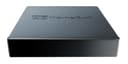
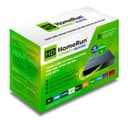
📺 Stream Smarter, Watch Together — The Future of Home TV is Here!
The Silicondust HDHomeRun CONNECT QUATRO HDHR5-4DT(UK) is a compact, network-connected TV tuner featuring 4 simultaneous DVB-T/T2 tuners. It streams Free-To-Air HDTV over your home Wi-Fi or wired network to multiple smart devices, enabling multi-user, multi-room viewing with pause and resume functionality. Compatible with popular platforms like Roku, Android, iOS, Windows 10, and FireOS, it supports DVR scheduling and recording via optional software. Ideal for cord-cutters seeking flexible, high-quality TV streaming across their home.


| ASIN | B07BFPWBNS |
| AntennaDescription | Television |
| Box Contents | 2m Ethernet cable, 4-Tuner Homerun CONNECT QUATRO device, 5v/1a Power adapter, Quick Start Guide |
| Brand Name | SiliconDust |
| Colour | Black |
| Compatible Devices | Roku, Android, iOS, Windows 10, FireOS |
| Connector Type | Coaxial |
| Customer Reviews | 4.3 4.3 out of 5 stars (454) |
| Includes Remote | Yes |
| Item Type Name | TV Tuner |
| Item Weight | 0.13 Kilograms |
| Manufacturer | SiliconDust |
| Manufacturer Part Number | HDHR5-4DT(UK) |
| Model Number | HDHR5-4DT(UK) |
| Network Connectivity Technology | Wi-Fi |
| Tuner Type | DVB-T, Digital |
| UPC | 857799005378 857799005385 |
S**G
it's a plug in and forget box.
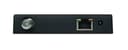
There are lots of reviews for the HDHomeRun, both good and bad. Most of the bad reviews seem to complain about issues that are outside of the control of the unit. To summarise, there are three issues that can influence the correct functions of the unit, and they are signal strength, network and software. Signal Strength The built-in tuners are quite sensitive but may not be as good as your TV. They need a good strong signal from your aerial. If you are in a weak signal area then consider getting an aerial amplifier to boost the signal. Network The unit connects to your local network via an ethernet connection. Each TV channel can use up to 6Mbps of network capacity, so if your network is already congested you may run into trouble. It’s well recommended that you plug the HDHomeRun directly into your router for the best results. Software The quality of live video and/or recorded video does depend on the software you are using. There is free software available to download from the manufacturer and available for most platforms. This software will let you watch live TV for free but requires a subscription for recording TV. There is other compatible software available such as Plex and Emby. You can use more than one at the same time as the HDHomeRun unit controls the tuner allocations. I use Plex for my library at home and this has live TV and recording facilities. You do need a Plex Pass subscription to gain these functions but it’s well worth it. It has the facility to remove adverts from recordings as well which is nice. This works reasonably well but it’s not perfect every time. The quality of recording is good but it can get a few jagged edges on video now and then. Setting up the unit is easy. It only has three connections, a power socket, an RJ45 ethernet socket and a UK compatible aerial socket. Please note though, there is no pass through on the aerial socket which means you need an aerial splitter if you want to share the aerial with your TV. Overall, this is an easy to use system and is very much a plug in and forget box.
J**P
Best solution and reliable
After 20 years of giving Hauppauge devices (in my opinion the main competitor to this device) I have invested in this and am really pleased. The latest attempt to try a Hauppauge device, the WinTV-dual HD, ended with no channels or a few channels that broke up, despite living in a very good signal area. This device picks up all channels and excellent signal strength (85%, matching my TVs signal strength exactly). The 4 tuner version is worth it, especially if you are using Plex DVR or similar as most server based DVRs don't include automatic padding of recordings, so say you add 2 mins to the start and end of each scheduled programme to ensure you catch the start and end, if you record 2 programmes at the same time, fine, but if you then want to record another programme straight after one of them, you are potentially using 3 tuners at once, hence the bonus of 4 tuners. The other bonus of this device over a USB device is that you can watch channels on any device on your LAN/Wifi network that can access a DLNA server, as this is built in to the box. So I have a TV in the bedroom attached to my network by wifi, you can open a channel like a video, and you are watching live TV, really easy and good for TVs that don't have the HDHomerun or app that works with your DVR server or any access to an aerial or TV signal. Nothing to setup once you have tuned it in using the quick start guide included, and it just works!
M**L
Everything I hoped it would be... eventually
UPDATE 18/6/20 Well, ahem, it turns out my signal booster in the loft was duff. Signal strength for some of channels was 93% this then caused symbol quality to deteriorate causing image deterioration and blocky display. Needed to use hdhomerun config software for Linux to troubleshoot this. Replaced the booster and all is now good. Back to 4 stars. I think it does need a really good signal. My PC tuner card is much more forgiving. UPDATE 7/4/20 Sadly the new unit I received is now playing up. If it records a film for example which would be around 2 hours long I find that in the latter half the signal it breaks up. I know it's nothing to do with signal strength. I believe the thing just overheats and can't cope. I will again have to send the thing back at my expense and be without live TV recording for 2 weeks and then what? Another gamble. Really fed up. UPDATE 22/1/20 For a couple of weeks it was great. Then in the morning I would find it hadn't recorded anything and furthermore I could not tune into any channel. Unplug the box for a short time and plug in again and all would be well for 12 hours until it broke again. Support responded to my ticket within hours. They asked me to turn diagnostics on and re-tune. But then it could not find any of the 192 channels it found before (until I left it unplugged for several hours) They asked me to return it (at my expense) and said a replacement would be cross-shipped and has now dispatched. I'm loping off just one star because equipment can break and they have responded in all the right ways and quickly. I'm hoping this was a one-off and the replacement will be good - other people have told me these devices are normally rock solid. ---------------------- ORIGINAL 5* review I've been tinkering with media centers for years now and had settled on using SageTV my PC with a PCI quad tuner card keeping the PC turned on 24/7. I wanted to turn off the PC to save electricity get away from the very unstable windows OS and moved to a QNAP NAS running Emby and this HDHomerun quattro as tuning device. I have found the device really easy to setup, it has run flawlessly, has stayed coo,l and the picture and audio quality good. The (browser based) configuration and status screens are simple but good enough and I was delighted that I could disable channels I am not interested in. The device has met expectations and is only 4" x 4". I have not seen any of the issues that others have cited. My TV signal strength has always been good because I made sure its accurately pointed, I amplify it at the aerial, and don't split it downstream that sorted all the issues I used to have with digital TV signals If I could name a single improvement it might be for an RF out so you can daisy chain two HDHomeRuns together without splitting the signal (my PC tuner card has that ability). But four tuners is enough for me so its not a biggie.
B**.
Please note, in order for DVB-C to work, you need to perform a firmware update, manually, by installing the app HDHomeRun (on a Mac at least) and just launching the app the first time.
Trustpilot
1 month ago
3 weeks ago