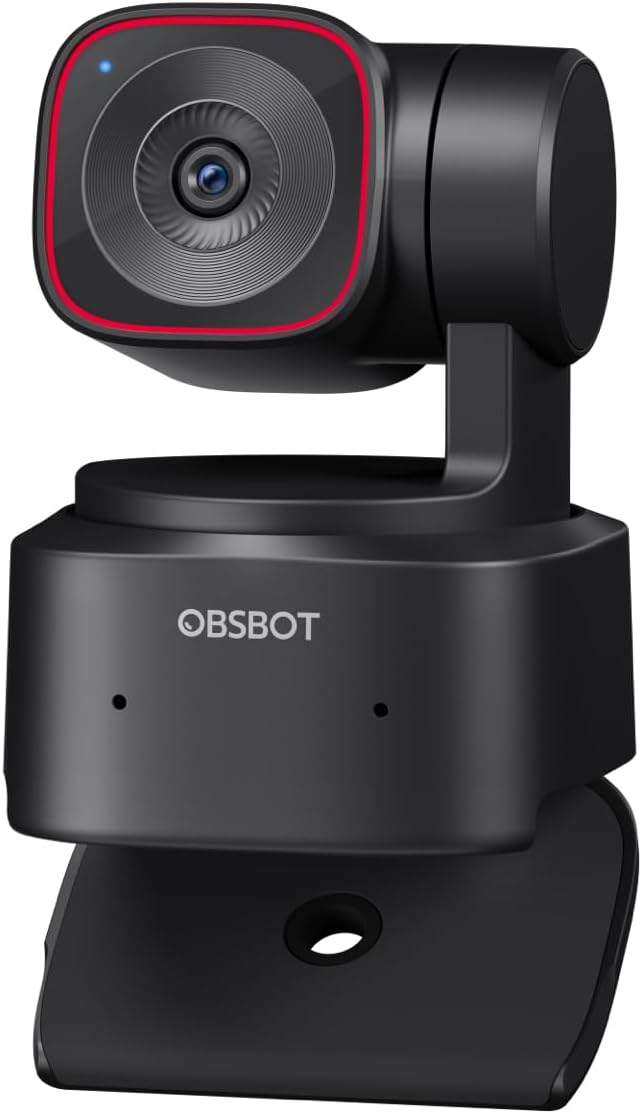
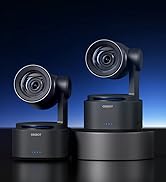
🎥 Own the frame, command the moment with OBSBOT Tiny 2 Lite!
The OBSBOT Tiny 2 Lite is a cutting-edge 4K webcam featuring a 1/2" CMOS sensor, AI-driven PTZ tracking with customizable presets, and dynamic gesture controls. Designed for professionals and streamers, it delivers smooth 60 FPS video, HDR imaging, and versatile shooting modes. Its plug-and-play USB-C interface supports both beginners and advanced users with SDK and Stream Deck compatibility, making it an essential tool for high-quality video calls, presentations, and live streaming.


| ASIN | B0CZ6XY78Y |
| Antenna Location | Sreaming/Meeting/Video Call/Remote Education/Presentation and others. |
| Are Batteries Included | No |
| Best Sellers Rank | #14 in Webcams |
| Brand | OBSBOT |
| Built-In Media | OBSBOT Tiny 2 Lite*1, USB-C to USB-A 3.0 Adapter*1, USB-C to USB-C Cable*1, User Guide*1, Warranty Card*1 |
| Camcorder Type | Webcam |
| Color | Black |
| Compatible Devices | System Requirements: Windows® 10 or later & MacOS 11 or later, CPU: 7th Gen Intel® Core i5 Processors or later, RAM: 8GB |
| Connectivity Technology | USB-C | No Wi-Fi |
| Customer Reviews | 4.4 out of 5 stars 1,621 Reviews |
| Digital Zoom | 4 x |
| Display Resolution Maximum | UHD |
| Effective Still Resolution | 8 MP |
| Effective Video Resolution | 3840 Pixels |
| Exposure Control Type | Automatic |
| Features | Multiple AI-Tracking Modes, Customizable Preset Modes, Multiple Shooting Modes, Dynamic Gesture Control |
| File Format | MJPEG/YUV |
| Flash Memory Type | NOT Available, Rely on Your PC/Mac |
| Focus Type | Auto Focus |
| Form Factor | Compact |
| Has Image Stabilization | Yes |
| Image Aspect Ratio | 16:9 |
| Image stabilization | Digital |
| Item Dimensions D x W x H | 1.83"D x 2.5"W x 1.9"H |
| Item Height | 6.42 centimeters |
| Lens Type | Zoom |
| Manufacturer | OBSBOT |
| Maximum Aperture | 1.8 f |
| Maximum Focal Length | 26 Millimeters |
| Minimum Aperture | 10 Millimeters |
| Minimum Focal Length | 10 Millimeters |
| Model Name | TINY 2 Lite |
| Model Number | TINY 2 Lite |
| Optical Zoom | 4 x |
| Photo Sensor Size | 1/2.0-inch |
| Photo Sensor Technology | CMOS |
| Screen Size | 2 Inches |
| Sensor Type | CMOS |
| Shooting Modes | Landscape/ Portrait/ Up-side-down |
| Style Name | Minimalist |
| Supported Audio Format | / |
| Supported Image Format | JPEG |
| UPC | 783970236289 |
| Video Capture Format | YUV, MJPEG |
| Video Capture Resolution | 4K@30 FPS, 1080P@60 FPS |
| Video Resolution | 4K@30 FPS, 1080P@60 FPS |
| Warranty Description | 1 Year Warranty |
| Water Resistance Level | Not Water Resistant |
| White Balance Settings | Auto, Cloudy, Custom, Daylight, Fluorescent, Incandescent, Kelvin, Shade, Sunset, Tungsten, Twilight |
| Zoom | Digital |
A**D
Excellent 4K PTZ Camera – Incredible Customer Support
I have had a frustrating experience with the OBSBOT Tiny 2 Lite. While the video quality and AI tracking were excellent while it worked, the hardware durability is highly questionable. Exactly 367 days after purchase (just 48 hours after the one-year warranty expired), the gimbal failed completely. After a firmware update, the camera began moving erratically up and down and refused to reset. I contacted OBSBOT support, and while they were responsive, they were unwilling to offer a "goodwill" exception for a failure that occurred so close to the warranty cutoff. The catch-22 for US buyers: Because I bought it from the official Amazon store rather than their own website, they refused to honor a warranty exception. Their solution was for me to pay for a paid repair service ($87 USD) and ship the unit internationally to their warehouse. When the camera costs about $160, spending over 50% of the value on a repair (plus the hassle of international shipping) makes no financial sense. Advice to the Public: Beware the 1-Year Mark: This gimbal appears to be a delicate component. If yours starts acting up, deal with it immediately before your 365 days are up. Support Limitations: Be aware that OBSBOT’s support is based in Asia. If you are outside that region, shipping for repairs is expensive and the "warranty" is strictly enforced down to the day. Firmware Risks: My issues began immediately following a firmware update. Proceed with caution when updating. It’s a shame because it’s a high-performing device, but I cannot recommend a product that fails right after the warranty ends with a manufacturer that won't stand behind its quality for a "near-miss" situation. UPDATE (Jan 2026): After posting my initial review, OBSBOT customer service reached out to me directly. Even though my camera failed just two days after the warranty expired, they offered a one-time goodwill exception. I shipped my faulty unit to their US-based warehouse, and they provided a brand-new replacement at no extra cost to me. The new unit is working perfectly. I am very impressed with their willingness to stand behind their product and ensure a positive resolution. Changing my rating to 5 stars to reflect this excellent support experience.
A**R
Best camera
This is the best webcam I have ever owned, I love the video quality, the ease of setup, the human tracking, and hand gestures. I use this camera for my business web meetings and for my new streaming ventures, it is easy to mount on my monitor or tripod. Currently I'm using it with my Mac mini and I haven't had any issues of any sort, it was very easy to get going. I love that it's on a gimbal, the sound quality is good for this very small package. I would highly recommend this camera.
K**G
Amazing webcam — super clear and easy to use!
I bought the OBSBOT Tiny 2 Lite 4K for streaming and video calls, and I’m seriously impressed. The picture quality is super sharp, even in low light. It’s 4K, so everything looks super crisp. What I love most is the auto-tracking—it follows me around smoothly, which is perfect when I’m moving or showing things on screen. The gesture controls are fun and actually work, and setup was super simple—just plug it in and go. Definitely worth the price. Great for creators, meetings, or anyone who wants to look pro on camera without any hassle.
J**D
High end Video Web Cam with AI functionality
The OBSBOT Tiny 2 is indeed tiny and a powerful webcam for professional presentations, recordings, and even for use as a content creator on YouTube. The price may seem steep for something this small; however, this camera delivers on several fronts while failing to provide in other areas. Right out the box, you get a camera and a cable, making setup as easy as plugging this into your computer and downloading the OBSBOT app family (There are several, but the one you really need is the OBSBOT Center - formally known as OBSBOT Webcam). Once you are up and running, you can connect UVC to any platform that allows you to take in video feeds: Zoom, Google Meet, etc You can also use it in OBS video studio and, of course, to record via a host of other apps I won't mention here. The camera delivers stunning 4K video, but beware that this is native and not many apps - especially ZOOM deliver 4K resolutions, so you may be disappointed when you hook it up to that app. Some podcasting and livestreaming platforms will have 4K, so just understand that just because you have a 4K camera, it won't be used everywhere. I feel that the camera has a weak point in its microphone, not fully capturing a quality signal, despite huge advancements in AI signal improvement out there, OBSBOT has not caught up in this department - Their much more expensive Tail2s don't even have microphones. But there are reasons for that, which I also will not get into. When it comes to the TINY 2, this is a very solid AI tracking, crisp capture, gymbal camera that will definitely upgrade your built-in camera on your computer. The simplicity of operation is not overstated here - it really is an easy camera to set up and get going with. The camera comes with a ¼ inch screw hole for attaching tripods, table or otherwise - it has a base that can latch to your computers monitor for eyelevel views and the app provides a series of refinements that range from picture quality, AI behaviours such as tracking your movements, autofocus and exposure and a beauty feature that smooths skin and other "funny" embellisments you would not be caught dead using in a buisness meeting. There are a couple of things that could make this camera better - wireless connectivity would be a huge upgrade, although I am not sure if a larger, more expensive camera in this range may have that feature. The Tail2 does, but in comparison is $1200! Bluetooth capability would be welcome here, as you could connect a microphone, use it with a phone or tablet, and even wirelessly operate a software joystick for the PTZ functions. In the accessories department, the camera does have a remote (sold separately), but it can only be used with a PC as it requires a USB wireless dongle to be attached for receptivity. This seems unnecessary if only they incorporated a BT radio instead. All these decisions are often what decides the size and price of the device, and I am sure the manufacturer may have ended up with this product version for those reasons. All in all, the unit is a GREAT webcam, the audio is passable, if you like "room tone" and "Reverb," but you can bypass this with another audio source on most software applications you would use this. The camera can't really be used on its own. I plugged it into a video hub and got a signal; however, there is no way to control the camera's gymbal or other functions without having a PC connected. It would be very useful if OBSBOT could make cameras this small that can operate independently, making for video production case scenarios, in a multi-cam setup up thanks to its VERY small footprint.
J**A
Great camera, great value, great price!
Excellent quality! Great AI tracking ability, and it's so darn cute. This webcam for a PC works great for Zoom or team calls and has excellent AI tracking capability for if you're giving a presentation and walking around the front of a room. The microphone is really good, and I don't think you can find something better than this especially at this price point. And it's so compact!
V**S
A Professional Webcam That Delivers
I’ve been very happy with the OBSBOT Tiny 2 Lite 4K Webcam. It’s a well-designed and highly functional device that delivers excellent image quality. Setup was quick and straightforward, and the camera integrates seamlessly with my PC. The 4K resolution at 30Hz provides sharp, clear video, making it ideal for video calls, streaming, or presentations. The autofocus is responsive, and color reproduction looks natural without requiring much adjustment. Its AI-powered tracking is a standout feature, keeping me centered in the frame effortlessly even when I move around, which adds real value during dynamic meetings. Overall, this webcam offers a combination of functionality, premium image quality, and ease of use. It’s a great choice for anyone who needs a reliable camera for professional or personal use.
R**N
Good Concept, Troubled Execution—PASS
I rarely write negative reviews, but I felt compelled in this case. The OBSBOT Tiny 2 Lite seemed like a great idea on paper, and for the first couple of weeks it worked decently. The concept is strong: a 4K webcam on a gimbal with AI tracking — exactly the kind of productivity tool I was hoping for. Unfortunately, the execution fell short, especially on the software side. When the camera stopped working, I went through extensive troubleshooting. I’m generally successful with electronics, but this was another level of frustration. Here’s what I tried: + Full system reboots + Uninstall/reinstall of OBSBOT Center (including a manual cleanup of leftover files) + Reinstalled the driver manually through Device Manager, since the OBSBOT software would not recognize the device (i.e., failed handshake) + Switched between USB-A and USB-C ports (front and rear ones on a ThinkStation P350) + Verified in Device Manager that Windows did in fact recognize the camera, but OBSBOT Center stubbornly reported “Device not found” There were warning signs early on. Even when it did work, there were conflicts with Zoom and other apps — sometimes the camera feed would remain “stuck on” despite shutting down all camera-related software. The supposed 4K video quality wasn’t on par with expectations. The gimbal tracking, while impressive in concept, often required coaxing through the OBSBOT app before it worked smoothly. At the end of the day, this is meant to be a productivity device — but the troubleshooting actively detracted from productivity. Instead of saving me time, it consumed it. In summary: all the ingredients for an excellent camera are there, but the software integration is buggy and unreliable. If you value your time, this is a hard pass.
S**K
The Lite does pretty much what the other does
It's hard for me to see really any measured differences between the "Lite" version of and the full version that is $100 more. This has been a lot of fun to play with since taking it out of the box this week. It's got all the features you would need/want. 4K resolution. Cool tracking features. Great quality. In fact, in most cases you probably won't even need the 4K, so it might be overkill unless you using it to film something. I have heard people say the built-in mic isn't the best, but the plan for me is to incorporate this into my podcasting setup, where I have a dedicated mic, so it really doesn't matter. I know the mic works well enough for quick video chats with my daughter at college, so I'm not to concerned about it. The only issue I have been having is I have yet to figure out how to get the effects that work in its own software to work with Facetime. A big selling point of the camera was those effects worked seamlessly with Facetime and other 3rd party platforms. Not so much, so far. I have watched YouTube videos. Mades sure all the permissions were given to it in my settings. Still will not work. with Facetime on the retouching options. everything else seems to work fine. I think for what this camera does, the Lite version seems like an incredible value. Would recommend.
Trustpilot
2 weeks ago
2 weeks ago