Desertcart purchases this item on your behalf and handles shipping, customs, and support to Thailand.
🚀 Elevate your workspace with the ultimate 11-in-1 docking powerhouse!
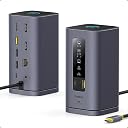
The Baseus Spacemate Docking Station 11-in-1 is a sleek, upright USB-C hub designed for Mac and Windows laptops, featuring triple 4K HDMI outputs powered by DisplayLink technology, ultra-fast 10Gbps USB 3.1 data transfer, and robust 100W power delivery charging. Its magnetic base and LED smart display streamline cable management and connection monitoring, making it a must-have for professionals seeking a clean, efficient, and powerful desktop setup.


| ASIN | B0D3QFWPDW |
| Best Sellers Rank | #756 in Computers & Accessories ( See Top 100 in Computers & Accessories ) #84 in Laptop Docking Stations |
| Brand | Baseus |
| Color | Space grey |
| Compatible Devices | For MacOS 10. |
| Customer Reviews | 4.2 out of 5 stars 848 Reviews |
| Hardware Interface | 3.5mm Audio, Ethernet, HDMI , USB 2.0 Type A, USB 3.1 Type A, USB 3.1 Type C |
| Item Dimensions L x W x H | 7.09"L x 4.69"W x 2.87"H |
| Item Highlight | with Smart Display, 4K HDMI, 10Gbps USB-C/A, 100W PD, Ethernet, Audio, DisplayLink driver. Install before use |
| Item Weight | 0.68 kg |
| Manufacturer | Baseus |
| Mfr Part Number | 11 in 1 |
| Minimum Required Operating System Version | Windows 10 |
| Model Number | 11 in 1 |
| Number of Items | 1 |
| Number of Packs | 1 |
| Number of Ports | 11 |
| Product Dimensions | 7.09"L x 4.69"W x 2.87"H |
| Total Number of HDMI Ports | 3 |
| Total USB Ports | 5 |
| Total Usb Ports | 5 |
| UPC | 850064146417 |
| Warranty Description | one year manufacturer |
| Wattage | 100 |
T**S
Sleek desktop docking manager!
I love this desktop docking station! It makes my life much easier and my desktop much cleaner than before. It has numerous outlets and can connect with my computer in a second. With a windows laptop issued by my company, I don’t need to connect numerous times each day but just one plug handles everything! It can support up to 4 monitors but I just got dual. So it’s much more powerful than I need it. You can check the connection on its LED panels and that’s so cool! Besides, it can also connect my MacBook Air. It looks so sleek in design that I would say it’s the best desktop decoration! I love this great product! It’s very great considering its prices!
B**B
Solid docking station
Bought this on a backup monitor setup instead of lenovo official docking station and it has exceeded my expectation in every way. I especially like the upright aluminum design. It takes up very little desk space, and the small screen showing the connection status is a nice touch. It also has all the ports I need for my peripherals and the setup was straightforward. Overall, I'm very satisfied with this docking station and would recommend it to anyone looking for a reliable and stylish solution for their workspace.
S**A
good quanlity and lots of port
This is my second time purchase baseus purdoct. It always has good quality at a low price. The docking station has both DP and HDMI, so no worries about finding adapters for different monitors. the build in typce C cable is long enough for me and can dircet charge directly through it, so it saves me 1 Type-C port on my laptop.
R**O
I have to retract my previous review.
I have to retract my previous review. I had given it a 5 star rating and said it was a blast. Even though it did suffer from flickering on one of the monitors, but I knew it was because my laptop's original charger didn't give enough power for the Hub and the 2 monitors plus all the HIDs. From experience I knew this could be fixed with a more powerful charger. That's why I bought the baseus combo, HUB + Charger. They were sent separately, so I plugged the charger into the Hub when it arrived and lo and behold, the laptop keeps plugging and unplugging from power, making it work intermittently on battery. When testing, I unplugged the baseus charger from the baseus Hub and plugged it into a smaller Hub I have. And it works. How is it possible that the baseus charger is not compatible with the baseus HUB, if they even promote and sell them together as a combo? I tried with different cables and it still works. The only way it works is that I plug it into my old Hub. So I have two Hubs connected and I can only power my laptop through the old Hub not the Baseus one which is supposed to be compatible with the Baseus charger. The Hub is not designed to deliver more power to the laptop, although it can receive different inputs like 5v=3A; 15v=3A; 20v=5A; It can only deliver 5v=0.9A; 5v=0.5A on output.
R**B
Solid product, great customer support, but you need to know more if you have a Macbook M4
OLD REVIEW: This just died on me, I connect 2 HDMI cables to my 2 monitors and it stopped working. No light indicator and no signal. On Windows and also on MacOS, same behaviour. I've tried unplugging, restarting my PC, no success. It looks dead. Probably something got fried inside. NEW REVIEW: The Company was kind enough to send a replacement device and I can now give a proper review. I have a Windows PC and a Macbook PRO 2024. Context: I want to use 2 monitors to extend my primary display. I have a LG and a Dell monitor to use alongside my Macbook pro M4 2024. WHAT WORKS - Works 100% well on my other Windows Laptop, it connects perfectly to all the 2 monitors and I can extend the displays to the 2 monitors. Perfect! WHAT DOES NOT WORK - It does not support MST on Macbook pro m4. From what the customer care shared and also I found out later in the documentation, this device does not support multi streaming transport. So that basically means, out of the box, this device can only help you connect your peripherals and one monitor, if you connect to two monitors, then both monitors will show a mirrored version of the display, but cannot extend the display. So you are stuck with using one monitor only. - On the same MacOS, It does not support display link drivers, I hoped this could be a last resort solution, unfortunately, it does not support. CONCLUSION: - This is a solid device, great build quality and design - On the technical side however, for someone looking to extend primary display to multiple monitors when using a Macbook M4 chip, then this device will not give you the justice you need. You can consider other options out there that supports specifically display link drivers so that you can use them on your Macbooks. RATINGS: I now can give it a solid 4 stars because of the great customer support, they sent a replacement device free of charge although it eventually did not solve my problem 100%
A**Y
Does What I Need
I got this to clean up my desk and connect everything with one cable. So far it’s been working great. The extra ports are really handy, and I like the vertical design since it doesn’t take up much space. The display setup was easy too. Overall, a really useful dock for my work setup.
P**A
Dual monitors not working at their full resolution
It seemed to be a well built, premium product and I was very excited. But my excitement was short lived. The primary reason I bought this was for a dual monitor setup, and this is where it fails. When I connect two 2560x1440 monitors at 60Hz via HDMI, the dock cannot handle the bandwidth and forces one of the displays into a very low resolution, making it unusable. I am connecting it to my Asus, Legion using the Thunderbolt port, also tried other ports. The product description should be much clearer that this dock does not support dual 2560x1440 displays when using both HDMI ports simultaneously. I did all trouble shootings. Contacted Baseus also. Nothing worked. Now going to order a DP cable and will try the combination, HDMI and DP as someone suggested. Update: Baseus promptly sent a replacement that I have yet to check. But, I also discovered that HDMI 1 and DP3 worked fine together. So, connecting one monitor using HDMI and the other one using a DP cable may resolve the issue.
T**D
Great docking station
This is a great docking station. 11 ports are really enough for my usage, the charging speed and file transfer speed are really fast. Didn't feel any heat when charging. Not very big and easy to carry out. Recommend this product.
F**I
hochwertige Dockingstation – funktioniert einwandfrei 💪👍 – Empfehlenswert 🤩
📦Lieferumfang: 1 x Baseus 11-in-1 Dockingstation 💲 149,99 € 🧐 Qualität / Funktion / Anwendung: Die Baseus 11-in-1 Dockingstation beeindruckt mit ihrer hochwertigen Verarbeitung und vielseitigen Anschlussmöglichkeiten. Mit Unterstützung für drei Monitore und 4K-Auflösung bei 60Hz liefert sie beeindruckende Leistung. Die Kompatibilität mit einer Vielzahl von Laptop-Marken wie Dell, HP, Mac, Lenovo und Acer macht sie zu einer äußerst praktischen Ergänzung. Für den Stromanschluss ist ein PD-USB-C Anschlusskabel mit Netzstecker erforderlich, der nicht im Lieferumfang dabei ist. Power Delivery ist eine Technologie, die es ermöglicht, ein Gerät mit maximaler Geschwindigkeit und sicher zu laden. Das System passt den Ladestrom automatisch an das jeweilige Gerät an und vermeidet so Überhitzung und Kurzschlüsse. Ladegeräte, die diese Technologie nutzen, müssen über ein geeignetes Kabel mit USB-C-Anschluss verfügen: Eine Verbindung über USB-A-Ports kann die Vorteile von Power Delivery nicht nutzen. Angeschlossene Geräte werden schnell erkannt und verbunden. 👌 Auf der Unterseite ist eine silikonähnliche klebrige Fläche integriert, die mit einer stabilen Schutzfolie geschützt ist. Dadurch hat man die Möglichkeit die Baseus Dockingstation Basis sicher und fest auf dem Schreibtisch zu fixieren, so dass diese nicht verrutschen kann. Die Dockingstation selbst wird magnetisch auf der Basis aufgesetzt und fixiert – Magnet ist sehr stark, damit auch bei Zug an den Kabeln die Dockingstation sicher auf der Basis fixiert bleibt. 💪 Dies finde ich super praktisch, vor allen Dingen, wenn die Dockingstation so platziert ist, dass man nicht ohne weiteres von hinten an die Anschlüsse kommt – es ist dadurch einfach die Station von der Basis zu heben und die Kabel einfach anzuschließen. 👍 Auf der Vorderseite ist ein kleines Display, das einem die verbundenen Anschlüsse anzeigt und mit zwei zusätzlichen USB-A und USB-C Anschlüssen mit 10Gbps Geschwindigkeit – sinnvoll, um einen USB-Stick oder ein anderes Gerät zu verbinden. Alles in allem funktioniert die Dockingstation einwandfrei 👍 🏆 Mein Fazit: Insgesamt bietet sie eine erstklassige Lösung für anspruchsvolle Nutzer, die Wert auf Flexibilität und Leistung legen.
R**N
Baseus Spacemate 11 v 1
This is a very good docking station. I used it differently. I had a lot of peripherals that required USB (keyboard, pad, mouse, etc.) and I also use portable drives and flash drives. I was looking for a solution to clear the desk of cables and I found a solution that not only did it but also has a nice design. I use a desktop PC - not a laptop. I bought this station, I connected a classic HUB from Baseus to it, which I placed under the desk. All USBs that are permanently connected are under the desk in the HUB, the cables from the desk disappeared and the docking station still offers me empty USB and USB-C on the desk. I do not have monitors connected to the station because they come from the graphics card. I have Win11 and the station communicates with them - if I press the top button on the station, the monitors go to sleep. The station does not even need an adapter because it does not charge anything and everything on it lights up as it should. Since I use a portable T9, I was worried if it would be enough voltage, but it is enough. The "C" connector on the motherboard provides what it needs. I recommend this product because it not only fulfills what I have, but it is probably one of the nicest docking stations.
A**I
Un monolite dalle eccellenti prestazioni
Ricorda vagamente l’entità sconosciuta dell’iconico film di Kubrick, ma è una potente docking station a forma di parallelepipedo che dispone di ben 11 porte di comunicazione per la gioia degli utenti più esigenti. La scelta di un design verticale così esclusivo non mira tanto all’aspetto estetico quanto a rendere più ordinata la gestione dei cavi che possono occupare spazio sulla scrivania. Dispone di un grande display a LED che visualizza lo stato di funzionamento delle periferiche e ci informa su quale porta è collegato il dispositivo. Prevede inoltre un pulsante di blocco dello schermo per abilitare l’accesso selettivo al PC e proteggere le informazioni che non vogliamo condividere. Oltre al display, il frontale della docking station contiene un ingresso USB-A e uno USB-C contrassegnati dal colore arancione, segno distintivo che le porte di comunicazione funzionano con una velocità di 10 Gbps. Sul dorso si concentrano il grosso delle porte a partire da due ingressi HDMI + due DISPLAYPORT in grado di riprodurre filmati in 4K fino a 60Hz. Seguono una porta USB-A 2.0 per il collegamento di periferiche standard e una porta USB-A 3.2 per trasferimenti ad alta velocità. È inoltre presente un ingresso JACK da 3,5 millimetri per cuffia e un ingresso RJ45 per collegamenti LAN in grado di supportare velocità fino a 1 Gbps. Infine, come ciliegina sulla torta, è presente una porta PD da 100 Watt che, oltre alla ricarica rapida, permette di alimentare dispositivi ad alto assorbimento elettrico quali hard disk meccanici e lettori DVD esterni. Nelle prove sul campo la BASEUS non tradisce le aspettative. Una volta inserito il robusto cavo in tessuto all’ingresso USB-C del computer, la docking station viene riconosciuta secondo quattro diverse interfacce (BILLBOARD). Sulle porte arancioni i dischi SSD raggiungono velocità di trasferimento elevatissime anche se non equiparabili agli standard Thunderbolt. Un file di 10 Gb viene copiato ad una velocità iniziale di 800 Mbps per poi stabilizzarsi intorno ai 200 Mbps, tutto sommato nella media dei dischi con interfaccia SATA. Nel complesso, la docking station rispecchia caratteristiche di fascia alta e rappresenta un accessorio risolutivo per i portatili che non dispongono di porte aggiuntive con prestazioni elevate. A suo favore gioca l’aspetto esteriore, una scocca in alluminio pregiato dal design decisamente accattivante. Inoltre, grazie alla sua base magnetica sganciabile, può essere collocato in qualsiasi punto della scrivania senza occupare eccessivo spazio, facilitando in questo modo l’accesso alle periferiche. Nel momento in cui scrivo il costo non è particolarmente contenuto, ma è in parte giustificato dalla qualità complessiva del prodotto e dal marchio assolutamente affidabile. PRO - Elevata qualità costruttiva - Design originale in alluminio - 11 porte di comunicazione - 2 porte HDMI + 2 DISPLAYPORT (4K/60Hz) - 2 porte USB-A + 1 USB-C a 10 Gbps (3.2) - 1 porta USB-A a 480 Mbps (2.0) - 1 porta Ethernet a 1 Gbps - 1 porta jack 3,5 mm per cuffia - 1 porta PD da 100 Watt - 1 cavo USB-C di collegamento - Base magnetica sganciabile - Compatibile con Windows/Android/IOS - Guida rapida in lingua italiana CONTRO - Nulla di rilevante
B**O
Qualidade
Muito bom
D**O
Probablemente devuelto y revendido
No servía, la caja no estaba sellada y parecía que era un regreso de otra persona, el producto tenía signos visibles de daño, unos pequeños raspones en la pintura.
Trustpilot
1 month ago
5 days ago