Desertcart purchases this item on your behalf and handles shipping, customs, and support to Thailand.
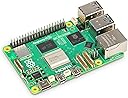
🚀 Power your innovation with Raspberry Pi 5 — where speed meets limitless creativity!
The Raspberry Pi 5 8GB RAM Single Board Computer is a cutting-edge development platform featuring a 2.4 GHz quad-core ARM Cortex-A76 processor, 8GB of LPDDR4X memory, built-in WiFi and Bluetooth, and dual HDMI outputs. Designed for professionals, makers, and educators, it supports advanced AI, robotics, IoT, and multimedia projects with desktop-class performance and versatile connectivity in a compact form factor.


| ASIN | B0CK2FCG1K |
| Best Sellers Rank | #21,274 in Electronics ( See Top 100 in Electronics ) |
| Box Contents | 1N BAREBONE |
| Brand | Raspberry Pi |
| Brand Name | Raspberry Pi |
| CPU Speed | 2.4 GHz |
| Compatible Devices | Camera, Personal Computer, Smartphone, Keyboard, Mouse, Speaker, Microcontroller (Raspberry Pi models) |
| Connectivity Technology | Bluetooth, HDMI , USB, Wi-Fi |
| Country of Origin | China |
| Customer Reviews | 4.6 out of 5 stars 2,952 Reviews |
| Global Trade Identification Number | 05056561803326 |
| Importer Contact Information | Patelcraft Solutions Private Limited, Jaipur Office: Address: Devi Nagar, Jaipur – 302019, Email: [email protected], Phone: +91-7416733071 | Bangalore Office: Address: SP Road, Bangalore – 560002, Email: [email protected], Phone: +91-8317437625 || For bulk orders and support, please contact us via the details above. |
| Item Dimensions L x W x H | 12L x 6W x 10H Centimeters |
| Item Type Name | Raspberry Pi 5 8GB RAM |
| Item Weight Unit of Measure | 60 Grams |
| Manufacturer | Raspberry Pi : Patelcraft Solutions Private Ltd : Email Id : [email protected], Raspberry Pi |
| Manufacturer Contact Information | Raspberry Pi |
| Manufacturer Part Number | SC1112 |
| Memory Storage Capacity | 8 GB |
| Model Name | RPI5-8GB-SINGLE |
| Model Number | SC1112 |
| Network Connectivity Technology | Bluetooth, HDMI, USB, Wi-Fi |
| Number of Items | 1 |
| Number of Packs | 1 |
| Operating System | Linux |
| Packer Contact Information | Raspberry Pi : Patelcraft Solutions Private Limited, Jaipur Office: Address: Devi Nagar, Jaipur – 302019, Email: [email protected], Phone: +91-7416733071 | Bangalore Office: Address: SP Road, Bangalore – 560002, Email: [email protected], Phone: +91-8317437625 || For bulk orders and support, please contact us via the details above. |
| Processor Brand | ARM |
| Processor Count | 4 |
| Processor Speed | 2.4 GHz |
| RAM Memory Installed | 8 GB |
| RAM Memory Installed Size | 8 GB |
| RAM Memory Technology | LPDDR4X |
| Total USB Ports | 4 |
| Unit Count | 1.0 Count |
| Warranty Description | 1 Year Manufacture |
| Wireless Compability | 802.11ac, Bluetooth |
H**N
A great SBC.! Buy it blindly if you're looking for getting a SBC
It's worth every penny spent on it. I've been using it for a private media server, hosting small bots, pi-hole, and many more. It handles them all without breaking a sweat. This is my first SBC experience and I'm very satisfied and awed by it's capabilities. It's a must product for engineering students . It helps us build many unique DIY projects, automation scripts etc ...
A**R
Good product
Good product, working without abt issues
S**M
worth investing in this product
best component ever used
R**A
Best
Immich and jellyfin. Totally worth it
R**H
Hi5 to my Pi5
Received it on time. Affordable as compared to other sites
S**K
Go for it
Amazing, fast and easy to setup and use
R**Z
Love the pi5
Great computer
A**N
Does not boot. Lights keep flickering like usual. Hardware fault out of the box.
Does not boot. Lights keep flickering like usual. Hardware fault out of the box. No output on either HDMI ports. Tried fan and nvme adapters, tried different OS along with pios and ubuntu server for pi, same result. Ethernet light blinks but never gets any ipv4, not detected in router for SSH. Absolute garbage faulty hardware.
V**.
Excelente calidad.
Magnifica navaja suiza. Tengo montado home assistant, pi hole, jellyfin y tvheadend y va como un tiro. Una de las mejores compras que he hecho en años.
J**H
Tiny Board, Massive Storage: Dual 4TB NVMe Drives on a Raspberry Pi 5
The Raspberry Pi 5 (8GB) has become the central brain of my home setup, and I say this as someone who works with tech daily and builds systems not just for fun but for productivity and long-term use. I purchased this particular unit in December 2024, and since the first day, it has run 24/7 with absolute consistency. For what it offers at its price point, it truly feels like a life-changing device, especially for those who are eager to tinker, automate, learn to code, or even run serious applications from a tiny board. One of the most transformative upgrades I’ve made to my Raspberry Pi 5 is integrating a dual-NVMe expansion setup using two 4TB NVMe SSDs. This is made possible via a PCIe HAT+ adapter board that includes a switch chip to handle dual drives over the Pi 5’s single PCIe 2.0 x1 lane. Despite the bandwidth limitation (theoretical max ~500MB/s), the performance is surprisingly solid for most real-world use cases. I regularly hit sequential read speeds of around 400–430MB/s and writes of 350–390MB/s, which is more than enough for backups, local file hosting, and even video streaming directly from the Pi. I’ve configured one of the NVMe drives as the primary boot device using Raspberry Pi OS, while the second is dedicated to storage. I use it for scheduled nightly backups from both my Android phone (via Syncthing) and my wife's iPhone (using the Photosync app in SFTP mode), and the reliability has been outstanding. The dual-NVMe board I use is passively cooled with heatsinks, and both drives stay under 55°C during extended file transfers. In my case, the Pi 5 serves multiple roles simultaneously. It acts as a Pi-hole DNS sinkhole, filters and logs internet traffic for every device in the house, handles over 250 persistent Pi-Seer MQTT device connections, runs Node-RED automations, and manages two IP cameras as a local NVR. This isn’t a stretch—it’s a real test for a system that’s passively cooled and silently humming away inside a small server-grade enclosure. I paired it with the Armor Lite V5 aluminium heatsink and PWM fan (which I also reviewed), and that combination keeps temperatures below 55°C under full load. The performance delta from the Pi 4 is noticeable and significant; where the 4 might get bogged down or throttle, the Pi 5 simply pushes through. I use the official 27W USB-C power supply, which is essential for keeping things stable when peripherals are attached. This includes an NVMe SSD via the M.2 PCIe HAT+, allowing for ultra-fast read/write speeds. This alone transforms the Pi into something that behaves more like a mini desktop or server than a single-board computer. Boot times are snappy, databases load instantly, and there's no delay in system response even when under concurrent tasks. Where the Pi 5 really shines is in development and education. I’ve been writing Python scripts, working with Docker containers, and even experimenting with AI tools—all from this board. A huge part of this success is thanks to ChatGPT and similar code assistants. In the past, learning how to set up a Pi as a local LAMP server or writing Flask applications with dynamic APIs would require deep technical knowledge and time-consuming trial and error. Now, I can prompt an AI to help generate boilerplate code, troubleshoot errors, or refactor inefficient blocks. I’ve used VS Code remotely through SSH, integrated Git workflows, and set up CI pipelines with relative ease. Anyone willing to follow a couple of guides can now build incredible things in a weekend. I recently used the Pi 5 to prototype a home energy monitoring dashboard. Using InfluxDB and Grafana, I track power consumption from smart plugs around the home and visualise it beautifully. MQTT messages come in from Zigbee2MQTT and ESPHome devices, get processed by Node-RED, and are stored and visualised with zero noticeable lag. The Pi 5 handles all this with remarkable grace. CPU usage typically sits at around 35% with peaks around 70% during compilation tasks. This board is also ideal for light AI experimentation. With the right USB accelerators or the new AI HATs, you can run object detection models locally, perform facial recognition, or build smart assistants without ever sending data to the cloud. Privacy-respecting edge computing has never been more accessible. I used the Pi 5 to run a basic LLaMA 2 language model stubbed with a local API, running inference through ONNX Runtime. The board doesn’t break a sweat and remains quiet while doing it. The Raspberry Pi OS has matured significantly, and with the community providing excellent support for Ubuntu Server, DietPi, and other Linux distributions, there’s a flavour for everyone. GPIO compatibility is excellent, with plenty of updated libraries replacing RPi.GPIO for the new architecture. The new RP1 I/O controller truly unlocks the performance potential for USB 3.0 and PCIe lanes. File transfers over USB 3.0 with my SSD hit consistent 350MB/s—something unimaginable a few years ago on a Pi. This is s a capable platform that can sit at the heart of home labs, IoT systems, learning environments, or even small businesses. Whether you're an educator setting up classrooms, a parent wanting to introduce your child to computing, or a hobbyist trying to build something custom and meaningful—the Pi 5 enables it all. Power usage on the second Pi 5, configured as our NAS and photo backup server, is incredibly efficient—averaging around 3.8W at idle and peaking at about 7.2W during simultaneous file transfers and photo uploads from two devices. I measured this using a USB-C inline power meter over a full 24-hour cycle, including overnight auto-backups and daytime access from multiple devices. Even when handling encrypted file syncs, indexed thumbnails, and NVMe activity, it remains cool and stable—truly impressive for a system replacing my QNAP 872XT, which used to idle at over 50W. In my own experience, this board has dramatically changed how I think about computing. It’s made me more resourceful, more curious, and ironically, more minimalistic. I no longer reach for the heavy-duty workstation for tasks that the Pi 5 can handle quietly in the corner. To wrap it up: The Raspberry Pi 5 is a gateway. It’s the computer I wish I had as a kid, and the one that’s going to power so many more ideas in the future. I wholeheartedly recommend it for anyone even remotely interested in computing. If you’ve got an idea and a bit of time, this tiny board can make it real.
D**N
Raspberry Pi 5: The Tiny Computer That Does EVERYTHING!
If you’re shopping for a Raspberry Pi 5, I’d strongly consider stepping up to the 16GB model—especially if your plan includes an AI HAT, heavier multitasking, or squeezing the most out of emulation/gaming. While the 8GB version is both functional and durable. The 8GB version is absolutely excellent for the majority of use cases (general Linux projects, home server tasks, Kali, etc.), but once you start stacking bigger workloads, the extra RAM gives you more breathing room and a noticeably smoother experience. On pricing: yes, the 16GB usually carries a small premium, but in my experience that difference is justified—particularly when it’s paired with fast shipping and you want to get building immediately. A few practical notes that will save you headaches: Power supply matters—big time. The Pi 5 really wants a proper 5V/5A supply. Underpower it and you’re asking for brownouts, instability, and random weird behavior. If you’re running from a battery, 5V/3A can work, but you’ll need to be smart about it: use a powered USB hub for peripherals so you’re not dragging the Pi down when you plug in devices. For the first boot, using a TV/monitor setup can make life easier—especially until you’ve updated to the latest firmware. Don’t skip active cooling. The Pi 5 can run hot under load, and throttling will undo a lot of the performance you’re paying for. Use a case. There are tons of options—just get something, even if it’s a simple silicone base. Protection + airflow is the goal. Finally, if you’re buying the Pi 5 specifically for penetration testing, plan on adding a compatible external Wi-Fi adapter. The built-in Broadcom wireless is fine for normal connectivity, but it’s not the right tool for packet injection/monitor-mode workflows—an external adapter will make your life much easier. One of the biggest perks of the Raspberry Pi 5 is how many operating systems you can run, depending on what you want to build: Raspberry Pi OS (64-bit) – the official, best-supported daily driver Ubuntu (Desktop/Server) – great for productivity, dev work, and servers Kali Linux – popular for security testing and training labs Retro gaming OS options – RetroPie, Recalbox, Batocera (awesome for emulation setups) Media center builds – LibreELEC/OSMC for a dedicated TV/streaming box Lightweight Linux distros – faster, lean builds for specific projects and low overhead Android-based builds (community-supported) – for an Android-style experience on Pi hardware No matter your goal—desktop, server, security lab, arcade console, or media box—the Pi 5 has an OS path that fits. Overall: 8GB is a fantastic value and handles most projects effortlessly, but if you’re aiming for AI, more demanding workloads, or a “buy once, cry once” setup, the 16GB model is the smarter long-term pick.
M**E
Terrible it doesn’t work and it’s a raspberry pi 4 not 5
It’s a 4 not 5
W**A
Do not boot
I use correctly a minimum specification, 5V 3A but do not boot. used the installer of Raspberry pi. nothing I just I bought a card sd that works normally and tested. if u will buy is better have a monitor mouse and keyboard to test in the same day.
Trustpilot
2 weeks ago
1 month ago