Buy anything from 5,000+ international stores. One checkout price. No surprise fees. Join 2M+ shoppers on Desertcart.
Desertcart purchases this item on your behalf and handles shipping, customs, and support to Thailand.
🚀 Elevate your office game with Xerox C325dni — where speed meets smart productivity!
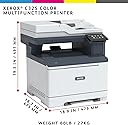
The Xerox C325dni is a compact, multifunction color laser printer designed for small to mid-sized businesses and home offices. It delivers fast print speeds of up to 35 ppm, automatic duplex printing, and high-resolution color output (up to 4800 x 1200 dpi). With built-in Wi-Fi, AirPrint, and Mopria support, it offers versatile wireless connectivity. The device supports copy, scan, fax, and email functions, backed by a 250-sheet capacity and a monthly duty cycle of up to 6,000 pages, making it a reliable, professional-grade solution for hybrid work environments.







| ASIN | B0D92VG5DM |
| Additional Printer Functions | Copy, Fax |
| B&W Pages per Minute | 35 ppm |
| Best Sellers Rank | #76,945 in Office Products ( See Top 100 in Office Products ) #573 in Computer Printers |
| Brand | Xerox |
| Built-In Media | "Xerox C325 Product • Pre-installed Starter Capacity CMY Print Cartridges: 1,000 print capacity4; Black cartridge: 1,500 print capacity • Software and Documentation CD (with User Manual, Quick Install Guide, Safety, Regulatory, Recycling and Print Drivers, and Warranty Statement) • Installation Guide Product Safety Sheet • Quick Use Guide • Power Cord" |
| Color | White/Blue |
| Color Pages per Minute | 35 ppm |
| Compatible Devices | Smartphones |
| Connectivity Technology | Wi-Fi |
| Controller Type | Android |
| Customer Reviews | 3.6 out of 5 stars 67 Reviews |
| Dual-sided printing | Yes |
| Duplex | Automatic |
| Hardware Interface | Ethernet, USB 2.0 |
| Ink Color | Black, Cyan, Magenta, Yellow |
| Item Dimensions D x W x H | 18.7"D x 18.9"W x 19.3"H |
| Item Type Name | Multifunction Printer |
| Item Weight | 59.5 Pounds |
| Manufacturer | Xerox Office Products |
| Maximum Copy Resolution Black and White | 1200 x 1200 dpi |
| Maximum Copy Resolution Color | 1200 x 1200 dpi |
| Maximum Copy Speed Black and White | 35 ppm |
| Maximum Media Size | 8.5 x 14 inch |
| Maximum Print Resolution Black and White | 1200 x 1200 Dots Per Inch |
| Maximum Sheet Capacity | 250 |
| Maximum print Resolution Color | 1200 x 1200 dpi, 4800 Color Quality Dots Per Inch |
| Model Name | Xerox |
| Model Number | C325 |
| Model Series | C325 |
| Number of Trays | 2 |
| Other Special Features of the Product | Auto Redial, Auto Reduction, Broadcast Send, Junk Fax Filter |
| Paper Size | 3 x 5 in to 8.5 x 14 in |
| Print media | Card stock, Labels, Paper (plain) |
| Printer Connectivity Type | Wi-Fi |
| Printer Output Type | Color |
| Printer Type | Laser |
| Printing Technology | Laser |
| Resolution | 4800 x 1200 |
| Scanner Type | Automatic Document Feeder |
| Special Feature | Auto Redial, Auto Reduction, Broadcast Send, Junk Fax Filter |
| Specific Uses For Product | Office |
| Total USB 2.0 Ports | 1 |
| Total Usb Ports | 1 |
| UPC | 095205044355 |
| Warranty Description | 1 year manufacturer onsite |
| Warranty Type | limited warranty |
| Wattage | 383 watts |
N**T
Better than HP
Replaced our HP8710 printer at work with this one and liked it so much I bought another one of these for home. The cartridges are more expensive but they print so many more pages that the cost per page is lower and the number of times you have to buy and swap cartridges is less. It scans double sided fast because it doesn't have to pass the paper through twice. It prints card stock so you can print coupons, rack cards, and business cards all with high quality color printing. The specs for this Xerox unit say it is deeper than the HP so we thought it would take up more table space. But it doesn't because with the HP you had to slide out the tray where the printed output came out, but with the Xerox, the output comes out within the boundaries of the printer.
S**Q
Too expensive... only thing worse than printer is xerox customer service
Most expensive printer I have ever owned. Bought it almost a year ago. Every month a toner or more has to be changed, and they are $120-150 each and it has 4. I have had xerox do online diagnosis, software updates, send out servicemen and no one can say why it never gets more that 1000 copies out of a toner - even though they are rated at 1800 ... forget ordering the high capacity. they don't' get half life out of them either. I like the double sided copy and scan features it is easy to use.... but it isn't worth $600 a month for that feature. I am sure machine is defective as I have had many xerox printers and all were good. But can't convince them there is something wrong with this one.
M**M
Print quality makes up for the clunky web interface and learning curve.
This thing is a beast! Works great. A bit clunky on the online interface, but once you navigate the web-based interface setting up the Scan to Network folders and get the Shortcuts set up, this printer is awesome.
T**M
Good quality printing
Good quality printer but toner runs out quickly and it’s of course as toner is for a laser printer…expensive.
S**R
Fantastic Home Office Multifunction Printer!
The C325 Multifunction Printer has been a fantastic addition to my workspace. Setup was quick and straightforward, and the wireless connectivity makes printing from my laptop and phone effortless. Print quality is sharp for both documents and photos, and scanning is clear and accurate. I also appreciate how compact and quiet it is, which makes it perfect for a home office without taking up too much space. Overall, it’s reliable, easy to use, and delivers professional results every time—I’d definitely recommend it to anyone looking for an all-in-one printer.
D**.
Too many problems; look for something better elsewhere
Bought this as a sale item before Christmas. It appeared to be new when I received it so I was looking forward to a great experience with a new color laser printer. First problem I noticed was that after doing the software setup and going into the Xerox Print and Scan Experience screen, the "Print" and "Print Queue Settings" options (two separate options) were always greyed out. And no amount of troubleshooting would ever get them to become available. The only really useful thing I could do on that screen was utilize the "Scan" feature. Second problem was that every time I tried to duplex print, it would print on the front and back of the paper, then jam just before it was about to be ejected from the printer. I'd clear the paper jam but the error message would not go away no matter how many times I followed the steps to clear the jam. The only way I could ever clear it was to pull the plug on the printer, wait a minute, then plug it back in. Eventually, I got tired of doing this so I returned it for an exact replacement thinking this just had to be a glitch with this printer. The replacement printer arrived with the box damaged, and when I pulled the printer out, it was clearly a used printer. All of the toner cartridges were either empty or near empty, and it would make a loud thumping sound as it was attempting to grab the paper. Plus, it still had the exact same problems as first printer; it wouldn't duplex print without jamming, and the "Print" and "Print Queue Settings" options were always greyed out in "Xerox Print and Scan Experience." This one is going back as well... this time for a refund. In short, the replacement printer was literally worse than the original printer. The only reason I gave the overall printer two stars was because if you were very careful with it, you could get it to print on one side and use the scan feature.
S**N
Wonderful fast and quiet
This printer scanner copier checked all the boxes. Was faster than expected and much quieter than expected. Love it. I would recommend this to any small office group.
B**T
Not worth the cost, the toner cost, the hassle, or xerox's games! DON'T BUY
This printer has been the biggest freaking pain! The first came broken and I had to send it back--broken pieces and panels as soon as I opened it up. The second would not work because the Yellow cartridge was somehow damaged and so it wouldn't finish the initialization process. The 3rd worked for a while and then claimed that the image fuser "was NOT xerox genuine" and refused to print after that. Nothing I did would fix it, even though I'd never removed or changed that part out...XEROX has GOT to get their @#$)#@_@#%*_@#*& together!!!! I did get one of them to work, just to find that their initial cartridges dropped to 70% AFTER IT INITIALIZED and before I EVER printed anything. AND their freaken toner is the most expensive garbage on the planet. Here's a simple comparison...a little over $200 for a XL black, while I can get ALL 4 toners (CMYK) for my Canon (that's almost identical to this one) for about $80. This is SO LUDICROUS that it's criminal. The ONLY good thing about this printer, if you can afford to even run it, is that it has quite a few professional / office level security, network, admin, bios, management settings that you don't typically find on home printers; AND this scans documents double sided at the same time--BUT THAT's IT! I've had to return 4 printers to get this to work, and I'd NEVER buy this again.
A**R
Everything and more
Hi Hi. This device is an upgrade from my 6515. And, everything and more than I expected. The price was good at this purchase time as well. The only issue was that it was delivered upside-down. Perhaps not an Amazon issue. This said, the packaging and protection maintained the devices integrity just fine. No issues. 5 starts for sure on this device.
Trustpilot
2 weeks ago
5 days ago