Desertcart purchases this item on your behalf and handles shipping, customs, and support to Thailand.
🖱️ Elevate your workflow with precision, comfort, and wireless freedom!
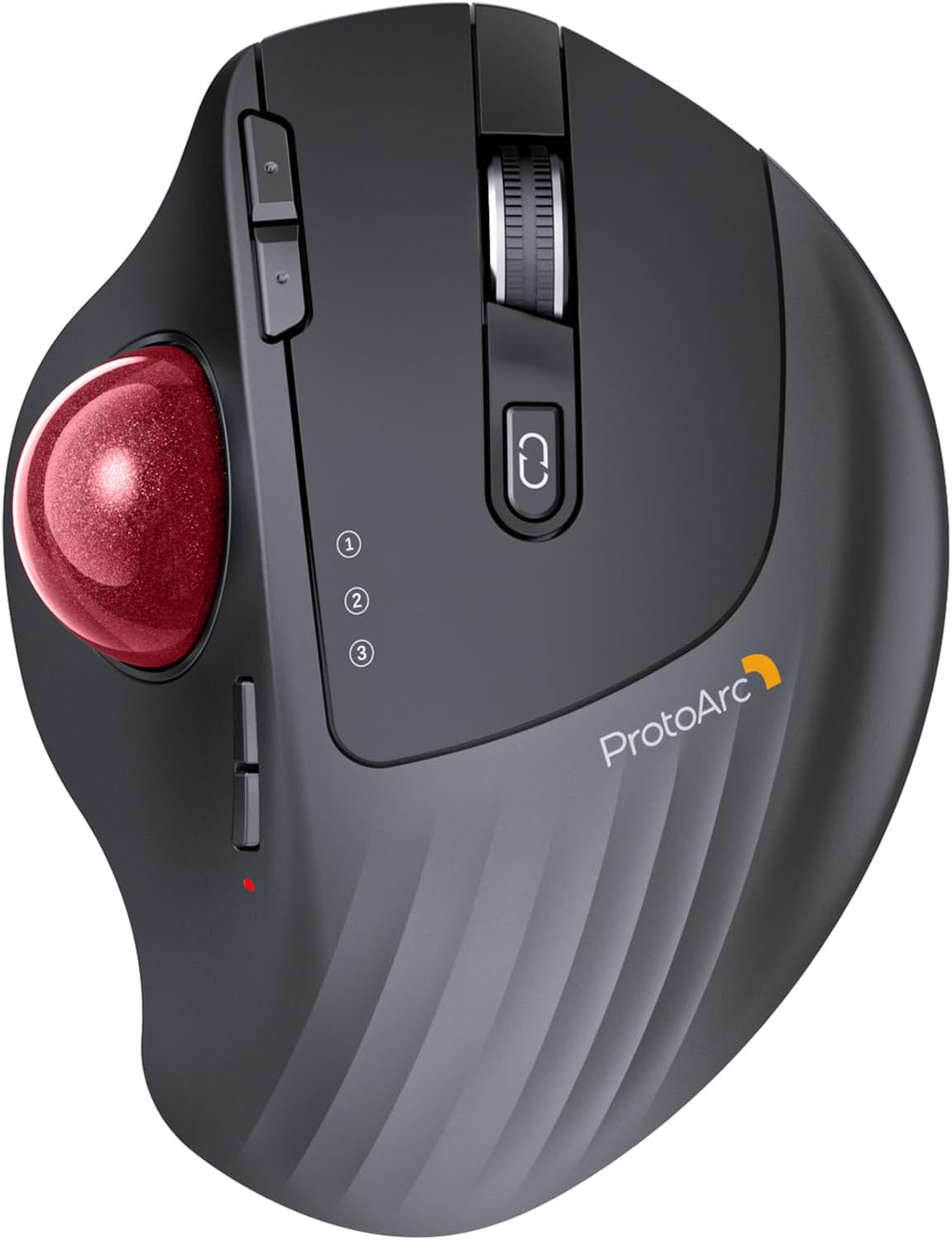
The ProtoArc EM01 NL Wireless Trackball Mouse features an adjustable ergonomic hinge (0-20°) for personalized comfort, a rechargeable lithium-ion battery with USB-C charging, and triple-mode wireless connectivity (Bluetooth & 2.4G) allowing seamless control of up to three devices. Its precise thumb-controlled trackball reduces wrist strain and excels in confined spaces, while quiet clicking enhances focus. Compatible across Windows, Mac, Android, and Linux platforms, it’s designed for professionals seeking productivity and comfort in one sleek, red matte finish.


| ASIN | B0CWTVY6WQ |
| Additional Features | Adjustable Angle, Ergonomic Design, Quiet, Rechargeable, Wireless |
| Antenna Location | Office |
| Best Sellers Rank | #106 in Computer Mice |
| Brand | ProtoArc |
| Button Quantity | 8 |
| Color | Red Ball |
| Compatible Devices | Desktop Computer, Laptop, Personal Computer, Smartphone, Tablet |
| Connectivity Technology | 2.4G Wireless |
| Customer Reviews | 4.2 out of 5 stars 3,499 Reviews |
| Enclosure Material | Plastic |
| Finish | Matte |
| Hand Orientation | Right |
| Hardware Platform | Linux |
| Included Components | A Type C Charging Cable, A USB Receiver, A User Manual, An Ergonomic Trackball Mouse |
| Item Weight | 0.33 kg |
| Manufacturer | ProtoArc |
| Mfr Part Number | Protoarc B0CWTVY6WQ |
| Model Number | EM01 NL |
| Mouse Maximum Sensitivity | 1600 dots_per_inch |
| Movement Detection | Trackball |
| Movement Detection Technology | Trackball |
| Number of Batteries | 1 Lithium Ion batteries required. |
| Number of Buttons | 8 |
| Operating System | Android, Mac OS, Windows |
| Power Source | Battery Powered |
| Range | 10.0 meters |
| Special Feature | Adjustable Angle, Ergonomic Design, Quiet, Rechargeable, Wireless |
| Style Name | Modern |
| Theme | Office |
| Unit Count | 1 Count |
| Warranty Description | 2 Year Warranty |
J**E
Effortless and Quality Mouse - A Definite Buy (Recommend Buying)
A definite buy if you are looking for a trackball mouse. Build quality is pretty good and it feels effortless to use the mouse. Trackball movements/motions are very very smooth. Very smooth scroll wheel. Left/Right click buttons require perfect amount of very light pressure to work, therefore the fingers wouldn't get tired after continuous use and same for the forward/back button. Click sounds while using the mouse are very subtle and just loud enough for you to hear the action. The DPI levels (the cursor speed) buttons have 5 levels that are perfectly spaced for varied needs. Size of the mouse and curves/arcs on the mouse are well designed and thought of for ergonomics and comfort and not to forget the 20 degree angle plate at the bottom of the mouse allows you to change the angle of the mouse, is a big plus. It can connect to 3 devices and I had no issues connecting it via Bluetooth. Only drawback is there is no storage for USB receiver/dongle on the mouse and it has to be stored separately, I would recommend ProtoArc to improve on this aspect. Another suggestion would be to provide the ability to customize the back/forward buttons to actions that user prefers. I also own a Logitech trackball mouse but after using ProtoArc's effortless mouse, I am NOT going back to Logitech.
A**R
Very Very Premium, Very Very Good
I have to say almost 6 days coming up on a year after buying this mouse, its perfect. Its funny cause when i bought this, i didn't really sift its specs thoroughly, didn't know physically moving the mouse didn't move the cursor, I just bought it because it looked good & it shipped fast. First off, the build quality is amazing, it feels and weighs very premium. love the fact that I can just recharge it with usb c. when I first got it, it took about 4 hours to get used to it because before it, the mouse i had was regular, so hand positioning was a bit awkward at first but after those hours i loved it. Never going back. Its very smooth and the scrolling is so good and easy to adjust. love that. One thing that's weird about it (or weird about me) is that u can use this while sitting in your chair (place it on the arms rest), standing up, on your lap, or laying down in your bed for tv (i use a projector). Its comfortable in every way. Although i said it took 4 hours to get used to, gaming took a bit longer, but over time it becomes way easier and honestly in my opinion, more convenient than a regular mouse. Reason why I say this is because for some people like me, our table may not have a lot of room to move the mouse, but with the rollerball, the ease of it is crazy. The battery lasts so long, I just charge it for the sake of seeing it charged, never for the sake of "its almost dead, or it died, lemme go charge it", if that makes sense. And the smooth connectivity is awesome, switches between devices like its nothing, the distance i can use it at is very good and I love the number-lights thing. Once you buy this mouse, you wont believe the quality you got for the price (compared to others). If the rollerball gets a bit slow or choppy, all I have to do is use my thumb and forcefully roll the ball until it feels smooth again, which i rarely have to do but its a quick fix, no extra steps. Overall, it feels awesome, performs awesome, and its aesthetic is awesome.
E**S
The Real Value Buy over the Logi MX ERGO+
Great value for the price, it definitely competes with the Logi(tec) MX EGRO Plus, it has all the same or simmilar features (from what I have used it for) - same buttons, sensitivity button, scroll buttons, wrist angle adjustment plate, usb C connector/charging port, thumb movement is good and feels similar, and it has one improvement: you can connect it to 3 different devices (vs 2 w the logi). Trackball Tangent: This is a great trackball mouse for those who know they like them, and for those looking to try one, this is a good buy, if you have never used one, you should expect to spend a couple hours getting used to it, and probably a month to get fully comfortable. Benefit: If you use a laptop or tv for your computer needs, a track ball is great because you dont need a sturdy table, you can hold it on the couch or even your leg, thus allowing for mouse, or keyboard & mouse in far more situations/locations. Note: I paid $38.69, and it looks to be even cheaper ($29) at the moment, and I thought I got a great deal. Note 2: If they are close in price when you are shopping, get the purple or yellow/gold ball version, those have proper amounts of flair (I messed up and got the grey version :( )
J**D
It's a good trackball mouse
This brand is getting some hype for being value priced competition without being garbage. I'll agree with that. At work I use a Logitech MX Ergo that I've had for at least 7 years. I've had zero issues with it and it has been extremely reliable. It was also $75 when I bought it. I wanted one for home too and found this ProtoArc for half the price and some good reviews. Here's how the ProtoArc compares (and I'll use my MX Ergo as a comparison tool). The overall size and shape is very comparable to the Logitech. It's a bit different, of course, but it's an easy transition from one to the other. Both are excellent for ergonomics. Buttons on the ProtoArc are just fine. They're quiet and work well. Both it and the MX Ergo have different features. The Ergo has a customizable thumb button (default is 'precision mode') and a horizontal tilt/scroll feature on the wheel. Makes navigating spreadsheets and graphic arts documents really easy. The ProtoArc doesn't have either of those, but it does have two buttons in the thumb position that control sensitivity (so you still have a "precision mode" technically), and there is no tilt wheel for horizontal scrolling. Both have buttons right below the wheel to change input mode, and both have two small buttons to the left of the main left button. These are set on the ProtoArc for I believe forward and back (not at home so I can't verify), while all of the buttons on the MX Ergo are customizable with Logitech software. The ball on both mice are good and similar in size. The bearings on the Logitech are just better, the ProtoArc isn't as smooth, but it's not bad either. You can use the MX Ergo while charging, and if you use the Logitech software, you can get pop-ups notifying when the battery is low. The ProtoArc just dies and quits working, and will not work again until the battery reaches a certain charge level; I have never got it work with a cable immediately after it dies. The batteries on both mice are extremely long lasting. So...should you buy one? If you have never used a trackball and are interested...this is a great entry point to try one out, and it's a good product on top of that. It feels solid under the hand, and has had zero issues. I wouldn't trade my MX Ergo for it, but my MX died and someone gifted me a ProtoArc as a replacement...I'd rock it.
D**U
Bought this just to spite Logitech, and I'm pretty happy
After having spent $70 on the fancy Logitech MX Ergo trackball, my left button started failing after 3.5 years. I certainly didn't want to spend another $70 on a trackball that doesn't support bluetooth and charges with a micro-USB port. Then I came across the ProtoArc, an obvious clone of the Logitech MX Ergo but with all the features I want. It can connect with both bluetooth and the included dongle, charges through USBC, has an up and down button for tracking speed, a larger 900mah battery (vs 500mah on the Ergo) and cost half the price of the MX Ergo. There doesn't seem to be any compromise in quality. The trackball is very smooth, and the build quality is solid. They also put thought into their packaging to boot. Oh, and the tilt plate on the bottom of the trackball attaches to the whole unit so it doesn't come off. It's a small detail but I definitely like that more. There is one slight complaint however, it's that the scroll wheel is harder to spin, making my finger more tired after scrolling a lot. Hopefully I can just oil the scroll wheel or something to make it spin easier. I've used Logitech trackball for the past 25 years, started with their wired version to the MX570 for both home and the office, followed by the MX Ergo in 2020. Logitech seems to reserve their most expensive products for bluetooth support and for the trackballs there isn't even an option with the premium price. I was forced to use my Macbook that has no USB-A port with an adapter just to have the dongle plugged in. Makes you forget it's the year 2024. I'm glad that ProtoArc stepped up to the plate and offered a great trackball. I'll now keep an eye on what else they offer. Hopefully a keyboard that rivals my Logi K750.
G**R
Nice trackball... Except the scroll wheel.
Overall, the quality is good. The trackball is responsive and the build quality seems solid. Battery life is outstanding, the device lasts for weeks at a time. The device is comfortable to use, as well. I have average-sized hands and it fits me perfectly. My primary issue is that the scroll wheel started to malfunction after about a month. I can scroll down and it will randomly scroll back up or sometimes will fail to scroll at all, even with me rotating the wheel. Unfortunately, that issue takes my score down, as I use my scroll wheel quite a bit. Hopefully the manufacturer will fix this, because it's otherwise a very nice device.
J**S
Much better value than Logitech
I had been a Logitech trackball user for 15+ years. My travel mouse, a Logitech M570, started having left-click issues and would no longer drag and drop. I was excited to see there were a few new options in the trackball market from the last time I had shopped for one. This Protoarc mouse offered all but one feature of the Logitech MX Ergo, which is my home-use mouse, and has a few that my Logitech Ergo doesn't have. The Protoarc doesn't allow you to push left or right on the scroll wheel to switch between browser tabs, but that feature only worked half the time anyway on the Logitech. It does have Bluetooth and 2.4Ghz wireless, and lets you switch between 3 devices, which is nice since I use three computers. The Protoarc also uses a USB-C cable to charge, whereas the Logitech MX Ergo uses an outdated micro USB cable. It's nice that I now have one less cable to drag around, since everything else I have uses USB-C as well. I've had the mouse for a month, and I haven't needed to charge it yet. There is an MX Ergo S now that uses USB-C, but it is currently priced at $109 versus the Protoarc for $37.50. Another difference I've noticed is that the left and right click switches are of better quality with the Protoarc. The most annoying thing about both Logitech mice was that resting my hand on them would cause me to click accidentally about every 5-10 seconds. I also had problems with the Logitech mice double-clicking things when I only single-clicked, which would unintentionally open things or close windows I didn't want to close if there were multiple set to full-screen. The Protoarc doesn't suffer from these issues, which has been awesome. As far as comfort goes, the Protoarc is on par with the MX Ergo. I haven't noticed any discomfort after using it for hours. I've had three wrist surgeries, so this is important for me. The best part about the Protoarc is the price. It was less than half the price of the MX Ergo, which is why I took the risk of trying an unfamiliar brand. Overall, I'm glad I did; it seems to be higher quality than the MX Ergo, which was surprising to me. My home use Logitech mouse is also failing to drag and drop now, so I will be purchasing another one of these in the next few weeks to replace it.
S**S
ProtoArc EM01 NL Ergonomic Wireless Trackball Mouse Review
First Impressions: I don’t usually care or take notice of packaging as it’s usually only dressing for me, but this one’s gave me pause and I actually marveled a bit at how it was presented. Small touches like the envelope. While it did include marketing material for the company it also had a picture and message from the designer. The colors of this work well to help you not to quite so consciously take note of the mouse’s width. One thing I’ve been painfully aware of with my recent foray into computer mice replacements is getting those that of getting those that are sized for your hand. Easier to remember for gloves but getting used to this for mice will hopefully become second nature soon. It looks sleek and the touch of color after the brand name is a subtle touch. Pros: Comfort- I bought this one because, despite how I like the Nulea M501, I regularly had pain using it so when I saw that this one had an option to change its angle, I was immediately intrigued. Just two days in but I’ve none of the pain or discomfort I had with said Nulea when used at the 20 degree angle, so it’s already ahead of the game. Granted, comfort/pain are highly individual. The ProtoArc also feels noticeably soft which is nice. Even for my unsophisticated self, this was a pleasant surprise. Utility- I suspected that the ability of it to angle wouldn’t be robust but so far it’s done great and has been consistent. Another pleasant surprise! After connecting it to my laptop via Bluetooth it did so consistently. The click buttons are markedly quiet. I’m not one who really cares about the loudness of a mouse but it’s a nice feature to have, now that I have it. I almost forgot to note that I regularly play the game Strands online and it was virtually unplayable without immense discomfort and pain with the Nulea but I can do so with one, which is a big change for me! Oddly enough I ended up using my middle finger to use the scroll-wheel and it just felt right and natural, though that could change, of course. Edit: On my first off-day of full usage I use my index finger for the scroll wheel. I will give it at least a week but as I used the Nulea for a while I’ve acclimated to trackball mouse usage versus traditional. Cons: Utility- Despite using several, if not all, DPI settings, I found that the cursor was quite jumpy so I had to use the lowest setting to make this usable. You also have to dislodge the trackball for cleaning by inserting something through the hole in the plate at the bottom. Not a huge deal but with the Nulea, it can be removed much more easily and without anything other than your hand. Edit: Having spent more time with it I finally have both hand position and DPI so that it's much more consistent. I had to read the manual to get how to connect it to my laptop via Bluetooth as, unlike the Nulea 501, they input methods noted by number rather than text shorthand so it’s harder to intuit. Not a huge deal, just less intuitive. One is for the dongle while two and three are for said Bluetooth. Edit: Now that I’ve had a full off-day of using it, the cursor issue is annoying and persistent despite my changing both the mouse angle and DPI. I swapped out the included trackball with the native Nulea one and the latter doesn’t work as well. The scroll-wheel does feel quite a bit scratchy (again comparing it to my Nulea 501 but also my Zelotes F-17), and it seems like I have to scroll on it quite a bit to progress on a page. It’s also quite loud by comparison. Not a big deal but a con all the same. There’s also no on-board storage for the USB dongle which is weird, given that my most recent computer mouse purchases (Nulea M501 and Zelotes F-17 do). Naturally, the other pairing options mitigate against potentially losing said dongle but it does come off as odd. With all the thought put into packaging/presentation and even the ability to change the angle, why not have on-board storage as well? This seems like it was an after-thought. I’ve also accidentally engaged the right click a few times now, unintentionally. Not a huge deal but if this persists I can see how this could be annoying. Concerns- The plate at the bottom does give me pause as it is a little tacky to the touch but I just hope it holds up. Edit: As I feared, the bottom plate did pick up some random debris. Initial Rating- 4/5 (as I can’t speak to longevity yet) It works consistently and is comfortable which is nearly all of what I’m looking for in a mouse. Humble Insight- When shopping for mice, please check that it’s good for your hand size. I had to scroll down the Amazon app page to the company’s product info and scroll sideways to see it for this product. This may help prevent you having to return it due to sizing issues alone. Do measure your hand and check the charts. I had to skip on the ProtoArc EM11 NL vertical mouse as it’s described as being for small-medium hands. There are plenty of people who have used trackball mice for years but if you’re new or have returned to them, give yourself some time to get used to using them. You may have to try ones that have larger trackballs (it seems most have ones that are 34mm but there are bigger ones), have it placed in the middle, or where your thumb is, etc. Try out different configurations to see what works best for you! You can also have dedicated mice for different needs so don’t feel like you have to have one that does it all. I read one review that mentioned separate batteries corroding their mice. Fair! I suggest using rechargeable ones, on average as they don’t do that due to their delayed discharge. Plus given the low power a mouse uses, even said rechargeable can last for a long time. I still have yet to charge my Zelotes F-17 one that I bought in late July despite using it regularly.
Z**6
bonne aide quotidienne
avec clavier virtuel car arthrite +++++ aux mains
G**O
In sostituzione di analogo mouse Logitech Ergo
Ho acquistato questo mouse come alternativa al Logitech Ergo che utilizzo ormai da molti anni. Dopo 3-4 mesi di utilizzo, sono totalmente soddisfatto. Se avete già usato Logitech Ergo, ecco alcune differenze e punti notevoli. a) la base è di plastica (anziché metallica) e si può regolare su due posizioni, quindi risulta più leggero, ma stabile b) il fondo della base è antiscivolo, discreta aderenza c) può essere collegato a 3 diversi apparati via Bluetooth, si cambia rapidamente col bottone selettore, molto comodo d) l'inclinazione della base è minore rispetto ad Ergo, ma ancora comfortevole e) la precisione del puntatore è più che soddisfacente f) si ricarica tramite USB-C, ci vogliono alcune ore - quando è in carica c'è un led rosso acceso, che si spegne a carica completa. Dato il costo significativamente minore, direi che è un ottima alternativa al prodotto Logitech
B**9
A really nice comfortable mouse replacement.
I've been using this daily now for almost a year and I find it much more comfortable to use and easier on the wrist than a regular mouse. I bought it to try because I was feeling strain from clicking and holding the middle mouse button whilst also moving the mouse which you have to do a fair bit in Blender and other 3D software. This type of mouse solved my problem as I'm no longer fighting my own grip. It's also a space saver as you no longer need to move the mouse around the desk. This is my first trackball mouse but I quickly adapted and within a couple of days I was just as accurate at moving the ball as I was pointing with a regular mouse. I don't have much to compare to but the build quality feels solid. I've not had any connectivity issues or issues with glide or smoothness, and it works well switching between different devices. The battery lasts a few months between charges and you can use it while charging too. The buttons are all nice to click in both orientations (flat or tilted) and the sensitivity is just set once and forget. You do have to pop the ball out to remove dust occasionally but it appears that's just expected maintenance with this kind of mouse. There's a handy hole you can push something through to help with popping it out. I'm really happy with this purchase and it has become part of my every day setup. I'm not sure how it weighs up against more expensive models but I'm happy enough and not looking to upgrade any time soon.
J**U
Wish I had bought sooner!
Such a game changer for working on my laptop at a small desk! I use this for my online assessments, Word, excel worksheets and it is nice not to have to move my hand all over the mouse pad. Easy with games that don't involve heavy combat and perfect for Baldur's Gate 3 and other turn based fighting. Two months and its still my favourite mouse.
N**N
Great trackball without LED lights
Nice stylish black trackball with (I choose) a red ball. Luckily no fancy LED lights, and connects to PC and MAC. Great!! What could be improved is a small storage area in the trackball for the dongle (wifi/bluetooth)
Trustpilot
2 weeks ago
3 weeks ago