Buy anything from 5,000+ international stores. One checkout price. No surprise fees. Join 2M+ shoppers on Desertcart.
Desertcart purchases this item on your behalf and handles shipping, customs, and support to Thailand.
๐ Elevate your storage game with hybrid speed and scaleโbecause your data deserves the best!
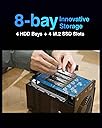
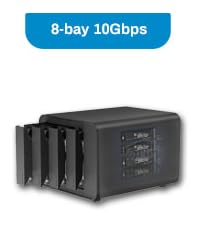
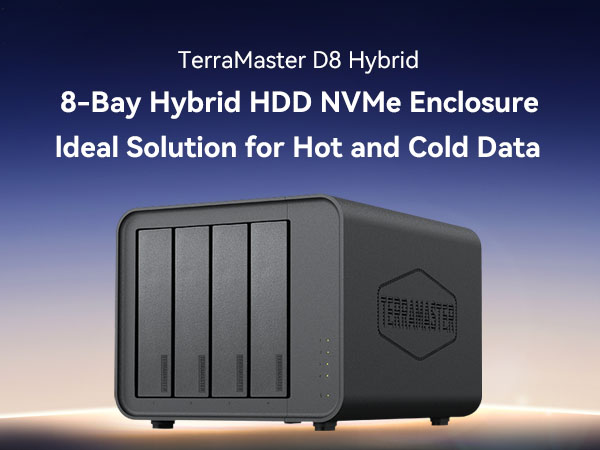
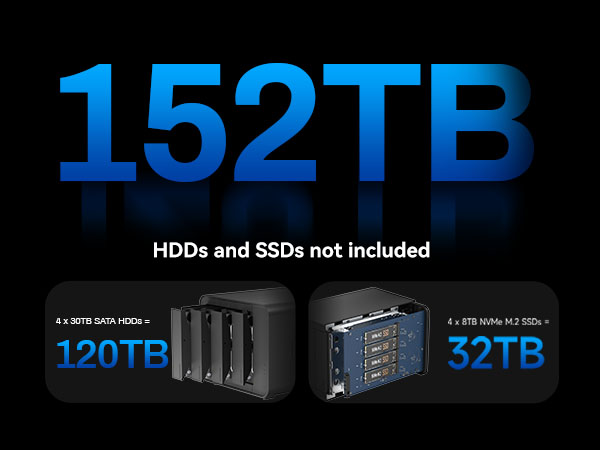
The TERRAMASTER D8 Hybrid is a cutting-edge 8-bay USB 3.2 Gen 2 Type-C enclosure supporting 4 SATA HDDs/SSDs and 4 M.2 NVMe SSDs, delivering up to 152TB of combined storage. Designed for professionals who demand both massive capacity and lightning-fast access, it features tool-free drive trays with a secure Push-Lock system, intelligent temperature-controlled cooling, and 10Gbps transfer speeds. Ideal for managing hot and cold data efficiently, this diskless enclosure is compatible with Windows, Mac, and Linux, making it a versatile solution for high-performance direct-attached storage setups.


| ASIN | B0D3YZSK95 |
| Best Sellers Rank | #160 in Enclosures |
| Brand | TERRAMASTER |
| Built-In Media | Power Adapter, Quick Installation Guide, USB Cable |
| Color | Black |
| Compatible Devices | Windows, Mac, Linux |
| Customer Reviews | 3.7 out of 5 stars 79 Reviews |
| Data Transfer Rate | 10 Gigabits Per Second |
| Enclosure Material | Plastic |
| Hard Disk Form Factor | 3.5 Inches |
| Hardware Interface | USB 3.2 Gen 2 |
| Hardware Platform | Windows, Mac, Linux |
| Item Dimensions L x W x H | 8.74"L x 7.05"W x 6.06"H |
| Item Weight | 1.9 Kilograms |
| Manufacturer | TERRAMASTER |
| Material | Plastic |
| Mfr Part Number | usb_enclosure |
| Model Number | D8 Hybrid |
| Product Dimensions | 8.74"L x 7.05"W x 6.06"H |
| Supported Devices Quantity | 1 |
| Warranty Description | 2 Years |
Z**H
UPDATED! Dropping connection of SSD on this Terramaster D8 Hybrid NVME enclosure.
UPDATED! - Terramaster has been great helping me through this issue I was having. It turns out the unit needed a firmware update. Now all seems to good now. I can't say enough about how great customer service has been with them. Original issue - Purchased in August of 2025 and was working great right of the gate. The unit now disconnects the SSD's randomly. Running on Mac Studio with latest OS version. Seems to be only the SSD's that are dropping connection. I have tried other SSD's and it does the same thing. Currently running 2 Western Digital WD_BLACK 8TB SN850X NVMe and they drop connection randomly as well. The spinning drives all stay connected, so maybe there is something wrong with the controller running the SSD portions.
R**Y
3 weeks later I lost some of my precious archives.
Update & Regrets from my 3 week of experience: ----- 3 weeks later - I am officially returnining this, I suffered data loss on back up and source drive corruption. * Endurance copy fails very predictably. * Not compatible with - GigaStone NAS 2.5 SSD * Not 100% stable with - WD Red NAS 3.5 HDD in RAID * Not 100% stable with - Leven NVME Leven + 1 died * Not 100% stable with - Leven 2.5 SSD * All the Leven NVMEs i never had any issues from my existing Thunderbolt 3 NVMEx4 bay enclosures (StarTech) * All the SSD i tested outside I dont have issue connecting to a USB-to-SATA adapter * I lost my entire TV show archives. Pros: Quality built plastic enclosure USB 3.2 Gen 2 10Gbps - descent performance First left 2 front loading drive bays can be RAID-0 (Stripe-Set), rest of the drive bay and NVME slots are individuals. Works with 2.5" generic SSD drives. Its a simple USB-C DAS not Cloud based NAS Cons: The Front loading drive locking mechanism is weak design, anyone or a "curious cat" on your table top can be curiously eject the drive bay mechanism. During heavy transfers, the USB-C Lag can be experienced even with USB 3.2 gen 2 protocol cable, but it's very little ... in comparing to Thunderbolt storage, you get what you pay for. Summary: --------------------- --------------------- --------------------- BACK UP YOUR DATA else where!!!!! --------------------- --------------------- --------------------- I really wanted this to work, It seems to fail everytime with endurance copy/transfers in a form of backing up entire archive to/from this DAS deviced, I tried factory cable came with TerraMaster my own Active Thunderbolt 3/4 cable (worked little better but this is not the issue).
P**O
Tons of storage over one cable
Does what it says on the box. Had four HDDs and two NVME drives in it. They all show up and work on my mac. Problem is I wanted it to set up a Raid 5 pool on a mac as a server and didn't realize there wasn't a cheap way of doing software raid on a mac. Not this thing's fault that I didn't do my research.
A**R
Excellent value, reliable so far under heavy/sustained write
After a week of use, Iโm cautiously optimistic. No major issues, the one issue that did pop up was perfectly handled by the device hardware and firmware allowing a quick graceful fix. Will report back later after more use, but for now I recommend it for an affordable but reliable 10Gbps enclosure with both m.2 and SATA support. Why am I optimistic? Iโve already written 16TB to it, via two sustained 48+ hour zfs send. Pretty solid stress tests, I think My configuration: Enclosure set to โSingle Diskโ (the default , passes through each drive) 4x 16TB WD Red SATA drives (ZFS raidz2) 4x 2TB WD Black m.2 NVME drives (ZFS mirrored pair, special for metadata and < 16kb blocks) Setup - The SATA sleds are tool-less, really nice. No major issues - m.2 was also easy once I checked the manual to see how to access the compartment (remove 2 screws, slide forward) First Boot One of the 4 SATA disks wasnโt being seen by the OS. I checked the helpful LEDs and sure enough one was not lit. Powered it all down, swapped the drive with another in a different bay. Booted up. Same issue with the same drive, different bay. So itโs the drive, not the bay. I knew the drive was functional (and had live data on it) so I swapped it back after first blowing into the connector in case there was dust or something. I also reconnected the tool-less rails, and was really deliberate when sliding in the tray of the problematic drive. Powered up - issue resolved. User error perhaps, but itโs fine now First Week I set up the ZFS pool as described above and immediately started a zfs send | zfs recv to copy an 8TB dataset to the new zpool on the DAS. Performance was as expected Roughly ~24 hours into the send process, I noticed one of the m.2 drives in the mirrored pair had fallen off the system- the OS could no longer see it. Not a good sign. It was mirrored so the pool was still up Then I noticed the drive had actually had a USB reset - so the OS immediately re-detected it, just with a new device name (sdo instead of sdl). I closed the now-stale LUKS volume, reopened it with the newly assigned device name, added the device back to the pool/cleared the error state and the copy gracefully continued, the pool was healthy. Roughly 36 hours later, the whole operation completed successfully. Then I did it all over again, no issues this time So, for now, Iโve decided it might have been a quirk with the USB controller or OS. It might have been some other issue, but Iโm not too worried. I havenโt been able to reproduce the issue, and it was handled gracefully by the OS, by ZFS and by the DAS. Everything worked correctly through a spurious failure So, Iโm happy. I deducted one star only because of the two quirks described above, even though neither were provably the fault of the device. If it runs for 6-12 months, Iโll add the 5th star Canโt beat the price, the forums are very active with vendor reps and it seems they take support very seriously and provide firmware updates for both โbugsโ as well as configuration changes (to disable power saving features if desired, I think, is one example I saw) Value for money: Canโt best this price.
E**L
So far so good
1/19/2025 Just installed the first drive, a NVMe easy setup under windows did not even need the excellent install video. Seems to be very fast when tested. I've two 3.5" hard drive to be installed, I'm installing drives one at a time and testing each. Will do the next drive soon. 3/18/2026 After loading the drive up it's gotten a lot slower. When a drive has not been accessed for awhile it takes about 2-3 minutes before responding. I've one hard drive slot open and 3 NVMe available. Now in the market for something faster.
A**S
Beast
Runs 4x24TB HDDs and 4x4TB NVMe drives each running in a RAID-5 setup holding all my precious moments. Although I had a problem at first with the connectivity over USB-C, turns out the port on my server was USB-C 2.0... Switching it to a USB-A 3.2 port opened the flood gates and unleashed an unfathomable power that I can't hold. It basically says "LET 'ER RIP" and I'm now transferring at full network speed over the wire. Great device!
L**R
As advertised
I used it as a drive bay for a home built NAS, haven't used the built in raid or the NVME slots yet but it was quick to set up and the NAS discovered the drives right away. So far it has worked perfectly.
A**R
Drives drives crash under load
Update: TerraMaster finally release a firmware update to fix the duplicate serial number issue. Customer support reached out and offered a discount on repurchasing. After receiving the second unit I flashed the new firmware and the NVME all report correct serial numbers. Unfortunately this is the end of the good news. 1) The firmware flash utility is Windows only. This make updates a pain when using any other software. 2) The system still crashes and resets USB under load when connected with 10Gb/s. In a system that maxes at 5Gb's USB3 it seems to work OK, but I do still see some errors in the Linux log. I only have one 10Gb/s system, a 13th Gen Intel(R) Core(TM) i9-13900H Minisforum MS-01. Neither the USB4 nor the USB3.2 ports are stable. I tried two different USB cables with similar crashes. 3) All drives work fine in a non TerraMaster chassis. 4) The SSDs don't allow trim support using Linux. I know the SSDs themselves support trim, but the D8 hybrid blocks them somehow. Still a one star purchase. Don't trust your data to it. Original review: Two issues made me return this unit, and likely avoid TerraMaster in the future. 1) Any NVME drives connected report the same Serial number as the first one. Sime firmware QA should have easily found this. Their forums are full of people with this issue. 2) Heavy IO writes to the NVME always fail after a time. The NVME were not overheating, the internal controller of the DAS fails. I used 1TB Crucial NVME. 3) Heavy read traffic from all 4 SATA drives causes one or more to go offline with USB errors. A simple Linux "dd" from all drives at once cause failure. I used four 8TB Seagate drives. All drives that had trouble inside this unit were tried in a different system without issue. Don't trust your data to the D8 hybrid, it will crash under load.
V**.
Does not work with TrueNAS
If you are trying to build a homelab style NAS - do not try to use USB disk enclosures, it will not work. No SMART passthrough. Disk serial numbers do not get passed to the OS correctly, disks are not detected with TrueNAS Core. When virtualized and passed as QEMU SCSI disks the speed is very slow and transfers break all the time. Seemingly works well enough in windows. Have not tried any of the RAID modes.
J**R
Great product, as advertised!
So far so good. Hard drives can be removed easily and there are no issues accessing data when used in a different enclosure or computer. I like that I can have the first 2 disks in raid1 and the other disks are setup as single disks. Very good product! Excellent customer service! Highly recommended!
B**C
A definitely starter enclosure
A great starter multi hard drive environment. The only thing that I would like to see even on this model is the fact of being able to network it. Hard drives are easy to extract and change and update within a matter of minutes it's one of the easiest enclosures that I've used.
A**S
I donโt recommend for the price
Build quality is cheap and feels flimsy I paid $500 AU for this I did not feel like I had $500 worth in my hands. The D8 is quite loud and is rattling I have pulled out the drives mounted and unmounted into the casing with the same results the operation I was running on the drive was a butterfly test using HDD scan. The drive is in good condition tested previously.
C**Y
Great for the money
I had mine for about a month, but the NVME slots never worked for me, the HDD SATA slots worked perfectly fine with 4 drives running at the same time, transfer speed was consistent and fast too. The raid functions were also working properly as demanded, there is an option for RAID 0, RAID 1, single and JBOD. Basically a screwless design which is convenient to swap out hard drives, but the NVME could have been impelented better and best if this was the full 40gbps instead of just 10gbps.
Trustpilot
2 weeks ago
2 weeks ago