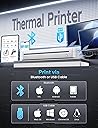
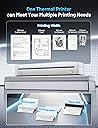
🖨️ Print Smart, Print Anywhere — Because Your Ideas Deserve the Spotlight
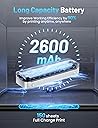
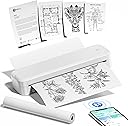
The Memoking M833 is a sleek, lightweight portable thermal printer offering wireless Bluetooth and USB connectivity. It delivers high-resolution 304 DPI prints on various thermal paper sizes without ink, perfect for professionals on the go. With a robust battery supporting up to 3 hours of continuous printing and prints that last over a decade, it’s designed for seamless productivity at home, office, or business trips.


| Additional Printer Functions | Print Only |
| Asin | B0CQYK5H6L |
| Best Sellers Rank | 167,403 in Computers & Accessories (See Top 100 in Computers & Accessories) 144 in Portable Thermal Printers |
| Box Contents | Power Cable, Manual, Warranty Card |
| Brand Name | Memoking |
| Color Depth | 1 bpp |
| Colour | White |
| Compatible Devices | Laptops |
| Control Method | App |
| Controller Type | Android |
| Customer Reviews | 3.9 3.9 out of 5 stars (28) 3.9 out of 5 stars |
| Dual Sided Printing | Yes |
| Duplex | Automatic |
| Hardware Interface | Bluetooth |
| Ink Colour | Black |
| Maximum Copies Per Run | 50 |
| Maximum Copy Resolution Black And White | 304 dpi |
| Maximum Copy Resolution Color | 304 dpi |
| Maximum Print Resolution Black And White | 304 dpi |
| Maximum Print Resolution Color | 304 dpi |
| Maximum Sheet Capacity | 50 |
| Maximum Supported Paper Size | A4 |
| Model Name | MK-M833 |
| Model Number | MK-M833 |
| Model Series | MK |
| Network Connectivity Technology | Bluetooth |
| Number Of Drivers | 2 |
| Number Of Trays | 1 |
| Other Special Features Of The Product | Portable |
| Paper Size | A4 |
| Print Media | Glossy photo paper |
| Printer Output Type | Monochrome |
| Printer Type | Inkjet |
| Processor Count | 1 |
| Resolution | 304 dpi |
| Scanner Type | Portable |
| Total Usb 2 0 Ports | 1 |
| Total Usb Ports | 1 |
| Warranty Type | Limited Warranty |
User
Portable, practical, relatively cost efficient
The Memoking Portable Printer A4 - M833 is a compact and versatile thermal printer designed for on-the-go printing needs.It comes with one thermal A4 size paper roll, charging and connecting cable, and a nice carrying pouch. The whole idea is that this type of printer requires special paper so make sure you don't attempt to use the standard one as it won't work.Anyway, it connects via Bluetooth and on the phone you get an app called Phomemo which allows you to print some documents or B&W pictures from your phone or generate some AI pictures but you will need some credits.All in all, everything seems to work as it should and the printing quality is quite good even for some simple art projects.Of course, the main KSP is the portability as you can literally take it on the go and print anything anywhere.
User
Superb, Efficient and Fast Little Printer
I have always wanted to be able to print directly from my Smartphone - this little gem delivers on that wish and some! Despite it’s width being not much more than the width of A4 paper, this printer is excellent in design and readily portable. It comes with suitable USB cables for charging and connecting to your computer. It can print from your Smartphone via Bluetooth and an App “Phomemo”.The App is easy to use and works really well with the printer, see my video. There is a downside to the app in that it frequently advertises add-ons which are in my opinion a bit pricey. - but you do not need add-ons to get good service from this machine. You do need good thermal paper. The print speed is comparable to my inkjet printer.The machine has a very good User Manual (Quick Start Guide) that is easy to follow - and everything just works!I can see lots of uses for this printer. It’s good for shop keepers to produce receipts definitely, but great too if, say, you are travelling by train and using that time to write-up a report. Not requiring messy ink is crucial! Accepting different sized paper and having the ability to print anywhere, everyone needs one of these.Video: On a PC, left mouse click the maximise symbol, bottom right corner, to view the video full-screen. Tap ESC (Escape) key to leave full-screen mode. On a Smartphone, tap the video and pinch in-out to adjust the video size.
User
A Versatile Little Workhorse of a Printer
There's nothing to distinguish this Memoking printer from most of the other portable wireless thermal printers that have hit the market over the past couple of years; most of them look alike and have the same spec. As in, right down to their physical dimensions and print resolution. Like the vast majority of thermal printers (and all wireless portable ones), this little Memoking one prints in monochrome only, i.e. black print. That isn't a weakness of this model - it's just how portable thermal wireless printers are. If you want a 2-colour thermal printer you can buy a decent one for upwards of £1,000 but it won't be portable and it won't be wireless; it'll be large and it'll need to be plugged into the mains to operate. You can even buy a high-quality 8-colour thermal printer if you want to spend over £6,000; it too will be bulky and far from portable. So it's not fair to complain about a dinky-little lightweight portable wireless thermal printer being able to print only in monochrome - that's just the nature of the beast.The obvious advantage of slimline wireless printers like this one is their extreme portability, which makes them versatile. They're a useful accessory for people who do business on the go. Many mobile tattooists favour this type of portable printer because it can print tattoo stencils in customers' homes, places of work, coffee shops, or pretty much anywhere else.The print quality is decent and the printer happily accepts thermal paper ranging in width from 53 mm to 216 mm (as a reference, A4 paper has a width of 210 mm). This printer works only with thermal paper, which costs considerably more than regular plain paper (there are some thermal wireless portable printers that have a dual print ability, i.e. they can print inklessly on thermal paper or with ink on any paper, but these printers usually cost around twice as much as this Memoking model, plus they come with the added expense of ink). If you're looking for a basic hassle-free portable wireless printer that will work with your phone (via app) or laptop/PC, this Memoking model is a reliable choice. The price is perhaps a bit steep, but the printer is a decent piece of kit.I've no criticisms of this printer. It does what it's designed to do and does it well.
User
Very portable and good quality prints!
This is an excellent little portable printer that’s ideal for a wide variety of jobs and whether you use it with a phone or laptop it works straight away and provides great print results without needing to refill any ink!Along with the printer you get a travel pouch, Type-A to Type-C charge cable, a Type-C adapter, a roll of paper, and the user guide.The overall quality of the printer is very good, and it looks quite smart for what it is. With some care it seems durable enough to last for a while.I’m a big fan of the Phomemo app as its well-designed, easy to use, has plenty of functions and gets updated frequently. You can print documents, web pages, images, and you can also use your phone to scan a document and then print it out. It works great with this M833 printer, and it connects immediately every time. When you first set the printer up the app automatically detects it and with a single press of a button its installed and ready to use.The printer will work with various sized thermal paper including A4, but it can print both images and text in black and white. You can use either single pieces of paper or a roll. The print speed is fairly quick but if you’re printing a full A4 image then it takes around 15 seconds to print out.Images and text are sharp and easy to read, and the print quality is very consistent. I haven’t fully tested the battery life but from a full charge it should manage over 100 sheets of A4 paper before it needs charging again so it should be enough for most people’s needs.Overall, if you’re in the market for a portable printer then I think this one would be a great choice as it works well, the print quality is decent and for around £130 its good value for money too when compared with other similar brands. It’s a printer I’m more than happy to recommend and I feel it’s worth the full five stars, buy with confidence!
User
the print quality was poor
I had high hopes for the M833 thermal printer, but it ended up being a bit of a disappointment. The Bluetooth connection was spotty at best, constantly disconnecting from my phone and laptop. While the idea of inkless printing is great, the print quality was poor – documents came out blurry, especially for anything with fine details. It’s also surprisingly slow, so printing anything longer than a few pages is frustrating. The only plus is that it’s portable, but even for travel, it’s not worth the hassle. I wouldn’t recommend it for serious business or home use.
User
Memoking M833: Portable Excellence but Fidgety Paper Guides
The ScoopThe Memoking M833 portable printer offers A4 printing capabilities, Bluetooth connectivity, and a 304 dpi resolution. It places emphasis on cost-effectiveness, portability, and ease of use.My Overall SentimentThe Memoking M833 portable printer is one of the more practical choices for users seeking a compact and portable printing solution. While it has limitations compared to traditional printers, its portability and ability to handle various paper sizes make it a suitable option for specific needs. Operating the printer is easy once it’s connected to your device’s Bluetooth and you open the companion app. From there you can select from the app what size paper you are using, and then it’s simply a matter of sending the file to the printer. Note here that unlike similar thermal printers I own that have sliding paper guides, the Memoking M833 has two internal paper guides that require removing and replacing in order to accommodate various paper widths which I found to be a bit fiddly and cumbersome - it’s fine with a thermal paper roll, but not ideal when feeding different width sheets of paper into the printer. Also worth noting was that I couldn’t find any information on the maximum diameter paper roll that M833 can handle, plus there is no provision for handling one of the most common till roll sizes of 57mm.Where the M833 is going to excel is in its portability, so along with USB-C charging, a thermal paper roll is going to be pretty much an essential element to have, and the M833 has all of that, plus a good battery too. All in, I really like the M833 but feel there are some aspects of the design that could be improved.What I Liked- Portable and compact design.- Bluetooth connectivity for wireless printing.- Good print quality for a thermal printer.- Easy setup and operation.The So-So’s- Accommodates common paper sizes.- Limited to black and white printing.- Thermal paper can be more expensive than traditional paper (but long-term running cost will be cheaper).- Print speed is in-line with similar thermal printers.- Not suitable for high-volume printing.What Didn’t Work For Me- Small, fiddly and cumbersome internal paper guide.- Paper guide width sizes barely visible on a black background.Advertiser’s Claims Examined"Mobile Printer" - The printer supports multiple paper sizes and can connect to various devices."Multiple print formats" - The printer can handle various document types."High quality portable printer A4" - The printer offers A4 printing with a decent resolution."Easy to use" - The printer is easy to use and has clear instructions.
User
impressive printer
This is quite an impressive thermal printer, having only used mini thermal printers before, having one that can print in A4 is extremely useful. It is very easy to set up using a smart phone or tablet. It only prints in black and white on thermal paper. It does say you can use photographic paper as well, but so far I have only used the thermal paper provided with the printer. The printer is fairly small and would easily fit into a backpack with lots of room to spare, so is very portable. It is however not overly light weighing 900g. It prints out very clearly, I have printed out various documents and a black and white photo of my cats, which looks that good it is now stuck to the fridge and I may possibly frame it. It arrived already charged up and comes with a charging cable for when it needs its next charge. It also comes with a soft velvet drawstring bag to keep it in. It is great that you don't require ink to use it, but this does have a downside as the thermal paper is more expensive than basic printer paper. Over all though I'm quite happy with it and would definitely recommend it.
User
Lacking instructions and poor print consistency
Slightly disappointing performance from this Memoking M833 Thermal Printer and I would have expected better based on the price.First I connected this to my computer to print from that, I was pleased you could print via a usb cord as well as via Bluetooth. The instruction pamphlet included with the device is very basic and only goes so far as to tell you to download the App or visit a website and download a Driver.Once the driver was downloaded it was straightforward to install - some strange messages via the driver installation though.Printing through this with the computer I did not get very good results. Initially it seemed good but after a couple of prints blacks were gray and there was sometimes drop offs in the print in places. There are several extra settings for it and three main modes when printing via the computer. But there is no help at to what these are either in the leaflet which comes with the product or on the website. Trying and comparing modes seemed to make no difference. Sometimes I would get an okay print, and then the next it would be very gray using the same settings.So I tried via Bluetooth, installed the Phomemo App and tried printing through that. The quality of printing through the App is noticeably much better. Not great all the time, but much better than I was able to do via my computer for some reason.The App is 'okay'. I found it a little difficult to navigate just to print and image from my phone but got there in the end. It has 'up-sell' features like AI image creation and these are prioritised over general printing on there. There really should be better instructions with the printer to help you understand how to use the App and get the best out of the printer. As it is you are left to just try to figure it all out and play around with settings.It comes with one thin roll of A4 paper. The paper roll in the device is quite small but you can feel paper through the machine from behind if needed. I've used up all the included paper just setting up the device and doing a couple of tests as you don't get much and also, the printer is very wasteful with paper. I don't know if there is an extra setting somewhere but it prints/feeds lots of blank paper with every print. Even when I adjust the paper size. Replacement paper looks to be about six pounds per roll looking online.I tried printing some thermal labels I have, these did print but not very well, I don't think this machine is really set up for labels.On the whole I think this printer would benefit from better instructions and should come with more than a single roll of paper. Its been a bit of a disappointment due to the constantly variable print quality and the fact I now need to buy more paper when I've not really got any consistent prints from it.Also worth baring in mind that thermal printed documents do fade quite quickly so if you are printing things 'to keep' this is not the way to go about it.
Trustpilot
2 months ago
3 weeks ago