Buy anything from 5,000+ international stores. One checkout price. No surprise fees. Join 2M+ shoppers on Desertcart.
Desertcart purchases this item on your behalf and handles shipping, customs, and support to Thailand.
🖼️⚡ Style Meets Speed: The Router Your Home Deserves
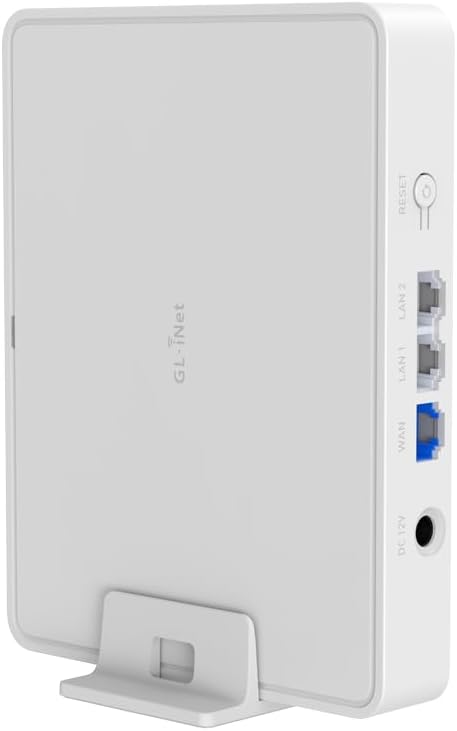
The GL.iNet GL-B3000 Marble is a cutting-edge Wi-Fi 6 router that doubles as a stylish 8-inch photo frame, delivering ultra-fast AX3000 dual-band speeds and robust security with built-in OpenVPN and WireGuard support. Designed for modern homes, it offers flexible display options, comprehensive parental controls, ad blocking, and effortless app-based setup, making it the perfect blend of performance and aesthetic for professionals who demand both style and substance.


| Brand | GL.iNet |
| Compatible devices | Personal computer, smartphone, tablet, smart TV, printer |
| Frequency band class | Dual-Band |
| Model name | Marble |
| Special features | Guest Mode , QoS |
| Wireless communication standard | 802.11ax |
N**O
Would and will buy more of GL.iNet
Excellent little router. Needed something versatile to allow for access points/router/ethernet modes and this delivered comfortably. Coming from an old but reliable TP-Link I am also surprised of all the features and configurability it has. The range is decent (better than the Orange Livebox's at home). I will certainly buy from GL.iNet again.
V**A
Funciona com tailscale
Muito bom e facil de instalar tailscale.
E**M
ist ein guter Router
Der GL.iNet GL-B3000 Wi‑Fi 6 Home Router ist ein guter Router, der im Alltag zuverlässig gearbeitet hat und meine Erwartungen erfüllt. Gute Leistung & Ausstattung: Der Router nutzt Wi-Fi 6 (AX3000) und bietet stabile, schnelle Verbindungen im Heimnetzwerk – ideal für mehrere Geräte gleichzeitig. Er hat 3 Gigabit-Ethernet-Ports und unterstützt sowohl OpenVPN als auch WireGuard, was zusätzliche Sicherheit und Flexibilität bringt. 🔹 Reset-Knopf / Hardware-Taste: Der physische Reset-Knopf ist sehr praktisch, wenn man schnell auf Werkseinstellungen zurücksetzen möchte oder nach einem Update Probleme auftreten – das gibt zusätzliche Sicherheit bei der Fehlersuche. OpenWrt-Support: Der Router kommt mit OpenWrt-Unterstützung, was für alle, die mehr Kontrolle und erweiterte Netzwerk-Funktionen wollen, ein echter Vorteil ist. Insgesamt bin ich mit dem Router sehr zufrieden – er läuft stabil, hat praktische Funktionen wie VPN-Support sowie einen echten Reset-Button und lässt sich flexibel in verschiedene Netzwerkszenarien integrieren.
B**E
Great Value, excellent
LOVE IT! It's small and unobtrusive, aesthetically pleasing, easy to set up for a tech novice... good features for the price. Fast. Love the guest Wi-Fi feature and encryption options.
C**R
Easy to use, provides flexible use-cases. (Private anonymous guest wifi via VPN)
The GL.iNet Marble (GL-B3000) is a significant upgrade from the Mango, offering reliable performance and powerful features, particularly for secure guest network management. Core Benefit: VPN-Enforced Guest Wi-Fi For anyone providing Wi-Fi to guests (visitors, Airbnb users, contractors), securing your network is paramount. The Marble allows you to enforce a VPN connection exclusively for a dedicated guest SSID. This setup offers crucial benefits: IP Masking: Guest activity does not reveal your home's external IP address. Anonymity: Guest internet usage is not directly tied to your household. Network Isolation: Guests are completely segmented from your main primary network, preventing access to your personal devices or IoT ecosystem. Technical Setup for Enforced VPN Guest SSID: VPN Configuration: Import your preferred VPN configuration (e.g., a "Secure Core" configuration from ProtonVPN's website) into your GL.iNet router. Guest SSID Creation: Configure a separate Guest SSID. VPN Policy Rule: In the GL.iNet GUI (often under VPN or Multi-WAN settings), set a policy rule to route traffic from the Guest SSID (or its associated VLAN) only through the VPN interface. Advanced Firewall Enforcement (LuCI): For enhanced security, ensure the guest Wi-Fi only functions when the VPN is active. Access the router's advanced LuCI interface: Navigate to Network > Firewall > Zones. Locate the "Guest" zone. Edit the Guest zone, and under "Covered networks", ensure that your main WAN interface is unchecked. Only your VPN interface(s) (e.g., VPN_Client, Wireguard_Client, tun0, wg0) should remain selected. Click "Save & Apply". Reboot the GL.iNet router. This configuration ensures the guest Wi-Fi will have no internet access if the VPN connection drops, maintaining privacy and security. Your main GL.iNet SSID will continue to operate directly via your plain internet connection. Enhanced Guest Experience: To facilitate easy and secure guest access, I export the guest Wi-Fi details (SSID, password) to a QR code using my Samsung smartphone and printed it. For added convenience, an NFC tag programmed with the Wi-Fi details can be stuck on the underside of the printout, allowing guests to simply scan or tap to connect to this secure, private, and anonymous network. This ensures their online activities remain separate and do not influence your personal Browse profiles or expose your home network. The price is very reasonable for the value it provides. It is larger than their travel routers, but this is not really the kind of device you would travel with. You can do everything I mentioned with their other travel routers also!
Trustpilot
2 months ago
1 month ago