Desertcart purchases this item on your behalf and handles shipping, customs, and support to Thailand.
🎯 Master your workspace with precision and comfort — the future of mouse control is here!
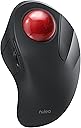
The Nulea M505 Wireless Trackball Mouse combines ergonomic design with advanced functionality, featuring a 44mm index finger trackball, 5 adjustable DPI modes, and a rechargeable battery lasting up to 60 days. Compatible with multiple devices via Bluetooth and USB, it’s engineered to reduce wrist strain and optimize productivity in any workspace.


| Additional Features | Ergonomic Design, Trackball, Wireless, Rechargeable |
| Antenna Location | Indoor |
| Are Batteries Included | Yes |
| Are Batteries Required | Yes |
| Asin | B0BKLGJPQT |
| Battery Average Life | 90 days |
| Best Sellers Rank | #55,964 in Computers (See Top 100 in Computers) #19 in Computer Trackballs |
| Brand | Nulea |
| Button Quantity | 6 |
| Color | red |
| Compatible Devices | Laptop, Personal Computer, Tablet |
| Connectivity Technology | Bluetooth, USB |
| Customer Reviews | 4.4 4.4 out of 5 stars (2,121) 4.4 out of 5 stars |
| Enclosure Material | Plastic |
| Finish | Smooth |
| Hand Orientation | Right |
| Hardware Platform | Mac, PC |
| Included Components | 1 lithium_ion battery |
| Item Dimensions L X W | 16.8L x 5.6W centimeters |
| Item Weight | 195 Grams |
| Manufacturer | Nulea |
| Model Name | M505 |
| Model Number | M505A |
| Mouse Maximum Sensitivity | 1600 Dots per Inch |
| Movement Detection | Trackball |
| Number Of Batteries | 1 Lithium Ion batteries required. (included) |
| Operating System | Mac OS, Windows |
| Power Source | Battery Powered |
| Range | 10.0 meters |
| Style Name | Modern |
| Unit Count | 1.0 Count |
User
Cambio para mejor!!!
Tras más de 6 meses y con más de 8 horas de uso diario, puedo decir que es un gran producto!!!Cuesta acostumbrarse viniendo de un "ratón normal", pero es extremadamente cómodo, la muñeca o dedos no sufren para nada, utiliza menos espacio que un ratón convencional (al no tener que desplazarse en ninguna dirección) y la batería dura mucho (en todo este tiempo solo lo he tenido que cargar 2 veces, y el ratón funciona mientras está cargando).Lo único a tener en cuenta es que los rodamientos deben limpiarse continuamente para asegurar un movimiento "limpio". Es una tarea muy sencilla que se hace en menos de 1 minuto (extraer la bola y limpiar con un paño)Solo puedo decir cosas buenas!!!NOTA: el material no está marcado y mantiene su aparicencia como el primer día.
User
Bon rapport qualité / prix
Article bien conçu, esthétique et complet avec le trackball (mouvement du curseur), des 4 boutons latéraux et de la molette permettant de scroller.Avec cette configuration, on doit revoir ses habitudes étant donné que l'équipement ne bouge plus contrairement à une souris standard, mais uniquement la boule avec les doigts> Même si l'équipement est imposant, ça reste un choix judicieux quand on a un petit poste de travail ou que la surface est vitrée - soucis avec le laser des souris optiques (d'autant qu'il peut aussi servir de repose-main)Ce modèle est sans fil grâce à son dongle (là aussi on évite un câble qui traine sur le bureau)La batterie [non remplaçable] se recharge via un port USB-C (câble fourni) et j'espère qu'elle durera dans le tempsNOTE : Modèle pour DROITIER UNIQUEMENT (dommage de ne pas l'avoir précisé dans le descriptif de l'article)
User
A good example of a tracker ball mouse. Supports wireless USB or Bluetooth.
Now I've gotten used to it, I like it. First "ball mouse" I've ever used in 30+ years so my muscle memory took some time to adjust.It comes with a wireless USB dongle (plugged into the base). Or you can use Bluetooth mode - there's a button on the bottom for switching modes. I've used both wireless USB and Bluetooth and they both work fine.I like the fact no mouse mat is needed. It works on my coffee table or on the sofa next to me.I wanted a top-ball mouse as my thumb is not as dextrous as my fingers.My right hand sits very comfortably on the mouse.The mouse has back+forward buttons which are handy in web browsers for going back a page and then forwards to the previous page. No need to move the mouse to the top left of the screen for the "<-" and "->" browser buttons.I charged it up on arrival. USB cable included for this. It's been running a week on a single charge, and I've been using it a lot. My previous mouse (single AA battery) would have died by now.The ball is removable for cleaning and has a decent weight to it. It'll hurt your foot if you drop the ball on it (I did this...).If you don't have space for an A4 mouse mat, or simply want to use a mouse on a sofa cushion without it sliding all over the place, then this is ideal.
User
Just received and immediately impressed
Just received it and unboxed and tried it out. First impression is that the design is exactly what I am looking for and how it feels while being used. The texture is pleasing (although I have doubts that this matt texture can survive more than a year’s use of daily 5 hour use) and the positions of the trackball and buttons are placed where I want them. Both left and right click buttons click downwards and not inwards which is a positive thing for me. The DPI switch which easily allows me to determine the speed of the arrow travel each time I touch the ball is a godsend compared to other trackballs.This trackball has a rechargeable internal battery - which I hope will last a long time. Always found that rechargeable devices often die due to the battery.It comes with a 2.4Ghz dongle or useable with Bluetooth connection. I have not tried using the rechargeable cable as a direct wired connection to the computer yet but I do not think a wired mode is an option. Will update on this later.Overall on initial impressions and use, this trackball is better than I had hoped and as a trackball user (Microsoft, Logitech, Elecom, etc.) this has so much promise. I will update again in a few months. If my impression is sustained through use in the months ahead, I plan to buy a few for my family and myself at home and office.
User
Ottimo mouse a sfera
Questo mouse M505 Nulea è ottimo per chi vuole iniziare ad utilizzare o già utilizza mouse fissi con sfera di movimento.Il mouse arriva completo di cavo di ricarica USB-c, ricevitore Bluetooth e libretti di istruzioni, uno in italiano e uno in inglese.I materiali con cui è realizzato sono buoni e ben rifiniti, al primo contatto con la mano la sensazione che da è di una superficie morbida e liscia.La connessione con il PC è stata semplice: è sufficiente inserire la chiavetta Bluetooth 2.4Ghz nel Pc, selezionare BT1 con il pulsante nel retro del mouse, tenere premuto il pulsante 3-5 secondi fino a che la luce non lampeggia, andare alla voce "aggiungi o rimuovi dispositivi Bluetooth" nel vostro pc ed aggiungerlo.Se come me siete pignoli con la precisione di puntamento del vostro mouse, è possibile regolare i DPI del dispositivo tra 5 modalità (200-400-800-1200-1600) premendo l'apposito tasto nel retro del mouse.Ogni tasto in questo mouse è personalizzabile al 100%, la sfera scorre bene e non ho riscontrato difficoltà nell'utilizzo.Il mouse ha una batteria interna che ne permette un uso davvero longevo prima di effettuare la ricarica, ogni 30 minuti il mouse entra in modalità stand-by, è possibile sbloccarlo premendo il tasto alla destra della sfera.Se cercate un mouse ergonomico che non fa fare sforzi eccessivi alla mano o al braccio, questo può fare al caso vostro. Consigliato
Trustpilot
3 weeks ago
1 month ago