🖱️ Elevate your desk game—multi-device control meets marathon battery life!
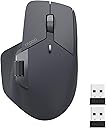
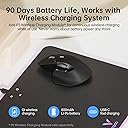
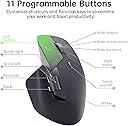
The Rapoo MT760 is a matte black, ergonomic wireless mouse engineered for professionals juggling multiple devices. Featuring tri-mode connectivity (Bluetooth 5.0/3.0 and 2.4GHz), it supports seamless switching across up to 4 devices. With 7 adjustable DPI levels up to 4000, 11 programmable buttons, and a magnetic side scroll wheel, it balances precision and comfort. Its 800mAh rechargeable battery offers an impressive 90-day runtime with USB-C quick charging, making it a reliable, productivity-boosting companion for PC and Mac users alike.


| ASIN | B0CM5SWRJW |
| Antenna Location | Office |
| Are Batteries Included? | Yes |
| Are Batteries Required | Yes |
| Battery Average Life | 90 days |
| Box Contents | 1 x USB-C Charging Cable (USB-A to USB-C), 1 x User Manual, 1 x Wireless Mouse, 2 x USB Dongles |
| Brand | Rapoo |
| Brand Name | Rapoo |
| Button Quantity | 9 |
| Colour | Matte Black |
| Compatible Devices | Personal Computer, Tablet |
| Connectivity technology | Bluetooth, USB |
| Customer Reviews | 4.3 out of 5 stars 367 Reviews |
| Enclosure Material | Plastic With Rubberized Grips |
| Hand Orientation | Right |
| Hardware Platform | PC |
| Item Dimensions L x W | 12.5L x 7.9W centimetres |
| Item Weight | 110 Grams |
| Item height | 0.1 inches |
| Manufacturer | Shenzhen Rapoo Technology Co., Ltd. |
| Model Name | MT760 |
| Model Number | MT760 |
| Mouse Maximum Sensitivity | 4000 Dots per Inch |
| Movement Detection | Optical |
| Movement detection technology | Optical |
| Network Connectivity Technology | Bluetooth, USB |
| Number of Batteries | 1 Lithium Polymer batteries required. (included) |
| Number of buttons | 9 |
| Operating System | Windows XP |
| Power Source | Battery Powered |
| Product Features | 11 Programmable Buttons, 7 Adjustable DPI, 90 Days Battery Life, Ergonomic Design, Wireless Charging Enabled, Up to 4 Devices, M+ Cross-Computer Technology |
| Product Finish Type | Matte |
| Range | 10 |
| Special feature | 11 Programmable Buttons, 7 Adjustable DPI, 90 Days Battery Life, Ergonomic Design, Wireless Charging Enabled, Up to 4 Devices, M+ Cross-Computer Technology Special feature 11 Programmable Buttons, 7 Adjustable DPI, 90 Days Battery Life, Ergonomic Design, Wireless Charging Enabled, Up to 4 Devices, M+ Cross-Computer Technology See more |
| Style Name | Modern |
| Theme | OFFICE |
| Unit Count | 1.0 count |
B**N
Amazing, as long as you aren't trying to replace an MX Master
This mouse is honestly amazing for the price and as long as you are looking for a simple mouse, this will fulfil 99% of the requirements. Build quality: 9/10, the only reason I deducted a mark is because it does look a little cheap, got some rough edges but other than that in the hands it feels great. How it feels: The clicks aren't your typical cheap mouse clicks, they feel solid but also don't make a snappy click sound, but rather a dampened "thump" sound/feel. I say sound, but in reality it's dead quiet and perfect for the office. Some people have said that the middle mouse button is easy to press and I will slightly agree with them. It is not light enough that you would accidentally trigger it and you may get used to it very quickly however it could be a bit light for some people. Side buttons feel a bit mushy but are okay. The side scroll wheel is amazing. Driver: The driver is truly atrocious, the UI even looks bad. Don't expect much from the macros, you can only bind simple things that combine ctrl, or shift, or alt, or win, PLUS one other key. This means you can't create any complex macros like you could in Logitech, so this is definitely not going to be a powerhouse users. As an engineer, this is fine for me. As a video editor this may not be fine for you. Features: This does feature bluetooth connectivity as well as the ability to move your cursor between two completely different devices if you have both of them plugged into the same LAN network and have a usb receiver in both of them. Additionally, it has 1000hz polling and the sensor feels extremely responsive. Cons: This does not have the free scroll that the mx master has, depending on your profession this could be a deal breaker. For me, it is fine to not have it. All in all, I would have given it a 4/5 if this was any more expensive than it is, but for the price, you are getting a solid piece of kit as long as you aren't expecting it to be an MX Master. If you want an MX Master, simply get an MX Master, you will be severely disappointed if you get this mouse.
S**O
روعة والله
جميلة ومتطورة .. ومتعددة الميزات .. قيمة مقابل سعر الحقيقة
A**N
Just because it isn't an MX Master replacement, that doesn't mean its bad
I'm a lifelong palm grip guy, so I tend to gravitate towards mice that work well with that grip. After trying the MX Master 2 for productivity at home (I do photo/video editing on the side), I decided to transfer that mouse over to my office day job to see how it would fare. It worked pretty well, but ended up leaving a void at home for when I wanted to work from home or do something other than game. There was no way I was going to spend over $100 to get the MX Master 3 for home, so I started looking at this Rapoo. For my hands and my grip, the Rapoo was a great fit. The ergonomics really allow me to rest my entire palm on the back of the mouse. I'm sure a lot of people are like me and are looking for an MX Master alternative/replacement. While similar, I wouldn't consider this a replacement. Here are some things that each one does better than the other. MX Master: - Infinite scroll is a nice feature - Horizontal scroll is in a better spot if you work with a lot of spreadsheets - The thumb click button is a nice if you can map it to something useful - The clicks from the left/right buttons are much more tactile Rapoo: - Instead of infinite scroll, you get a DPI switcher. Useful if you occasionally game, but also useful for if you do photo editing and need finer control - While the horizontal scroll is in a little more of an awkward spot, the back/forward buttons are in a much better spot. I use those way more often than I use horizontal scroll. - The unit comes with a USB dongle which gives you an additional method of connectivity. Very useful if you often have to switch to devices that may not have BT built in. - The left/right buttons are way quieter. They still give positive feedback, but there is some tactility loss due to the damping. This is a compromise I'll gladly take when working in an office environment. As a result, the Rapoo is now my work mouse and I moved the MX Master 2 back to home.
A**E
Half the price with no compromise
Great alternative to the Logitech one which is double the price. Love the way this one feels in the hand. Connects to multiple devices easily, and is super comfortable for long work days. Battery life is fantastic, I've only charged this one once since purchasing it and I'm using it 5 - 6 days per week. Definitely recommend!
M**Z
Great mouse for the price with ability to control multiple devices
Best mouse I have had. The fit in the hand is perfect. The thumb rest is so nice, there is an iceskate under the thumb to help glide around. The combination of 3 BT devices and 2 different dongles for connectivity it helps me switch from my work laptop to home computer to cell phone so easily. flip the switch and you control another device. I have not used the DPI settings but there is a noticeable difference in the speed when switching, will have to try gaming on it. Thumb buttons are easy to click for my big hand and the scrolling mouse wheel is easy to move. The dedicated side scrolling wheel has been a life changer in Excel. so easy to scroll right and left. Battery life must be great cause I don't remember the last time I charged it when I finally have to charge it. The button clicks are very muted making it a very quiet mouse. Overall great for the price I paid considering I have spent more in the past and they didn't have the functionality of this one.
Trustpilot
3 days ago
3 weeks ago