Buy anything from 5,000+ international stores. One checkout price. No surprise fees. Join 2M+ shoppers on Desertcart.
Desertcart purchases this item on your behalf and handles shipping, customs, and support to Thailand.
📅 Elevate your family’s organization game—because chaos is so last season!
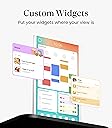
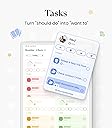
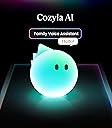
The Cozyla Calendar Plus 2 is a 24-inch smart digital wall calendar featuring a vibrant touchscreen that syncs multiple calendars in real-time without subscription fees. It offers a fully customizable dashboard with widgets for chores, meal planning, and more, plus voice and photo input via its AI assistant. Designed for busy families, it combines functionality with a sleek, wall-mounted design to streamline household management and reduce paper waste.


| ASIN | B0DHCJ14ZZ |
| Best Sellers Rank | #25,185 in Office Products ( See Top 100 in Office Products ) #22 in Wall Planners |
| Brand | cozyla |
| Brand Name | cozyla |
| Customer Reviews | 4.7 out of 5 stars 265 Reviews |
| Item Dimensions W x H | 13.57"W x 22.65"H |
| Item Weight | 4.7 Kilograms |
| Manufacturer | cozyla |
| Material | Plastic |
| Model Number | CZL-WH-22 |
| Model Year | 2026 |
| Mounting Type | Wall Mount |
| Part Number | CZL-WH-22 |
| Product Dimensions | 13.57"W x 22.65"H |
| Size | 24 inch |
| Year | 2026 |
V**Y
Perfect Smart Calendar for Keeping the Whole Family Organized
We’ve been using this smart family calendar for a while now, and it has honestly made daily life much more organized. The 24-inch screen is the perfect size for the kitchen or hallway, and it’s very easy for everyone in the family to see schedules, appointments, chores, and reminders at a glance. The setup was simple, and syncing with our phones worked smoothly. I really like that each family member can have their own color-coded schedule, which makes everything much easier to manage. The chore chart and meal planning features are also super helpful, especially for families with kids. The touchscreen is responsive, the display looks bright and modern, and the overall design feels very premium. It’s not just a calendar — it’s become the center of our family organization. We use it every single day, and it has definitely helped reduce missed appointments and confusion. A little pricey, but absolutely worth it for the convenience and functionality. Highly recommend for busy families!
J**J
A Truly Intuitive Family Hub That Actually Makes Life Easier
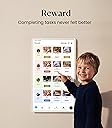
The Cozyla Calendar Plus 2 has turned out to be one of those rare smart‑home devices that immediately earns its place. What impressed me first was how intuitive everything feels. Setup was quick, adding accounts was painless, and the interface is clean enough that even kids can navigate it without help. I wasn't sure it would get used but now I wish I got it way sooner!! The calendar and task pages are where it really shines. Having everyone’s schedule, chores, and reminders in one shared space has made our home noticeably more organized. The built‑in stars and rewards system is perfect for kids—it turns chores into something visual and motivating instead of a daily negotiation. Each child gets their own color and avatar, which makes the whole thing feel personal and fun. Because it’s based on Android, the flexibility is a huge bonus. Being able to install apps from the Play Store means it doubles as a mini smart display. We use it to control YouTube Music and other streaming apps, which makes it feel like a true command center rather than just a calendar. The touch screen deserves a mention too. It’s responsive, accurate, and has a smooth feel that makes tapping, dragging, and rearranging widgets satisfying instead of frustrating. The build quality overall feels solid and durable—exactly what you want for something that’s going to be touched constantly and mounted in a high‑traffic area. And honestly, one of the biggest wins is the no subscription model. Everything syncs with Google, Apple, Outlook, Yahoo, and more without any monthly fees. The companion app makes adding events or tasks from your phone incredibly easy, and everything updates in real time. Overall, the Cozyla Calendar Plus 2 is a well‑designed, highly functional family organizer that actually delivers on what it promises. It’s intuitive, durable, flexible, kid‑friendly, and doesn’t nickel‑and‑dime you with subscriptions. If you want a shared digital calendar that genuinely helps keep your household running smoothly, this one is absolutely worth it.
S**Z
Stunning 24-Inch Touch Screen that Runs Our Life :Chore Charts, Family Schedules, Meal Plans
Okay, if you are a parent, especially if you have twins like me! you need this in your life. We have it just for few days so far and I honestly loved the functionality. It has completely stopped the "Wait, who has practice today?" chaos in our house! With twins, our schedule is absolutely packed. This 24-inch screen is big enough and clear (the 1080p IPS display is gorgeous and super bright!), so everyone can see exactly what’s happening at a glance. We use the color-coded family calendar constantly, and the drag-and-drop widgets make it so easy to customize the dashboard. This was the biggest surprise! It’s not just a boring calendar; it’s a full-blown Android device. I downloaded Spotify and YouTube right from the Play Store. Now, while I'm prepping dinner or checking the meal planner widget, I'm blasting my playlists or watching videos. The built-in speakers are surprisingly loud and clear 🎶 Zero "Tech Stress": It was super easy to set up. It syncs perfectly with our Google Calendars, and the touch screen is snappy—no lag at all. Plus, since it’s white, it looks super sleek and modern on our wall, not like a clunky piece of tech. It’s powerful, it’s beautiful, and it brings my family together. Highly recommend!
D**S
The Cozyla Calendar+2 is a Well Designed, Intuitive Solution
Out with the whiteboard and in with the digital command center for our lives. What We Love The first thing I liked was how responsive it was to touch. And when I pulled my fingers away, they were not covered in blue, red, or black marker dust! Oh, and we can talk to it when our hands are full. The 24-inch Cozyla Calendar+ 2 is a huge touch screen powered by Android. It’s really like a huge Android tablet hanging on the wall. Integrating our Google calendars was easy, and adding our Apple calendars was simple after I used the easy-to-find built-in support page that showed me exactly what to do. The interface is sleek and intuitive. Finding the various settings was similar to that of other Android tablets. We had the basics set up in about 15 minutes, including giving it access to our Google Photos to use as our wallpaper and screensaver. All Google apps are available, including Google Play, so all my favorite apps, games, and utilities are available. The audible alarms from the calendar have been the game-changing element keeping us on track with our appointments. I wish we had had this years ago. The frame can be mounted vertically or horizontally. We use it for meal planning (which we never stuck to using the whiteboard). What We Would Like To See Calendar items less than 45 minutes do not show the item title; they only show a colored bar. Suggest adding the title regardless of the event's length. How about adding a camera? Conclusion It has been three weeks since we set it up, and we are relying on it more and more every day. We could not be happier with this great device.
N**Z
Worth the money, not just a calendar template.
This has been a game changer on my mental load. Delivery was quick set up was easy. The 24” is perfect for my family, just the right size. We mounted ours on a computer stand and the kids have no issues turning it 360. It’s been very stable. No more questions on what day something is happening, what chores need to get done, my kids love checking of their daily routine’s and getting stars for their individual rewards. My husband and I have our “ to do lists” in one place. Organizing and packing for events and trips are easy, as everyone can check off items from their lists in one central location. We even leave notes for the pet sitter on it. Love the parent controls, as we can lock down all apps, and controls, with our parent code. Cozyla keeps adding more features, and updates to make this even more convenient. All without a subscription! I’m only a few months in with this device, but so far it’s been amazing for our family. The Facebook community is so helpful when we have questions too. There is a bit of a learning curve to get it just the way you want, but it’s no different than any new device. Emailing support has been easy, and responsive. The best part is no more questions from my family now. They all have autonomy in their schedules, chores, and responsibilities, in one central location, without me having to constantly repeat myself. The question’s of what’s going on tomorrow, or can I go play are now answered with, check the calendar, or is everything checked of in your task menu? This is not a template, it’s fully customizable for your needs and with the addition of adding any app from google play store it’s endless on possibilities.
L**J
Awesome product but needs better resolution at 24”
Good product. Right away unboxing the Cozyla (we purchased the 24” Calendar 2+) was quick and easy, and I was immediately impressed by the attention to detail. It came with a small level and a full-size screwdriver, which honestly says a lot about the quality and thoughtfulness behind the product. The included mounting template for both portrait and horizontal layouts also made installation straightforward and stress-free. This allowed us to determine if we which orientation we wanted to use…but the mount also rotates so you can change it as you wish. I was a bit hesitant at first since it runs on Android and I’m very much an Apple user, but the learning curve was minimal. It didn’t take long to get comfortable with the interface. We mainly use Cozyla for calendar management and task lists, and setting up a shared family Google Calendar was seamless. Having everything visible on the screen, especially in screensaver mode, has made it much easier for our family to stay organized and on the same page. One feature I really appreciate is the ability to set on/off times, so the screen is only active during certain hours. It’s a small thing, but it helps the screen feel intentional rather than always “on.” The resolution on the 24” isn’t amazing, but it hasn’t been an issue for us since we’re not using it as a digital photo frame. From what I understand, the 32” version has better resolution, so that may be worth considering if image quality matters to you. Overall, I’m very happy with Cozyla. It’s been a practical, reliable addition to our home and has genuinely helped us manage our family’s schedules and daily tasks more easily.
H**N
Highly recommend
The Cozyla Calendar Plus 2 has been a total game changer for keeping our busy household organized. Honestly, it's like a digital command center for the whole family. The best part is there are no hidden subscription fees a huge relief in today's subscription-heavy worldYou simply pay once and get a fully functional family hub. Our family relies on the color-coded calendar that syncs all our Google and Apple calendars onto one shared screen I can see my meetings next to my partner's workouts and the kids' school events at a single glance.What I didn't expect to love is the built in chore chart. Assigning tasks and watching the screen erupt in confetti when the kids finish a chore is surprisingly motivating for the whole house The meal planner has also been a lifesaver, automatically turning recipe URLs into a grocery list we all can edit Since it runs on Android, I can download any app from the App Store, use voice commands to add events via the Al assistant, or fire up Netflix to stream a show while I cook It's a tantastic all-in-one tool that has genuinely reduced our daily chaos and brought the family together. Highly
M**I
Love it
I really love this smart calendar display. It took a little while to mount on the wall, but all the tools and hardware were included, which made the installation process much easier than expected. Setup was also super simple, especially connecting and loading my Google Calendar. What I like most is the convenience—just walking by the screen and being able to quickly check reminders, schedules, chores, or plans is extremely useful for daily life. The large display looks clean and easy to read from across the room. I also ended up using it as a music and media player since I placed it in the living room. The sound quality and video performance are totally acceptable for casual use and honestly better than I expected. One thing I personally care about with electronics, especially living in Hawaii, is heat buildup. I’m happy that this device does not noticeably heat up during use, which makes me feel much more comfortable leaving it on throughout the day.
A**M
Great 24 Family calender
The Cozyla Calendar+ 2 is a large, wall‑mounted digital calendar designed to help families and busy households stay organized. It functions as a smart display and family command center, combining scheduling, task management, meal planning, and entertainment in one device. Design and Display The Cozyla Calendar+ 2 looks and operates like an oversized Android tablet mounted on the wall. It is available in 15.6‑inch, 24‑inch, and 32‑inch sizes, with touchscreen support and both portrait and landscape orientation options. Reviewers consistently highlight the large, clear display as a major advantage, especially for viewing multiple calendars at once. Core Features The device syncs with Google, Apple (iCloud), and Outlook calendars, allowing multiple users to view and manage schedules in one shared space. Each user can have a color‑coded calendar, making it easy to see who is doing what at a glance. Beyond basic scheduling, Cozyla includes: Chore and task management with reward and gamification elements Meal planning and shared grocery lists Notes, reminders, and widgets (weather, photos, to‑do lists) Access to Android apps such as YouTube and streaming services These features make it particularly attractive for families with children. Ease of Use Most reviews describe the interface as intuitive and family‑friendly, with children able to add tasks and events easily. However, some users mention that initial setup and calendar syncing can take time, especially for less tech‑savvy users. Performance and Reliability Professional reviewers generally praise the system’s performance and flexibility, but several note occasional syncing issues, which can be frustrating given that calendar reliability is the product’s core function. Pricing and Value The Cozyla Calendar+ 2 is considered a premium product. Prices vary by size, with larger models costing significantly more. A key advantage mentioned in reviews is that there is no mandatory subscription, unlike some competing digital family calendars. Large, easy‑to‑read touchscreen Strong family‑oriented features (chores, meal planning, rewards) Supports multiple calendar platforms No required subscription Cons Overall Verdict The Cozyla Calendar+ 2 is best suited for busy families or multi‑person households that want a central, highly visible organization tool. While it may be expensive and require some setup patience, reviewers agree it can significantly improve household coordination when used consistently.
A**R
Absolutely love this calendar for my family
We got this Cozlya digital calendar over a month ago and I waited this long so I can leave an objective review after a month of use. Honestly, it exceeded my expectations. First of all, the packaging was super nice. It came in a secure box and everything was sealed up with plastic wrap. The device itself has a great finish and the color is sleek and clean. The touchscreen feels premium and it really does look good on the wall. Very giftable too! Once we opened it up, the setup was faster than I thought. We synced both my and my partner's Google calendars in under a minute. Now we can both see our schedules side by side on one big screen. I added the to-do list widget and meal planning board right away. It also shows the weather, and even lets us use other Google Play apps. I’ve got YouTube and Spotify on there for cooking time vibes. We mounted it in the kitchen and now it’s like our daily control center. We assign chores using the built-in chart (everyone gets their own color!) and check things off as we go. I also love that we can plan meals and it even generates a grocery list. No more whiteboard scribbles or asking “what’s for dinner.” Overall, this calendar really helped us get organized and on the same page. It’s not just a calendar, it’s more like a smart dashboard for your family life. Although it took us a few weeks to fully familiarize ourselves with it. Now, everyone from kids to adults can use it. If you’ve got multiple people with busy schedules, I really recommend this. It made our house feel calmer and more in sync. Worth every penny.
J**E
Sleek, Smart, and Surprisingly Addictive
I’m completely obsessed with this! I wasn’t expecting it to become the most-used item in my house, but here we are. It looks like a minimalist piece of digital art — sleek black frame, ultra-clean interface — but underneath that beauty is a total productivity powerhouse. I mounted it in my office and immediately started calling it my “command center.” LOL The touchscreen is sharp and incredibly responsive — no lag, even when switching apps or typing quick notes. It synced with my Google Calendar in under 60 seconds and now displays all my appointments, events, and reminders in a gorgeous visual layout. The brightness auto-adjusts depending on the time of day, and you can even set “quiet hours” so it doesn’t glow at night. You can set themes and adjust the layout to your own aesthetic. I’ve customized it to show a colour-coded schedule, daily chores, weather, meal plans, and even rotating motivational quotes. It genuinely makes me more accountable. What really impressed me is its versatility. You can wall mount it for a sleek, tablet-on-display look, or prop it up like a desk dashboard. It supports Google Play apps, so I added Spotify, a grocery list app, and even Google Tasks for my own to-do list. It’s like having a digital assistant living on the wall. If you’re someone who juggles multiple schedules, activities, chores, and family members, this honestly becomes a brain-saving tool. It’s one of the rare devices that feels like a luxury and a necessity all at once. I can't recommend this enough if you're ready to level up your home’s organization — it’s absolutely worth every penny.
K**Y
Nice digital Calendar
This digital Calendar is a game changer in our house. It was very easy to set up and use. The digital calendar is the best part, everyone’s schedules are color-coded and synced in one place, so it's hard to miss or double book events and activities. The big 24" screen makes it easy to see anywhere in the living room, and adding or moving events is super quick. The dashboard setup is also very convenient, you can pin the calendar, to-do lists, weather, meal plans, etc. Finished activities can be checked off which is good for organizing. It also supports Google Play apps so we can add tools we already use. Overall, I highly recommend this useful family planner.
E**C
Must to have for busy family.
I switched to a digital calendar after getting tired of constantly updating our dry-erase board. Shipping was fast, the digital calendar arrived securely packaged. This calendar a complete game changer for our family, much cleaner, easier, and more efficient than what we had before. Setup was easy and quick, I synced my calendar with my wife's in just a few minutes. Now we can both see all of our appointments, family plans and kids activities without having to keep asking each other. The extra features make it even more convenient. I'd highly recommend this to anyone with a busy household, whether it's kids in school, hectic work schedules, or a partner who could use a little help staying on track.
Trustpilot
2 days ago
5 days ago