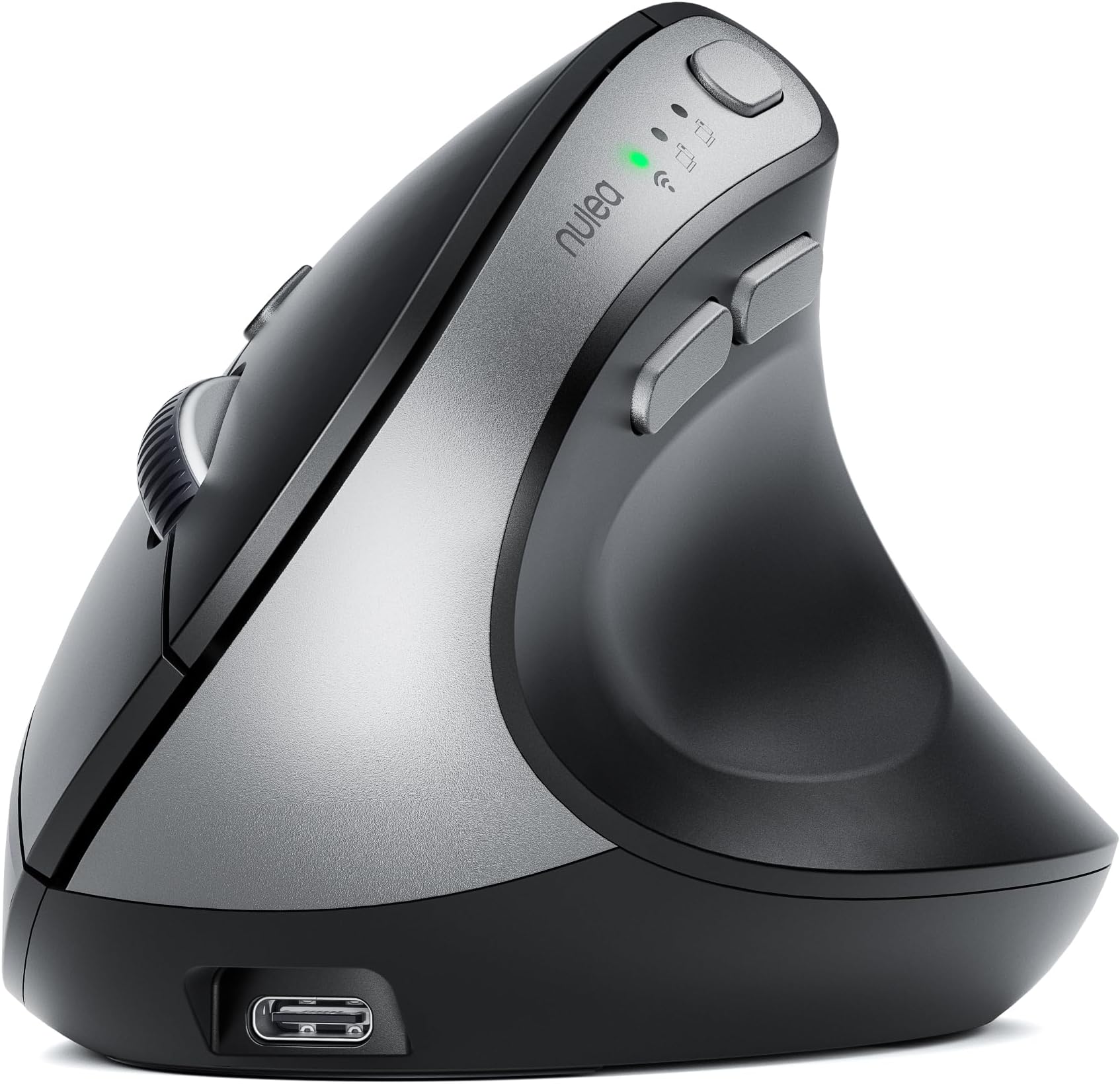
🖱️ Elevate your workflow with ergonomic precision and wireless freedom!
The Nulea MD280 is a rechargeable, ergonomic vertical mouse designed to reduce wrist strain and carpal tunnel risk. Featuring dual wireless modes (Bluetooth & 2.4G), 4 adjustable DPI levels for precision, and whisper-quiet clicks, it offers up to 260 days of battery life on a single 3.5-hour charge. Lightweight and durable, it’s ideal for professionals seeking comfort, productivity, and sustainable tech.


| ASIN | B0DC6JYJ9J |
| Best Sellers Rank | #22,044 in Computers ( See Top 100 in Computers ) #684 in Computer Mice |
| Item model number | MD280 |
| Manufacturer | Nulea |
| Package Dimensions | 14.2 x 10.49 x 8.79 cm; 299 g |
J**R
A Lightweight and Excellent Wrist-Friendly Vertical Mouse. I’ve been using another model, the M513, but this MD280 model has a slightly wider grip compared to the M513. However, the M513 requires two batteries, while the MD280 uses USB Type-C for charging and doesn’t need batteries at all, making it very lightweight and excellent. Additionally, you can switch to a wired connection by plugging in a cable, allowing you to connect it to your computer. Since this vertical mouse is designed to be extremely lightweight, I think the MD280 is a great choice for those who prefer a slightly wider grip and have issues with batteries. For those who have been using a regular mouse and are experiencing wrist pain, I highly recommend this vertical mouse. It significantly reduces pain, and it’s much better than a regular mouse. From my experience using both models, I believe that women with smaller hands might prefer the M513 because it has a slightly thinner grip than the MD280. However, this is something you can get used to, and once you try the MD280, you’ll notice its overwhelming lightness. Compared to the M513, which has two batteries, the MD280 is much lighter since it doesn’t require batteries. This lightweight design could make a difference during prolonged use. For anyone who has never used a vertical mouse and is dealing with wrist pain from a regular mouse, or for those who are debating between a vertical mouse and a trackball, I recommend trying the vertical mouse. I used a vertical mouse for the first time this time, and I experienced no wrist pain at all. With a regular mouse, just clicking caused pain in my index finger, thumb, and wrist due to tendonitis, but with the vertical mouse, the pain was reduced to about 1/2, 1/3, or even 1/4. I’ve also used a trackball in the past, but that caused finger pain. However, the vertical mouse didn’t hurt as much as either a regular mouse or a trackball. The price is also very reasonable. Therefore, I highly recommend the vertical mouse.
M**.
El raton funciona bien y es preciso. El tacto es bueno y los clicks son suaves. La inclinación te permite tener la mano en una posición más natural y evita fatigas en largos periodos de tiempo. Solo lo he probado con la conectividad inalámbrica via el usb que trae y funciona muy bien. 100% recomendable 💯
T**S
La souris est exclusivement pour droitier, ce qui peut sembler logique, mais important à préciser avant l’achat. Sous la souris, on trouve une petite trappe permettant de ranger le dongle USB, ainsi que le bouton d’allumage. Elle se recharge en USB-C, et l’autonomie est excellente : je l’utilise tous les jours et je ne la charge qu’une fois par mois, ce qui est un vrai point fort. Elle possède un bouton de réglage des DPI, permettant d’ajuster rapidement la vitesse du curseur en fonction des tâches effectuées. La prise en main est un peu surprenante au début, car la main n’est pas posée à plat, mais inclinée dans un axe plus naturel. La différence se ressent surtout en reprenant une souris classique, où l’on réalise à quel point cette position est plus ergonomique. Je travaille en flex office, donc avec des bureaux de différentes couleurs, et sans tapis de souris. Aucun problème de détection, le capteur fonctionne parfaitement sur toutes les surfaces testées. L’essayer, c’est l’adopter.
N**N
I’ve used this style of mouse for the last 5 or so years and prefer it. This one seems a little thicker than other ones I’ve used so I’m not sure how comfortable you’d find it if you had small hands. Like: Easy connections and multiple ways to connect (however unfortunately it won’t connect to my work laptop no matter how much I try. No issues connecting to my personal computers or my other work computer though so not blaming this one on the mouse). Battery lasts for soooo long and you’re able to charge it while you use it. Don’t really have any dislikes. The scroll wheel might be a little touchy. Often when I’m scrolling, I’ll push the wheel down a bit and activate that other thing that lets you scroll by moving the mouse up/down/sideways. It really an issue though and I’m not taking any points off for it.
G**N
Hace unos meses me empezó a doler el hombro derecho. Fui al fisioterapeuta y me confirmó que por mi trabajo de oficina tenía una inflamación crónica provocada por el uso del ratón. Me dijo que para evitar que fuera a mas, tenía que empezar a usar un ratón vertical que fuera lo mas ergonómico posible y con el tiempo y mas sesiones de fisioterapia se iría corrigiendo. He tenido la oportunidad de adquirir este ratón de la marca Nulea y no lo he dudado ni un segundo. Después de ponerlo a prueba durante mas de una semana y con una media de 9 horas de trabajo solo puedo decir maravillas sobre el. Estas son las principales características que me gustaría remarcar, por si ayuda a otros compradores. - La comunicación es inalámbrica mediante bluetooth. Se puede hacer directamente con el ordenador si lleva integrado bluetoooth o bien a trasvés del USB que lleva oculto dentro del propio ratón y que está tapado por una tapa magnética. Simplemente hay que tocar un botón para escoger el modo. - Es tremendamente ergonómico y fácil de usar. Se ajusta perfectamente a la palma de la mano y los botones están a un a distancia cómoda de pulsar. - La tecnología de funcionamiento es óptica y no laser, por lo que puede funcionar el cualquier superficie con una precisión optima. - Se puede configurar la velocidad del movimiento del puntero mediante uno de los botones (800/1200/1600/2400 DPIs). - Tiene 5 botones de funcionamiento y una rueda de desplazamiento. Se nota que los botones actúan al pulsarlos, pero de una manera muy silenciosa. - La batería integrada dura una barbaridad. - El cable de carga es un USB de tipo C. Conclusión: Este ratón vertical es tremendamente ergonómico y fácil de usar. Es un accesorio de ordenador muy útil para evitar dolencias producidas por una mala postura provocada por el uso de un ratón inadecuado.
Trustpilot
1 day ago
2 weeks ago