Buy anything from 5,000+ international stores. One checkout price. No surprise fees. Join 2M+ shoppers on Desertcart.
Desertcart purchases this item on your behalf and handles shipping, customs, and support to Thailand.
๐ง Power Up Your Productivity!
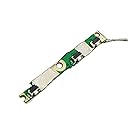
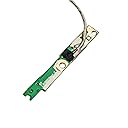
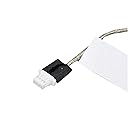
The GinTai Power Button Board with Cable is a versatile replacement part designed for various Dell Inspiron and Latitude models, ensuring seamless power connectivity and enhanced device performance. With its user-friendly installation and durable construction, this component is essential for maintaining the functionality of your laptop.
| ASIN | B076ZBFR6B |
| Best Sellers Rank | #499 in Laptop Computer Replacement Parts |
| Brand | GinTai |
| Compatible Devices | Laptop |
| Connector Type | ATX |
| Connector Type Used on Cable | ATX |
| Cooling Method | Air |
| Customer Reviews | 4.7 out of 5 stars 101 Reviews |
| Form Factor | Clamshell or Tablet |
| Item Weight | 0.01 Kilograms |
| Manufacturer | GINTAI |
| Maximum Input Voltage | 240 Volts (AC) |
| Mfr Part Number | NE0788 |
| Minimum Input Voltage | 100 Volts (DC) |
| Model Number | 8541584882 |
| Output Wattage | 5 Watts |
| System Bus Connector Type | ATX |
| UPC | 191381194348 |
| Wattage | 5 watts |
B**D
Worked Perfect
The power switch on my Dell Inspiron 7778 was getting worse and worse, and finally one morning, I pushed the button and it went inside my machine. So, I knew I needed a replacement board. Looked around and found this one, and it came quickly. It was simple to remove the 12 or so screws and replace with this new switch. It fired right up and still is working after 30 days. Good product!
N**N
Exact fit, good as new.
Replaced on Dell Inspiron. Exact fit. Work as new.
W**P
Replacement Dell P69G Power Control Board for Volume/Power Cheap, Easy to Install, Fast Shipping
Fast shipping for a general vendor. The replacement power control board is wonderfully inexpensive, fairly easy to install despite the cramped engineering and my laptop/tablet powered right up. Thank you!!
C**S
Works in Inspiron 15 7569
I have a 5 year old Inspiron 15 7569 that has been through the ringer. It made it through part of undergrad and all of grad school. The power button got to the point I had to press it about 20 times, hoping to feel a click to get it to turn on. I looked into trying to set up the computer to turn on by clicking on the mouse pad, but this did not work. I tried seeing if I could change something in the BIOS for a different power up option. Then I checked to see how expensive it would be to have Dell replace the power switch circuit, knowing that it would mean I would not have a computer for work for about a month. I came across this part after looking on the partsguys.com website and seeing that the circuit is reasonably easy to replace and figured $20 was worth the risk instead of $250 to send it into dell. Replacement was simple with the steps being: 1. Check that you are ordering the right part 2. Order the part and wait patiently for it come 3. Unscrew the back panel of the computer (Make sure you do not use a magnetized screw driver and that it fits snugly so you do not strip the screws) 4. Disconnect the AC power adapter and unplug the battery connection 5. find the little circuit board that looks like the replacement part you ordered. Observe how it is oriented and remove and remove any necessary screws. Follow the wire from the board to where it plugs in and gently tug on the plug to disconnect it. 6. Plug in the new board, place it, screw it in and make sure the wire will not be pinched when you add the cover back on. 7. Reconnect the battery Put the back plate back on and screw it shut. 8. Turn the computer on by pressing the power button that is now operated by your new power switch. This was my first computer repair and I was concerned I would break my computer, but everything turned out fine. I even forgot that the button is supposed to be pushed out slightly past the case since I got so used to the worn out old one being permanently depressed into the housing of the computer. I just replaced the board yesterday and will let you know if I need to update this in a few months.
N**T
Made my computer work again.
The computer technician recommended this and put it in my computer. Works great.
R**.
Decent replacement
Works as intended to replace Dells poorly designed power button. The part didn't quite exactly fit as the fitment groove on the parts pc board is not as deep as the OEM part but with some careful wriggling you can make it work. Would (and will probably have to) buy again.
A**O
Perfect fit!
I woke up trying to use my laptop and noticed that the power button was depressed all the way into the chassis. I took my laptop apart and was able to locate the problem. I was able to find the part and ordered it ASAP. itโs working like new now!!
P**.
Well built replacement part
My power button failed on my Dell Inspiron 17 7779. I am so glad I have worked in the tech industry for years or I would never have known how to jump start my computer. Anyway, discovered Dell was smart enough to NOT integrate the power and volume buttons onto any of the main circuit boards, making it a cinch to replace them should they break. It is so easy to open up the Inspiron laptops and replace the buttons. Once you have the back off (12 easy access screws for me), it was 2 more screws to release the buttons. Just very gently lift the buttons to trace the wires back to where they plug in. As with all computer repairs, ALWAYS make sure you've disconnected the AC and battery first. But, again, very easy repairs. And this part is as durable as the original.
Trustpilot
2 months ago
3 weeks ago