Buy anything from 5,000+ international stores. One checkout price. No surprise fees. Join 2M+ shoppers on Desertcart.
Desertcart purchases this item on your behalf and handles shipping, customs, and support to Thailand.
🎥 Elevate your screen game — see all angles, never miss a moment!
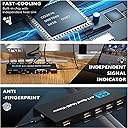
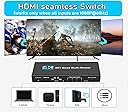
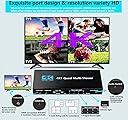
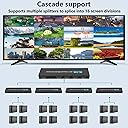
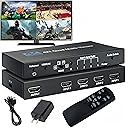
The SIGRAPID 4K HDMI Multiviewer 4X1 is a professional-grade splitter that supports 4 HDMI inputs and 1 output, enabling simultaneous display of multiple HD sources on a single screen. It offers 5 flexible viewing modes with seamless switching and supports resolutions up to 4K@60Hz (YUV) and 1080P@60Hz. Controlled via buttons or IR remote, it’s ideal for conference rooms, control centers, and multimedia setups requiring stable, high-quality multi-screen monitoring.


| ASIN | B0DJYNCM8M |
| Brand | SIGRAPID |
| Cable Type | HDMI |
| Color | HDMI Multiviewer 4X1 |
| Compatible Devices | Laptops, monitors, televisions, game consoles, projectors, computer mainframes, etc. |
| Connector Type Used on Cable | HDMI |
| Customer Reviews | 2.9 2.9 out of 5 stars (14) |
| Item Dimensions D x W x H | 14.7D x 6.1W x 2H centimeters |
| Item Weight | 204 g |
| Manufacturer | SIGRAPID |
| Number of Ports | 5 |
| UPC | 768561855568 |
S**G
The SIGRAPID 4K HDMI Multi viewer 4X1 is an item I was hopping to love and was skeptical about the other review being wrong. I received the item and immediately set it up with 4 devices. At first glance everything looked great, all 4 video device being displayed on the screen. I then cycle through all the different view layouts and that seem good as well. I then tried to go full screen so I hit the number 1 and cycle through the numbers all the way to 4. On the first attempt the screen began to freeze. I then hit the mode button to return to the 4 screen layout but it changed to 2 screen. I continue to cycle through until I reached the 4 screen view. Once I manged to get a full screen on video on input 1 I had audio but it was for one of the other inputs. I hit the audio change button and nothing happened. Long story short you need to change back to the 4 screen view to change the audio. I then hit 1 again and had the correct audio. I then switch to input 2 but still had the audio for input 1. Some times the audio follow the change of video while on full screen and sometimes it does not. This device is full of bugs and for me is not worth the headaches. I will be returning the item. The screen freeze while switching inputs and you need to change to another input or go back to 4 screen view to fix it. The audio does not always follow the video input change / selections. Changing modes always make you cycle trough all available layouts before you can get back to the 4 view. If you go full screen and want to go back to the full view the only way if to cycle through all layouts which means about 5 button hits. Again I really wanted to like this device as I been eyeing a few type of this devices for a bit but it has way too many glitches / bugs for me. The vendor will needs to make improvement and or firmware updates for this product to then be ready for mainstream use. At this ticket I would classify this item as being in beta / development stage.
A**R
This is an HDMI quad display matrix controller. It combines 4 HDMI inputs into a single screen. It provides four equal size images from the HDMI inputs or several variations of one large image and 3 small images or a full screen display. The unit is controlled by a button on the from of the device or by an Infrared remote control. The unit requires a power source which is supplied via a USB-C port, with a USB-A to USB-C cable and a 5V 2.1A USB-A charger cube. Display quality is very good. Output Image quality does not seem to be degraded from the original HDMI input. There is no perceptible image lag.
A**R
First off: This does what it says it does, and it does it well. Different signals, both 1080p (camcorder) and 4k AppleTV box (to 4K HD TV) were output to this device. It was fast with display after plugging in, and the image/sound was clear. It also doesnt seem to suffer from plug-in order of inputs like so many of these switch/splitter like devices do. You can also choose to downgrade a 4k signal to 1080p ****edit**** When coming back after 24 hours, the sound output from my apple tv was no longer passing through. I had video, but no sound. Had to unplug and replug the multiplyer to get sound back. So, with the aspect ratio issues (discussed after edit) and now the sound issue, I have to drop my review from 4 stars to 3. Sorry guys (developers), fix these two issues, and this is a four. Add picture in picture and make the remote sensible, and you have a 5 star. Back to the drawing board. ****end edit**** CONS -However, areas where this doesn't perform well is aspect ratio. I have no control over ratio it seems, and the instructions give next to no guidance on the operation of this device. For whatever reason, it will squish or stretch your image out depending on how you have it placed on the screen. This seems to impact the primary image mostly. -The remote is confusing. It is nice you can move other inputs into the primary position, but the remote and actual switches on the device are so convoluted, it leaves you to trial and error. PROS -My LG TV has some builtin functionality to do the same thing as this Multiviewer, but it is hit and miss and slow. For whatever reason, the LG only works in specific input video combinations, and struggles with hi resolution. If it doesnt like the input combination, it just refuses to show the image(s). Black screen on one or both images. And you only get two multiviews. This Multiviewer is much more reliable and faster. However, the LG did maintain correct aspect ratios. -Fast input response without issues with input order -Clear picture and sound -downgrade a 4k signal to 1080p -Dont need 4 inputs plugged in. Manual says you will get colour bars if no signal, but this is not actually the case. No signal, no output box on screen at all. Thoughts: So this isnt an advertised feature, so no points off. But if I was to actually pay for a device like this, I would like some picture-in-picture options. This doesn't seem to do picture in picture at all, so you will never be able to maximize the main input while showing 1 or more of the other inputs. But at least you can make any input full screen. Although again, that is confusing on the remote to figure out (simply the 1,2,3,4 buttons. They take up a lot of space on the remote and that's all they seem to do).
M**L
I had high hopes for the SIGRAPID 4K HDMI Multi-Viewer 4X1, especially since it supports output to four individual screens at 1080P. It worked well with my 43-inch 4K UltraSharp monitor, but there were several issues that made the experience less than ideal. Upon initially connecting four video devices, the display showed all four video sources in separate quadrants on the same screen. When I switched to full-screen mode, each video device displayed in full-screen at 1080P, which was great. However, returning to the multi-screen view required me to manually cycle through the 4-quadrant format and then switch back to the original display setup. This process was cumbersome and inconsistent. On top of that, I occasionally experienced screen freezes while switching between different modes, which was incredibly frustrating. I really wish the cycle button allowed me to quickly return to the original 4-quadrant setup without the extra hassle. Unfortunately, due to these issues, I’m giving this product one star. It’s clear that the functionality needs significant improvement before it's ready for prime time.
D**E
This HDMI 4 in 1 out adapter is amazing! I connected two sources and can confirm it's working flawlessly. The remote is a must-have as there are many things you can adjust with the remote, including switching the audio source. Now I can browse the web on my TV and have a split screen so my kids can watch TV or play video games on the same screen. The picture is smaller, but the image is still comparable to a computer monitor, even after splitting, depending on the size of the TV. The resolution is good enough for browsing if you have some zoom, but definitely ok for video games or watching videos. What I don't like is that if I want to have one big screen and three smaller screen modes --- the big screen is stretched a lot, not the native aspect ratio. There's enough space on the screen to display the native aspect ratio, but somehow this adapter cannot do that, and the stretched image is more like 5:4. So ideal use is four split or two split for my purpose. There is also a slight delay, it's noticeable if you are moving the mouse around, it's not as smooth as a direct connection.
Trustpilot
2 weeks ago
1 week ago