Desertcart purchases this item on your behalf and handles shipping, customs, and support to Thailand.
๐ Elevate your IoT game with the Pico 2 W โ where power meets wireless freedom!
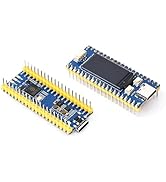
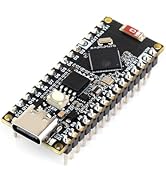
The UeeKKoo Pico 2 W is a versatile microcontroller board featuring a dual-core RP2350 processor architecture (Arm Cortex-M33 & RISC-V) clocked up to 150 MHz. It integrates Wi-Fi 4 and Bluetooth 5.2 wireless connectivity via the Infineon CYW43439 chip, includes 4MB Flash and 520KB SRAM, and comes with pre-soldered color-coded headers for easy prototyping. Designed for professional-grade embedded projects, it supports USB 1.1 device/host modes and offers low-power operation modes, making it ideal for advanced IoT and wireless applications.


| Asin | B0DP54FWX1 |
| Best Sellers Rank | #17 in Single Board Computers (Computers & Accessories) |
| Brand | UeeKKoo |
| Built In Media | 1*3PIN yellow pin header x1, Pi Pico 2 W with pre-soldered header (color-coded) x1, USB-A to micro USB cable ~1.2m x1 |
| Compatible Devices | Computers (PCs, laptops, tablets) |
| Connectivity Technology | Wi-Fi 4, Bluetooth 5.2, USB 1.1 |
| Customer Reviews | 4.7 4.7 out of 5 stars (126) 4.7 out of 5 stars |
| Manufacturer | UeeKKoo |
| Memory Storage Capacity | 4 MB |
| Model Name | Pico 2 W |
| Model Number | RPi Pico 2 W with header |
| Operating System | MicroPython, C/C++ with Pico SDK |
| Processor Brand | ARM |
| Processor Count | 2 |
| Processor Speed | 150 MHz |
| Ram Memory Installed | 520 KB |
| Ram Memory Technology | DDR |
| Total Usb Ports | 1 |
| Warranty Description | Technical Support is provided |
| Wireless Compability | 802.11n |
User
Great little device to run as a dedicated wireless PS5 Controller Dongle for PC
This was used to run a program that someone made to make my PS5 Controller run wireless on my PC and still get the full PS5 Haptics as I should if I am playing a PS5 style game game that was ported to PC or any game that was built for the PS5 that took the time to include the added Haptics when porting to PC. Like Deathloop. The controller works in bluetooth on the PC but I get basic rumble like an xbox controller, when I plug in the PS5 controller with USB I get full haptics in specific game that take advantage of the controller. This device and the program allowed me to go wireless with the PS5 controller on my PC. Super nice. make sure to 3D print a case or buy a 3d printed case to protect from shorting it out.
User
Great SBC Board
Great little single board computer. I flashed my project code onto it and was to and running.
User
Works great
My son use these I have no idea what they do, but he saids they work excellent.
User
Cheap and powerful
Great board for learning Micropython!
User
Excelente producto
Excelente producto
User
Worked for my purpose, needed slight modification.
Would be great if the seller offered a version without the pre-soldered pins, as I used this for a USB dongle for a Bluetooth game controller. I was able to desolder the pins so I could get it into a no-headers 3D printed case.Also, a better quality USB cable could have been provided; this cable wiggles loose from my USB ports easily causing random disconnects.
User
Raspberry Pi Pico 2 W
The price was high, but delivery was next day and arrived on time. Device seems to work properly.
User
If you know what you're doing, you'll be fine!
No issues with any bridging on the solder, just be warned when using files designed for the Pico 1 as not all will be compatible with the Pico 2 unless you compile it with support yourself. Had to go this route to get PicoFlasher working with my Pico 2 since it was compiled for the Pico 1.Otherwise, no issues and a good buy, especially if you don't want to solder your own header!
User
Easy-to-use board with great online documentation
Pros:- Decent build quality- Includes programming cable with micro-USB connector- Excellent online documentation- Easy installation process- Colour pre-soldered header matches the pinout diagram- Beginner-friendly- Worked well with Thonny on Windows 11Cons:- Onboard LED not workingThe UeeKKoo Pico 2 W with Colour Pre-Soldered Header Compatible with Raspberry Pi Pico 2 W RP2350 Microcontroller Board with 2.4GHz 802.11n Wifi 4 and BLE 5.2 has a decent build quality. This board adds wireless capabilities to the popular Pi Pico 2 board. A programming cable with a micro-USB connector is included. Before using the Pico 2W board, you need to install MicroPython by flashing it with a .uf2 file. It comes with great online documentation, and the link is included in the bootloader. The online documentation also tells you where to download the .uf2 file. This is so refreshing to see, as many MCU boards I have reviewed failed to include any documentation. It is really not that hard for the manufacturer to include an external documentation link in the bootloader as demonstrated by UeeKKoo. For beginners, the difference is day and night!After you download the .uf2 file, you can boot into the bootloader of the board by holding the "boot" button on the board before plugging it into the computer. Wait until a folder pops up before you release the button. Just drag the .uf2 file into this folder, and if everything is done right, the folder will close, and the board will reboot.I used Thonny to test the Pico 2W board under review. With the board already plugged into my Windows laptop, I opened Thonny and selected the proper COM port for the board in the lower-right corner. Then I ran a little MicroPython script, and everything appeared to work fine.from machine import Pinimport time# Set up GPIO pin 0 as an output because GP25 pin 25 does not turn on the LEDled = Pin(0, Pin.OUT)while True:led.value(1) # Turn on the LEDtime.sleep(3) # Wait for 3 secondled.value(0) # Turn off the LEDtime.sleep(1) # Wait for 1 secondBasically, I toggled the GP0 output pin for 3 seconds high and 1 second low repeatedly. I used my multimeter to measure the voltage on Pin 1 of the board and observed that the voltage stayed at 3.3V for 3 seconds and 0V for 1 second. So it appears the basic function of the board is working. I did not test the WiFi or Bluetooth wireless interfaces.The onboard LED, which is supposed to be on GP25 from the documentation, does not work. I am not sure why. That's why I needed to use a multimeter to measure the voltage on Pin 1 (GP0 output).Overall, the basic functions of the UeeKKoo Pico 2 W board appear to work well with Thonny on a Windows 11 laptop. I love the colour pre-soldered header since the colour matches exactly what is in the pinout diagram of the Pico 2W board. When I measured the voltage on Pin 1, it was easy for me to tell that Pin 3 was Ground because it is black in colour. It just makes the whole debugging process much easier when you reference the official pin-out diagram of the board. The colour-coded headers are nice touches! I love it! The fairly extensive online documentation provided just makes the product so much more beginner-user-friendly. Good job, UeeKKoo! A great acquisition for me!
User
Love it
Great little board, and the extra colour coding looks great & is super useful!
User
Neat idea for hobbyists
This is an RP2350 board (looks like an original Raspberry Pico 2W board, with headers soldered on). No debug pins soldered, but it came with a 3 pin block (yellow) to solder yourself if desired. The board has a micro-USB connector, and a USB-A to micro-USB cable is supplied so you can power it.The distinctive feature of this Pico2W seems to be the colored header pins. Each type of pin has a different color (black=ground, dark green=GPIO, blue=ADC, red=power (5v+3.3v), lime green=system control). Even just looking at the power and ground makes it easier to find a desired GPIO pin. A very good idea for useability. Note that the colors are only visible if you have the pins pointing upwards. So if (for example) you have the board inserted into a breadboard, you wonโt be able to see them.I did some trials (using Arduino IDE), and the board seemed to function with no issues.I think the Pico 2W board is a neat little board for hobbyists, and this variation with the colored headers is even better.
User
Good Pico W board with convenient soldered colour coded pins.
The highlight of this board is the colour coded pins. The board feels well made, and while you pay extra for them the soldered pins are convenient. I love that I'll spend less time soldering and more time coding with this.It's a fun little board and I'm looking forward to hours of tinkering. I'm fairly new to these boards. So far I've installed MicroPython and tried to get it working as a temperature logger. I quickly learnt with the non-W version that it's difficult to get data off the board without networking, so I upgraded to this board. I had the temperature reading nicely for a moment but somehow it's not doing it anymore. I presume this is user error on my part, and all part of the fun of learning. I can recommend this board if you want to get into Pi coding. Definitely worth getting the W version.
User
Easy to use
The Pi ecosystem is very mature at this point, and there are a ton of python libraries that abstract the board differences away, and examples to get even complex things working in minutes.The colour coded headers are a small thing, but I still remember my first experience with 555 ICs 30 years ago, having to find the little dot to get the orientation right. For a beginner, this simple gesture reduces one of the many questions that will pop up if something goes wrong.Included cable worked fine, and I was able to get the board running some sample code with a breadboard, some LEDs, and some resistors in minutes.The price is decent for a no-MOQ, quickly delivered and pre-soldered pi.
Trustpilot
3 days ago
3 weeks ago