Buy anything from 5,000+ international stores. One checkout price. No surprise fees. Join 2M+ shoppers on Desertcart.
Desertcart purchases this item on your behalf and handles shipping, customs, and support to Thailand.
⚡ Elevate your creative command center with precision and style!
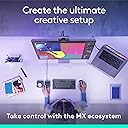
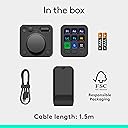
The Logitech MX Creative Console in Graphite is a dual-piece customizable input device featuring 9 tactile mechanical keys and an aluminum dial. Designed for professionals, it integrates seamlessly with Adobe Creative Cloud apps and supports custom profiles for a wide range of software. With Bluetooth and USB-C connectivity, backlit LCD keys, and a sleek graphite finish, it enhances productivity and workflow speed for creative and productivity tasks alike.


| ASIN | B0D5FRQXWZ |
| Additional Features | Backlit, Customizable Display Keys, Hotkeys and Media Keys |
| Antenna Location | General Computing |
| Best Sellers Rank | #56,292 in Computers ( See Top 100 in Computers ) #1,634 in Computer Mice |
| Brand | Logitech |
| Built-In Media | [Inferred] USB Cable |
| Button Quantity | 9 |
| Color | Graphite |
| Compatible Devices | PC |
| Compatible Operating System Family | Windows |
| Compatible Tablet Computer Models | AAUB P30 |
| Connectivity Technology | USB-C |
| Customer Reviews | 4.1 4.1 out of 5 stars (295) |
| Enclosure Material | Plastic |
| Generation | 1st Generation |
| Hand Orientation | Ambidextrous |
| Item Weight | 1.26 Pounds |
| Keyboard Backlighting Color Support | Single Color |
| Keyboard Description | Mechanical |
| Keyboard Layout | QWERTY |
| Language | English |
| Manufacturer | Logitech |
| Mfr Part Number | 920-012660 |
| Model Name | 920-012660 |
| Model Number | 920-012660 |
| Number of Batteries Required | 1 |
| Number of Keys | 9 |
| Number of Sections | 1 |
| Power Source | Battery Powered |
| Series Number | 920 |
| Style Name | comtemporary |
| Switch Type | Tactile |
| Theme | Gaming |
| UPC | 097855197085 |
| Unit Count | 1 Count |
J**I
Absolutely amazing! Made my workflow atleast 3 times faster.
L**G
Elevate your creative workflow with a state-of-the-art device designed for digital artists, graphic designers, and multimedia enthusiasts. The sleek console boasts 9 customizable LCD keys and a control dial that seamlessly integrates with your favorite software, ensuring an efficient and intuitive user experience. Whether you're editing photos, designing graphics, or mixing audio, this tool is engineered to enhance productivity and unleash your creativity. ☑️ 9 Customizable LCD Keys allow for instant access to your most-used functions, simplifying your workflow. ☑️ The Control Dial offers precise, tactile control over various adjustments such as brush size, zoom level, and more, making it an indispensable tool for creators. ☑️ Seamless integration with popular software like Adobe Photoshop, Premiere Pro, and others, enabling a more efficient creative process. ☑️ Robust build quality paired with an elegant design not only ensures durability but also adds a touch of sophistication to your workspace. ☑️ Easy setup and customization through the accompanying software, allowing you to tailor the device to your specific workflow needs. ⭐⭐⭐⭐⭐ Finding the right tool to aid in the creative process can be challenging, yet this device proves to be a game-changer. Its thoughtful design, combined with empowering technology, optimizes your creative endeavors, making every project more enjoyable and less time-consuming. The ability to personalize every aspect of the console ensures it adapts to your workflow, rather than the other way around. For creative professionals and hobbyists alike, this console is not just a tool but a catalyst for unlocking new levels of creativity and efficiency.
L**U
I recently got the Logitech MX Creative Console, and it’s been a game-changer for my editing workflow. This two-piece console features a customizable keypad and a dialpad, both easy to set up with the Logi Options+ app. It’s especially useful for Adobe Creative Cloud users, with dedicated integrations for Premiere Pro, Photoshop, and others, plus additional apps coming soon. I am personally not a creative cloud user and still find it very useful. I have created my own profiles for Capcut, Davinci Resolve, Krita, and, for the fun of it, even an old Quake 1 map editor. I fully expect to add more profiles for random and obscure apps in the future. The hardware is sturdy, with an aluminum dial and customizable LCD buttons on the keypad. You can create your own graphics to fully customize all the buttons. My only gripe is the current limited selection of third-party apps in the Options+ marketplace, but I’m optimistic this will grow over time as users and developers contribute. A little surprised Blender wasn't on the list at release. I fully expect that and various cad software support soon. Overall, it’s a fantastic addition to any creative setup. But could see the usefulness in Excel, PowerPoint, and other such productivity applications as well. Color matches with my actual computer, bluetooth connectivity is great. Definitely worth its price, highly recommend!
S**N
I do a great deal of creative editing in several applications and this will be my third device in an attempt to streamline / speed up workflow and I finally got it right. I had a Loupedeck (cheap and finicky) and a Tourbox (by the time I really got it flowing, it broke) and really needed something simple and customizable. Grabbed one of these, game changer. Keypad is backlit, every button is fully customizable by color / label / function and you can have multiple pages. The scroll wheel is heavy and has good tactile feel, and the buttons on the wheel are also assignable. The only 2 drawbacks I’ve found are as follows: The Logi app is easy to navigate and fun to use, but unlike some of the competition, not EVERY function in a given app is available and assignable. Granted, it covers 95 percent of what you’d need, but as a power user I sadly ran into 3-4 things that weren’t options in the assignable function list. Usually creating automations / presets and then assigning them to a button dodged most issues (which is incredible by the way. Having labeled presets and actions as physical glowing buttons). Other drawback is the app updates. Every week or two I plug in my MX and start working and it doesn’t function. Turns out my creative software updated automatically at some point and it rendered the Logi useless until I update it as well. I fear the day Logi stops updating, as this thing is heavily dependent on its software. Overall it rules, costs less than other tools like it, and I highly recommend it. You also get to look like some kind of missile commander once you get good at it, if you’re using it in public.
N**P
Easy to set up, and works well with my DAW and video editing apps.
Trustpilot
3 weeks ago
2 months ago