We remain fully operational. Our teams are working around the clock to ensure your deliveries continue safely.

DOWNLOAD THE APP


Copyright © 2025 Desertcart Holdings Limited
DOWNLOAD THE APP




Buy anything from 5,000+ international stores. One checkout price. No surprise fees. Join 2M+ shoppers on Desertcart.
Desertcart purchases this item on your behalf and handles shipping, customs, and support to Thailand.
❄️ Elevate your cooling game with a screen that’s as smart as your setup!
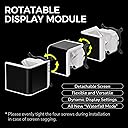
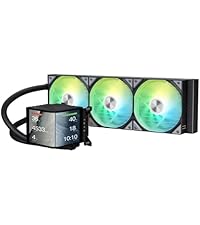
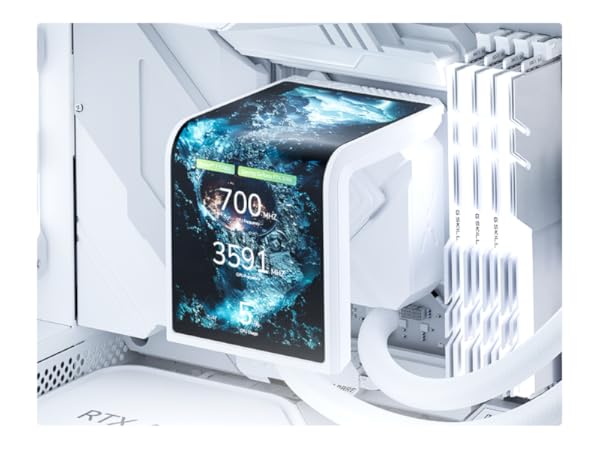
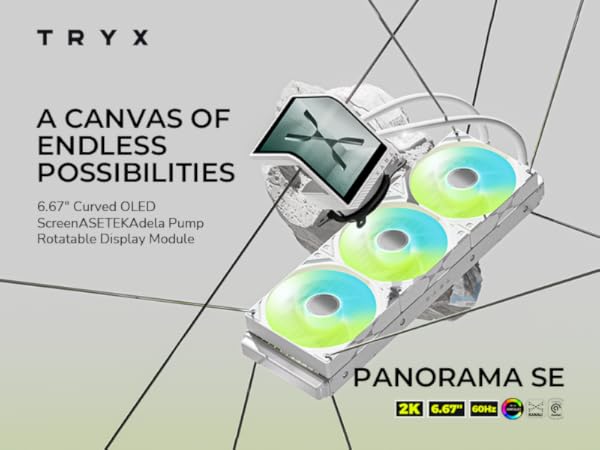
The TRYX PANORAMA SE 360 ARGB White is a premium 360mm AIO liquid cooler featuring a rotatable 6.67'' AMOLED curved screen with 2K resolution and 3D anamorphic effects. Equipped with Asetek’s Adela pump delivering 280W TDP cooling capacity, it ensures stable performance for demanding CPUs. The cooler includes customizable ARGB lighting, near-silent ROTA fans, and broad compatibility with Intel and AMD sockets. Its innovative screen and software integration offer unique visual customization, making it a standout choice for professionals and gamers seeking both performance and style.







| ASIN | B0DQV2CBX1 |
| Air Flow Capacity | 66.09 Cubic Feet Per Minute |
| Best Sellers Rank | #13 in Water Cooling Systems |
| Brand | TRYX |
| Brand Name | TRYX |
| Compatible Devices | Cpu |
| Cooling Method | Water |
| Customer Reviews | 4.7 out of 5 stars 434 Reviews |
| Included Components | AIO Cooler,AMD/ Intel Brackets,Thermal Paste,Manual,Accessories |
| Item Dimensions L x W x H | 16.93"L x 8.74"W x 5.71"H |
| Item Weight | 5.6 Pounds |
| Manufacturer | Shanghai TRYX Technology Co.Ltd |
| Material Type | Aluminum, Copper, Polybutylene Terephthalate |
| Maximum Rotational Speed | 3600 RPM |
| Noise Level | 27.86 Decibels |
| Power Connector Type | 7-Pin |
| Product Dimensions | 16.93"L x 8.74"W x 5.71"H |
| UPC | 850066255209 |
| Unit Count | 1.0 Count |
| Voltage | 12 Volts (DC) |
| Warranty Description | 2 Year Screen, 6 Year Cooler |
| Wattage | 5.5 watts |
D**N
Great looking and performing AIO
The AIO is very easy to hook up, and the cooling temps are great ! It really adds to a PC setup with the impressive screen ! The second best part is TRYX customer service ! I had a issue with the unit making some of the RGB on some of the fans shut off, they and quick replies to me e-mails and helped till I found out what was going on and the problem was fixed ! I had a good AIO but this one with the 6.5 inch screen really topped off the build ! and a again great customer support form the company !
K**S
Good quality screen and pump!
Very simple installation process! Quality is good the most I seen my temps hit is 73 that’s after hours of playing games, the screen is very bright and colors look amazing I provided photos but it doesn’t do it justice. Only “complaint” I may have is that the way I want to do my screen isn’t conventional and it can be a pain but nothing to do with the screen and can be fixed with future software updates and there is work arounds, genuinely a good product for aesthetic and for functionality
J**S
Overall great value, but limited compared to Non SE version.
I would give this product a 4.5 if I could it's so close to being perfect, but its software customization is really limited. I got the Panorama SE because the price was far better than normal version and its screen has an onboard memory which makes CPU utilization near 0%. Pros: The screen, It looks amazing and its more stunning in person than any picture can show. Great cooling, it keeps my 9800x3d between 75c and 80c while gaming. Long tubing allow to mount and hide the tubing. The RGB fans look pretty nice and have good brightness. Cons Kanali software is too limited for the SE model, cannot control the pump peed, rgb, speed of the fans. Mounting bracket for the screen is flimsy with only 4 small plastic pins holding it, if they break you are done. Overall a great purchase, I might do a custom Waterloop and 3d print a mount for the screen to put on top of a boring waterblock, I don't plan on buying the $240 waterblock screen, its way too over priced.
K**D
Solid AIO, here's what you should know
I bought this on Black Friday and replaced my DeepCool LT720 because I have had my eye on the original Panorama ever since it was shown off at CES 2025. I wasn't really sure what to expect with temps or noise levels, since there were not any in-depth reviews from large YouTubers when I bought this, but I was willing to take a gamble since I got a little over $100 off the $249 sale price (cash back on my Amazon card). Paying closer to $140 for this AIO made it a lot easier to buy without a lot of information out there. I have a Ryzen 7 9800X3D, and my DeepCool AIO consistently idled about 42-43C with the pump at full speed. With the pump on this Tryx set to "normal" in the BIOS, I am idling around 41-42C. Full speed will push it a little lower, but the noise of the pump running at full speed was unbearable, it's very loud at full speed. The DeepCool AIO was around $130 when I bought it, and unless you are after a clean looking sensor panel or just having a cool screen inside your tower, you'd be much better off just buying something else instead of this boutique AIO. For pure cooling performance, I don't feel the MSRP price of this Tryx AIO is worth it, you'd just be wasting money. You are paying the extra money for the OLED screen. The hoses on this Tryx AIO are longer than they were on the DeepCool, allowing me more slack in my hoses inside my case (Lian Li O11 Vision). The old AIO hoses just barely reached, so I really liked the extra hose length provided. The radiator is vertically mounted to the motherboard side of my case, exhausting out the side of the case. I replaced the Tryx fans with three Phanteks PH-F120D30 fans because that's what I'm using in the rest of my case. I did not use the fans Tryx included, so I cannot speak to how loud they might be. I did have to use the Phanteks fan screws, as the Tryx screws were too short for the new fans. The fans on my old DeepCool AIO had a horrible resonance, so I had replaced those with these same fans - I just moved the fans from the old AIO to the new one. It was pretty painless, it only took about 10 minutes. The screen connects to your PC via a USB 2.0 header. My power supply (Lian Li Edge 1300) has a powered USB hub built in, so that's what I connected my screen to. Pros You can upload your own videos and images to the AIO screen. I scoured the internet for animated pixel art and I am using that on mine, but you can do videos, jpegs, etc. There is a decent selection of animations provided in the Kanali software too, but I'd like to see more options. The screen looks great, the 1440p resolution is more than perfect for this screen size. The screen is basically a stripped down Android tablet, and handles images/videos on its own without bogging the PC down. Once they are loaded up onto the screen, the minimized Kanali software mostly has no CPU usage. Enabling system information to be displayed will of course negate that, because the software will need to be pinging the screen constantly with updates. When I powered it on the first time, I saw some Android UI elements, so a resourceful modder could probably do some very cool stuff with this display. I'd love to see apps like SignalRBG updated to support sensor panels like these. Acceptable temperatures for an AIO. Some Noctua fans designed for AIOs would probably shave a couple more degrees from my idles. The AIO keeps up with CPU usage spikes, with temps leaping up, but quickly being brought back down by the AIO's pump speeding up. The software allows you to shut off the screen with a simple toggle. Customer support chat is built into the Kanali software, and they are fairly fast at responding. Cons Loud pump! It buzzes like a fish tank air pump, and I found it unbearable at full speed. Setting to Normal in BIOS made it much quieter. I was honestly shocked by how loud it was. The software is limited - "Shuffle" just plays my GIFs once then cycles to the next GIF, which is annoying for short looped GIFs. I messaged Tryx and suggested adding a feature to loop them X times fore displaying the next GIF, or even offer a shuffled slideshow mode instead. The software advises against displaying the same image for more than a couple of hours to avoid burn-in, but has no options to have a slide show with the video/image changing ever X minutes like Windows does for wallpaper. This would be a solid addition to the software. The Kanali software doesn't allow you to control fans or pump speed. For some people, this is a deal breaker, but for me, I honestly don't care, I am happy to let the computer's BIOS control these automatically. The magnets on the base of the screen/block could be stronger, the weak magnets leave the screen feeling flimsy when installing, but the screen isn't falling from its water block either, so it's sufficient. Notes Auto-launching Kanali is a must, otherwise the screen will not power up when Windows is loaded. You will need to *enable* Start with Windows within the Kanali software - BUT - you will also need to *disable* Kanali in as a start up item in Windows Task Manager, otherwise Kanali will not auto start itself minimized to the system tray like other apps typically do, it will instead just open its own window. I messaged Tryx to express my annoyance with the Kanali software opening itself in a window when I log in, and this is what they advised me to do and it does work just fine now. They said that it's something that will be addressed in an update. The screen shots I've included with my review are from Kanali 1.2.1 - all my complaints and praise about the Kanali software are for this version. The firmware update tool is a separate download from the Kanali software, though the software does claim it can check for updates. When I tried, the update window just sat on a spinning wheel for several minutes. When you install this AIO, download both and update your firmware. The GamersNexus YouTube channel has recently stated that they plan to do an in-depth review of the Panorama, so keep an eye on YouTube for that if you are still unsure about buying one of these AIOs, but do keep in mind that the price might go up because the Android powered screen does have RAM and storage built in. If you are looking at the Panorama SE vs. the older model - the older AIO has a fan on the water block, intended to blow air at the motherboard VRM to assist with cooling. The SE does not have this fan, but it does have a better screen. I picked the better screen, because I have a decent motherboard. If you have good air circulation in your PC case and a decent midrange/high-end motherboard with a good VRM cooler setup, you don't need to really worry about additional cooling for the VRM.
L**Y
Beautiful Display
TRYX made a great product, it’s worth the hype. The screen is beautiful and fits perfectly into my PC. The fans are easily switchable to match whatever you desire. The cooling itself is decent, I get around 40-45 Celsius in idle, gaming around 50-55. There are definitely better coolers out there if you want raw performance, but the panorama definitely provides eye candy. The packaging was clean, there was even pre applied thermal paste, as well as an extra tube that comes with it; which was a nice touch. One issue being that my screen didn’t turn on at first due to a manufacturing error I guess? Anyways I contacted TRYX support and they quickly respond, are very patient, and quite knowledgeable. The workers are all Chinese I believe as their English wasn’t native for sure, but they have a good level of communication. I was sent a new screen within a week or so, and then it worked as intended.
P**E
Does The Job While Looking Good!
I’ve always wanted one…Now I have one. It was definitely worth the price! Setup was a breeze and it looks great! Temps haven’t gonna above 70 under full load. It’s pretty big so make sure you have an adequate case.
M**L
Get this CPU cooler if you can!!
Love this CPU cooler!! I’ve had it since October and love it so much! It was very easy to install! Love the brightness and lover how better it is at cooling and it have little to no noise!!! The color is very good too!! It’s definitely worth the money!!!
N**Y
Insane Cooling + The Screen is a Showstopper
This AIO exceeded my expectations. Cooling performance is excellent—even under heavy loads my temps stay very controlled on a high-end CPU. The fans are quiet and airflow is solid. But the real highlight is the AMOLED curved screen. It’s super crisp, bright, and actually useful—not just a gimmick. Being able to rotate it and customize the display adds a ton of personality to the build. Installation was smooth, and everything felt well-built and fit perfectly. If you want something that performs AND stands out visually, this is easily one of the best AIOs out right now.
Trustpilot
2 months ago
2 weeks ago