Buy anything from 5,000+ international stores. One checkout price. No surprise fees. Join 2M+ shoppers on Desertcart.
Desertcart purchases this item on your behalf and handles shipping, customs, and support to Thailand.
๐ Own your data, stream like a pro, and never worry about storage again!
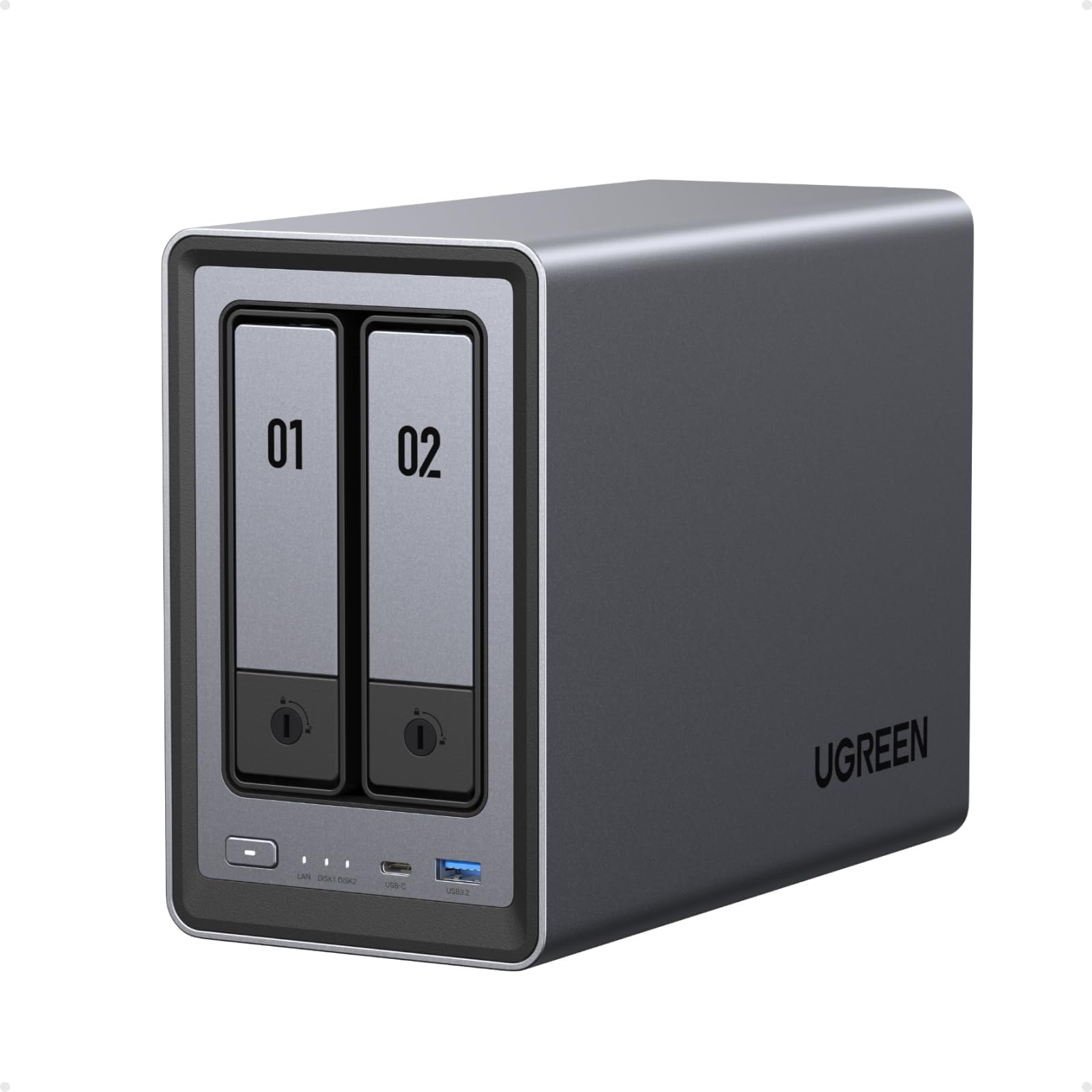
The UGREEN NASync DXP2800 is a powerful 2-bay desktop NAS featuring an Intel N100 quad-core CPU, 8GB DDR5 RAM, and 2.5GbE connectivity. It supports up to 80TB of storage with dual M.2 NVMe slots for caching or expansion. Designed for seamless multi-device access, it includes AI-driven photo organization and advanced encryption for secure, private cloud storageโall in a sleek, quiet aluminum chassis.


| ASIN | B0DYCBTV78 |
| Best Sellers Rank | 3,510 in Computers & Accessories ( See Top 100 in Computers & Accessories ) 1 in Network Attached Storage (NAS) Enclosures |
| Brand | UGREEN |
| Brand Name | UGREEN |
| Colour | grey |
| Compatible Devices | Laptop, Desktop, Server, Smartphone, Tablet |
| Compatible devices | Laptop, Desktop, Server, Smartphone, Tablet |
| Country of Origin | China |
| Customer Reviews | 4.7 out of 5 stars 256 Reviews |
| Enclosure Material | Aluminium |
| Is Assembly Required | No |
| Manufacturer | Ugreen Group Limited |
| Manufacturer Part Number | DXP2800 |
| Material | Aluminium |
| Model Number | DXP2800 |
| Mounting Type | Tabletop |
| Mounting type | Tabletop |
| Product Warranty | 2 year limited warranty |
| Size | 3.5" H x 17" W x 12" D |
T**S
Solid simple NAS
This is my first dedicated NAS, but I've been mucking about with hosting stuff on mini PCs etc for a while. Like many people, I've become more interested in having a 'personal cloud' as I'd prefer not to store my whole life on Google or Amazon's servers. That necessitates more storage than my little GMTEC Mini with its 4 nvme bays could offer. First impressions of the box are positive. It looks and feels good. A satin textured mix of pressed aluminium and high quality plastic. The HDD bays are simple to use and feel secure, though I'd like a bit more dampening on them. Like many NAS boxes, the DXP4800 has a Intel N100. Not a particularly fast processor, but fairly low wattage and also offers decent hardware transcoding performance for media. It's sufficient for my needs as I'm not using this machine for compute, just storage and running a media server. Similarly, the 8gb of RAM is close to the bare minimum I'd want. I can run 4 docker containers and only utilise about 33% of the allocation, so it does have a bit of headroom. The machine runs pretty quiet, with a single 120mm fan pushing air through the body. There's a nice magnetic dust cover, too. The two 8TB WD Red Plus drives I have in there at the moment are audible in use, but I'm rarely in the room when they're operational, as I've got a cache setup in unraid (more on that later). Suffice to say, if you've been used to the silence of solid state storage these past few years, you will notice the clunking sound of HDDs in operation. That's the price we pay for cheaper storage, though. There are a plethora of ports and storage expansion options beyond the 4 HDD bays and 2 NVME slots, making it easy to add USB and SD flash storage if necessary. I'm not going to comment on the UGreen OS as I actually immediately installed Unraid on the system because I have a few mismatched drives that Unraid is very good at taking advantage of. Having an SSD cache allows me to have a pool of storage that I can later move over to the HDDs when it fills up, meaning most of the HDD write/read noise happens at 3am when I can't hear it. Anyway, this isn't a review of Unraid, but it's important to note that this is 'just a pc' that happens to have convenient drive bays and a nice form factor. It's very simple to disable the OS EMMC in BIOS and boot into whatever OS/distro you fancy. Recommended.
J**S
If you're looking for a powerhouse of a NAS, this is the one
What a great little NAS. You get incredible features for the money. 2x 3.5 bays (can also take 2.5inch drives) and 2x NVME slots. Supports Docker absolutely fine. The UGREEN OS is built upon Debian and is still relatively new and devleoping. But I believe the OS can be replaced if you wanted too. RAM can be upgraded to 16GB. Incredibly easy to use, great build quality and certainly beats some of the more well known manufacturers. Highly recommended
R**S
Great for newbies
I am completely new to the world of NAS drives and I was keen to expand the limited storage on my laptop. I didn't want to have to use the laptop with an external drive plugged in, and I have a few nagging doubts about the security of my information on the cloud. These fears may be unfounded, but I'm just cautious. The setting up of this NAS drive was a breeze. The wizard takes you through everything. I found a few useful YouTube videos too, which, combined with the wizard makes things easy. The drive is a nice sturdy construction and feels solid. It is superbly quiet with the Western Digital drives that I bought. The disk trays make installation of the disks very straightforward. It is certainly quick enough in its operation for my needs out of the box, but it offers upgradeability for those who wish to go down that route. The applications included with the drive are simple to use. I hoghly recommend this unit.
M**N
I would have bought Synology, but I'm very, very pleased with this!
After loading the NAS with 4x8TB WD Red Plus disks I had knocking about (honest), building a RAID5 took over 24 hours (I was expecting something like this). It feels like the WD Reds are a bit noisier than my IronWolfs... I have a Synology NAS - so the UGOS interface was not unfamiliar. Whilst the App variety may not be as extensive as Synology - the bits I use the most are there. I actually found setting up the user and group accounts much easier than Synology. The 2x2.5G connections are very welcome - means I can have a high-speed connection to my MiniPC at last. This NAS is going to be used as a high-speed repository for my myriad of less-often used photos and rarely being used interactively for image review. One thing I hope UGreen fix is that when you upload photos - an image indexing service kicks in to generate thumbnails of all the images (this took over 24 hours to complete - and not something you can easily disable). Just as well I only transferred around half my catalog; this really needs to be configurable! I was hoping to expand the internal memory up to 16GB - but the memory chips are like gold dust at the moment (and priced accordingly); this will be something I look at in due course. Indeed - the as-delivered Samsung 8GB SO-DIMM appears to no longer be in production! I chose the 4800 over the 4800+ as I'm unlikely to need 10Gbe in the near/medium term - so having 2x2.5G connections suits me better. The NAS (+4 disks) appears to consume around 50W in general usage - peaking at about 100W when booting. I've only just got the power meter - so I can't easily say what was being used when the images thumbnails were being created. I noticed the CPU got to just over 50C when processing this task - only bumping up the fan speed to maximum brought this down to something a 'bit more acceptable'. One thing I do miss is the lack of SHR - and it's ability to handle disks of different sizes. I have downloaded the UGreen app on my phone - but haven't really explored the capabilities of that yet. Maybe something to do over Christmas when I get bored of eating and drinking (and family ... who said that??). I've had to do 2 firmware updates over the past few days and updated a couple of the installed packages. From what I can see - everything is well made; the disk trays work (despite being a bit plasticky). The chunky Cat7 cables are each about 1m long - bit too short IMHO. Do I regret not going for the plus model? At the moment, no. I chose this because I feel it suits my needs.
D**J
Great value hardware & promising software
Good hardware specifications for the money. Unit is very quiet, although the drive bay caddies can rattle a bit which is rather annoying. Unit seems to stay fairly cool. Build quality is very nice. UGOS is pretty good, certainly not as full featured or as many apps as Synology but works for my needs. Dedicated app makes it easy to use and access from mobile. Using it mainly for photo storage and CCTV recording and transcribing. Also have a couple of other Docker containers running. If I need more storage, Iโll definitely look at the larger models.
K**.
Best for new NAS owners
I'm pretty happy with it. I like that you can do what you want with it basically there's not any restrictions on features that you have to pay extra for, software is open for your use how you need to use it. You can even change software with an NVME SSD. It's a very nice unit, useful for what I need it for, mainly media and file storage/backup. It is a bit loud but this is not a problem if the device is not in any bedrooms. I like how it is simple to use through the app. I like the price and hardware. My only problem is ugreen does not prioritise features that consumers want added they seem to add irrelevant features with updates before adding useful ones.
N**L
Great nas for home media
This nas is great. Well built, easy to use, software works and has been very reliable since setup. Prior to this purchase I was using a small Synology nas... I wouldn't buy another Synology nas as the UGREEN nas is so much simpler to use. Im using this nas for media (movies, tv shows, music etc) and have had no issues running home media software nor streaming content on my home network.
P**L
Noisy under load without SSD caching
If you have been living with silent SSD drives past few years, beware you're in for a shock at how noisy mechanical drives are again. Desk shaking floor shaking under load. That was my first impression. Although it could be the drives I bought with it as seen in pic but im sure its just mechanical drives in general. Dont put it in your bedroom lol Other than that its a pretty amazing bit of kit. I went Raid 0 with 2 20TB disks so no redundancy but maximum storage (after format its 36TB) Great software and easy to use at setup with loads of potential with additional apps to configure it however you wish. Edit: Since post I added 2 M2 SSD drives for caching and its eliminated much of the noise and sped access up to where it almost feels like an internal SSD now. Highly recommended to pay the extra as it completely changes the performance. Although good luck buying them with price hikes and limited to one per customer ect.
Trustpilot
1 month ago
2 weeks ago