We remain fully operational. Our teams are working around the clock to ensure your deliveries continue safely.

DOWNLOAD THE APP


Copyright © 2025 Desertcart Holdings Limited
DOWNLOAD THE APP
Buy anything from 5,000+ international stores. One checkout price. No surprise fees. Join 2M+ shoppers on Desertcart.
Desertcart purchases this item on your behalf and handles shipping, customs, and support to Thailand.
🚀 Elevate your home network to warp speed with Nighthawk WiFi 7!
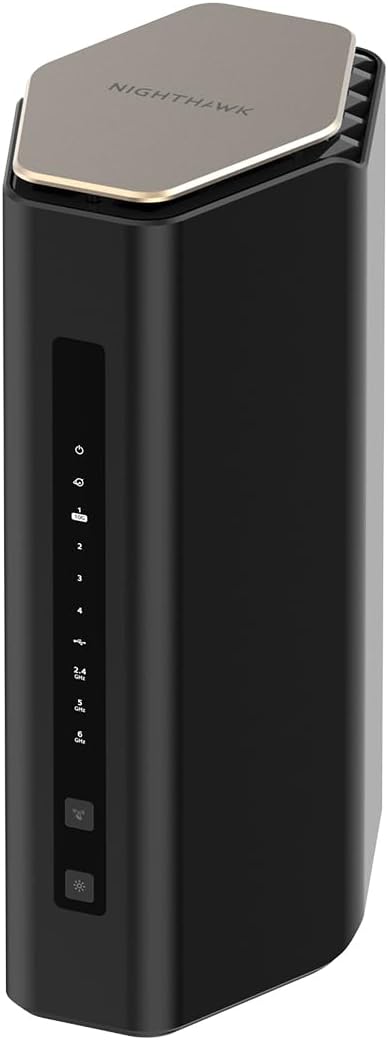
The NETGEAR Nighthawk BE17000 WiFi 7 Router delivers ultra-fast 17 Gbps tri-band wireless speeds, covering up to 3,300 sq. ft. and supporting 150 devices simultaneously. Featuring a 10 Gigabit Ethernet port for lightning-fast wired connections and advanced security with NETGEAR Armor, it’s designed for gamers, streamers, and professionals demanding top-tier performance and seamless connectivity.


| ASIN | B0DW1TZL1L |
| Antenna Location | Business, Gaming, Home |
| Antenna Type | Fixed |
| Best Sellers Rank | #43 in Computers & Accessories ( See Top 100 in Computers & Accessories ) #4 in Computer Routers |
| Brand | NETGEAR |
| Built-In Media | One (1) 19V/3.42A power adapter, One (1) 2 m Ethernet cable, One (1) WiFi 7 Tri-Band Router (BE17000), Quick start guide |
| Color | Black |
| Compatible Devices | Gaming Console, Personal Computer, Security Camera, Smart Television, Smartphone |
| Connectivity Protocol | Wi-Fi, Ethernet |
| Connectivity Range | 3300 Square Feet |
| Connectivity Technology | Ethernet, Wi-Fi |
| Control Method | App |
| Coverage | 3300 square feet |
| Customer Reviews | 4.3 4.3 out of 5 stars (217) |
| Data Transfer Rate | 17 Gigabits Per Second |
| Frequency | 6 GHz |
| Frequency Band Class | Tri-Band |
| Has Internet Connectivity | Yes |
| Has Security Updates | Yes |
| Is Modem Compatible | No |
| LAN Port Bandwidth | 10 Gbps |
| Manufacturer | NETGEAR |
| Maximum Upstream Data Transfer Rate | 10000 Megabits Per Second |
| Mfr Part Number | BE17000-1AZPAS |
| Model Name | BE17000-1AZPAS |
| Model Number | BE17000-1AZPAS |
| Number of Ports | 4 |
| Operating System | ZyNOS |
| Other Special Features of the Product | Internet Security |
| Router Network Type | Tri-band |
| Security Protocol | WPA3, WPA2-Enterprise |
| UPC | 606449174106 |
| Unit Count | 1.0 Count |
| Voltage | 19 Volts (DC) |
| Warranty Description | 1 Year Limited |
| Wi-Fi Generation | Wi-Fi 7 |
| Wireless Compability | 802.11.be |
M**E
Good buy. Fast and easy setup
Easy setup, works great. Up to 150 devices. 2.6g, 5g, 6g. No issues so far!
F**N
Top Notch WIFI Router!
I bought this router through the Amazon used program to save some $$. It came in good packaging with all the original included accessories. There were no blemishes and it was like new. I did have an issue with setting it up where the previous owner had changed the admin password and it wouldn’t let me configure it until I called Netgear support. They were able to reset it after I sent them an email with the serial number and proof of purchase. Once I set it up, it was blazing fast and worked great. It has excellent range and worked for all 30 of my WIFI and ethernet devices. If you are willing to deal with some potential extra steps, this is a good way to save some cash. I am a very tech savvy individual so I don’t have issues with things going a little sideways once in a while. Overall, I’m very happy with the router, Netgear tech support, and product.
D**E
Awesome Network Router for Medium-High Internet Traffic
Title: Awesome Router Description: The BE17000 Router substantially increased the network/internet speed on my home network. The setup was very easy, and I had the router up and running in less than 15 minutes.
M**W
You will not find WiFi here, only pain.
TL;DR - Frustrating setup process, contrary to the promised "fast and easy" configuration. Range actually seemed worse than my current Netgear router, which is 7 years old. Very unreliable connectivity. Speed was great, when it worked, but that's the rub. Devices would randomly be kicked off the network and we frequently had to power cycle the modem and router to restore the main carrier signal to get back online. None of this is good for any router, but it's unacceptable at this price point. Extremely disappointed with this product, which resulted in it being returned. Specifically, this review is for the 17Gbps, 10G Port model, which you know, happens to be the top of the line, most expensive offering. Also, for general knowledge, I attempted to use this device with Xfinity high-speed cable service. Disclaimer: I am not an engineer (lot of folks claiming that these days...IYKYK). I am also not a network admin, SYSOP, BBS, modem-dodem, ICQ, wonder-guru tech guy. That said, I'm not a total dunce with computers. I've built my own rigs for over a decade and have configured home WiFi networks for myself, friends and family, so I at least know the basics of what I'm doing. Also, I am normally a fan of Netgear products. I am currently using an older Nighthawk router, one which I went back to using after returning this POS, one which is still running more reliably then this newer, supposed marvel of technology. Okay, let's get into it. The coolest thing about this device is probably the box and packaging. They really upsell you with the presentation. It's a good thing, too, because those are the only positive feelings I have left from this item, so it was kind of them to trick me right out of the gate. Basic setup is, well, basic. You plug it in to an outlet and connect it to your modem. However, when it comes to setting up the WiFi network itself, they make you download an app. Okay, whatever, this is nothing new since literally everything has an app these days. They claim it is "easy and effortless setup." The setup, was in fact, neither easy, nor effortless. After the app was installed, I had to repeatedly go through the basic setup of connecting to my ISP because it kept failing. And this wasn't a "once or twice" type failure, it easily happened over a half-dozen times before it finally established a connection. Then came the actual network configuration, where you use the preestablished one they provide you, but then change to your own name and login credentials. This was a repeat of the process failing out midway and then having to start all over. This whole "easy setup" easily took over an hour, so yeah, I know that all I was doing was clicking buttons on the app, but it was still frustrating. Finally, finally everything seemed to be getting ironed out and the network was established. Okay, great, let's start connecting our myriad devices. Surprisingly, this was rather painless. Phones, tablets, PCs, security cameras, TVs, everything seemed to be connecting. I resigned myself to the whole configuration process having just been teething pains, and thought the worst was behind me. How wrong I was. The first 24 hours of usage were...fine...for the most part. One thing I noticed though was that despite speed tests showing good numbers, the perimeter security cameras were all showing lower signal strength than normal and seemed to be taking longer to access the live feeds. That's...curious...especially considering how strong a signal they had with the old router. This new one is supposed to have nearly twice the coverage range, right? Surely, the manufacturer wouldn't lie, right? We got about another day of relatively reliable usage and then the problems really started. Devices kept getting dropped off the network and we were prompted to re-enter the password. The cell phones and televisions would show connected but would have "no internet access." Then we started noticing sluggish performance on the work computers, with frequent drop-offs in connectivity. It got to the point where almost daily, and sometimes even multiple times per day, we had to power cycle the modem and router to get things up and running again. Based on the strange disconnection issues of the various devices, I feel like there had to be something weird going on with the tri-bands and that the 2.4 and the 5 and 6 weren't playing nicely. I certainly did not diagnose this, but it's just a hunch. I was not going to bother dealing with tech support. I really don't have time for that, especially not when I had a perfectly functioning, older router just sitting there that I could plug back in. And plug it back in I did. The older Nighthawk powered back up with the old network still in place and all the bad thoughts went away. Perfectly reliable connectivity was restored at only marginally slower speeds. Oh, and the cameras around the property all had their stronger signals back. Funny how that works. I really wanted to like this product because the promise of faster speeds and greater range was, well, promising. Alas, it was not to be, and so, with a tear in my eye, I packed it up and started the return process. Maybe I got a dud, but when you consider that this is their top model, that's not really excusable in my book. As I mentioned earlier, I've used Netgear products for years (and still do, technically), but I will be looking elsewhere for a router upgrade because I'm simply not willing to roll the dice on another one after this experience.
I**S
Good solid performance, reasonable price
Good solid performance Replaced a 13 YO NETGEAR router. Installed 3 days ago. 30+ devices connected and all are working well
L**D
Set-up is not as easy as promoted. Overall the router works well.
The router set-up is not flawless. The Nighthawk App is glitchy. Started with following instructions to use the Nighthawk App. I followed each,step and towards the end of set-up, either the App, or router hangs. Being an old school network guy, I logged into the router and did the set-up there. Once I got set-up via the local,web browser, the interface in the Nighthawk App synced with the router and there it is, the tri-band router is,working. I really like the 6G WiFi for my devices. I also created a Mesh wireless network using the the Netgear EXS25 and EXS27 extenders. Again I tried the Nighthawk App set-up, hangs and clunky. I resorted to plugging in a lan/etherenet cable into the ports and configured manually. Worked well. Again the Nighthawk App finally caught up after the manual web,based set-up. Netgear please fix that clunky Nighthawk set-up App. A novice will find this frustrating and may return the product. Perhaps you should also publish,how to set-up using the web interface. I would have given this 3 stars but for now 4 will suffice. Once the nework,is running,it is a breeze to admimister. Also with the 3000 sq foot coverage of the router plus 2 wifi extenders, the whole house is completely covered with no weak or blind areas.
T**D
Upgraded
Title: Upgraded Description: We noticed immediately multiple devices stopped queuing videos, the blue circle of death disappeared. My smart TV showed better connection right away. The coverage of more sq footage was noticed by my kids in the far rooms. Now I can monitor how many devices, test my speed, and see that my network is handling all my devices better than my previous set up. I did have to call my internet provider for help with passwords, but it was mostly Plug and play. I realized this is the first wifi I have set up with my smart phone, instead of using a home computer. I got a good deal, and this unit works well for my family, thank you
A**R
Easy and reliable
The Netgear router was very easy to install. I downloaded the app and followed the steps. It took between 5 to 10 minutes. It works very reliable and all my devices such as computer, TV, and tablet connect quickly and Internet works well. Additionally, the router is nicely designed and looks good on top of my cabinet.
Trustpilot
1 week ago
2 months ago