We remain fully operational. Our teams are working around the clock to ensure your deliveries continue safely.

DOWNLOAD THE APP


Copyright © 2025 Desertcart Holdings Limited
DOWNLOAD THE APP
Buy anything from 5,000+ international stores. One checkout price. No surprise fees. Join 2M+ shoppers on Desertcart.
Desertcart purchases this item on your behalf and handles shipping, customs, and support to Thailand.
🔥 Engrave Your World, Anywhere, Anytime!
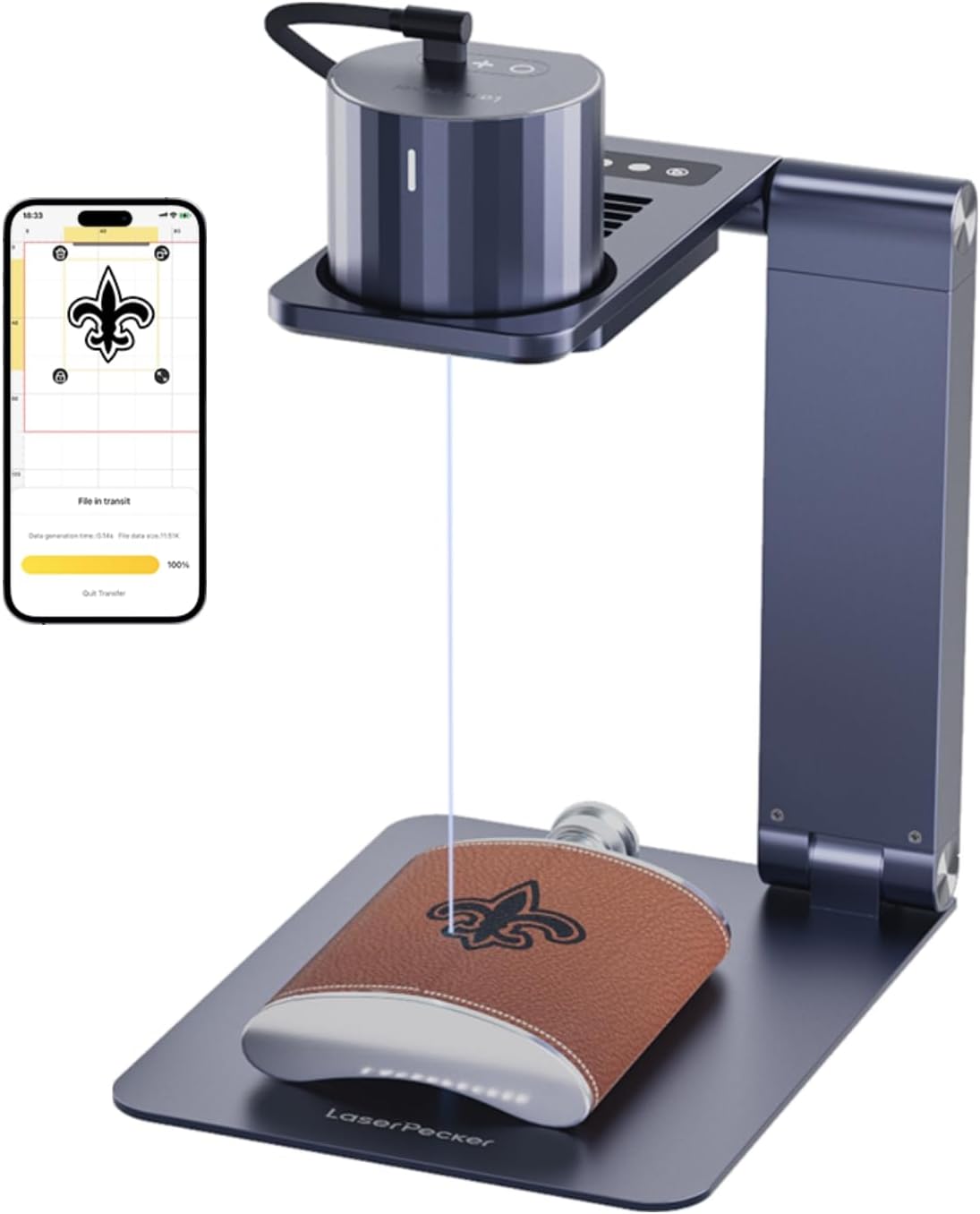
The LaserPecker LP1 Pro is a compact, portable diode laser engraver featuring a 405nm blue-violet laser with 0.15mm precision and an auto-focus stand for effortless setup. Designed for beginners and pros alike, it supports Bluetooth app control for engraving on wood, leather, felt, and more, all while prioritizing user safety with built-in protective features. Perfect for on-the-go customization, it runs on USB power and includes a full accessory kit with safety glasses and tripod.


| ASIN | B08K8Z1H4G |
| ASIN | B08K8Z1H4G |
| Batteries Included? | No |
| Batteries Required? | No |
| Color | Lp1 Pro Suit |
| Customer Reviews | 4.2 4.2 out of 5 stars (512) |
| Customer reviews | 4.2 4.2 out of 5 stars (512) |
| Date First Available | 23 July 2022 |
| Date First Available | 23 July 2022 |
| Item Package Quantity | 1 |
| Item Weight | 1.88 Kilograms |
| Item model number | L1 Pro Suit |
| Item model number | L1 Pro Suit |
| Manufacturer | LaserPecker |
| Manufacturer | LaserPecker |
| Material | Paper-board, Fabric, Wood, Leather, Felt,Plastic,Cloth,Fruit More |
| Package Dimensions | 23.6 x 19.99 x 14.71 cm; 1.88 kg |
| Package Dimensions | 23.6 x 19.99 x 14.71 cm; 1.88 kg |
| Part number | 20200929 |
| Size | LP1 Pro Suit |
Z**D
Great first-step!
Perfect for beginners. I basically got it for my Dad for him to practice with before he gets a heavy-duty one. It does the job perfectly and helped him understand how the UI's with laser engravers work
C**C
What can I say, I love this thing. Makes me wonder why it took me so long to buy a laser engraver. I was waffling between this one and another brand but I went with this one because it was compact and portable. As long as you have a power supply, you can engrave pretty much anywhere. I use the engraver with the Apple App on my iPhone. I've not tried the Windows app. So far, I've been engraving wood and leather goods for my Winery and the results are very nice and professional looking. I've found that it will use bitmap and jpeg files that are in my phone's photo album. Honestly, the biggest challenge I have is getting my artwork from my computer to my phone's album. I just email them to myself. I did want to engrave drinking horns and discovered that the laser just reflects off of the light colored horns without even making a mark. The solution, I found, was to cover the horn with painters tape first and then engrave. I had to turn the depth up pretty high but it engraved nicely after that. You can see the one horn cup I engraved in one of my pictures. I'm guessing this method will work for other items that are too reflective for the engraver. I really do love this engraver and only have a few complaints. These are the things I think could be improved. First, the App interface is white and orange text which is nearly impossible to see with the safety glasses on. Black text in the option buttons would have been better. Second, there are too many verification popups in the App while in use. When you want to engrave, you have to tap four times, which is three times too many. Yeah, I get that you want to remind users to be safe and check the distance between engraver and material, but maybe make that go away after a tutorial. I get sort of annoyed that I have to tap so many times just to repeat a previous job. Third, the default preview setting is so dim, no one can possible see it. You have to immediately turn the brightness up to see a preview. Maybe make the brightest setting the default. Fourth, I thought it had a battery that needed charging. It does not. It has to stay plugged in while in use and the cord that comes with it is not very long. If you use an extension cord, be careful that the cord does not move the unit while in use. I found that my one cord had a heavy end that, if it slipped off the table, would take the engraver, tripod and all, with it. I have a USB Ryobi battery adapter that I found works just fine if I am going to be out and about at markets and shows and need to do some impromptu engraving. My only regret is that I didn't spend more to get the one with the base that rotates cylinders (for engraving mugs). But that may be a future purchase. I don't know the lifespan of this laser and have only been using it for a couple of days, so I guess only time will tell how durable it is.
G**R
I am having so much fun evolving from a retired knowledge worker to creating woodworking functional art pieces. I generally use reclaimed hardwoods found in Hawaii such as Koa, Monkey Pod, Milo (Pacific Rosewood), and Eucalyptus to name a few. I am learning so much and have given myself a very creative and satisfying outlet. I was looking for something that could give me the professional look of a logo and signature on my pieces while still providing the flexibility of combining customized information related to the wood species and the date of the piece. Additionally, the solution had to be priced in a range my new business could afford. My general feedback is WOW!!! Such a great tool in a small and affordable package! Don't let the looks of the smallness of the LaserPecker fool you into thinking this is just a cheap toy. I can tell you, it is not! I've tested the LaserPecker using a graphic design I custom made using Microsoft Word on an iMac and have the LaserPecker software installed on my iPhone. I save the graphic (the arched Trade Marked business name "Makana Originals", the maker's mark, and the Copyright symbol portion of the attached photograph) from MS Word as a ".png" file on my iMac. I then access the graphic remotely through my iPhone via LaserPecker's application's "Album" functionality on the app's home screen. That functionality accesses my iPhone Photo albums. I added the date "July, 2023" and "Monkey Pod" information using LaserPecker's application built in functionality. That took less than a couple of minutes In order to visualize placement of your burn, LaserPecker provides a very useful "Preview" capability which draws a non-etching rectangular laser outline of your graphic. "Preview" can also show the center location of the graphic. Be sure to increase the intensity of the light. The application defaults to the light being very dim and I wasn't able to see it at first. Setup and use of the LaserPecker was much easier and intuitive than I expected. The engraving was exactly what I was looking for. Their "How to engrave perfectly" documentation was especially useful! The difficulties which I spent most of my time resolving were mostly related to where MacOS (iMac) and iOS (iPhone) save and expect to find shared files. Also, Microsoft's version of MacOS Word is a bit challenging. But the Internet was very helpful in answering any questions I had. Of course, this issue has a little to do with the usability of LaserPecker's application. But I was able to finally figure out where the application was looking for the graphic. Even though my testing has, so far, been strictly limited to my use of a single custom graphic and some type-written words, I can say without any reservation that their application was easy to set up and use. Simply said, the interface is intuitive and flexible. I was up and running in a matter of a few minutes. Familiarizing myself with the application's interface and functionality took less than an hour. Figuring out how to use and access a custom graphics took a few hours spanned over a couple of days. Fine tuning my logo burn was a matter of several tests taking place over a couple of hours.. If you plan on using most of LaserPecker's built-in graphics or typing, you'll be working in no time. Bottom line - I'm up and running! I received my LaserPecker mid-day Thursday, and etched the piece in the attached picture by Saturday morning. So far, I couldn't be happier with my purchase!!
B**M
With no detailed manual the product is a little difficult to figure out. That being said, this device is one cool thing! Portable, Versatile, Fairly easy to work once you get an understanding of how to do so. Kind of like IKEA...who needs instructions??? Lol. All-in-all.. a very good purchase for simple carvings to put on wood, recycled paper and more. I just happen to think those 2 things look the coolest. You can get a really cool, old-timey look by burning images onto brown recycled paper envelopes and cards, and those are pretty cheap on Amazon so if you mess up the first time you're not losing out on a ton of money. Actually I would suggest that as a good starting point so you can try as many times as you want and get a hang of the product itself before going ham on expensive wood. Wood coasters are fairly cheap too in bulk. Good stuff. :)
P**H
First, before anything else, we had some pretty mixed expectations in regards to this little guy. So much that our team was evenly split. However, actual opinions (come time) began to swiftly lean into the direction of "impressed". For one, this little LaserPecker is quite costly. Especially, when you have full-out machines that cost around the same price that can cover a larger area. However, they do not compare to the user-friendliness of this one. Some of those machines are like using a 3D printer in ways (some others, a little easier than that). This little LaserPecker, however, is the easiest of them all, and by far, the most portable. Assuming the app works at least. Looking into some of the reviews for the app, we were initially a bit worried. It doesn't have the best rep. However (a lot of howevers in this review), the app seems to work just fine outside a small hiccup. Our small hiccup involved registration as the code wouldn't send out to our mail server. So we switched to Gmail and received it (finding out that they send confirmation codes from a generic domain that was likely blocked by our server due to known spam issues in the past). In the end, though, we got the code and we were able to continue using it. It WOULD be nice not to have to do that though. Since everything is managed locally from the app, we felt that any kind of confirmation codes or registration was unneeded. If anything, do a normal user/pass scenario and be done with it, but only if you have a community of art or something to go with it. Else, an account shouldn't be needed. As long as this paragraph might be, we didn't experience much trouble with it, so no stars taken. That little tidbit aside, we were able to get the app to work and were able to engrave a number of things, and had quite a lot of fun doing so. The wait time isn't so bad for the smaller stuff (branding of small logos and text on leatherwear and the sort). Especially, compared to something like a 3D printer. So you will find yourself "burning" (literally) through a lot of things as you have fun trying it out on various surfaces. However, when you go a little deeper and larger (especially with wood), the math suddenly changes. A 100mm x 100mm flower on wood (100% laser, 100% depth) we did for someone took 723 minutes (that was a little painful). So it shines best with small branding and the sort. Leather works quite well with this unit, as well as paper, cardboard, and simple plastics. Smartphone cases that feature durable plastic may take a number of runs to get a crisp enough result. We wound up using an old beat-up case as practice and ran it under it about 5 times before we were happy (each time, upping the laser or depth more and more until we hit 100% laser and 60% depth and called it good. The only thing we had a problem with was the feet, which should be dipped in rubber or cover with rubber caps of some sort. The long flower print we did featured a portion of the flower chopped off since the tripod of the laser slid ever so slightly. Likely due to the curvature of the surface it was on. The feet of the tripod are plastic, so there isn't really any grip to help keep it steady. Sometimes, it's the simple things that wind up mattering a lot. The app is quite user-friendly and as long as it doesn't experience any of the issues before mentioned (by other people than ourselves), we would say that it has plenty of potential as they expand on it. So far, we absolutely love it. **If you have found our review helpful, please vote it as helpful below so we know. This helps us to provide quality feedback in the future.
J**O
From it's crisp clean lines and solid geometric design to it's user friendly handfeel you will not want to stop exploring all of the amazing new workflows that your imagination can create! From templates to cards to plaques! You will discover that Laser Pecker PRO is very capable, accurate and a joy to watch! You also find this technology overlaps into very many other crafting areas that will surely help you come up with great new designs! Once you start using it your mind will open up to an entirely new world of creativity and the applications will become more obvious with use. It's hard to believe that a laser can do all of this in such a small creative package but the truth is it does all of this and still so much more! You really can't go wrong buying it on Amazon and I cannot see how anyone would not fall in love with this product right away... No one paid me to say any of this and I even wrote the company to let them know how impressed I was, so... If you're thinking about getting one of these it's a great place to start and due to the form factor and functionality it will never go out of style no matter what other laser products you decide to buy in the future. You will always want one of these in your tool kit! How about some creative instant memories on a tree out in front of your house? How about customized lettering out of foam? IT CUTS! How about that LATTE FOAM with customized cinnamon designs? This product works rather quickly for what it's doing and can easily fit into the projects workflow at any point to add some creative flair on a number of different fronts. Can you tell that I really want people to try it? Happy laser peckering... Okay, it's so big but it's so small!
Trustpilot
2 months ago
1 month ago