⚡ Power your build with speed, style, and smart cooling!
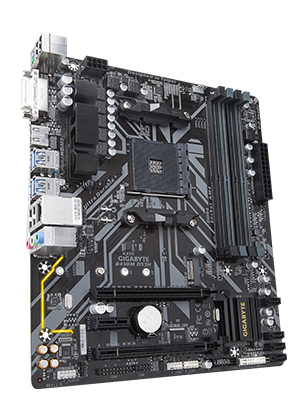
The GIGABYTE B450M DS3H is a Micro ATX motherboard designed for AMD Ryzen 1st and 2nd generation processors, featuring dual channel DDR4 memory support across 4 DIMMs, PCIe Gen3 x4 M.2 NVMe for ultra-fast storage, and RGB Fusion lighting with 7 color options. It includes Smart Fan 5 technology for optimized cooling, Realtek Gigabit LAN with internet acceleration, and multiple display outputs (HDMI, DVI-D), making it a reliable, budget-friendly foundation for gaming or professional builds.


| ASIN | B07FWVJSHC |
| Best Sellers Rank | #511 in Computer Motherboards |
| Brand | GIGABYTE |
| Built-In Media | Motherboard |
| CPU Socket | Socket AM4 |
| Chipset Family | AMD Promontory |
| Chipset Type | AMD B450 |
| Compatible Devices | Personal Computer |
| Compatible Processors | AMD 1st Gerenration Ryzen , AMD 2nd Gerenration Ryzen |
| Customer Reviews | 4.6 out of 5 stars 8,369 Reviews |
| Global Trade Identification Number | 00889523014196 |
| Graphics Card Interface | PCI Express |
| Item Dimensions L x W x H | 12.25"L x 4.22"W x 15"H |
| Item Type Name | MicroATX Motherboard |
| Item Weight | 454 Grams |
| Main Power Connector Type | 24-Pin |
| Manufacturer | Gigabyte Technology |
| Memory Clock Speed | 3600 MHz |
| Memory Slots Available | 4 |
| Memory Storage Capacity | 1000 TB |
| Mfr Part Number | B450M DS3H |
| Model Name | B450M DS3H |
| Model Number | B450M |
| Number of Ethernet Ports | 1 |
| Number of Ports | 1 |
| Platform | Windows 10, Windows 7 |
| Processor Socket | Socket AM4 |
| RAM Memory Technology | DDR4 |
| Ram Memory Maximum Size | 128 GB |
| S/PDIF Connector Type | Optical |
| System Bus Standard Supported | SATA 3 |
| Total Number of HDMI Ports | 1 |
| Total PCIe Ports | 3 |
| Total SATA Ports | 4 |
| Total Usb Ports | 11 |
| UPC | 889523014196 |
| USB 2.0 | 2 |
| Unit Count | 1.0 Count |
| Warranty Description | 3 years |
W**K
Good for inexpensive gaming build or home office PC.
The only thing some users might not like it the position of one of four SATA ports. If you plug SATA cable that is not on 90 angle, it would be impossible to install full length graphics card. The board allows for overclocking, but it does not make it easy by providing +/- values listed. Instead user has to enter new values. It requires knowledge of voltages and frequencies to set up overclocking correctly. Provided by Gigabyte SIV software allows for easier overclocking and setting XMP for RAM. Unfortunately SIV does not display RAM (DDR4) speed correctly while displaying it's status. I think it's a Windows 10 issue. Thankfully, DVD disc provided with the motherboard has a CPU-Z that correctly displays RAM speed, so there is a way to verify that settings are applied correctly. I have used this mobo to build a home office PC with Athlon 3000G and it's build in Vega 3. It allowed me to reliably overclock APU to 4.025 GHz with core voltage of 1.4V. I'm using SATA SSD, so I have not tried NVMe functionality on this board. AMD claims that Ryzen is required for NVMe to actually work as a system drive, but there are reviews of systems with Athlon 3000G working fine with NVMe as a boot/system drive. It worked with Athlon 3000G out of the box without any firmware update, so it is Ryzen 3000 ready (3000G requires the same mobo firmware as ZEN 2 Ryzen processors). The board is not flimsy and seems to be well build. The built-in RGB lighting on thy mobo is basically an orange light that can be turned on or of. That's it. There is however an RGB header for other components. The one shortcoming is that there are only two fan headers, one for CPU and the other for the case, so in some builds it means that additional splitters controllers are required, or fans will have to work at constant speed being not controlled by motherboard. For the price it is still a very good product.
T**E
Solid board
I've used this motherboard in two budget boards for both my 18 year old son's gaming rig (Video) and 13 year old daughter's homework and gaming rig (pictured). Both builds were super easy except for my daughter's build...when I went to install Windows 7, it got to the beginning where you click to install windows, both mouse and keyboard turned off. This did not happen in my son's build which I did first. Could not figure out why. I ended up going straight to Windows 10 install and it worked fine. Anyway, both systems are up and running and run the games they play flawlessly. He plays GTA V and League of Legends and she plays Fortnite and some other random games. They both play Overwatch together. Son's AMD Ryzen 5 1600 (AF) B450M DS3H 16gb OLOy Warhawk RGB 3200 ram Enermax Aquafusion 120mm AIO Enermax SquA RGB Fans 2x120mm Samsung 512gb m.2 Thermaltake Smart 600w ps EVGA GTX 780 TI DIYPC S2-W-RGB White ATX Mid Tower Daughter's AMD Ryzen 3 1200 B450M DS3H 16gb OLOy Warhawk RGB 3200 ram ASUS GeForce GTX 1650 4GB Phoenix Fan OC Edition Samsung 512gb SSD Thermaltake 750w PS darkFlash DLM22 Mint Green Micro ATX case
M**W
Great mother board for the price
For the price its a phenomenal motherboard (At time of writing, price was 75 shipped). 4 ddr4 slots, 2 slots for video cards, 4 sata 3 ports, very easy bios with mouse support (an appreciated feature). My ONLY complaints about the board is the location and orientation of the sata ports can cause interference with any decent sized graphics card. The ports are orients straight off the board, instead of to the side- so cables will point straight towards the card. The lower 2 will clear most cards with ease (My application has a 1080ti, and even then both ports were easily accessible), but the upper two ports are covered. You CAN readily use a low-profile sata cable however, just keep that in mind. Second and last real complaint about the board is that it lacks much in the way of fan headers. Theres a single fan header for your cpu, and a single fan header for your system fans. *Thats it*. If you plan to run more than 2 fans, you will need to approach this (Fan controller, splitters, fans powered by sata or molex, etc). Not a huge deal- again, this is a 75 dollar board- but one thing to keep in mind. One last and very, VERY minor critique, is that the ram is located quite high on the board, which can cause screw-clearance issues with top mounted fans/radiators. Ive installed these boards in a few different cases now and things have ALWAYS fit, but the ram posts always block off 1 screw in the top fans. Ive always had to install the fans, than the board. If you want to do anything with the fans, you have to remove the board to get that last screw (assuming you dont just leave the screw out). Not a huge deal by any means- abut again, something to be aware of. Again, for the price? Phenomenal product.
C**H
DOA De-Mystified
OK, full disclosure: I did not buy this board. I am a 35yr system builder who swapped a (better) motherboard with a good friend for this one ... which he swore was dead. These days we don't build many machines ... save for professional grade gaming rigs, CAD stations, and File Servers. Anything else -- just go buy something from Dell or HP and call it a day. <G> So I don't have much experience with Micro-ATX Ryzen boards, as you wouldn't ordinarily choose one for any of the aforementioned building scenarios. So the first thing I did was pop a Ryzen 5 3600 (same CPU my friend tried) into the socket and power it up ... NADA! Not a blip on the fan, CPU Fan, no measurable voltage anywhere with a volt meter. So ... dead, right? Wrong! Being familiar with the finicky BIOS requirements for different CPU's in this board, I tried something older. It was actually an AMD A8. Well, that was too old (not on the compatible CPU list) but it did prove that the board wasn't dead. With that CPU installed, it did everything you'd expect -- except POST. Digging a little deeper, I tore apart one of my older rigs and unearthed a Ryzen 5 1600. Bingo! The board powered up to a successful POST. But here's where it gets interesting ... According to the Gigabyte website, the BIOS required for the Ryzen 5 3600 is F40. The installed BIOS on the board, as shipped, was F41. So the box bore the "AMD Ryzen 3000 Desktop Ready" label, and should have worked. I went ahead and flashed to F50 (the latest as I'm writing this) while my 1600 was installed, reset to all of the default settings, and powered it off. At this point, I inserted the Ryzen 5 3600 back into the socket, powered up and ... the board works as it should! Not satisfied (because it should have worked with F41) I tried to see if I could a) get that revision to work, or b) reproduce the bizarre state the board shipped in. So I flashed back down to F32 (which doesn't support the Ryzen 3000 series) and reset the BIOS to defaults. Switching back to the 3600 at this point, it behaved as I would have expected. Fans spin, board powers up, but the CPU won't POST. Next I put the 1600 back in and flashed to F41 ... but this time I purposely did not reset the BIOS to default settings. Switched back to the 3600, and there we were ... back to the way the board shipped. Seemingly DOA. One more switch back to the 1600, reset the BIOS to default settings, switch back to the 3600 ... and indeed it works with F41 as well. So while I can't say this for certain (because obviously I didn't see their boards) I think many of the DOA experiences from the other posters might be due to a rash of boards that were hastily flashed from F32 (which is required first for anything beyond that) to F41 (so that they would be "Ryzen 3000 Ready") without resetting the BIOS to default settings. This seems to pretty consistently produce a board that appears to be DOA (at least with a Ryzen 5 3600 installed). It's also a much more plausible explanation than Gigabyte sending out a rash of dead boards. We've dealt with them for years (though admittedly with products a bit higher up the food chain) and have never had QC experiences of that nature. They're not totally off the hook, though. As if this is what happened, they're going to get a rash of these thrown back at them, and rightly so. That's why I took a star away. I'm using this board right now. Performance-wise, it's been fantastic. If you're a tinkering sort, and you know what you're doing, and you have access tp extra Ryzen CPU's, then this is a solid choice, it's probably the most "bang for the buck" in this price range. On the other hand, if you're not all of these things, you're only going to save 5 or 10 bucks over the next competing brand. The time you'll likely waste unraveling this mystery is worth far more than that. So much so, that I'd strongly advise you to choose something else if that's the case.
K**Z
BEST motherboard at this price, but.. get the wifi version if you need wifi.
If you are interested in wifi, and bluetooth as a bonus, I would easily recommend getting the B450M DS3H WIFI (rev. 1.0) on amazon over this product at this time for $20 more. Otherwise it is possible to fit a wifi on the lower PCIe x 4, but it is very cramped, reduces GPU airflow, and I've even noticed that it occasionally shuts the wifi down when the heat gets too intense from my stress tests. Like other reviews have noted, if you install a GPU the PCIe x1 slot below it along with the CMOS battery are completely covered. Also don't plan on putting a second GPU in this motherboard. It is impossible to install another GPU without covering the USB2, 1, COM, and TPM inputs, and in my DIYPC mini case a second GPU wouldn't fit due to cramping with the PSU, so you would need at least a mid tower to accomplish that. There is only 1 system fan PWM connection?!? So yes, I had to get a couple of fan splitters to remedy this for my 4 fan set up. Besides those issues, it is a truly wonderful, budget motherboard, but get the wifi version. PS you will still need a fan splitter with the wifi version so ya :p
S**Z
EXCELENTE PRODUCTO
EL PRODUCTO LLEVA MÁS DE 10 AÑOS Y EN EXCELENTES CONDICIONES
J**E
A solid, MicroATX B450 board with perhaps one issue
A no-nonsense B450 board with support for 4, full-size DRAM SIMMS AND M.2 support for this kind of price is hard to find, but Gigabyte found a way. The all-black finish is nice, and heat sinks on everything that needs them lends some sense of security for the build. More than enough USB 2 and USB 3 ports on the main IO for most users, with headers for more on the board itself. While the inclusion of RGB support was nice, it wasn't something I was intending to use, and this is where the one issue was: only one system fan header. Even MicroATX cases come with multiple case cooling options, and with only one system fan header, you are forced to use a splitter, or worse, have to install a fan management device. Luckily for me, I'm no over-clocker, so a simple 1:2 splitter let me power the front and back case fans. An oversight on my part, but as long as you don't intend to try and use this board as the base for an over-clocking project, it does the job. Additionally, SPICY BOMB, the provider of this board, delivered it AHEAD of schedule, for which I thank them. I will definitely keep them in mind for my next PC project.
A**N
Affordability
This Mobo is great for the price. Headers are easy to access when installing and overall its a solid board. I have very little I can complain about this board. I mean it was 75 dollars, Theres not too much quality of life in this board. Its the bare bones straight forward board you buy when you spent your whole budget on a GPU and CPU and you're trying to cut a few bucks from other places to make the difference. It has all that you need, and the Bios interface is pretty easy to navigate and really straight forward for first time builders. If you want a board with more quality of life i recommend getting a MSI or Asrock Steel legion board. But for those who dont need the extras or would rather use the money on buying a better part for their PC, I really cant recommend this enough. I dont think you should go any cheaper than this board. i mean PCIE x16, 1 M.2 sata, 4 Dimm slots, and a possibility to overclock "safely" (overclock at your own risk). That really all you need in a board.
L**G
Buen producto
Fácil de instalar, configurar y actualizar, simplemente cumple con su trabajo, la calidad de los materiales y la construcción se siente muy solida y te da la impresión de que durara muchos años, me hubiera gustado que trajera wifi integrada (por supuesto a un costo mayor), tiene suficientes puertos como para conectarle todo lo que necesites incluso para una ssd m2, dependiendo de que le compres te puedes armar un monstruo de pc con esta mother o algo mas discreto, el precio me parece justo, y si eres un niño rata incluso puedes configurar a gusto las brillantes lucecitas sin software o hardware adicional (personalmente odio eso pero bueno lo de hoy es que tu cpu parezca una atracción de feria)...
S**O
Excelente placa
Excelente placa com ótimo custo beneficio.
K**K
Very good board!
Edit: MB died on 5 June 2022. Very good board. Was worried with some of the negative reviews but it worked like a charm for me. Anyone who built their own pc before should not hv a problem. Tips: take a pic of the front panel pins with description for easier zoom in when connecting the jumpers and make sure the positive + pins match jumpers with small arrow notch. Pw_led for 2 pins. Pwr_led for 3 pins connector depending on your PC case. Make sure pay attention to every detail the diagram. I.e slots 1 and 2 for dual channel ram. Alternate layout. If you can assemble Ikea you can assemble this. My PC case came with a case fan with standard psu connector so I don't even need to use the motherboard fan header. M.2 slot is perfectly fine. Just unscrew the screw at the end of the slot, put it in and screw gently back. I am using integrated r5 2400g so didn't use the pci slots. Boots up the first time. Perfect. Delivered 24 Oct 2019 and box says supports ryzen 3000 desktop CPUs. So don't need bios flash.
J**0
High reliability - Good price.
This is a great board. It works well, its well specified, easy to install and it has been utterly reliable in service. I bought this at same time as another make of board and have been so impressed by this one and disappointed with the other make, that I have now bought another gigabyte to replace the other board. These boards do what they say on the tin. They may not be the best if you want fancy gaming facilities and bells and whistles, but if you want a solid and reliable board to build a high spec desktop or server, this does very well indeed. I have now used this board in small office fileserver and in a dedicated Video production workstation. In both applications it has proved 100% reliable
S**.
Good value for money
Trustpilot
1 month ago
2 weeks ago