Buy anything from 5,000+ international stores. One checkout price. No surprise fees. Join 2M+ shoppers on Desertcart.
Desertcart purchases this item on your behalf and handles shipping, customs, and support to Thailand.
🎨 Elevate your digital art game with precision and portability!
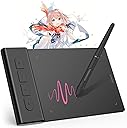
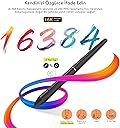
The VEIKK VK430 is a compact, ultra-thin 4x3 inch drawing tablet featuring 8192 pressure sensitivity levels and a 290 PPS report rate for smooth, precise input. It includes 4 customizable shortcut keys and a battery-free stylus, compatible across Windows, Mac, Linux, and Android platforms. Weighing only 82.5g, it’s designed for portability and professional-grade digital creativity.


| ASIN | B09TZS1F4Q |
| Active Surface Area | 4x3inch |
| Best Sellers Rank | #24,967 in Electronics ( See Top 100 in Electronics ) #42 in Graphic Tablets |
| Box Contents | Digital Pen, Pen Nib Clip, Replacement Nib |
| Brand | VEIKK |
| Brand Name | VEIKK |
| Colour | Grey |
| Compatible Devices | Windows 11/10/8/7, MAC OS 10.10 or above, Windows 10 Android 6.0 -13.0,Linux |
| Connectivity Technology | USB |
| Country of Origin | China |
| Customer Reviews | 4.1 out of 5 stars 3,976 Reviews |
| Display Type | LCD |
| Importer Contact Information | TIGER PUG COMMERCE PRIVATE LIMITED A-302, Dipiti Classic, 32-34,Suren Road, Andheri-east,Mumbai Suburban Maharashtra 400093 Tel:022-6879 5151 Email:[email protected] |
| Item Dimensions L x W | 6.3L x 3.9W Centimeters |
| Item Type Name | pen tablet |
| Item Weight Unit of Measure | 84 Grams |
| Manufacturer | VEIKK |
| Manufacturer Part Number | VEIKKVK430 |
| Model Name | VK430 |
| Model Number | VK430 |
| Native Resolution | 1920x1080 |
| Network Connectivity Technology | USB |
| Operating System | Chrome OS 88 or later, Windows 7 or later , Mac OS 10.12 or later, Android 6.0 or later and Linux |
| Packer Contact Information | Shenzhen Hezon Lito Technology Co.,Ltd. C3,No.45ShasanRoad,ShasanCommunity,ShajingStreet,BaoanDistrict,Shenzhen,China Email:[email protected] Tel:022-6879 5151 |
| Pressure Sensitivity | 8192 Levels |
| Product Features | Extra-Slim |
| Screen Size Unit of Measure | 3 Inches |
| Special Feature | Extra-Slim |
| Specific Uses For Product | Designing, Painting, Animation, 3D Modelling, E-signature, Online-Education, Drawing, Editing |
| Target Audience | Student |
| Unit Count | 1 Piece |
| Warranty Description | 1 year |
C**S
Great product and Excellent Customer service
After a lot of searching I ended up on choosing the Veikk S640. The company’s pricing is extremely competitive as compared to the other established brand like Wacom or Huion. This pen tablet is suitable for anybody interested in digital arts. As a graphic designer, I use coreldraw, photoshop and lightroom for majority of my work and this tablet does that job extremely well. The build quality of the tablet is exceptionally good for the price and the pen is very responsive. The nibs provided are of good quality and based on my use I have not faced any problems. The tablet has an attached USB cable. The surface of the tablet is pretty smooth. The only problem I faced was with the driver. If you are a windows 10 user, you might face a small problem during installation. To install the driver you need to disable secure boot in Bios and then disable the driver signature enforcement for the pressure to work. This can be done by a simple code in the command prompt “bcdedit.exe /set no integritychecks on”. I had trouble with the driver and contacted Veikk on their official website through online chat. I was pretty impressed with the way they handled their after sales support. They got in touch with me by email that I had provided them and helped me troubleshoot the problem. Veikk has filed an application with Microsoft regarding the Digital signature of the driver. I applaud their patience and dedication. All in all, the tablet does what it says. The interface is pretty simple and straightforward. The package contains a Tablet, Pen, 8pcs of replacement nibs and a nib remover. The products works well with Photoshop, coreldraw, Medibang Paint and illustrator (These are the softwares I use) If anybody wants to give digital arts a try. This can be the tablet to start you off cheap and easy.
A**L
Best tablet at the price point.
TL;DR: It's the best tablet you can get at the price point. If you're worried about the size then be assured it's perfectly fine even for veteran artists Long Version: The Good: = The tablet is pretty light, so you can easily carry it anywhere. The Pen pressure is very good and responsive if you set it right. The pen is perfect thickness and quite nice looking compared to others. I got the tablet fir 2500 during discount period which is very good. The Bad: = The cord is non-detachable, which might be problematic for some; I however use it directly in front of my laptop and the cable hid pretty neatly below the cooler pad. The surface might get scratched a little bit if you have a heavy stroke (Does not affect the performance in any way); You can get a tablet skin to cover it or just wrap thin paper around like I did. That's it, there's nothing else bad about it xD Note: 1. Pen buttons sometimes bug out with Photoshop, although I prefer to work with Krita and Manga Studio, so it didn't care much. 2. If you plan to play OSU!, some people recommend using Hawku drivers, but I didnt feel the need to. The original drivers work alright. Do remember to enable windows ink input option in the mapping settings though.
N**A
Tablet
Really good drawing tablet, had no issue with it even after months of use, size is also not too small and not too big, just the right size to store easily. Good for notes and drawing and the veikk software helps customize the pressure easily. The pen is study too, I've also dropped it multiple times and had no issue / scratches.
T**Y
Let's call it lite version of a drawing tablet
This drawing tablet is for those who have space constraints and also to those who would like to use it either for smartphones or or for tablets. I have never seen a drawing tablet this slim which weighs very less. I will get into its details in brief. It has a small drawing area which is more than enough either for a tablet or smartphone and the drawing area is smooth without a matte finish which we get to see in Premium veikk tablets which are for PCs. It would have been great if the sides of the tablet got encased completely by plastic casing as it would have made its looks better. Now when it comes to the pen which we get with the tablet i was impressed a lot by it. It gives us a premium feeling as it has a matte finish along with a perfect design which i didn't see in a veikk PC Tablet i already have. Believe me it feels so comfortable and perfect when using it. As said in the product details we get a drawing tablet, pen, few nibs, a nib clipper, usb type C and Micro USB OTG Adapters. And we don't have to worry about running out of nibs as veikk made nib spares available on amazon these days. I would have been much more happy if the tablet had a removable input cable than the fixed cable as even though the device gives us long life its cable may not give us the same life if we keep wrapping it and opening it. My suggestion would be just keep the cable length which you need rather than unwrapping it completely for longevity of the cable. Though it is mentioned by veikk that this tablet doesn't work with Samsung, i found that they do work but not like the way they work on other devices. I mean we get to see a cursor on other devices but on samsung we should visualize the screen of the samsung device on the tablet to use it. And the pressure levels work fine on samsung too. I have tried this tablet on smartphones of OnePlus, Vivo, Honor, Xiaomi, Samsung Tablet & Smartphone and Windows PC. I couldn't try it my iPhone as i didn't had the lightning cabe convertor at the moment. Finally i would say that i am satisfied with the tablet as it meets my requirements at an affordable price unlike its counterparts.
S**A
Okay for beginners, but much better products out there
It functions well on all the basics, and I appreciate the screen protector and gloves it comes with, but the buttons feel cheap and wobbly, the drivers don't give you any flexibility on custom assignments to the dial, and their inbuilt brush-size modifier on the dial is so slow, you'll have to spin the dial 10 times to get a decent size change (which makes manually clicking and changing the size instead seem easier). Some initial issues I had with this as well where some buttons registered double-taps when only pressed once. Though they've claimed to fix it now in their driver updates, so their customer care seems to be responsive atleast.
N**A
Money wasted product
After 4 months it is not working. What to do now. Totally money wasted product
I**M
Worth the Money
I bought the Veikk S640 mainly to try digital art and honestly, it surprised me. The pen feels smooth, pressure sensitivity works really well, and I love that it doesn’t need charging. The tablet is super slim and lightweight, so I can just throw it in my bag with my laptop. Setup was quick and it worked fine with my software. For the price, the performance is amazing. The only small downsides are the fixed USB cable (wish it was detachable) and the small drawing area, which might feel cramped if you’re used to bigger tablets. Overall, it’s perfect for beginners, students, or anyone who wants a portable tablet without spending too much. Definitely worth it!
A**H
Affordable portable tablet !
It's an ultra thin, light weight and affordable pen tablet ! Working area is about 6*4 inches ..which means it's a really compact tablet which is absolutely a great option to carry while travelling. It has got 8192 units of pressure sensitivity level ..which is what we'll get in any of the branded tablets (so a biiig plus at this affordable range). In the package,we'll get the Tablet, pen, pen sleeve, nib remover, few extra nibs, instruction manual, driver reminder in the box. USB cable is attached to the tablet itself. Both the tablet and the pen is really light in weight and has a sleek design. Pen works without a battery, so no worries about charging. The tablet surface is really smooth and the pen glides nicely upon it. There are no express keys or touch pad. A tiny indicator blinks when the tablet is plugged into the laptop. The installation and set up is pretty simple. I have a win 10 laptop and it worked fine with it. I tried the tablet in both krita and Photoshop , and it worked well with both . I didn't get much wobbly lines and the pressure sensitivity worked really well. The pen had two buttons which is customisable. At first I felt like I had to apply more pressure while drawing ..but after juggling with the pressure graph , I found a suitable range for me. Pros It's a really affordable tablet ,great for beginner digital artists. It's lightweight and portable , great for travel purposes It has a stylish design It has got the highest available pressure sensitivity and works great ! Cons No touch pads or no Express Keys (could have given atleast two keys for the ease of use ) It's more suitable for beginner level digital artist who would like to try out digital art..or those artists who want to carry a tablet which won't take up much space while travelling. I wish the usb connector was not attached to the tablet (a personal preference) Verdict : it's a compact portable budget tablet !
E**E
Tablette
Cadeau pour mon fils il est ravi pour l’instant le produit fonctionne très bien à voir dans le temps
N**I
A lot better than expected for it's size
Drawing tablet for Mac/Chromebook/windows/android This is a fab little drawing tablet and better than I thought it would be for it's little size. This is roughly 16cm x 10cm x 0.5cm, with a drawing area of 10cm x 8cm and 4 shortcut key buttons. These buttons as well as the pen, allow you to customise the drawing tablet to suit you and your style, you can even set it to left or right handed too. It feels well made, sturdy and durable. You have a 155cm USB cable to power it with, this will not work with an extender USB, you need to plug it in directly if you're using a Pc. You can use it with laptops, tablets and your phone too, the phone needs a USB adapter. You have the drawing tablet pen, which has two buttons on, this is roughly 15cm long, this comes with 8 replacement nibs, a nib remover tool and it doesn't need batteries to work, so that's good. The set up is really easy, you need to download the software, which is quick to install and simple to follow. Once you've installed this you have a little app as such, to customise the drawing tablet. In the app you can change the button functions on the pen, you have many options for what you want this to do, I kept one as an eraser, as it's easy to remove small areas. You can change the pressure and sensitivity you want it to have, to suit your own drawing style. You can customise the shortcut keys, I kept one as an 'undo' button, which makes it really easy to erase larger parts you want rid of. Also I kept two as zoom in and out, which helps draw in those tiny areas when necessary. You can map your work area, so you can set it to use all or part of the drawing area, set it to size scale with your screen, use right handed or left handed style and a few more. Using the tablet itself is fantastic. Whilst you're hovering over the tablet, you can see on screen where you are exactly, it won't start drawing until you put that pen to it. It won't pick up your hand leaning on it or anything like that. Drawing away is easily done. You can use other areas of the monitor screen with your pen, so you can change colours, pen line widths, open new pages etc with the pen itself. I would recommend this. I think it's brilliant for a starter drawing tablet, definitely better than I expected it to be. Good quality, works well and easy to use.
J**D
Great
Seems to be working well.
G**C
Fácil de usar y muy completa
Funciona excelente con la computadora para dibujar
J**.
SuperAwesome Device!
OK, first of all... this thing is tiny! But it works amazingly. It's about half the size of a mouse pad. So, if you're short on room on your desk, this is the thing for you. Set up was a breeze and highly responsive. I mainly use it to mark up screenshots or take notes with Paint. If you are looking for something simple and that works, then I highly recommend this gadget.
Trustpilot
2 weeks ago
5 days ago