Buy anything from 5,000+ international stores. One checkout price. No surprise fees. Join 2M+ shoppers on Desertcart.
Desertcart purchases this item on your behalf and handles shipping, customs, and support to Thailand.
🚀 Elevate your workspace with the ultimate PC sidekick!
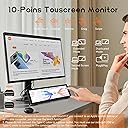
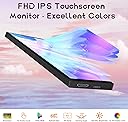
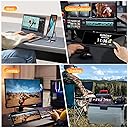
The Upgraded 8.8 Inch Small Touchscreen Monitor delivers a sharp 1920x480 IPS display with 60Hz refresh rate and 2ms response time, designed for real-time PC sensor monitoring. It supports touch input, customizable themes, and wide device compatibility including Windows, MacOS, and Raspberry Pi, making it the perfect compact companion for tech-savvy professionals seeking enhanced productivity and style.


| ASIN | B0DFGRMZDP |
| Aspect Ratio | 16:9 |
| Best Sellers Rank | #115,077 in Electronics ( See Top 100 in Electronics ) #413 in Monitors (Computers & Accessories) |
| Brand | AISHICHEN |
| Brand Name | AISHICHEN |
| Colour | Black |
| Contrast Ratio | 1500:1 |
| Customer Reviews | 3.9 out of 5 stars 63 Reviews |
| Display Technology | LED |
| Display Type | LED |
| Hardware Connectivity | HDMI |
| Has Color Screen | Yes |
| Image Brightness | 400 |
| Image Contrast Ratio | 1500:1 |
| Item Dimensions D x W x H | 24.9D x 19.8W x 6.6H Centimeters |
| Item Weight | 0.44 Kilograms |
| Manufacturer | AISHICHEN |
| Maximum Display Resolution | 1920 x 480 |
| Model Name | 8.8-Bulit In Bracket |
| Model Number | futitxp |
| Native Resolution | 1920 x 480 |
| Network Connectivity Technology | HDMI |
| Picture Quality Enhancement Technology | IPS, Brightness Adjustment (300cd-600cd), Contrast Ratio (800:1) |
| Product Features | Touchscreen |
| Refresh Rate | 60 Hz |
| Resolution | FHD 1920x480 |
| Response Time | 3 Milliseconds |
| Screen Finish Type | Glossy |
| Screen Size | 8.8 Inches |
| Screen Surface Description | Glossy |
| Total HDMI Port | 1 |
| Total Video Out Ports | 1 |
| Unit Count | 1 Count |
| Viewing Angle | 170 Degrees |
J**D
BUY THIS MONITOR!!! read on for some reasons why you should.
This monitor is one of the best looking screens for use as a system monitoring screen or running anything you want that you don't want running on your main monitor. I created the layout you see and it allows me to monitor all the settings I want to, which has been extremely helpful because I like to undervolt, overclock my OCD keeps me always wanting to monitor my temps, usage, and speeds. (Yes those are some nice undervolted speeds of my ryzen 9950X3D in game mode and to me the results are even nicer then the screen 😀 jk) I prefer to have this screen directly under my Asus pg32ucdp OLED and those who know understand if you put a monitor next to a beautiful OLED it must be bright and have amazing contrast , dark darks, and great viewing angles. This screen has ALL those things. Remember, I have this setup as a normal second monitor in windows. I just changed it to display horizontally so I could place it under my monitor. You can stand it up vertically if you prefer that or want to put it inside your computer case. I highly recommend buying this screen. The price and quality is amazing. Yes, I am a PC nerd who loves building only top of the line machines. I wouldn't use a screen that was garbage with my Ryzen9 9950x3d &RTX5090 system. Personally I recommend using it like i am to watch your sensors. There is plenty of software out there to create nice looking templates to show off your sensors instead of just showing numbers and them covering your gaming monitor. 1)The first photo is the entire screen shot. (You can open any program you want and move it there. I have my sensors panel always load with windows and take up full-screen automatically) 2) I know its extremely hard to see,but even from a distance, with all the different screens and lights on in my game room you can still see how bright and colorful this tiny monitor is.(I have my racing bracket i slid over to my pc because I was just about to play some recers,but I had this photo on my phone already and it shows how amazing this screen really is. 3) this third photo shows this monitor up close, right under my monitor ,above my keyboard. I honestly am one of those people who was constantly switching back and forth or taking up half my gaming screen just to monitor my settings results while gaming. It took alittle bit of time,but I finally got it to look and display everything I want it too. That's how the screen looks in horizontal mode. This is the perfect size screen to get if your using a 32inch monitor as your main screen.
M**.
Farsa
Decia ser touch y es una farsa, pude comprar algo mas barato dado que no es touch, es muy ancho y corto, no lo recomiendo por el precio excesivo.
T**E
Great! Exactly What I Needed!
I honestly didn’t expect to love this little monitor as much as I do. I originally bought it just to monitor time while I work, but it quickly became one of my favorite little gadgets on my desk. The glossy screen looks sharp and modern, and the built-in bracket makes it easy to place wherever I want. It doesn’t take up much space at all, which is perfect for my already cluttered setup. It is also a touch screen! I’ve been using it to show system temperature, RAM usage, CPU load, even my Spotify now-playing. Sometimes I just throw a little animated weather widget on it to brighten up my desk. Setup was super easy, just plug and play with a single HDMI cable and USB for power. No extra drivers, no fuss. Highly recommended! I kind of want to buy another one just to play around with different layouts!
P**A
Not recommended
Love the screen, unfortunately the cords are bigger than the device and it’s not functional whatsoever. Big disappointment.
Z**N
it’s a handy little second screen that’s quite portable
It’s a one little screen with great brightness in it’s very easy to use. I’m actually going to add a anime screen writing in the background. It doesn’t take much space. It’s easy to connect to your phone and it don’t flicker. It has an adjustable kickstand if you want to prop it up.
Trustpilot
5 days ago
2 weeks ago