We remain fully operational. Our teams are working around the clock to ensure your deliveries continue safely.

DOWNLOAD THE APP


Copyright © 2025 Desertcart Holdings Limited
DOWNLOAD THE APP
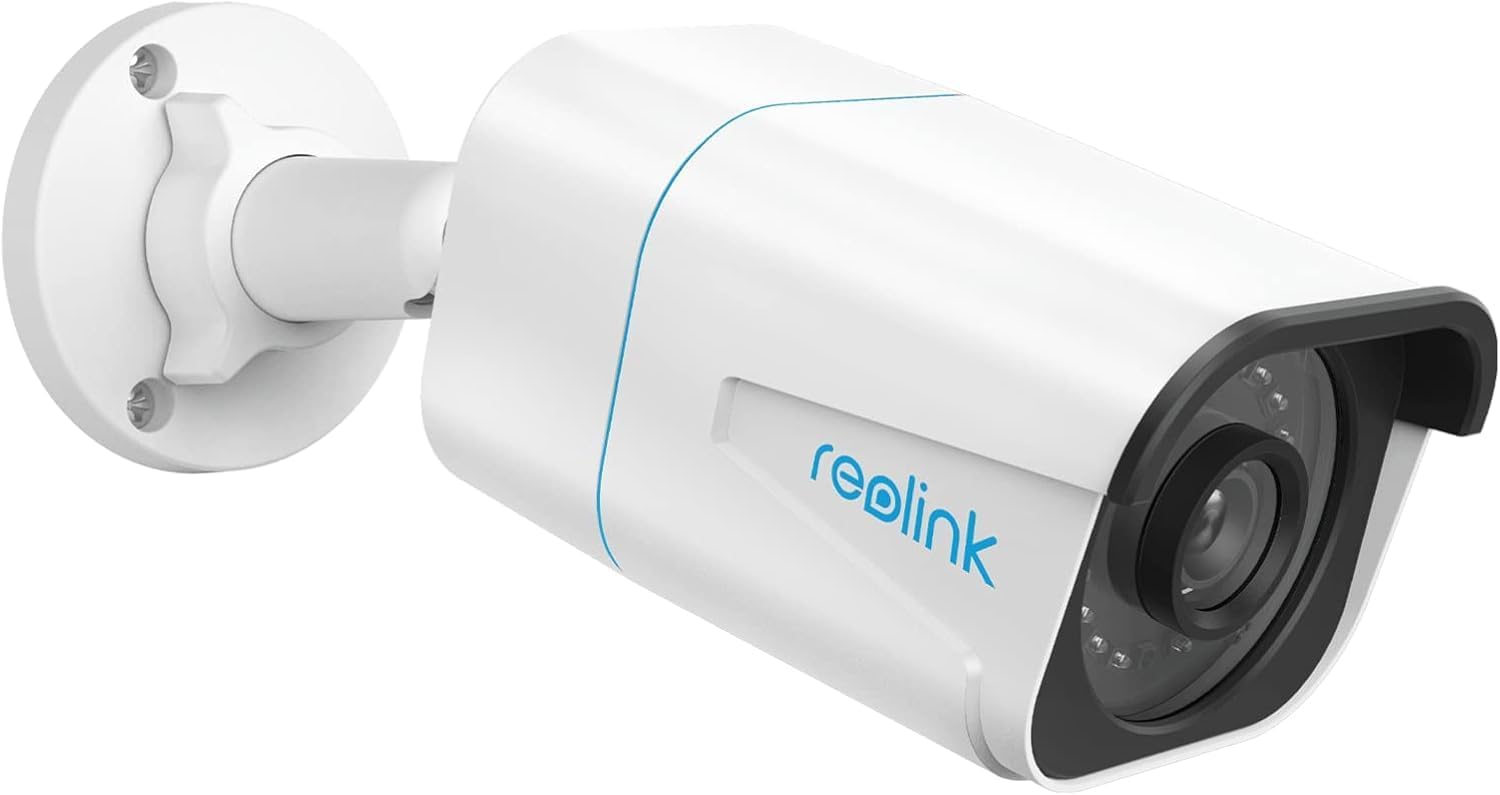







🔒 Elevate your security game with 4K clarity and AI smarts — don’t just watch, know.
The Reolink RLC-810A is a cutting-edge 4K Ultra HD outdoor PoE security camera featuring AI-powered human, vehicle, and animal detection to minimize false alerts. It offers a streamlined single-cable installation via Power over Ethernet, 30-meter night color vision, and a durable IP67 waterproof design. With built-in microphone, timelapse video support, and compatibility across major platforms, it’s engineered for professional-grade surveillance with user-friendly setup and a 2-year warranty.





| ASIN | B07K74GWX5 |
| Alert Type | Motion Only |
| Amazon Bestseller | #12,472 in Electronics ( See Top 100 in Electronics ) #52 in Bullet Surveillance Cameras |
| Antenna Location | Outdoor Security |
| Are Batteries Required | No |
| Brand | REOLINK |
| Built-In Media | RLC-810A Camera, 1M Network Cable, Waterproof Lid, Instruction Manual, Mounting Tools, Security Signs, Screws |
| Color | white |
| Compatible Devices | Smartphone |
| Connectivity Protocol | HTTPS, SSL, TCP/IP, UDP, HTTP, IPv4, UPnP, RTSP, RTMP, SMTP, NTP, DHCP, DNS, DDNS, FTP, P2P |
| Connectivity Technology | Wired |
| Control Method | Remote |
| Controller Type | PC: Windows, Mac OS; Smartphones: IOS and Android |
| Customer Reviews | 4.4 4.4 out of 5 stars (1,363) |
| Effective Still Resolution | 8 MP |
| Effective Video Resolution | 8 MP |
| Focus Type | Manual Focus |
| Form Factor | Bullet |
| Frame Rate | 25 fps, 15 fps, 10 fps, 2 fps |
| Indoor Outdoor Usage | Outdoor |
| Installation Type | Ceiling/Wall Mount |
| Item Dimensions | 10.8 x 12.2 x 19.6 cm |
| Item Type Name | 4K Resolution Outdoor PoE Security Camera |
| Item Weight | 488 Grams |
| Light Source | Infrared |
| Manufacturer | Reolink Digital |
| Manufacturer Warranty Description | 2 Year Warranty |
| Model Name | RLC-810A |
| Model Number | RLC-810A |
| Mount Type | Ceiling/Wall Mount |
| Night Vision | Night Color |
| Night Vision Range | 30 Meters |
| Number of Channels | 1 |
| Number of Items | 1 |
| Other Special Features of the Product | Motion Sensor |
| Photo Sensor Resolution | 8 MP |
| Photo Sensor Technology | CMOS |
| Power Source | Corded Electric |
| Room Type | Classroom |
| Shape | Standard type |
| Specific Uses For Product | Outdoor |
| UPC | 725423889727 |
| Unit Count | 1.00 Count |
| Video Capture Format | MP4 |
| Video Capture Resolution | 4k |
| Voltage | 12 Volts (DC) |
| Waterproof Rating | IP67 |
| Wattage | 12 W |
| Zoom Ratio | 6 |
| Zoom Type | デジタルズーム |
漁**師
画像がきれい 夜間の赤外線ライト付きが有り難い。
熊**ん
防犯強化の為購入 画像、扱い、初心者もわかりやすくお手頃
麗**美
恐らく意図的なのかもしれないが、PCや他社のNVRには接続できないようになっている。接続するためにはセキュリティを理由にブロックされているポート80や8080を手動で開放しなければならない。そして開放する為にはPCやスマホにReolink のアプリのインストールを要する。くどいがReolink のアプリをインストールしポートの開放を行うことによりReolink の縛りから開放され一般的なONVIFのネットワークカメラとして動作する。どこの4Kネットワークカメラも一緒かもしれないが確かに画面サイズは4Kサイズであるし映像も綺麗だが画角が広がり広角になっただけで解像度が高くなったわけではない、故に従来のカメラで識別できなかった小さく細かい対象物がこのカメラを使用し認識できるようになるわけではない。
と**り
良い点 4Kで映像がきれい POEで設置が簡単 悪い点 専用アプリが必要。ONVIF対応ですが専用アプリから有効にする必要がある 本製品は3つの焦点距離ラインナップがあり、どの製品が送られてくるか分からない。私に届いたのは6.0mmタイプですごい望遠仕様でした。防犯カメラとしては最悪です。35mm換算で80mm相当ぐらいです
A**様
今までのカメラが壊れたため、同じ様なものを探していました。 安くて性能が良すぎるのか今までサーバーとして使用していたパソコンでの録画がギリギリの状態のようです。 安い性能の良いサーバーがないか探してる状況です。
K**A
機能的には充実していて気に入ったのですが、肝心要の信頼性がいただけません。以前に使っていたHIKVISION製のカメラは4台とも屋外の連続運転で7年間も全くの故障知らずで稼働し続けました。こちらのカメラと交換したのも機能的に時代遅れになったからで、故障したからではありません。 ところがこのカメラは稼働を始めてからわずか三日で接続できなくなりました。たまたまハズレに当たったのか、それともこの会社の信頼性軽視の設計製造姿勢によるものかわかりませんが非常に残念です。 返金処理をした後もう一度同じ商品を購入してこの会社の製品の品質の判断をしたいと思います。 その後同一品を再度購入してみましたが、稼働後二週間も経たずに雨が降った翌日に接続不能になりました。本質的に品質に問題がありそうです。
エ**よ
カスタマサポートに問合せをしたら、24時間以内に返信が来た。とても安心した。 撮影動画は普通にキレイです・・・容量食いますが・・・ LANケーブル1本で配線できるので楽ですね ネット経由のクライアントアプリは日本語対応ですが、直付モニターでは日本語対応してないのでアップデート待ってます
H**X
他社のNVRには使えないのを覚悟で試しにこのreolink製4Kカメラを購入してみました。たしかに一般のNVRでは接続できませんでしたがPCのWin10と制限があるもののDahuaのNVR5216で使用できました。H.VEWやbrillcamの4Kカメラの画質の粗さと15fpsのカクカクにがっかりしていましたが、このカメラは明らかに精細さがワンランク上です。コマ数も25fpsでDahuaのIPC-HFW3849Tと同等の解像度を持っています。なんとかreolinkとDahua以外のNVRにも接続したいものです。そうすれば今後の購入カメラはこのカメラ一択になりますね。
S**N
I'm using this camera via RTSP with Frigate software, and it's working great. One small drawback is that it only seems to support H.265 (HEVC), and if you would prefer H.264 (less efficient but compatible with more software), I don't think that's an option - or at least I can't figure out how to select that mode. But otherwise it works great - very reliable, great picture quality, decent audio quality (though not as good as the picture quality IMHO), and "just works".
G**A
The Reo Link set of cameras are of a good quality and build. The cameras themselves show sharp pictures and take good videos of objects (animals, vehicles, people). The configuration is fairly straight-forward as I have it linked to the Reo Link DVR system. This system is a power over ethernet (POE) solution which works great for me as I have installed the cameras (we have five total) in places where power is not currently run. Motion detection is good though the exclusion capability is a bit harder to master. You can set zones for the camera to focus on and determine the size of the object (again animals, vehicles, or people).
J**M
REOLINK rocks! I upgraded to reolink 5mp and 8mp IP cameras and 2 NVRs, from an older and un-named "another brand". Reolink's ease of use, functionality, setup is continuously proving itself as a fantastic value for the money. The picture quality is awesome, the motion detection is Ai assisted and fantastic. The connectivity, options and storage capacity are second to none in my opinion. I had a problem with 1 of my 7 cameras, after a bit of on line trouble shooting it was shipped out/replaced very quickly. I am totally impressed and grateful for REOlink, their products and support.
S**K
I've tried a variety of cameras where this one now lives, until this camera they've been wireless. While they work most of the time, they disappear with unacceptable frequency. The best solution is wired, and POE is even better. My house is old and wiring changes are a challenge so getting an ethernet drop to where the camera is mounted was a challenge I procrastinated for a long time. Anyway, I have wire to the location where the camera goes. It's POE so getting it onto your network is easy. Outside of the need for network, nothing else has to go there. My switch supplies sufficient POE power so to get it on the network was as simple as plugging it in and letting it boot. Once it pulls an IP address, you'll need to use the Reolink app to set it up. This isn't hard and out of the box can record to an inserted SD card. I chose instead to use my Blue Iris computer to record from it and so you need to dive deeper into the settings to turn on the functions for that purpose. My thoughts on this camera so far are that I'll probably buy more for locations where a POE connection is available.
W**5
I used this camera to replace an existing street facing 4MP Reolink Camera. Although I am happy with my 4MP system overall, I wanted something a little bit clearer for this location, particularly at night. The swap was very easy as both cameras have the same mounting plate (holes line up), the same wire connection and the NVR auto-detected the new camera immediately. The 4K camera did not disappoint - both the day and night quality are significantly better and you get a slightly larger field of view. I have attached night time captures from both cameras for comparison. For the reasonable price, I am considering upgrading a few more and re-purposing the the 4MP cams for less critical duties. I did consider the 5MP version, but for only $15 more (at the time I purchased) and no real need to integrate with 3rd party software (more on that below), I thought It was worth going all the way, The motion detection appears similar to the 4MP versions, you have the same options to adjust the sensitivity and detection areas. Since this camera sees a lot of foot and vehicle traffic, I am not utilizing alerts, but the motion events are still helpful to narrow things down when playing back footage. For the advanced users, although there does not appear to be a way to integrate this camera fully with 3rd party apps/software (I believe you can with the 4/5MP versions) - I was able to get the below snapshot URL to work (loads a still snapshot from the camera each time your reload the page). This same URL also works for my 4MP cameras. http://<YOUR NVR'S LOCAL IP ADDRESS>/cgi-bin/api.cgi?cmd=Snap&channel=<CAMERA'S CHANNEL NUMBER ON NVR>&rs=fsj78fjkdf&user=<NVR USER NAME>&password=<NVR PASSWORD> (Replace the <CAPITALIZED TEXT> with your systems info - channel number should start with 0) This URL will only work in a web browser if you are connected to the same network as the the NVR. I am an avid DIYer but not a networking expert - im sure there is way to use port forwarding or some other method to accomplish this from outside your network, but that it outside my wheelhouse. With that said, I was able to add this camera to my Vera Edge home automation hub as a "Generic IP Camera using the above URL which does allow me to access the snapshots through the Vera interface and Imperihome locally or remotely. This also opens up the ability to add snapshots from the camera to notifications/scenes or have it auto-reload a new snapshot a set interval on a tablet based dashboard like Imperihome or SmartTiles. I did not test it on SmartThings or any other hub, but if it worked on Vera, I assume its possible on others as well. Long story short don't dismiss it completely if you only need partial smart home integration - the snapshot functionality can be very useful for door bell/door lock notifications or other connected system triggers beyond the native Reolink motion based alerts.
Trustpilot
1 week ago
1 week ago