


Buy anything from 5,000+ international stores. One checkout price. No surprise fees. Join 2M+ shoppers on Desertcart.
Desertcart purchases this item on your behalf and handles shipping, customs, and support to Thailand.
📅 Elevate your family’s rhythm—because your time deserves a smarter calendar.
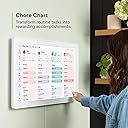
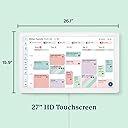
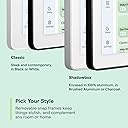
The Skylight Calendar Max is a 27-inch HD touchscreen smart calendar designed for busy families. It syncs effortlessly with major calendar platforms, features an interactive chore chart, and supports updates via a mobile app. Its sleek, mountable design fits any space, making it the ultimate digital organizer to streamline schedules, chores, and routines with style and ease.








| ASIN | B0F1WYX8J6 |
| Brand Name | Skylight |
| Customer Reviews | 4.6 4.6 out of 5 stars (298) |
| Format | Wall Calendar |
| Item Weight | 362.6 Ounces |
| Manufacturer | Skylight |
| Material | Plastic |
| Model Number | 270GBa |
| Part Number | 270GBa |
| UPC | 860011834335 |
P**N
We are a family of 4 with 2 kids. We were using a dry erase calendar board on our refrigerator as our means of keeping track of everyone’s schedules - daily life, work, school, planning our weekends and big events like trips. We were also using a small dry erase board for routine things like chores for our kids and other to do’s like oil changes for our car. We were hesitant to try this product at first and decided to try a digital calendar on our phones that we shared so that we could keep track of things. We learned quickly that it required a lot of discipline and communication between us (parents) to coordinate everything and then update it on our phone only to forget things regularly. It also did not solve the issue of routine related items, for example forgetting to return books at the library. We needed a way to stay organized and stop being forgetful, so we tried the Skylight Calendar MAX. We went for the max because we wanted it to be CLEAR and easy to see who was doing WHAT with just a glance at the calendar on the wall. Speaking of on the wall. Installing everything was a breeze. They included everything you need to install and mount your Skylight - a template a drill bit and a mount with a level so you really can’t mess it up. All you need is a power outlet close by, a screwdriver and a drill. You download the app for your phone and turn it on and off you go. My wife and I were shocked at how easy and intuitive everything was to use. You can plan things in the app on your phone or on the Skylight itself. We quickly became proficient with adding events on our calendar, creating to do lists, chores for the kids with a rewards program, and so on. There’s even a countdown at the top of the calendar so you can keep tabs on when important events are happening. Each person has a different color so you can quickly see who is doing what on the calendar without having to go into details or clicking into anything. We have ours mounted in the kitchen so every morning when we get up and have breakfast we gather around and naturally have our huddle before it’s game time for the day/week. One of my favorite features is the “SideKick” magic family assistant. You can take a photo of something like a school schedule on paper and it’ll make it digital - putting it on the calendar or making it into a list so you don’t have to waste time trying to copy all that information manually. On a side note, the unit itself looks great and super clean on the wall too. To sum it up - This is a game changer for our household. We can’t live without our Skylight now. If you value your time and you have a family I recommend giving it a try. You won’t look back. TLDR - Easy to install and easy to use; very intuitive. Saves you a lot of time and keeps you extremely organized. If you value your time and have kids it’s a no brainer.
A**D
Ok, long post alert but definitely an honest review: I read about the Skylight Calendar Max in the New York Times and wanted to give it a try. I am a super busy, working mom of 2 young kids, who is in full-time grad school and trying to organize their school schedules, play dates, activities, and more. I also have to juggle MY busy schedule and synch it with my husband’s so we are always on the same page. This is an IMPOSSIBLE task (as any caregiver or parent will know) and I was desperate to find an easier solution. $619 is a lot to spend but I figured it would be well worth the money if it gave me extra time and peace of mind. All I can say is: it is well worth it! First off, the packaging and interface are beautiful and very well thought out. It provides everything a busy working mom could want: calendar for all family members, easy list making, meal planning and a recipe box (that will import any recipe!!!), photos, reminders, and chore charts. It was extremely easy to set up; very intuitive and user-friendly. I barely had to look at the instructions. I hooked it up first and started using it to make sure I loved it before mounting it to the wall. I do love it and absolutely will be mounting it as soon as I get a free moment. The Skylight app is really helpful, as you can upload literally everything to your device from the app (even external calendars from iCal or Google so you don’t have to manually transfer them). You can take pictures of things you want to import and it will magically upload it to the device and integrate it into the proper place! The app really makes it easy to use the Skylight. It also allows you to send pictures directly to the device that immediately show up for a custom slide show. I appreciate its functionality and really like that you can use it horizontally or vertically depending on your available space. I also love that it negates the need for choosing special photos to get printed and mount because you can just have a continuous slideshow going at all times of all your special moments. It is actually a really great conversation starter for friends and family. I also like that the text on the calendar is so colorful and prominent. It makes it nice to look at and also makes it easier to point out tasks and chores for my kids. It looks really beautiful on the wall and has a very slim profile so it’s not bulky or sticking out from the wall. The ONLY fault I can find in the device is that sometimes when you send a picture to the Skylight from the app, it will show up in the app but not in thr “pictures” tab on the device itself. However, once it’s in slide show mode, the picture always comes up anyway, so it’s really not that big of a deal. Overall, I’d say that I absolutely love the Skylight Calendar Max and would recommend it wholeheartedly to any busy family to make life just a little bit easier.
S**.
I LOVE my skylight calendar!!! Easy to set up and sync calendars. Picture/Screen quality is great. Have the option to select month or week view. Absolutely love the tasks lists and grocery lists- it’s accessible on the phone app, so I won’t forget anything at the store or while running errands. My teenager enjoys the chore/routine feature, because it gives her the satisfaction of completing tasks and accomplishing things. My husband stays informed of everything that’s going on with our family. When setting it up, if you are interested in trying the Plus feature items for free the first 30 days, then don’t “Skip” when you’re setting it up. I accidentally skipped it, and now can’t get the free trial. We don’t use the plus features, but I would have liked to try it. Other than that, this calendar has been such an awesome tool to have in our home!
D**Y
This calendar has completely changed how our household stays organized. The large 27” screen is bright, clear, and easy to read from across the room, making it perfect for keeping track of everyone’s schedules at a glance. Setup was quick, syncing with our phones was painless, and updating events is simple. Color-coding for each family member is a lifesaver, especially with kids’ activities, appointments, and school events. It looks clean on the wall and actually becomes a helpful hub rather than just another screen. Worth every penny for staying organized and reducing daily chaos. Highly recommend for busy families.
T**R
This is a solid calendar although all of the features cannot be accessed without a subscription. My wife saw the FB marketing and so this was the one she wanted and I wanted her to be happy. That's why we ended up choosing this model over all the other calendars available. GOOD: >Easy install. >Quality hardware. >Syncs to Google calendar without any issues whatsoever (assume same for Apple calendar). >Kids like checking off to do list (small kids of course. The teens could care less). >I like being able to quickly add something to the calendar while in the kitchen. BAD: >Without subscription you get a calendar plus checklists and nothing else really. The subscription includes an AI feature and recipes which I understand paying for. But you won't be able to add your own photos as a screen saver without paying recurring subscription. I would be glad to pay one time to buy a "photo App". But don't really understand paying every year forever for something so basic as a screensaver. RECOMMENDED UPGRADES: >Screen saver (the black one with no photos of course). You can set a time for screen saver and we set ours for overnight 8:30pm to 7:00am. If you touch the screen it wakes up which is great. But for some reason that cancels the screen saver for the rest of that day. So if at 10pm you touch the screen to check something it wakes up and will just stay lit all night. Really when in screen saver mode it would be better to default to staying on only for like 30 seconds when you touch to wake up. Just a silly programming and they could have changed this by the time you read review. >Announcements: Hey it was my wife's B-day today and I really just wanted to put something on the screen for her. A big message or something. W/B nice if I could do that. Not an option. >Scrolling on the calendar: You can toggle from month to month with the arrows at the top. I would like to be able to scroll into next month up/down like on a phone. That's just a user preference but at $600 maybe it's worth giving us the option.
Trustpilot
2 months ago
3 weeks ago