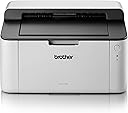

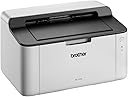



ブラザー工業 HL-1110 COMPT MONO LASER PRINTER
Product ID: 741638141
Details
- ブランドブラザー工業
- プリンター出力モノクロ
- モデル名HL 1110
- 印刷技術レーザー
- 商品の重量0.01 キログラム
- 接続技術USB
⚡20 PPM print speed
🔌USB 2.0 connectivity
🖤Monochrome laser precision
Desertcart purchases this item on your behalf and handles shipping, customs, and support to Thailand.
🖨️ Print smart, work sharp, stay ahead.
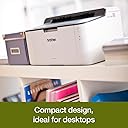
The Brother HL-1110 is a compact monochrome laser printer delivering fast 20 ppm print speeds via USB 2.0. Designed for professional and home office use, it offers reliable black-and-white printing with a 150-sheet input capacity and a 50-sheet output tray. With a strong 4.3-star user rating and network compatibility, it’s the go-to choice for efficient, no-fuss document printing.
| ASIN | B00EKF2D24 |
| Amazon 売れ筋ランキング | レーザープリンタ - 656位 |
| GTIN (Global Trade Identification Number) | 04977766721417 |
| USB2.0ポート数 | 1 |
| USBポート数 | 1 |
| おすすめ度 | 5つ星のうち4.2 1,728 レビュー |
| インク色 | 黒 |
| カラー | ホワイト |
| シリーズ番号 | 1110 |
| デュプレックス | 手動 |
| トレイ数 | 1 |
| ハードウェアインターフェイス | USB 2.0 |
| ブランド | ブラザー工業 |
| ブランド名 | ブラザー工業 |
| プリンタ出力 | モノクロ |
| プリンタ採用技術 | レーザー |
| プロセッサ数 | 1 |
| メーカー名 | BROTHER |
| モデルシリーズ | HL-1110 |
| モデル名 | HL 1110 |
| ワット数 | 380 W |
| 両面印刷 | いいえ |
| 出力シート容量 | 50 |
| 印刷メディア | プレーン紙 |
| 印刷技術 | レーザー |
| 商品の追加説明1 | ネットワーク対応 |
| 商品の重量 | 0.01 キログラム |
| 型番 | HL1110 |
| 接続技術 | USB |
| 最大コピー速度(モノクロ) | 20 ページ/分 |
| 最大入力シート容量 | 150 |
| 最大印刷速度(カラー) | 20 ページ/分 |
| 最大印刷速度(モノクロ) | 20 ページ/分 |
| 特徴 | ネットワーク対応 |
| 管理方法 | タッチ |
| 色 | ホワイト |
| 色彩深度 | 1 bits_per_pixel |
| 追加のプリンタ機能 | 印刷のみ |
| 通信・接続インターフェース | USB |
M**L
handlich, minimalistisch, zufriedenstellend
*** Rezension zum Druckermodell HL-1110 *** * Gesamteindruck: Der Drucker ist sehr minimalitisch und leicht. Insgesamt macht mir das Gerät einen soliden, zuverlässigen Eindruck und ich kann es weiterempfehlen. * Bedienung: Der Drucker verfügt über eine Taste, mit der das Gerät ein- und ausgeschaltet wird. Darunter befinden sich zwei Status-LEDs. * Schnittstelle: Man kann den Drucker nicht über WLAN verbinden, sondern nur über USB-Kabel. Drucken vom Handy aus ist ist leider nicht möglich. * Lieferumfang: Drucker und Toner (für wie viele Seiten dieser ausreicht weiß ich leider nicht). Das zum Drucken benötigte USB-Kabel war bei mir nicht enthalten. * Duplexdruck: Duplexdruck ist nur händisch durchführbar. * Installation: Ich habe mir das Treiberpaket direkt über die Website von Brother gedownloadet. Nach einem Neustart konnte ich sofort problemlos drucken. Einrichtung war einfach.
V**R
Doesn't come with necessary USB cable
Doesn't come with a cable, so I am ordering one separately. Unfortunately I cannot test the product just yet.
A**N
Superb Printer, What's not to like
Great little printer at a very good price, Set up was a doddle even for a 80 year old, To save time I had already Downloaded the full and latest driver/software package (37MB) on to my desktop from the Brother website the morning before the printer arrived, I also used my original USB lead off my now defunct old printer, all up and running/printing within 15mins, Considering the price I was surprised, Toner easy to fit, Quick in operation, Quite, Print quality ideal for my needs, very small footprint, what’s not to like, all in all a very good buy indeed. NOTE: Some people seem to jump in without doing any research at all before buying, For instance Printers aren’t supplied with USB cables anymore so make sure to order one when purchasing your printer they are only about £5, Cost out the price of toner/inks first, Any supplied installation CD will be old/out of date, So download the latest up to date drivers etc direct from the manufacture's website, Read good and bad comments then make up your own mind, Little things like this and researching first will make your purchase and installation journey easier.
C**I
One Star
like
A**O
Perfecta para imprimir papeleo
He probado muchas impresoras a lo largo del tiempo y ésta además de tener toners compatibles que funcionan a la perfección, calidad/precio no he encontrado nada mejor. Además de ser láser que a la hora de realizar muchas copias, es mucho más económica que cualquier impresora de tinta tradicional, ya que dura más. Pros: Pequeña, toners compatibles, rápida, silenciosa y fácil de instalar (además lleva un toner de cortesía) Contras: Ninguna Lo recomendaría a cualquiera que imprima mucho papeleo
Trustpilot
1 month ago
3 weeks ago