Desertcart purchases this item on your behalf and handles shipping, customs, and support to Thailand.
🌈 Elevate your desk game with vibrant precision and compact power!
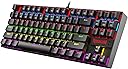
The Redragon Kumara K552 is a compact, tenkeyless mechanical keyboard featuring 87 keys with durable metal construction. It boasts smooth linear red switches for quiet, rapid keystrokes, and vibrant rainbow LED backlighting with 6 preset modes. Designed for gamers and professionals alike, it supports full anti-ghosting, N-key rollover, and customizable macros via software, while offering plug-and-play compatibility across Windows, macOS, and Linux. Perfect for those seeking a high-performance, space-saving keyboard with eye-catching style.


| Antenna Location | Gaming |
| Asin | B016MAK38U |
| Best Sellers Rank | #1,626 in Computers & Accessories (See Top 100 in Computers & Accessories) #29 in Gaming Keyboards |
| Box Contents | 1 Keyboard, 1 User Manual |
| Brand Name | Redragon |
| Button Quantity | 87 |
| Colour | Black |
| Compatible Devices | PC |
| Compatible Operating System Family | Linux, Windows |
| Connectivity Technology | Wired |
| Country Of Origin | China |
| Customer Reviews | 4.3 4.3 out of 5 stars (32,908) 4.3 out of 5 stars |
| Enclosure Material | Plastic |
| Global Trade Identification Number | 00740002400346 |
| Hand Orientation | Ambidextrous |
| Is Electric | Yes |
| Item Dimensions L X W X H | 35.4L x 12.4W x 3.7H Centimeters |
| Item Type Name | Keyboard |
| Item Weight Unit Of Measure | 875 Grams |
| Keyboard Backlighting Color Support | RGB |
| Keyboard Description | Mechanical |
| Keyboard Layout | AZERTY |
| Keyboard Plate Material | Metal |
| Language | English |
| Manufacturer | EASTERN TIMES TECHNOLOGY CO., LIMITED, Redragon |
| Manufacturer Contact Information | EASTERN TIMES TECHNOLOGY CO., LIMITED |
| Manufacturer Part Number | B016MAK38U |
| Model Name | Kumara |
| Model Number | K552 |
| Number Of Items | 1 |
| Number Of Keys | 87 |
| Number Of Packs | 1 |
| Number Of Sections | 87 |
| Packer Contact Information | Origin Marketing Private Limited, 121 Raj Ratna Industrial Estate, Liberty Garden, Malad West, Mumbai 400064 |
| Power Source | Corded Electric |
| Product Features | Compact, Ergonomic, Backlit, Durable |
| Series Number | 552 |
| Style Name | Modern |
| Switch Type | Linear |
| Total Usb 2 0 Ports | 1 |
| Unit Count | 1 Count |
| Upc | 740002400346 796594786894 780682638264 |
| Warranty Description | 1 Year Manufacturer Warranty |
User
Best Gaming Keyboard In The price range
Feels Great , Also feels very premium quality , works very well
User
Good for the price
This is my first mechanical keyboard. I think I've been using it for around 3 weeks now. For the price I can't complain. It looks fairly good.The Outemu reds are responsive and feel good to press. The keys do make some noise, but it is manageable. It's not as loud as the Outemu blues, which are clicky. This has a more of a 'thok' to it in comparison.The rainbow backlit is also fairly bright and looks pretty (more importantly it gets the job done!). I think RGB is pretty but overrated. Save the roughly 1k rupees and buy this. There really isn't any other difference between the two.Overall, if this is to be your first mechanical keyboard, I would say go for it!However, this is really cheap for a (good) mechanical keyboard. I wouldn't be surprised if it starts breaking down within a year or 2. If you have the budget, you should look into something costlier. But I can assure you that the quality is definitely good (for the price). It's one of the most popular keyboards at this price point for a reason!And finally, yes, it's definitely good for gaming. I've played Witcher3, Dave the Diver and League of Legends so far with no issue (Dave the Diver is a great game btw!).
User
Loved it!!!!!
A very good Mechanical Keyboard at this price range for people new to Mechanical Keyboard. I had used Membrane Keyboard but never used Mechanical Keyboard before. The responsiveness is very good and backlight looks good with different effects. Sound is good too as I bought the red switch one, it was not very clicky. The Ergonomics are good as well. Overall a good Mechanical Keyboard at this price for beginners
User
Perfect beginner to intermediate level TKL keyboard.
Short review: If you find a deal anything less than ₹2000, buy it. Red switch keyboard is relatively quieter than blue or brown switches and gives good feedback (of course, only when the keys bottom out :P )Price bought at: ₹1599 in a sale.Long review:This review is going to be long and would answer almost all the questions you may have just like I had before making a purchase.I never had a thought to have an external keyboard until I jumped into casual gaming. I own Logitech MK650 which is a great combo for productivity with multi connect bluetooth low power consumption.But the catch is that it is a membrane keyboard. It definitely doesn't serve the gaming purpose.Making a choice:Now the hunt for a perfect affordable gaming keyboard begins. RGB is overrated.Everything that has RGB might not be a great keyboard for gaming.I landed on this from a suggestion by my colleague who is a competitive gamer. I can trust him and took a look.It was costing 2600 on Redragon's official website and was costing 2365 on Amazon. I added it to the wishlist and was waiting for a deal price.Thanks to pricehistory website for revealing its past prices. I waited for long enough to grab it in sale.Hiccups:Amazon website itself is vulnerable with bugs in pricing and checkout.I missed great deals because of that bug and I had to follow up with Amazon technical team to get it fixed.Jago grahak Jago:Bought the product on official website for 2380 with a 5% discount coupon.2 days later, Amazon listed this product for 1599. With no hope that I would get it at the sale price, I gave it a try and boom order is placed.I wouldn't have been surprised if that failed like last time. But I got lucky.Cancelled the order from official website and waited for Amazon order. Thankfully it was delivered too.Unboxing:The Box is well packed with the cable and accessories tucked under the flap.It includes a key cap puller, a switch puller, 4 spare switches.The keyboard feels heavy enough and sturdy just by the initial glance. No flex what so ever.The legs adds an advantage to vary height as per comfort.Backlight:No per key RGB but each row has dedicated color and as I touch type on keyboards, I am least bothered about the backlight. It is there when needed.Though the color option is only 1 there are few patterns the keyboard can be illuminated by pressing FN+INS keys. They keep cycling between the available 9 modes.Apart from these lighting modes, there are 8 presets which illuminate a set of keys with respect to the type of game mapped to that preset.There are two custom presets which can be configured on the keyboard without a need of external software. Read through the manual to understand.All these will be stored in keyboard's onboard memory so it will be retained every time it is plugged into computer.Switches/Keys:Coming to the Outemu red switches, they are hot swappable and we have 4 spare switches in the box.The key travel is long enough to give the mechanical feeling while it is short enough to bottom out for the feedback.They hold right balance between the travel distance and hard stop.They are neither too soft nor too hard.I initially felt the keys to be a bit narrow after coming from MK850 which has flat and wide membrane keys but it didn't take me long to get used to these and build muscle memory for touch typing.I felt these are too soft until I got Redragon fizz which is softer than this and definitely feels better, but it comes with extra cost.Also Fizz is a 60% keyboard and hence Kumara makes more sense because of the TKL layout so I can use arrows without having to press additional buttons.I have to mention, this comes with media controls and Function keys row. It also works with Macbook to with ScrLk and Pause Keys to increase and decrease brightness respectively.Cons:Considering everything I mentioned above as pros, here are few cons but we could live with it. These are personal and might not bother you.It comes with a fixed plastic sleeve cable with Type-A connector. Though the cable length is long enough I would have liked it better with a type-C port.A braided cable would have added more value and durability to it.These are not dealbreakers in anyway.Verdict:I can strongly suggest this one over other keyboards from Cosmic byte and Ant esports because of the Hot swappable keys. Ant mk1200/1300 comes with type-C connector too so it is a better choice if hot swapping isn't something you care.
User
Unleash Your Gaming Potential with the Redragon Kumara K552 Mechanical Keyboard
The Redragon Kumara K552 Rainbow LED Backlit TKL Ten Key-Less Mechanical Wired Gaming keyboard is a true game-changer for avid gamers seeking a competitive edge. As a dedicated gamer myself, I recently had the pleasure of experiencing this mechanical keyboard, and I must say, it left a lasting impression. With its exceptional build quality, customizable RGB lighting, and responsive Red Outemu switches, the Kumara K552 delivers an immersive gaming experience that surpasses expectations.First and foremost, the build quality of this keyboard is outstanding. The compact Ten Key-Less (TKL) design not only saves valuable desk space but also allows for more freedom of movement during intense gaming sessions. The keyboard's sturdy construction instills a sense of durability, ensuring it can withstand the rigors of extensive use.The Kumara K552's Rainbow LED backlighting is a visual treat. The vibrant and customizable RGB lighting adds an aesthetic appeal to your gaming setup, while the various lighting modes provide a dynamic and immersive atmosphere. Whether you prefer a steady color scheme or pulsating effects, the keyboard's lighting options allow you to create a personalized gaming ambiance.One of the key highlights of this mechanical keyboard is its Red Outemu switches. These hot-swappable switches provide a smooth and tactile typing experience, ideal for both gaming and typing enthusiasts. The responsive keystrokes, combined with a relatively quiet operation, enhance your overall gaming performance while minimizing distractions. Additionally, the hot-swappable feature allows you to easily swap out switches to suit your preference without the need for soldering, providing a customizable experience.The Kumara K552's anti-ghosting and N-key rollover features ensure that every keystroke is accurately registered, even during intense gaming sequences that require complex key combinations. This ensures a seamless and uninterrupted gaming experience, giving you a competitive advantage in fast-paced games that demand quick reflexes.Furthermore, the keyboard's ergonomic design enhances comfort during extended gaming sessions. The keycap design provides a tactile feel, and the adjustable rear feet allow for customizable typing angles, reducing strain on your wrists and hands. The inclusion of a braided USB cable adds to the overall durability of the keyboard, ensuring a reliable connection.While the Kumara K552 is primarily marketed as a gaming keyboard, it is also suitable for general typing tasks. The compact layout and responsive switches make it a versatile choice for both gaming and work-related activities.In conclusion, the Redragon Kumara K552 Rainbow LED Backlit TKL Ten Key-Less Mechanical Wired Gaming keyboard sets the bar high for gaming keyboards in its price range. With its exceptional build quality, captivating RGB lighting, and responsive Red Outemu switches, it delivers a remarkable gaming experience. Whether you're a casual gamer or a competitive eSports enthusiast, the Kumara K552 is a solid investment that will undoubtedly elevate your gaming prowess.
User
Highly recommended for gamers seeking a reliable TKL keyboard.
The Redragon Kumara K552 Rainbow LED Backlit TKL keyboard is a compact and high-performance mechanical keyboard.The tactile keys provide satisfying feedback, making it great for both gaming and typing.The RGB lighting is vibrant and customizable, though I noticed two keys with slightly dim LEDs — minor flaw considering the price.Build quality is sturdy, and the keyboard feels premium.Highly recommended for gamers seeking a reliable TKL keyboard.I noticed two keys with dim LEDs.
User
Review after 1 year of usage
Cons -1- Its keys doesn't work in first go.2- bit requires more maintenance like cleaning and should be handled softly.Pros -1- budget friendly and gives you premium touch.2- Does its job properly.Overall not worth of money as it doesn't last after 1 year of normal uses(I am a programmer and normally work on it around 6-8 hours)
User
Please check the reviews before buying!
With great reviews on YouTube and everyone talking about this keyboard, I hastily bought it cause it is my first mechanical keyboard and I was overjoyed. It offered great switches and build quality for a low price which was its selling point but one grave mistake led me to write this review, I forgot to check the reviews on Amazon and noticed a lot of people have the double or even triple entry for a single key problem and sometimes unable to use it at all which I am facing right now. It was a great keyboard while it worked with great feeling and being compact too which added to the overall gaming feel but after some months of usage I noticed the double-entry problem and looked upon the internet for answers but it seemed like most people were facing the same problem as me so, I looked and noticed some forums about keeping the keys dust-free as it will hinder the mechanism so, cleaned it really well but it made no difference after a week of use as the same problem arose. I cleaned it once more and the problem still arose and now I am stuck with a useless keyboard whose wasd and some other keys don’t work at all which is the biggest problem since I can’t play at all. So, my suggestion would be to get the Logitech G413 keyboard which costs around 5500 with a discount and uses the same keys as its higher expensive models but cut down in a certain area to reduce the cost. My suggestion is to please read the reviews on Amazon as it is the place that will give a glimpse of how this keyboard is while other places do not offer it at all. I am not certain if everyone has the problem or only a select few such as me who is unlucky but it hasn’t worked well for me considering after spending almost 5k and it didn’t last more than 6 months.
User
ممتاز
ولا غلطه كم معي 3 سنين
User
J'adore
Un excelent clavier mécanique pour un prix bas. J'adore travailler avec ça longues journées de programmation et écriture sur l'ordi.
User
Affordable and very nice, a little noisy but can be modded
My daughter uses this keyboard, we both love it, but it's indeed loud. We've tested other keyboards including Razer, Logitech, Cosair, as well as some varieties of Chery Brown and Red, but in the end still love this Cherry-Blue clone.Tried some dampening O-rings, didn't help much, so I decided to open it up and experiment (need to remove the keycaps to access the screws holding the top plate down). Here's what I found.The noises come from:- the click of the switch itself. It is what we like over the other switches, but the keycap amplifies this click quite a lot.- the bottom-out noise when the keycap hits the switch's box. The O-ring can dampen this sound a bit, but the boxy plastic base amplifies it multiple times. Coupling with an IKEA tabletop, it sounds like hitting a drum.- the sound of the switch hitting the switch's box on the way up. You can hear this sound when you hold a key down and lift your finger up quickly (like when typing fast). Again, this sound is also amplified by the keycap.The good news is, if you take the circuit board out of its boxy plastic base, all the noises are reduced to around 25-35% (my rough estimation), the only noticeable sound is the faint click of the switch itself. If you like a really quiet keyboard, you can just make a custom base/footing (a block of foam for example). You just need to cover the exposed circuit board on the underside, the top metal plate is pretty solid and won't bend. I'm pretty sure it's even quieter than the typical Dell keyboards at my office.However, my daughter prefers the keyboard with its base, so I tried to stuff the inside with foams, hoping to muffle it, and it seemed to work. But upon tightening the screws back in, it's noisy again. So, the noise is transmitted through the screw poles to the plastic base, then the base amplifies it. Stuffing might have helped a bit, but not noticeable.To decouple the keyboard from the screw poles, I cut pieces of foam to the same height as the screw poles and double-sided taped them to the base. The poles are of different heights, shorter near the space bar, and taller near the Function keys. When putting the keyboard back, the circuit board and top plate sit on the foams, I tightened the screws very lightly, basically the screws keep the top from jumping out rather than holding it down. This significantly reduces the noise. I also filled the base with thinner foam rods, to reduce the void space in case it does act like a speaker enclosure.The keycaps were still problematic, with the switch's click, the bottoming-out, and coming-back noise. Instead of using O-rings, I stuffed cotton ball in the keycaps, just little enough to muffle the sound, and acts as a thin layer of O-ring. The more cotton, the muffler the sound, but also shorten the travel distance. I didn't want it to interfere with the great feeling of the switch so I didn't use much. I was lazy and didn't stuff the function keys as they're rarely used, also to serve as a comparison. You'll have to experiment a bit to find the right amount to your liking. The cotton does block the backlight a bit, but not much (and don't look straight into the backlights after removing the keycaps, they're blinding).One last thing, whatever the small amount of noise left, transmitted to the tabletop and got amplified. So I rolled a thin foam bag into little feet and taped them to the keyboard, no noise from the tabletop at all.Overall, I'd definitely call it a success. She was ready to compromise for a quieter keyboard, but now more than happy to keep it. I used to be able to hear her "smashing" the keyboard in her room from the living room, now I can barely hear the "light" click if I really pay attention. She wanted the RGB version, so I'll buy one to trade with her, and probably will experiment with a custom base instead. See a need, fill a need!
User
Muy bueno
Me gusto mucho, es de muy buena calidad y muy estético
User
Great keyboard
I bought this for my son and he loves the keyboard. He finds the clicking noise satisfying. He had it now for a few months and there are no issues to report. Great buy for the price.
Trustpilot
2 weeks ago
2 weeks ago