Buy anything from 5,000+ international stores. One checkout price. No surprise fees. Join 2M+ shoppers on Desertcart.
Desertcart purchases this item on your behalf and handles shipping, customs, and support to Thailand.
🚀 Own the cockpit, dominate the skies — the ultimate HOTAS for pros and dreamers alike!
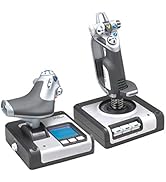
The Logitech G X56 HOTAS is a professional-grade flight simulation controller featuring over 189 programmable controls, a 4-spring adjustable joystick for personalized resistance, and true 6 degrees of freedom via mini analog sticks. Designed for PC and VR gaming, it boasts hall-effect 16-bit sensors for precision input and customizable RGB lighting to match your setup. Ideal for serious flight sim enthusiasts seeking immersive, tactile control with a premium feel.


| ASIN | B079P6SSHP |
| Additional Features | Ergonomic |
| Best Sellers Rank | #1,008 in Video Games ( See Top 100 in Video Games ) #6 in PC Game Flight Controls |
| Brand Name | Logitech |
| Button Quantity | 24 |
| Color | Black |
| Compatible Devices | PC, Windows |
| Compatible Video Game Console Models | Kinhank Mini Pc Game Box Chili, Sony PlayStation VR, Sony PlayStation VR2 |
| Connectivity Technology | USB |
| Controller Type | Joystick |
| Customer Reviews | 4.0 4.0 out of 5 stars (2,860) |
| External Testing Certification | Não aplicável |
| Global Trade Identification Number | 00097855136145 |
| Hardware Platform | PC |
| Included Components | Palm Rest Spacer, User Guide, X56 Stick Base, X56 Stick Handle, X56 Throttle |
| Item Dimensions | 7.28 x 8.86 x 3.54 inches |
| Item Type Name | Logitech G X56 H.O.T.A.S. RGB Throttle and Stick Simulation Controller for VR Gaming (945-000058) |
| Item Weight | 6.92 Pounds |
| Manufacturer | Logitech |
| Manufacturer Part Number | 945-000058 |
| Model Name | X56 |
| Model Number | 945-000058 |
| Package Quantity | 1 |
| Power Source | Information Not Available |
| UPC | 097855136145 |
| Warranty Description | Manufacturer’s warranty can be requested from customer service. |
A**N
buy this one to fly its worth it
let bad first the throttle has a little play between the 2 halves left to right ,,,, the rest so far is amazing took a little to get used to the position of the throttle 2 spin knobs top and bottom i use for vert thrust and horz thrust because the x52 has one on its side and that made it make more sense beyond that this is making my gaming so much better I have almost all elite daNGEROUS controls mapped and im only on M1 mode i still have M2 and S1 i could use,, would be extra nice if the throttle stiffness had a little more range between is easy movement and hard it starts at about medium stiff but i have read that will get easier over time so not really a complaint I have rather large hands and it feels nice fit not reaching for anything tiny hands may have a small reach issue but should be manageable ,, each half have 4 corner holes so you can mount it to a dest directly or buy a mount system starting at 59 bucks so not bad at all i used 3.5in wood screws attaches it to 7x9 in x1/2 in wood plates and then attached ttaht to the edge of my desk feels nice and can be moves other controlers have overly complex whole patterns so this is by far easier to mount I opted to follow another review and download g drivers system so i have the option to pre program all my buttons to keybinds this way they would be universal across any game i play but thus far i just mapped them within the game im playing as i learn what feels natural to me PLUG directly into the pc do not use a hub unless its a powered hub and high powered one at that if you cant avoid using a low powered hub go into the g software and make the RGB black or super dark so it draws less power and this will help avoid ghost inputs this is an ISSUE with MANY MANYY rgb devices so I do not fault this one easy plug n play usb and great great value
S**T
If you are looking at this HOTAS read my review it is made for those of you wondering.
I normally don't write reviews but I thought it was important to write this one because like me I am sure many other people are looking at this HOTAS and wondering if this is the one for you. You are also probably looking at the x52 and x52 professional. I opted for this HOTAS (playing Elite Dangerous & X4 and various others). This one while being the most expensive option was also the most available at the time and looked the most sturdy as well. THIS IS A SAITEK PRODUCT that Logitech acquired and then branded their own. That's ok, it still works with the proper software driver download (we will get to that later in review). First off this HOTAS is rather large, but keep in mind there are also a LOT OF BUTTONS which require it to be so. Some people with smaller hands might find this to be to big for them. My hands are fairly large and this is at just about the maximum size I can comfortably control. Some reviews complain of poor button placement, well you have a million buttons they all have to go somewhere so nothing is going to be perfect. You just have to adapt to the layout of the HOTAS. The Stick: Solid feeling with the look and feel of a fighter stick, (this is not a Cessna stick here this is a space ship/fighter jet stick). You can still fly a Cessna with this but you also can fly a Boeing 747 or a space shuttle, its up to you. There are multiple HAT controls just on the stick including a smooth move all direction hat that is in fact like a miniature joystick on your joystick. What would you use something like that for? Well for example in Elite dangerous I use the smooth move hat (black to the left of the stick half way down) for which direction I want to "look". This way I can control the direction of the ship with the Stick itself while using the little HAT control to look around which has replaced the mouse for looking around. Very handy, You can effectively remove all keyboard and mouse input with these types of controls and setups. The Stick and Throttle are both coated in that nice feeling smooth PTFE feeling rubber. This makes for a comfy grip not so much of a plastic like feeling like my old Logitech Extreme 3d Pro which I upgraded from. (Had the 3d pro for 15 years excellent entry level joystick and you can still buy it!) The Throttle: This took some getting used to but in the end I am learning to really like the throttle. First off yes you are looking at a split control throttle. Either side can move independently of one another like a real plane. There is a locking mechanism to lock them both together which is how mine will always stay because none of the games I play require independent thrust input to one side of the engine or the other. You will feel that seam in the middle when moving the throttle BUT you will get used to it. Like other reviews the throttle is in fact STIFF, why? because a real throttle is also stiff. If it wasn't than when a stewardess brings the pilots their coffee and sneezes the plane would crash. You have a knob to turn to affect the tension of the throttle, even turned all the way to lowest setting the throttle will feel stiff to push but it is mimicking real life. If you are buying this thinking you are going to be able to just SLAM THE THROTTLE open, you will break this thing like a few review pictures will show. In the games I play you aren't accelerating faster then you can push the throttle so this is a non issue. In fact once again this makes it feel far more real and less chincy than other throttle designs. (for reference I wield chainsaws and buck hay all day my hand strength is above average). YES YOU HAVE A BOATLOAD OF BUTTONS ON THE THROTTLE. Once again you have to ask yourself, if you are getting this many button monster are you gonna be upset at the button placement? Or are you going to adapt (this is the correct answer ADAPTING). The metal toggle switches I would like to point out are not ON/OFF switches. They return to center after you push them up or down. So basically you have 2 buttons for every metal toggle but they still feel ultra satisfying to push and flick. .....So many buttons, if you aren't playing an actual flight sim you will be hard pressed to utilize all your button options. That's ok, better to have more options than less but then again that's why you are going to buy this monster you want them buttons don't ya? The Important: Ok I would like to address a few issues here related to some minor details and specifics I had to figure out for myself when installing this monster. PAY ATTENTION TO THIS I HOPE TO SAVE YOU TIME and maybe even help others who have bought this thing but couldn't get it to work properly. For reference I am running Windows 10 on a computer that is NOT A POTATO. OK here we go...... YOU WILL NEED TO GET THE DRIVER TO MAKE THIS THING WORK PROPERLY AND UTILIZE YOUR PRETTY COLOR FUNCTIONS. This HOTAS is not really plug and play and it is not recognized in GHUB. Listen carefully because you also get ZERO instructions with this thing but I am going to tell you right now what to do. 1. Open box and marvel at the beast you just purchased. (DO NOT PLUG IT IN YET) 2. Go to Logitechs website and go to downloads and look up this product for drivers. 3. You will have a list of about 7 or 8 drivers, go to the one on the BOTTOM not the top. (bottom newest driver circa 2018 lol) 4. If you are running 32 bit choose the driver immediately above (I am 64 bit so I believe my driver was the last one in list) 5. (DO NOT PLUG IT IN YET!) Run the driver you just downloaded. 6. You will see a screen come up that has a picture of joystick then a small picture of a USB WITH A RED X over it and then a picture of a computer. (The red X is telling you NOT TO PLUG IT IN YET there are no instructions past this I had to learn all this by rote and trial and error) 7. Click "Next" the driver will start installing ( DO NOT PLUG THINGS IN YOU BETTER NOT HAVE EM PLUGGED IN!) 8. When the first half of the install is done you will see now the image you first saw except the USB icon at center no longer has a red X over it. This is the 2018 program telling you to PLUG IN THE JOYSTICK AND THROTTLE. 9. NOW you PLUG IN THE JOYSTICK AND THROTTLE. (be advised I am very certain this requires USB 2.0 or higher not basic USB). 10. After you have plugged them both in you may now click next on the install window. 11. After the install is finished the button will now say restart. CLICK RESTART. 12. Upon desktop load you will now have a new Icon for X56 HOTAS, this is your joysticks program this is where you change the color of the lighting and also to do programming button binding etc (this is advanced button binding outside of game controls). If you are playing a game like Elite dangerous or X4 do all your binding IN GAME. Yes I had to learn all this on my own but I have shared it with you and now you know how to set this up dear god I hope this helps at least one soul. Changing the spring on the Stick: Go to Youtube, search "how to change X56 Hotas Springs" WATCH THE VIDEO! I changed to the highest spring, it was tricky but it worked I was a little spooked about breaking something make sure you watch a video on this so you understand what exactly you are doing. Once again let me remind you there is no instruction booklet on this thing in the box, you are either using the internet or reading this review or hopefully BOTH. OVERALL: I am very satisfied with the quality of construction and feel of this $250 sink of my hard earned American currency. Plays Elite Dangerous like you were IN THE SHIP ITSELF and I can't wait to try it on other games like X4 or maybe a real flight sim. Buy this product. Take the time to set it up right. Put on a pot of coffee and spend all night binding 486 gorillion buttons. Have Lots Of Fun After. I truly hope this helps clarify some things for wondering folks and helps for you to make a more informed decision on whether this is the right HOTAS for you. ::This review may be updated in the future, First draft 1/25/2025
A**S
Quality H.O.T.A.S Throttle and Stick
I bought the Logitech G X56 H.O.T.A.S for the intention of playing Microsoft Flight Simulator with the intention of eventually upgrading and buying and fully Honeycomb Aeronautical setup with a more advanced Yoke and Throttle Quadrant more suited for airliners. The X56 is pretty good for a flight simulator setup, before I bought it ai had only had minimal experience with the X52 by Logitech G. My first annoyance after plugging them into my PC is that they do not connect to the Logitech G Hub, which was partially why I bought them over Thrustmaster. Other than that, the stick is good, it is a bit of a pain to set up all of the buttons and add deadzones to ensure there is no stick drift which was a problem I had with the little joystick where your thumb likes to go and mess with your camera. Which brings me to my next thing which was that it’s not super comfortable to hold. Your thumb either has to be below the joystick or up near the silver and black camera look functions, which is not very convenient or comfortable. Overall okay but by no means amazing. The throttle is okay, it is definitely one that you want to get a mount for or drill it into your desk somewhere with some screws. I have not done anything yet, because I haven’t figured out exactly where I want them, but it is annoying to throttle up and the throttle is so stiff that the base likes to push up with the throttle, which is annoying with takeoffs but is fixable with a mount. The switches are good quality. It has a mode selector in the bottom left, but I haven’t been able to figure out how to use it. The nice thing about the throttle is that there is a nice spot next to the top and bottom silver knobs to put your thumb where is won’t adjust any cameras you don’t want to. One thing I would for sure do is get a label maker and label all of your switches so you don’t accidentally turn your engine off midair or turning on your parking brake instead of lowering your flaps. Overall pretty good as an entry level setup, but I will likely sell them later once I upgrade.
W**L
Finally found one i like! *oh wait, nevermind, its garbage*
Just received this today. will start off by saying in the past 2 weeks ive gone thru the thrustmaster t1600m (just the stick) and the x52 pro hotas setup. hated the button placement on the thrustmaster, and the x52 pro, while it had great buttons, was a crap stick. tiny movements were impossible as there was way to much sticktion. This stick however, is 100X better. the movement of the stick is actually precise, and smooth. i swapped for the blue spring for a little less tension and its just great. im over the moon that i finally found a stick i can play ED with again. The throttle IS very stiff, i hope that it will loosen up some more over time. And the two toggles right next to the throttle will never be used, but i knew that before buying it. They're just way to close to the throttle itself to reach easily. All the buttons feel great. nice and clicky. I have already tested all buttons, found to be in working order. (FYI, button 15,16,17 are mode selections for the joystick,) Make sure that you install the saitek drivers BEFORE plugging in the hotas, it will tell you when its ready to plug them in. The colors dont match up to what i expect from RGB, but im playing in VR, could care less what color it is. And the 255 blue actually comes out as a really pretty blue violet mix. My ONLY complaint, this stick is HIGH. Will be finding some way to mod it so my hands can reach all 3 hats with ease. For now, thats it. will update review after it gets more use. **UPDATE** So i finally finished my work week, and sat down excited to try this setup out in elite dangerous. Absolutely unusable. After a few painstaking hours of binding keys, setting deadzones, adjusting throttle tension, i was finally happy with the layout and had memorized where most of my functions were. Decided to head out of station and give it a test and boom...destroyed in station. As soon as i throttled up, i boosted, opened my system map, and a few other functions at the same time. After hours of more reading, this is a widespread, known issue with the PAST iteration of this product, and it seems nothing has changed. The fix was to plug the throttle, and only the throttle, into a 5v powered usb hub. Did that with no change. So, it doesn't happen every time i throttle up, but it happens often enough that i cant reliably use the product. I also discovered that for whatever reason, i cannot throttle down to zero. not even after setting a rather large deadzone on the throttle. when i attempt to come to full stop, I'm still drifting at 1. This setup was replacing the X-52 pro i just purchased last week (joystick on that setup was crap) I'd really like to know how logitech expects people to put up with this kind of product craftsmanship. In the past, i had really liked almost all of their products. I have a mouse from over 15 years ago that still works perfectly. This is especially aggravating as there just is not a hotas setup worth buying it seems in the under 400$ range. On another note, if logitech had simply taken the joystick from this x56 (which works really well) and the throttle from the x52 pro (which also works really well, even though it has some weird button placement, and a useless screen) They would have had a decent, reliable product. However, it seems you cannot even use the two together, if you were willing to buy both. I will definitely steer clear of any future logitech products in the future, as i have now wasted two weeks trying to make their products work the way they were designed to.
R**S
High end HOTAS
I was a little hesitant after the documented issues with X52 and reviews of the X56, but decided to go for it instead of spending the multiple hundreds into thousands that is the next step up from here. Wow! I have used it for Elite Dangerous, Star Citizen, and MSFS, and am impressed! Have also used it to replace dual joysticks for logging in farm Sim, but it really shines in the games with lots of controls to bind. Despite being primarily plastic, the controls feel premium and construction feels solid. The movement of the main joystick is fluid and smooth, and there are more buttons and hat switches than I could possibly need! The single complaint is with the split throttle needing to be very stiff in order to maintain position, or it will lower itself and easily moves if bumped - and that part never got better over time. I use clamp on brackets, so I can deal with a very tight throttle, but it does get irritating at times, to be honest. Warning #1, check the dimensions, these things are huge compared to some other HOTAS options! Warning #2, despite that size, they are not too heavy, so some kind of mounting is necessary if you "play with passion." lol Have over a couple hundred hours use and no problems except the throttle not holding position unless super tight. Easily recommend unless a person can afford the big jump in cost to go the next step up.
G**E
Good but could be better.
This HOTAS is great with the many, many different switches and buttons. It isn’t cheap and the quality isn’t the best as this is my third one. The joystick hasn’t had any problems but the throttle has. Unfortunately you cannot just replace the throttle you have to purchase both.
G**G
Not impressed
A number of issues so far: First off, as has been typical with every Saitek/Logitech X series HOTAS I have owned, there is the usual slop in the stick's yaw axis. Ergononmically, many of the controls are poorly placed. It feels like the stick and throttle are designed for someone with an extremely wide hand with really thin fingers. The throttle especially requires constant changing of hand placement to reach vairous controls. The thumbstick and lower hat switch on the throttle are placed so low that your thumb hits the rotary dials and toggle switches when using them. The upper hat switch on the throttle is too close to the lower roatary dial so my thumb runs into it trying to operate the hat. Then having to reach my thumb around all of the hat switches to push then button on the lower rotary dial puts my hand in a really uncofortable position. On the stick, the pair of hat switches are placed too close together and the conical shape of the top one makes it had to operate reaching my thumb across then nicely shaped lower one. Trying to grip the stick solidly to use the yaw twist without deflecting the thumbstick again just doesn't feel right. One feature the X-52 stick has the the X-56 lacks is an adjustable palm rest. I had to add !/4" of foam padding to bring my hand up to where my thumb rests on the pov hat and reaches the button at the top of the stick, but the button at the bottom of the stick is then hard to press. The pinky switch is placed too far out and hard to reach. Power requirements are rather high for devices that are solely USB powered. A high-output USB hub is required to prevent glitches. After a bit of troubleshooting, what I eventually found watching in the joystick control panel is the controllers reset after a low power state and send a set of test button push signals to the software, which it ignores as normal operation. However, in-game these manifest as sporadic inputs that caused problems. In X-plane just minor things like landing gear raising and lowering on it's own, but in Elite Dangerous the manifestations made the game unplayable. In-game configuration is problematic as well other than X-plane. There is no consistancy between games as to which button is assigned a label. Some recognize the controllers as a set and therefore sequentially number the buttons as a pair, while some assign numbers individually. Very problematic when they just tell you to hit Joy3 as it has nothing to do with how the stick or throttle are labeled or even which of the two it is referring to. The only exception was X-plane which graphically shows which button in the setup screen, but still doesn't always use the manufactuters label. MSFS does have a graphic representation that can be brought up in flight, but that doesn't help when looking at the configuration screen. The instructions for changing the tension springs on the stick are a joke. the box for the springs shows to unplug the stick, place a spring, and plug in the stick. No instruction on how to remove the collar holding the spring. Actual retention methond for the spring is rather suspect in terms of durablity as the is a collar that snaps over a 2 piece collar that retains the spring. Probably best not to change the spring out to many times to avoid breaking the snap tabs on the one piece collar. Price wise, it is the only HOTAS with this many controls that won't cost you an arm and a leg, but it also will never be the most comfortable to use, and after only 2 days I don't know if it will hold up better than the previous HOTAS's I have gotten from this manufacturer.
T**L
Yes. Just yes.
Day one. I’m playing Aces of Thunder with VR on my pc through the Quest 3s and mounting hardware for the desk. Instant improvement. Went from 1-2 kill matches with 3-4 deaths and constant losses to 5+ kills many times with 0 deaths and have been stacking up the wins ever since. 15/10 so far. If you’re on the fence, allow me to shove you off into the land of buying.
Trustpilot
2 weeks ago
1 month ago