Desertcart purchases this item on your behalf and handles shipping, customs, and support to Thailand.
🚀 Elevate your home network — because buffering is so last decade!
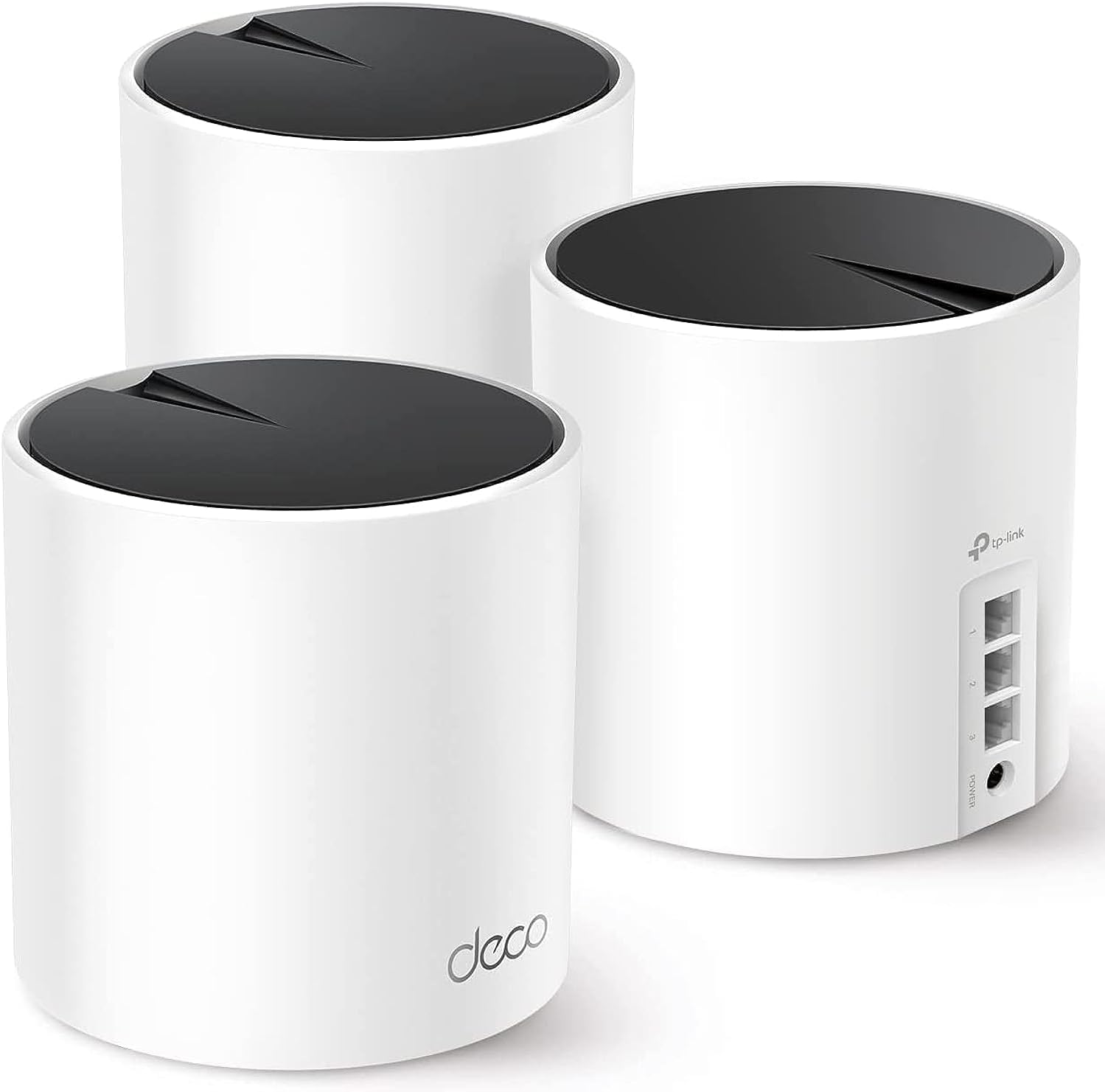
The TP-Link Deco X55 AX3000 WiFi 6 Mesh System (3-pack) delivers ultra-fast, reliable Wi-Fi coverage up to 6500 sq.ft, replacing traditional routers and extenders. Each unit features 3 Gigabit Ethernet ports and supports Ethernet backhaul for superior wired speeds. Designed for modern smart homes, it connects over 150 devices seamlessly with advanced security protocols and easy app-based management, making it the ultimate upgrade for professionals demanding flawless connectivity.


| ASIN | B09PRB1MZM |
| Antenna Location | Home |
| Antenna Type | Internal |
| Best Sellers Rank | #2 in Computers & Accessories ( See Top 100 in Computers & Accessories ) #1 in Whole Home & Mesh Wi-Fi Systems |
| Brand | TP-Link |
| Built-In Media | 1 x Quick Installation Guide, 1 x RJ45 Ethernet cable, 3 x Deco X55 units, 3 x Power adapters |
| Color | Black, White |
| Compatible Devices | Smartphone, Personal Computer, Security Camera, Smart Television, Tablet, Printer, Gaming Console |
| Connectivity Protocol | Ethernet, Wi-Fi |
| Connectivity Range | 6500 square_feet |
| Connectivity Technology | Ethernet, Wi-Fi |
| Control Method | App |
| Controller Type | App Control |
| Coverage | 6500 square feet |
| Customer Reviews | 4.4 out of 5 stars 12,970 Reviews |
| Data Transfer Rate | 3000 megabits_per_second |
| Frequency | 5 GHz |
| Frequency Band Class | Dual-Band |
| Item Dimensions L x W x H | 4.33"L x 4.33"W x 4.49"H |
| Item Type Name | Mesh WiFi |
| Item Weight | 5.5 pounds |
| LAN Port Bandwidth | 10/100/1000 Mbps |
| Manufacturer | TP-Link |
| Maximum Upstream Data Transfer Rate | 574 megabits_per_second |
| Mfr Part Number | Deco X55 |
| Model Name | Deco X55(3-Pack) |
| Model Number | Deco X55 |
| Number of Antennas | 3 |
| Number of Ports | 3 |
| Operating System | Omada |
| Other Special Features of the Product | Guest Mode |
| Router Firewall Security Level | High |
| Router Network Type | mesh |
| Security Protocol | WPA-Personal, WPA2-Personal, WPA3-Personal |
| Special Feature | Guest Mode |
| UPC | 840030703010 |
| Unit Count | 3 Pack |
| Voltage | 12 volts |
| Warranty Description | 2 year manufacturer |
| Wi-Fi Generation | Wi-Fi 6 |
| Wireless Communication Standard | 802.11ac, 802.11ax, 802.11b, 802.11g, 802.11n |
| Wireless Compability | 802.11ac, 802.11ax, 802.11b, 802.11g, 802.11n |
F**R
Works PERFECTLY in our Big home
I was having some occasional issues with our Google mesh wifi system, and frustrated with some of the interface limitations, so decided to try this system after looking at reviews for lots of products on the internet. I bought this system some time ago and have been waiting a couple months to see how they would perform. I'm please to say this is the best system I have used in many years. As an electronics engineer maybe I am a bit too critical of products, but I have nothing to critique so far about the TPLink mesh wifi system. Frankly, I used to not be very fond of TPLink products, but I think they have gotten much better in the last few years. Getting to the details: I have a LOT of wifi connected products in the home. 74 devices to be exact and the house is 4200 square feet. These 3 units are more than enough to get complete coverage in the house as well as the patio areas on both sides of the house. I especially like the smart phone interface compared to my previous Google Mesh and the eero system I had before that. It lets me assign some devices to a specific mesh unit which is nice because some competitor systems seem to occasionally connect a device farther away from one that is closer which results in a worse connection. This TPLink system does not have that issue. I also like the fact that I can assign any device to specifically connect to either 2.4 GHz or 5 GHz. A couple other systems I have tried in the past wouldn't allow it. I haven't yet tried the "HomeShield" subscription to other features that might be helpful for a decent price. I'm not sure I need those upgrade features yet. I wanted to try the system with the upgrade first to see how it works. I'll probably try the 30-day free trial later on since there are some features of interest. With the separate backhaul communication between mesh units, I've been seeing really high bandwidth rates without a single dropout. Example, we have 3 TVs that regularly stream 4K content with two of those TVs doing it at the same time. Other devices are high resolution WiFi security cameras connected along with music streaming and all of the other oddball devices I have like light controllers, robot vacuums, appliances, smoke detectors, energy monitors, shades, phones, iPads, garage door openers, sprinklers, a piano, the car, and a bunch of other things I likely forgot. Bottom line is that everything stays connected without issues and I have yet to have a device that didn't connect or see and hangup with the system. I also got a recent software update that installed seamlessly. I surely missed mentioning some other features.
J**R
Affordable, stylish, and strong wifi.
Fairly easy to connect using the free app on my phone, though coordinating the reboots of the internet service provider (ISP) modem and first TP-Link router was a bit confusing to me as a novice. Of course, you lose your existing Wifi connection upon disconnecting the old router and then have to rely on a connection using cellular phone data to look up and clarify any uncertainties. So it would have been nice to have printed instructions or a downloadable PDF file of such detailed instructions before starting. With everything connected—and connecting the two additional nodes only required plugging them into wall outlets—I have very good wifi coverage throughout my 1850 square foot home. The 3 nodes of the mesh system by default automatically choose how to best connect to one another based on signal strength. The ISP cable enters my home on one end of the house where the first node is located. The second node is in the middle where of my house on the other side of a wall, and the third node is on the other end of the house where a convoluted hallway means there are multiple walls between the second and third nodes. I expected the third node to automatically connect to the second node closest to it. But, instead, it automatically connected to the first node and the signal is having to pass through an extra wall. This is not ideal and the connection strength is only fair or good for the third node instead of excellent. Manually forcing a connection between the second and third nodes was easy enough using the app. But it did not improve the connection strength to the third node. I will try moving the third node around, perhaps elevating it on a shelf to see if that helps. No matter that issue, related to the signal strength for the third node, my wifi coverage is much better than it was before using an older router and extender: For example, I have some outdoor security cameras and one of them repeatedly lost its wifi connection or complained about a weak signal using the old router and extender. That problem has been resolved completely with this new mesh router system.
P**R
Impressive improvement in speed and coverage
We have a long house (4,000 sq. feet) and because my modem was at one end we have used range extenders to reach TVs and computers at the other end. My son works in sales from home and required a faster and more stable connection than he had in his office at the far end from my modem. We decided to install a mesh WIFI system and chose TP-link's Deco S4 (3-pack). Once up and running (easy) we weren't able to achieve a faster speed than the range extenders. Although, things were slightly better in coverage and stability. After reading a lot about do's and don'ts of mesh WIFI systems we decided to return the Deco S4 and get the Deco AX3000 X55 (3-pack) system. Here are the early results: 1. My son's speed more than doubled to 535 Mbps, which is almost the same speed I get being directly connected to the modem at the other end of the house. In other words the rated speed that our ISP sold us. 2. The TVs haven't buffered even though we use streaming exclusively on 3 sets. Plus we have mobile phones and other assorted gadgets that use the internet. 3. My wife's PC, even farther than my son's, is getting almost double the speed (145 Mbps) that it got with the S4 and triple the speed she received from the range extenders. 4. Very easy setup via the mobile app. Here are some of the reasons why the newest mesh system is better from a technical perspective: 1. The AX3000 is rated at double the speed of the S4 (at less than double the cost on Amazon using their coupon). 2. The AX3000 has a maximum of 6500 sq. feet of coverage vs. 5500 sq. feet for the S4. 3. The AX3000 is WIFI 6 vs. WIFI 5 on the S4. This means a 50% increase in "streams" providing greater functionality and speed because there are more paths to the base station router. One of the x55s (base station) sits next to our ISP's modem and the other two are set up as satellites at the other ends of the house. Satellites can be connect via ethernet cable (called a backhaul) if you have cable already installed in some rooms. This should increase the throughput. Unfortunately, we weren't able to do this. 4. The AX3000 is smaller than the S4 and thus doesn't stand out as much. This is not a technical issue, however we plan to mount two of the units on the wall with wall mounts that can be purchased separately. The S4 is almost twice as tall so may tip out of the mounts easier. Plus the cord and charger is white rather than black so doesn't stand out as much. 5. Other systems are faster and cover more area, but are significantly more expensive for a 3-pack. Also most use WIFI 6E, which we don't need because we're in a single family home. I understand WIFI 6E comes with those systems because it's good for people in large apartment buildings. It's not faster but does have a third band in the 6 Ghz range which WIFI 6 does not. Update: I have had trouble connecting our solar panel gateway to the new system. Our solar system installer suggested connecting to the 2.4 Ghz band because or WIFI is now mesh. I didn't know we had that capability until I read an earlier post by another happy user. I will now research how to do this.
R**.
Reduces Speed-Drops, Not a Magic Pill
I thought I read somewhere in the ad, just before writing this, that it included a cat6 Ethernet cable, but it doesn’t. Per the attached photo, it’s a cat5e (aligned pins vs oscillating “up-down” pins), which is fine. And Upon a double-check, I could not find anywhere in the ad stating cat6. The app is top notch, very intuitive, reliable, and gives me access to all of the features I could think to want. These include network name, password, entering a preference for each deco unit (I.e., which unit it should prioritize drawing its signal from), entering the same type of preference (soft control) for each device connected to the network (I.e., each phone, laptop, Roku, etc.), whether each device should is be isolated (strong control) to one unit, and setting up a guest network. This system is not a miracle pill. It will improve speed drops in various locations in the house. I had dead spots before and called the internet company to come out and tune the fiber light settings for our house. This greatly reduced the frequency of losing signal, say, on my phone in the back corner of the house. I still don’t get the speeds elsewhere in the house like I do right next to the modem/router (& main, wired-connected deco unit). Our router is located downstairs in one of the front corners of the house. So, getting the signal to the back corner, especially upstairs, is tough (used to be mostly a dead zone but still very slow back there after the fiber optic tuning performed by the internet company). The app recommended placing the remote units in opposite corners of the house. So, modem was downstairs in front-right, so I placed the remote units upstairs in front-left and upstairs in back-right. One of these had a strong signal from the base unit and the other a medium strength signal from the base unit. Before installing, I went around the house capturing screenshots of google speed test results on my phone from every room, the garage, front yard, and back yard. It seemed that the opposite corner of the house (back-left) had weakest signal because of distance but probably also due to AC ducts (and probably electrical and water if I had to guess) running through a broad, center shaft of the house. I imagined I had to route the signal around this section to get it to the back. I ended up having to pay attention to the parts of the house that randomly had a stronger signal with the original modem/router - the garage, laundry room, and foyer. The deco units can’t project a lot of speed if they’re not receiving a strong signal. I ended up getting the best combination by placing one directly upstairs from the main unit and one in the foyer. So, you need to play with placement. Place them where signals were strong before so they can properly project.
J**.
UPDATED: Now 5 star! Super fast Wifi-6, easy install, good choice to upgrade to a mesh system!
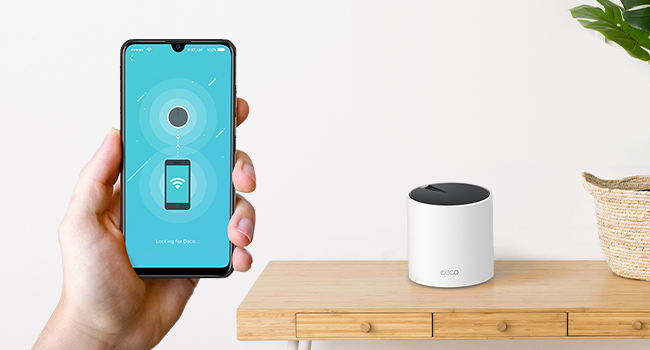
Thanks to Prime Day it was time for me to finally upgrade my home network. I was looking for a reasonably priced WiFi-6 mesh system with 3 stations (1 main + 2 satellites), at least AX3000 speeds, and a price tag of up to $300. It came down to two choices: the Eero 6+ and what I chose instead, the TP-Link Deco X55. Both systems had similar specs, but I liked how the TP-Link Deco had 3x Gigabit ethernet ports per satellite (the Eeeros have just 2). That meant I could wire each satellite in a daisy-chain configuration for a wired backhaul AND connect the 3rd ethernet plug to the gigabit switches I had at each satellite location. This meant that all of my hard-wired devices could stay hardwired, while adding mesh WiFi at full speeds (no bandwidth reserved for transmission thanks to the backhaul). Installation was quick and easy - I simply turned off my cable modem, disconnected my previous router, installed one of the Deco X55's in its place (in my bedroom), and turned everything back on. After downloading the TP-Link Deco app I had an internet connection set up and good to go in less than 5 minutes! Once that was working, I added the other two Deco's into the mix - one in the living room and one in the family room - with all three forming an almost perfect triangle for whole-home coverage. In less than 15 minutes after opening the box, I had a fast, Wifi-6 mesh system in my home. I had been using an older AC1900 router for almost 10 years now and back then it was just fine - but with more and more smart home devices being added to my home, it no longer was enough. I have a medium-sized amount of smart home devices (around 50 devices including hubs) and on occasion, I'd experience signal dropouts on some of the farther cameras, and other devices would sporadically go offline/online at random. With the X55 mesh installed, all of my issues disappeared! My smart cameras used to show a signal strength of between 80% (indoor cameras) down to around 55% (outdoor cameras). With the TP-Link Deco mesh in place, the signal strength changed to 100% indoor and 95% outdoor - a major improvement for sure. Pulling up live and recorded footage from the outdoor camera is so much quicker now. All of the other indoor smart devices I have all show 98-100% signal strength. Needless to say, this was a definite upgrade! As for my rating, I give it a solid 4-stars. There are a few small details that keep me from giving it a full 5-stars: some missing features that I had with my old router. One of them is being able to bulk reserve IPs by entering them into the app beforehand; with the TP-Link Deco, the device has to be connected to the network FIRST (with whatever DHCP IP address the Deco gives it), then you have to go into the app to reserve it with a static IP. I would rather have the more common table where you just enter each Mac address, static IP, and device name and it's done. Another missing feature is being able to have at least 2 separate SSIDs (not including a guest SSID). With the Deco you can only have one main SSID and one isolated guest SSID. Finally, to see some speed numbers I ran speed tests using both fast.com and speedtest.com, and the day before installing the mesh system I had an average internet speed of around ~260Mbps. The day after I installed the TP-Link mesh system my speeds went up to well over 490Mbps! Downloading is a lot faster, and streaming is super snappy as well. So in the end, I am very happy with my purchase of the TP-Link Deco X55 Wifi6 mesh system. Aside from the small feature complaints above, everything is awesome! I no longer have devices going offline/online. My internet speed has almost doubled (my old router was the bottleneck!) and streaming seems quicker as well. If you are looking for a mesh system to upgrade your current home network to the current WiFi6 standards, I would say that this is definitely a good buy! ------------ EDIT 02.18.2024: TP-Link Improvements Are Awesome! TP-Link has been steadily pushing out Deco firmware and app updates, and my -1 star complaint no longer exists thanks to two added features that completely address my complaints: - CUSTOM IP RESERVATIONS First, I don't have to play the game of connecting a new device, letting the Deco assign a DHCP address to it, then having to go back into the app to manually change the reserved IP. Now I can go straight into the Deco app and under the "Address Reservation" tab I can now select "Custom"; this brings me to a page where I can manually type in a MAC address AND the local IP address that I want to assign to it - without having to connect the device first. - SEPARATE IoT NETWORK My other complaint was that I only had the option to have two SSIDs - one main and one guest network. I wanted to be able to configure another SSID specifically so I could group all of my Smarthome devices, and after a couple of firmware updates later TP-Link not only gave me that option, but an even better one: they added a dedicated Iot (Internt of Things) network! Not only does this group my sparthome devices separate from my main network, but it also restricts communications between networks so that the IoT devices stay isolated. This is exactly the feature I wanted them to add during my initial review. - VPN COMPATIBILITY TP-Link has also added the option to use a VPN (server or client) directly through the router, as opposed to having to VPN each individual device manually. Furthermore, the VPN can be assigned to the network in two ways: either all devices (every device connected to the mesh will go through the VPN) or I can select specific MAC addresses that must pass through the VPN before reaching the Internet (tI chose option #2). With this I can make sure that certain devices that like to "call home" can only do so through the VPN, helping to protect my network and privacy. All in all, TP-Link has done a great job at supporting these devices, and their ability to add additional features over time have made me feel confident to revise my initial review now give this system a worthy 5 stars!
J**O
Does EXACTLY what you want, great coverage, fast, reliable speeds.
This is not perfect, but it's SIGNIFICANTLY better than what I had, 4.5 Stars! So for possibly 10 years I've used a T-Mobile ASUS 1900 AC 5Ghz router, which was FANTASTIC! Occasionally it would overheat or need to be reset, but I loved this router, even placement in the basement of a 2 story house reception was great everywhere and it worked outside. But it was getting long in the tooth and wasn't as great with newer WiFi standards (no support for WiFi 6, 7 ect). We upgraded to T-Mobile fiber optic and they provided a Nokia Beacon 6 router which is the biggest piece of trash I've ever seen. I called the tech back repeatedly and it would always say "works fine" but certain devices would never connect, or immediately drop connection, range was horrid and speed was wildly inconsistent, from 1100Mbps to like 2Mbps. I hate this device, they even replaced it and it's terrible. The actual T-Mobile connection is reliable and consistent, but the router was killing me. So I finall bought this TP-Link Deco X55 mesh system. I use an HDHomerun device and it was important to have a satellite unit I could plug directly into. I also wanted a other unit in the basement because the Beacon would cut reception and speed tremendously. Unfortunately I wasn't able to successfully get this device working plugging it directly into the T-Mobile fiber modem, I suspect that T-Mobile would need to authorize the device to work on their network, so this actually has to plug into the Beacon (which is plugged into the modem) kind of dumb, but with very minimal loss of speed. Coverage is excellent. It's one band for both 2.4 and 5Ghz, app is great for customizing things, grouping devices, limiting or turning off connection, resetting nodes. It's just fantastic. I have purchased other mesh sustems in the past that never worked well and I would return them. This one has been solid. Highly recommend.
A**N
Great coverage and easy network management
Title: Great Coverage and Easy Network Management I replaced my old ASUS router setup with the TP-Link Deco X55 mesh system, and the difference has been noticeable right away. The setup process was quick and straightforward through the Deco app, and I really like how easy it is to manage and monitor my network from my phone. Coverage throughout the house has been excellent, with strong and reliable Wi-Fi in areas that used to have weaker signals. The app gives me plenty of control over my network settings, devices, and security features without being complicated to use. Overall, this has been a great upgrade, and I’m very happy with the performance and functionality so far.
N**N
Fantastic Performance at a Solid Price
Insane signal strength for a great price. I’m so Impressed with this set up. I went from Spectrum’s equipment and was getting between 80-100 mbps. Now I’m getting 900-950 mbps. I have a 2700 sq ft house and now we have zero dead zones. Set up is a breeze as well, took around 10 minutes to get everything going. Great work TP Link.
S**L
TP-link
O produto funciona como anunciado, embora tenha vindo aberto, usado, já configurado.
K**D
سريع جدا وثابت
المنتج مثالي، ويشتغل كويس مع مودم اس تي سي، اهم شيء لازم توصل بينهم بسلك ethernet نوع Cat6 او Cat6a انا اشتراكي 300ميقا، وواصلني 300ميقا في كافة انحاء البيت، وبشبكة وحدة (مايحتاج اني اغير الواي فاي من الجوال، وين مارحت المكان كله شبكه وحده) وفي الالعاب، ال ping 8 منتج مثالي، لي سنة تقريبا، ولا غلطة
G**G
Works really well and a must for gamers or streamers
This is a great product perfect for gamers and streaming movies on amazon prime and others seamless maximum internet speed trough the entire house. Always reaching near the maximum speed in any room. The setup is extremely easy, plug any of the boosters on the the main modem then it becomes automatically the main one. I found that where it gets a little tricky is placing the two other boosters. For an optimal performance, you should not have more then one wall separating the boosters from one an other and not have to many electronics around it (magnetic field) otherwise it looses significant speed. but after about one hour trying to figure out where are the optimal places for each unit i get near maximum speed regardless of the room or level I'm on. WIFI 6 is a faster signal but also a shorter one so the units cannot be places to far apart. The time it took to setup and find the perfect spot is really worth the results and hassle free experience of high speed internet the the house. It really is trial and errors on where you place each unit. my suggestion connect the first one on to the router then plug the second unit where you would think is most appropriate then with your phone go on the deco app make sure your phone is connected to the second unit and do a speed test until you get the maximum speed (or at least near it) then repeat for the 3rd unit. An other tip : if you can try to put them at a certain height to get less interference. My las unit is placed near the basement ceiling and just by doing that i gained about half more of the speed. i love the fact that each unit has 3 ethernet ports on the back to be able to plug things that could be too far to reach the maximum speed on WIFI. 3 units was enough to get the main floor and basement covered at maximum WIFI speed. pros: Easy setup app is really easy to use and offers many options create a guest connection in less than 10 seconds small and discreet seamless internet trough the house (does not disconnect when changing unit connection) gives you a weekly report about your WIFI cons: if you have more than one wall separating one unit form another it looses significant speed but this is not due to the product but to the type of signal overall score A+
J**Z
Excelente producto
Hice una investigación previa para reemplazar los dispositivos mesh anteriores que ya estaban siendo intermitentes y degradando la señal de wifi. Fácil de configurar, me funcionó perfecto en una casa antigua con muros de concreto en un área de aproximadamente 240m2 distribuidos en dos plantas, la señal de internet llega perfecto a todos los rincones de la casa y se puede administrar con buenos features de seguridad a través de la aplicación. El diseño es discreto y elegante, en mi caso los coloqué en zonas donde no se ven. Llegaron en tiempo y forma y todo sin contratiempos.
M**A
Perfect for Villas
Great Product, Easy to setup and really good performance.Works perfectly in a 2 storey villa with thick precast walls
Trustpilot
3 weeks ago
2 weeks ago