Buy anything from 5,000+ international stores. One checkout price. No surprise fees. Join 2M+ shoppers on Desertcart.
Desertcart purchases this item on your behalf and handles shipping, customs, and support to Thailand.
🎯 Master precision and comfort — the pro’s choice for unstoppable productivity!
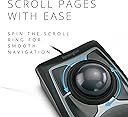
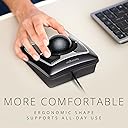
The Kensington K64325 Expert Trackball Mouse features a large 55mm precision trackball with DiamondEye optical tracking for superior accuracy. It offers full customization of 4 buttons via TrackballWorks software and an award-winning scroll ring for smooth navigation. Designed with ergonomic comfort in mind, it includes a detachable wrist rest and connects reliably through a wired USB interface, making it ideal for professionals seeking enhanced control and reduced wrist strain.


| Are Batteries Included | Yes |
| Are Batteries Required | Yes |
| Asin | B00009KH63 |
| Battery Average Life | 12 Months |
| Best Sellers Rank | #33,386 in Computers & Accessories (See Top 100 in Computers & Accessories) #12 in Trackballs |
| Box Contents | Trackball, Manual |
| Brand Name | Kensington |
| Button Quantity | 3 |
| Colour | Black |
| Compatible Devices | Personal Computer |
| Country Of Origin | USA |
| Customer Reviews | 4.3 4.3 out of 5 stars (4,056) 4.3 out of 5 stars |
| Global Trade Identification Number | 00085896643258, 50085896643253 |
| Hand Orientation | Right |
| Hardware Platform | Mac, PC |
| Importer Contact Information | Interface Connectronics Pvt Ltd, # 85, Unit # 3, First Floor V.V.Yoga Saurabha, S.C.Road, Yeshwanthpur, Bangalore, India 560022, Contact: +91-9739952969, [email protected] |
| Item Dimensions L X W | 14.8L x 19.1W Centimeters |
| Item Part Number | 64325 |
| Item Type Name | Trackball |
| Item Weight Unit Of Measure | 0.34 Kilograms |
| Manufacturer | ACCO Brands Asia Pte Ltd, 2 International Business Park Tower 2 #05-31/32, The Strategy, Singapore 609930, Contact: +65-67760195, [email protected], Kensington |
| Manufacturer Contact Information | ACCO Brands Asia Pte Ltd, 2 International Business Park Tower 2 #05-31/32, The Strategy, Singapore 609930, Contact: +65-67760195, [email protected] |
| Manufacturer Part Number | 64325 |
| Minimum Required Operating System Version | Mac OS 10.13 High Sierra |
| Model Name | Trackball Mouse |
| Model Number | 64325 |
| Movement Detection | Optical, Trackball |
| Network Connectivity Technology | Wired |
| Number Of Batteries | 1 12V batteries required. (included) |
| Operating System | Chrome OS, Mac OS 10.13 High Sierra, Windows 8 |
| Packer Contact Information | Interface Connectronics Pvt Ltd, # 85, Unit # 3, First Floor V.V.Yoga Saurabha, S.C.Road, Yeshwanthpur, Bangalore, India 560022, Contact: +91-9739952969, [email protected] |
| Power Source | Corded Electric |
| Product Features | mac_compatible |
| Style Name | Modern |
| Unit Count | 1 Count |
| Upc | 638458744902 085896643258 809385141014 666669843022 803982736673 |
| Warranty Description | 1 year manufacturer warranty |
User
Your Best Studio Buddy!
This product has found its home in almost every professional recording studio in the world. It is extremely dextrous and such a comfort to the wrist. Long hours at the studio don't seem so long anymore! The only issue I have noticed is with the scroll wheel not performing smoothly, but it still works. The trackball is weighted and has sufficient momentum to sen e cursor flying to the other end of the wide screen display. Integrates very well with Pro Tools, and general workflow. I am yet to try out the customisable top keys to instantiate macros. Very satisfied with the product finish and quality.
User
A fantastic Trackball
I think this is a fantastic mouse for doing colour jobs in Resolve. The huge trackball with proper tactile feel is perfect for precision. The scroll button works like a charm. I had to fiddle around to find the middle button click, but once that was done everything fell in place. Saves my wrist.
User
Must have Mouse for Audio Facilities
Must have product for every music producer and Audio Editor / sound designers & Studio ownersWith this altimate product don't worry for unlikely wrist or finger pain.. on long work seetings..
User
Worthy tank
I bought this after experiencing pain on my pinky finger due to traditional mouse movements while editing audio tracks for long hours. This trackball mouse is definitely worth in terms of no wrist movements. It comes with a wrist rest which is very comfort for me. But still after long audio editing works, I feel tired to move the ball multiple times and mainly the scrolling is not at all smooth. I read that it is designed in that way. There are however options to program the 4 buttons in combinations of single button as well as double button pressed simultaneously. You must install a small program for this option. For example, I have programmed one button as click and hold, so I can drag things at leisure with free hand. Still some programmed options were not working inside some softwares. I can also program macros. I created a list of contact details which very often I had to fill in some situations, pressing those button gives me a list and click that will be filled into the required area such as name or address in an online form.It is definitely a worth buy as it is solid built and guaranteed by authorised center in India itself, not abroad.
User
Five Stars
Very good product & fast shipping by seller
User
Why are the Kensington trackballs comington goes it's hampering the good will of the company.
I have purchased twice from techchize and received damaged slightly ,and the damages are in the important places the left top button and the scroller wheel. I have mailed Kensington as well because it's a matter of good will for these companies building this and been using these trackball for many years. I have ordered again ,please see to it ,the product is in best condition.
User
Satisfied for now
So I was using this product at my work place and really liked it so I ordered one for myself at home..I work in the audio video industry so I need really precise movements for automations and stuff..Initially it was misbehaving a bit.. like everytime I was pressing the upper right button its cursor speed changes.. don't know why but had to unplug and reconnect it then it started working normally..then I had to avoid using that button as the deadline of the project was really close.. but later it automatically worked fine..I hope it'll work fine in future as well ..
User
Good for amateur colorists!
I got it as a basic entry level control surface for coloring. I use it with DaVinci Resolve and works perfectly. The trackball software that comes is really good where you can configure the settings of the buttons, scroll ring and trackball for different applications. The mouse is bigger than i expected with a resting pad included which makes it comfortable for long term use.I have used it till now for 4 hours straight and have no issues. Good for amateur and entry-level colorists!
User
I absolutely love it!
UPDATE 24 FEB 2011Here is an update to my original review. I just as keen on this excellent input device as I was a year ago when I bought it. It has been in constant use and it really is imho the best input device I have ever used.I use it for graphics, mostly in Adobe Illustrator for example and there is so much control and it is precise. Equally it can go very quickly across screens so I can get across my two screens easily.I also use it for editing video in Final Cut Pro and here, it is really superb. It's great big trackball makes it very easy to just creep forward and back a frame at a time.I really do think that people may overlook this terrific input device because it is not slick and cool, but it is very much the best possible thing for the job.My only comment that could be negative, but isn't, is that using it exclusively may risk RSI problems with you shoulder. I think this is true of any mouse of this sort. That is why I also use the Contour RollerMouse Free. This I use for scrolling around word processing documents and that kind of thing.ORIGINAL REVIEW MARCH 2010I bought mine on 30 January so I've had it for six weeks now. I absolutely love it!I do not use it exclusively, I use it in conjunction with a Contour RollerMouse Free. However I use the Kensington Expert Mouse for graphics. I recently just finished doing a lot of editing of a video with Final Cut Express and the Expert Mouse is superb for this kind of thing.Many years ago I used a Kensington trackball, I think in about 1995, and I really like that one, but this is so much better because it has such a large trackball.The negative things about this trackball are that it feels a bit cheap in construction compared with say, a Logitech or Microsoft mouse at this price, however I think it is well constructed nevertheless.It looks rather 70s to me but I don't mind this. In actual use the feel is very good. The scroll wheel bearing surface is noisy in a plasticy way but there is no problem with this in use.From time to time it is a good idea to remove a build up of gunge on the three little ball bearings. I keep an old toothbrush nearby for this purpose. It's also quite good to take the ball out and polish it, perhaps with your shirt :)Any of these small negatives are hugely outweighed by the fact that the level of control over the cursor is superb. That is what an input device like this is for and that is what it does so well.Before I got this I tried the most expensive Logitech mouse, however the software for that on my Mac was a disaster so I had to send it back. IMHO the Kensington Expert Mouse is a far better buy than that more expensive Logitech mouse. The level of control over the cursor is much better.The software for the Kensington Expert Mouse works very well indeed on my Mac. I use it with the default settings and it is fine. The scroll direction can be switched with a menu in the menu bar at the top of the Mac OS screen and this is very handy.If you buy this you will be initially disappointed when you take it out of the packaging. You will think it is a prop from the Star Wars movie.When you first use it you will think it is a bit weird if you have not used a trackball before. You will still be having doubts.After a week of using it you will never want to use a "normal" mouse again!
User
Computer navigation the way it should be!
After having read several reviews around the web and being aware of the potential downsides as well as the upsides, I decided to buy myself one of these. Boy, am I glad I did. Admittedly, I'm the kind of person who's not satisfied with the typical mousing solution (I have really big hands and I do a lot of delicate work) and likes to try new things, so if that's not you then you may want to try one out before you buy if possible, or at least get one with a return policy. Caveat emptor. That being said, short of building a custom one myself, the Kensington Expert Mouse is pretty much what I want in a trackball, and having used it for awhile any regular mouse feels foreign and less-than-intuitive.First, the cons, in order of greatest to least issue (and they're all minor issues to me anyway).:: It does have a bit of a backward slope to it, probably about 10-15 degrees, which my large hands and already-tilted desk find mildly awkward. If you have a desk that's fairly high above your lap, then that backward slant will probably match the angle your arms are already at and this won't be an issue.:: The scroll wheel, as has been mentioned elsewhere, does feel a little scratchy, like a plastic-on-plastic sort of texture. It's not quite the buttery-smooth, gliding motion you expect after using the ball itself (more on that later) - it feels more like the back of a plastic spoon sliding across a Formica counter. That said, mine wasn't that bad, and probably would go away with a bit of silicone oil, but other reviews range from "not a problem at all" to "nasty-feeling deal breaker" so I suspect that Kensington's quality control could use a bit of tightening up. Again, get one with a return policy in case you don't like it. Common sense. I find myself using the scroll wheel less than I would otherwise anyway, as I've mapped one of the buttons to middle-click and I use that in web browsers to scroll up and down by moving the cursor. Smoother and easier than the scroll wheel.:: Occasionally, a button click won't register if you press the button on the corner or edge - you have to get closer to the middle. Rarely an issue unless I'm gaming, because my hands have a large span and I may physically miss the button at a critical moment when I'm not paying attention. It'll come with practice, I'm sure, just something to be aware of if you have palm-a-basketball-sized hands like me.Now, to the pros! Whee!:: Yes, it's got a pretty big footprint - it's about 5.5" by 9" with the included stiff-foam wrist rest (which I do recommend using, because of the aforementioned back angle) - but it doesn't move around. It takes up about 60% of the desk space that you'd dedicate to a typical mouse pad. Especially on those pull-out keyboard trays, there isn't enough room to use a mouse, but since the Kensington Expert trackball is under six inches wide it'll fit in a nice little rectangle next to the keyboard. Height is another matter, since the ball itself sticks out pretty high, but I don't personally find it to be too much of an issue. YMMV.:: The four large, programmable buttons. I'm not a lefty, but I mouse left-handed, so being able to map the buttons to essentially whatever I want with Kensington's free software is absolutely a blessing. In addition, different people will prefer to use different fingers for tasks of varying frequency, so whereas I don't right-click much and map it to where my ring finger sits, someone else may put it under their index finger or thumb. The software in general is pretty easy to use, and has enough functionality to feel nicely customizable without being so in-depth that only an advanced power user can take advantage of its potential.:: The trackball. Oh, that trackball. Smoother than a greased Fonzie on a Teflon-coated ice rink. Right out of the package it actually feels slightly rough or not as free-spinning, because the ball and its three contact points are completely pristine. Once you get some skin oils on it through use, it's like buttah. Gross-sounding, I know, but pretty much everything you touch gets skin oil on it. Speaking of which, the ball is just dropped into its socket, so to clean out the inevitable gunk that will accumulate in any trackball assembly you just have to turn it upside down and the ball falls out. No disassembly required. The inside of the socket is smooth plastic, so you just wipe it out and get back to work. The ball itself has a nice bit of weight to it, and is positively pleasurable to the hands in use. It's got a solid feel and has some inertia when you move it, which brings me to the next point...:: It has an infinite range of very smooth motion. I currently have a dual-monitor setup, and (besides being very awkward and un-ergonomic) I despise having to pick up a mouse, move it back to the other side of my mouse pad and continue my motion across the screen. DESPISSSSSE. It makes my fingers recoil just thinking about it... Ahem. Anyways. A quick flick of the ball will send the cursor moving across the screen, and the ball's inertia will continue the motion. It doesn't jump around or go crazy, it just follows the ball like it's supposed to. I have the acceleration parameter in the software set to maximum, so a fast motion of the ball will cover lots of ground quickly, but slow motions will still allow fine, precise positioning of the mouse. This becomes an even greater blessing with triple- or quad-monitor setups, and once again, this trackball takes up less desk space than an ordinary mouse. You don't have to have a huge screen to need this, either... for extra-fine work like Photoshop or video editing, you may want to slow the cursor speed down, which effectively makes the screen much larger relative to the motion of the mouse. There is no picking up and putting down with the Kensington Expert trackball - you just keep rolling. If you're not there yet... keep rolling. It feels natural, the way navigating a computer should.So, to sum it all up, I guess I could say that I love my Kensington Expert Mouse because it feels right. It's intuitive to use, customizable, ergonomic, and it just works. There are a couple little niggles, but in my humble opinion they are far outweighed by how they make my computing experience easier and more natural. Because everyone has different needs for their computing experience, not everyone will want or need one of these. If I was just an occasional casual computer user that isn't concerned with ergonomics or ease of use, I would absolutely think twice about spending $75 on a mouse I'm not sure I'll like when the one I have mostly does what I need it to. But that's probably not Kensington's primary market here. For me, and people like me, it's worth the money to make my interface with my computer feel good, because I use it every day.
User
Excelente!
Muito gostoso de mexer. Botões muito fáceis de clicar ao manuseiar a bola. Minha única ressalva é que o botão raspa na bola quando você segura o botão e roda, mas aí é um uso errado meu... mas com 1mm a mais de distância do botão resolvia.
User
Wonderful
Top class, fine control and has a serious pphysical presence but also a serious function. IF you like trackballs, this is IT!
User
Support Kensingtona nie istnieje
Trackball nie współpracuje z oprogramowaniem Kensington. Sprawdzałem na 2 komputerach z Windows 10 64bit. Wsparcie producenta praktycznie nie istnieje - na odpowiedź czeka się ponad 2 dni, a uzyskane porady do niczego nie są przydatne.Szkoda, bo sam produkt całkiem fajny.
Trustpilot
1 week ago
2 days ago