We remain fully operational. Our teams are working around the clock to ensure your deliveries continue safely.

DOWNLOAD THE APP


Copyright © 2025 Desertcart Holdings Limited
DOWNLOAD THE APP
![SABRENT USB 3.0 to SATA External Hard Drive Lay-Flat Docking Station for 2.5 or 3.5in HDD, SSD [Support UASP] (EC-DFLT)](https://m.media-amazon.com/images/I/81Y8qIYM2eL._AC_SL3840_.jpg)

Buy anything from 5,000+ international stores. One checkout price. No surprise fees. Join 2M+ shoppers on Desertcart.
Desertcart purchases this item on your behalf and handles shipping, customs, and support to Thailand.
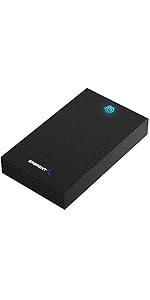
💼 Elevate your data hustle with SABRENT’s ultra-fast, universal docking station!
The SABRENT USB 3.0 to SATA External Hard Drive Lay-Flat Docking Station supports 2.5" and 3.5" SATA HDDs and SSDs up to 20TB, featuring SuperSpeed USB 3.0 connectivity with UASP protocol for accelerated data transfer rates up to 5Gbps. Designed for easy plug-and-play use, it includes an external power adapter for 3.5" desktop drives and offers a compact, stable lay-flat design ideal for professionals needing quick, reliable access to legacy or additional storage.



| ASIN | B00LS5NFQ2 |
| Best Sellers Rank | #1 in Hard Drive Docking Stations |
| Brand | SABRENT |
| Built-In Media | External Hard Drive Lay-Flat Docking Station |
| Color | Black |
| Compatible Devices | Desktops, Laptops |
| Connectivity Technology | usb |
| Customer Reviews | 4.4 4.4 out of 5 stars (36,636) |
| Data Transfer Rate | 5 Gigabits Per Second |
| Enclosure Material | Single Bay |
| Global Trade Identification Number | 00819921011572 |
| Hard Disk Form Factor | 3.5 Inches |
| Hardware Interface | 3.5-Inch Floppy, USB 3.0 Type A, eSATA |
| Hardware Platform | Windows |
| Item Dimensions L x W x H | 7.09"L x 4.8"W x 1.6"H |
| Item Weight | 7.5 Ounces |
| Manufacturer | SABRENT |
| Memory Storage Capacity | 20 TB |
| Mfr Part Number | EC-DFLT |
| Model Number | EC-DFLT |
| Supported Devices Quantity | 1 |
| UPC | 780746852766 819921011572 737989665660 650135421227 |
| Unit Count | 1.0 Count |
| Warranty Description | 1 Year Limited |
C**H
Great product
This thing works wonders on my 256 GB seadisk hard drive from a computer that the motherboard failed on many many years ago. I must say this first because at first I did not think it worked because it would not go into it. What I did have to do is remove the adapter that comes off of the front side that plugs into the computer itself. After you do that more than likely it will go in just as designed because most laptops have adapter pins specific to their branding or whenever it was made. I did have to remove the outer shell which had the mounting screws in it to slide in and I hook the power supply up as well as plugged it right into the USB and it started reading everything flawlessly. I can't speak on anything further than this because that is the only hard drive I have tried but initially I thought it was a botched attempt to manipulate words because it says all hard drives from 2.5 in to 3.5 in less than 20 TB. Again once I pulled the plastic adapter piece off of the front of the hard drive where it would go into the computer it slid right in just fine and started to read immediately. Basically you can turn a failed computer hard drive into an external or if you cannot gain access to that computer any longer because the motherboard has failed or something along those lines use this and you can recover everything just the same ways you would see it on the computer you were using without any extra software
A**R
Worked very well!
Simple design, well made and very straightforward to operate! Worked perfectly with my older SATA 3.5” hard drive!
S**.
Great enclosure
My old laptop pc died, one too many falls to the floor. I needed the files on the drive so I took apart the pc and rescued the hard drive from it. I didn't know what type the drive so took a chance and ordered an enclosure last night just before midnight. It was here by 6am this morning. The harddrive slid right in. I connected it to the computer (usb) plugged it in a it works wonderfully. Ive only had it for a few hours but it's working great. Up and working in 10 minutes. Great! Now if I could access my old onedrive cloud files on my new pc, I'd be a happy camper.
K**D
works well
works well - if it holds up then add a star.
A**D
looking for a simple solution to accessing your old files then this is the perfect item to add
surpassingly great cooling for a docking station, it was easier than i was expecting simply plug in and extract or place files no issue, quite literally saved all my old photo's and other important data on my dying drive. I do wish the usb was a little longer though not really a complaint thought just a personal preference on my behalf.
H**E
This was plug n' play!....For my situation, anyway.
Back when I entered the workforce, one of my first big purchases was a desktop PC slightly customized by a local computer dealer. As the years went by, I moved on to a laptop, desiring more mobility. I wound up using the laptop as a desktop, and recently bought a brand-new desktop PC, the very one I'm using to write this review. Doing some cleaning the other week, I dug out the first desktop mentioned above and realized I had files on it that I wanted. Trouble is, the GPU had somehow died from years of not being used. I didn't want to put money into an old computer, but I wanted the files. After a bit of research, I discovered HDD enclosures such as this one and decided it was worth a try. I was a bit hesitant, seeing as other reviewers have had issues with this device. I'm happy to say I had no such issues! After dismantling the old desktop, I easily popped in its old Western Digital HDD into this enclosure, plugged in the PSU, and connected the enclosure to my new desktop. I was able to immediately access all partitions of the old HDD after a few confirmations that I had administrator access and was then able to easily transfer the drive's contents to my new PC. Could I have saved money by picking up a cheap GPU, and popping it into my old desktop? Probably. However, this was such an easy method that I don't regret it! I also want to note that I did NOT need any software to interface with the removed HDD to my new computer. My new PC recognizes this enclosure with the old HDD as an external hard drive (which it is), so I was able to just use Windows Explorer to peruse, copy and transfer all the files I wanted. I'm not sure why other reviewers are discussing needing to download third party software to use this, but I acknowledge that I'm largely ignorant of such applications. So, that's why I've specified in the review title that for MY situation, this enclosure was an easy plug n' play device with no issues or extra setup processes. So, if like myself you've got an old hard drive and need data off of it, but don't want or can't resuscitate the computer that houses it, this enclosure is worth a look. For the record, my Western Digital HDD has SATA connectors, so it cleanly clicked into place when I inserted it into this enclosure. The enclosure's PSU seems adequate for demand, though I did notice the enclosure was pointedly warm after I finished the data transfer. If I were to use this enclosure often, I would at least open this enclosure's door during use, if not seek other cooling measures, such as USB powered fans.
P**P
Als jemand, der regelmäßig mit großen Datenmengen arbeitet und verschiedene Festplatten verwaltet, bin ich von der SABRENT Festplatten Dockingstation restlos begeistert. Dieses kleine Kraftpaket hat meine Erwartungen in jeder Hinsicht übertroffen und ist zu einem unverzichtbaren Werkzeug auf meinem Schreibtisch geworden. Die Kompatibilität ist fantastisch: Egal ob 2,5-Zoll-SSDs oder 3,5-Zoll-HDDs, die Dockingstation nimmt beides problemlos auf. Das werkzeuglose Design ist ein Traum – einfach die Festplatte einstecken, und schon kann es losgehen. Kein Schrauben, kein lästiges Gehäuseöffnen. Die Plug & Play-Funktionalität und die Hot-Swap-Fähigkeit machen den Wechsel zwischen verschiedenen Laufwerken zum Kinderspiel, ohne dass man den Computer neu starten muss. Besonders beeindruckend ist die Geschwindigkeit. Mit USB-A 5Gbps (SuperSpeed USB 3.0) werden Daten blitzschnell übertragen. Das ist ideal für große Backups, das Klonen von Festplatten oder den schnellen Zugriff auf archivierte Daten. Ich habe keinerlei Performance-Einbußen festgestellt, selbst bei intensiver Nutzung. Die Verarbeitungsqualität ist robust und die Station steht stabil auf dem Schreibtisch. Die Bedienung ist intuitiv und selbsterklärend. Ob für Datenrettung, Datensicherung oder einfach nur, um alte Festplatten wieder nutzbar zu machen – diese Dockingstation ist die perfekte Lösung. Zusammenfassend lässt sich sagen: Die SABRENT Festplatten Dockingstation ist eine absolute Kaufempfehlung für jeden, der eine schnelle, flexible und zuverlässige Lösung für seine SATA-Festplatten und SSDs sucht. Ein Produkt, das hält, was es verspricht, und volle 5 von 5 Sternen verdient!
S**0
システムのバックアップには最適です。排熱も問題ないと思いますが、最近は気温が高いのでそのへんは各自調整していくのが良いでしょう。なにより、引っ越しソフトウェアがダウンロード可能なのが良好。使いながらレビュー追加していきます。
A**R
Si vous retrouvez des vieux disques et les utiliser, vous devez les placer dans un ordinateur, avec cet appareil vous pouvez directement les utiliser , sans montage, il suffit de soulever le couvercle et de placer le disque et allumer. Les transferts de données sont rapides, il fonctionne à la perfection sous Linux.
H**E
Excellent drive bay
D**A
Ho acquistato questa docking station Sabrent per recuperare alcuni dati da vecchi hard disk che avevo nel cassetto e devo dire che fa esattamente quello che promette, senza complicazioni. Prestazioni e Facilità d'uso: La cosa migliore è la semplicità: è un dispositivo Plug & Play a tutti gli effetti. Basta inserire il disco (che sia un SSD da 2.5" o un HDD meccanico da 3.5"), collegare il cavo USB 3.2 e il PC lo riconosce all'istante. Supportando il protocollo UASP, le velocità di trasferimento sono ottime e stabili, ideali per spostare grandi quantità di GB senza attese infinite. Design e Qualità Costruttiva: A differenza di altre docking station "aperte", questa ha un design orizzontale molto stabile. La scocca è in plastica robusta e il meccanismo di inserimento è fluido. Apprezzo molto il LED di stato che indica l'attività del disco, così evito di scollegarlo mentre sta ancora lavorando. Perché sceglierla: È lo strumento ideale per chi fa manutenzione ai PC o semplicemente vuole trasformare un vecchio hard disk interno in un'unità esterna in pochi secondi. Non scalda eccessivamente e non richiede driver particolari. Pro: Compatibile con dischi da 2.5 e 3.5 pollici. Velocità USB 3.2 (supporta UASP). Stabile sulla scrivania e semplicissima da usare. Contro: Il cavo USB in dotazione è buono, ma avrei preferito fosse leggermente più lungo per una gestione dei cavi più pulita. In sintesi: Un accessorio indispensabile da avere nel kit di ogni smanettone. Rapporto qualità-prezzo eccellente, come spesso accade con i prodotti Sabrent.
Trustpilot
2 weeks ago
1 month ago