We remain fully operational. Our teams are working around the clock to ensure your deliveries continue safely.

DOWNLOAD THE APP


Copyright © 2025 Desertcart Holdings Limited
DOWNLOAD THE APP
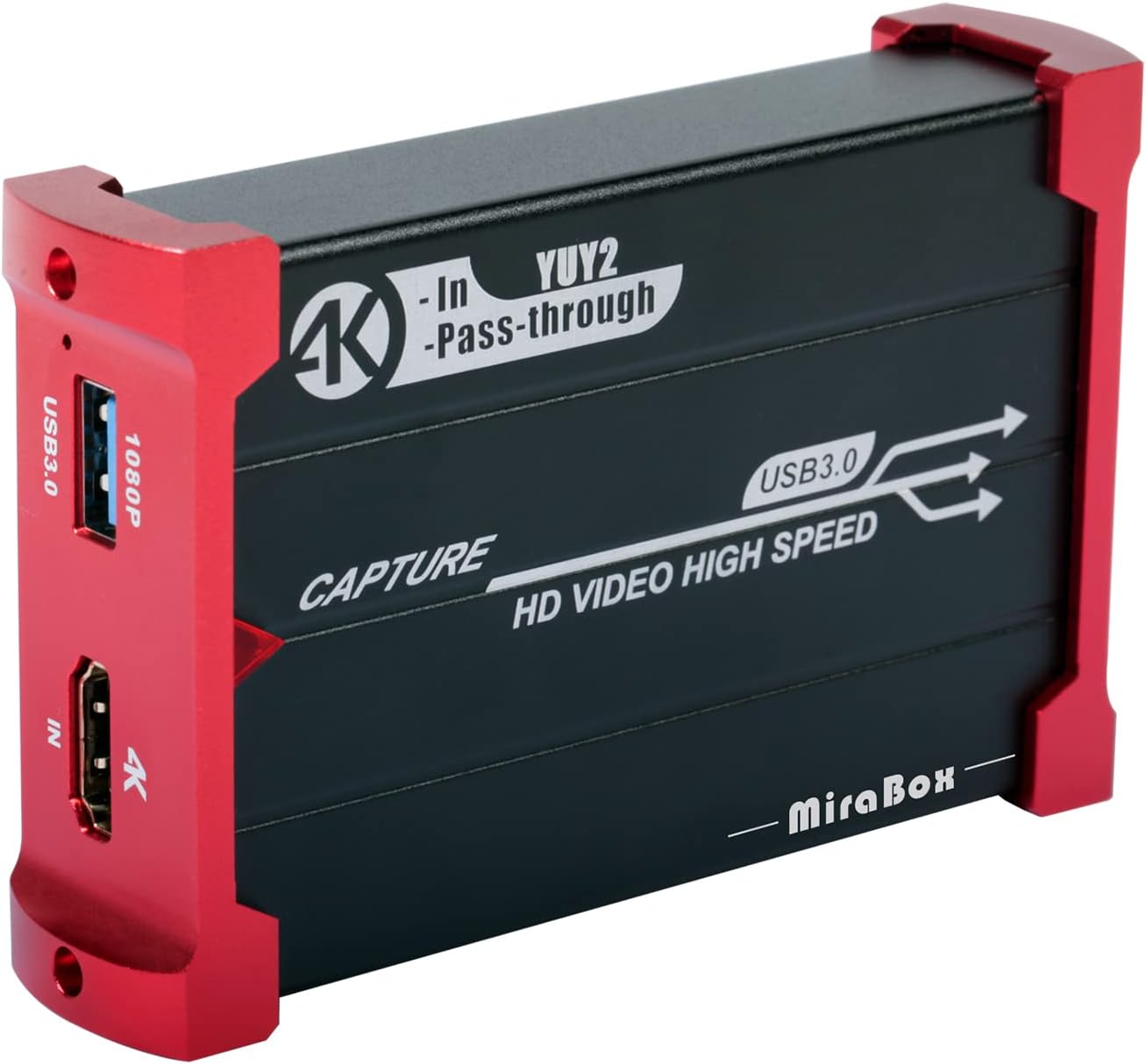


🎥 Stream Like a Pro, Game Without Limits!
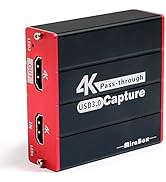
The Mirabox Capture Card delivers zero-latency 4K@30Hz HDMI passthrough and smooth 1080P@60FPS capture via USB 3.0. Compatible with major consoles, cameras, and PCs, it offers plug-and-play ease across Windows, Mac, and Linux platforms—perfect for professional-grade streaming and recording.



| ASIN | B07G84G7VF |
| AV Output | YUV |
| Antenna Location | Video Recording |
| Best Sellers Rank | 104,809 in Computers & Accessories ( See Top 100 in Computers & Accessories ) 154 in Internal TV Tuner & Video Capture Cards |
| Box Contents | Capture Card, HDMI Cable, USB Cable |
| Brand Name | Mirabox |
| Compatible Devices | PS4, PS5, Xbox One, Xbox 360, Wii U, DVD players, cameras, surveillance cameras, DSLR cameras, set-top boxes |
| Customer Reviews | 3.8 3.8 out of 5 stars (768) |
| Hardware Interface | USB 2.0, USB 3.0 |
| Item Dimensions | 9.5 x 6.3 x 2.2 centimetres |
| Item Weight | 118 Grams |
| Manufacturer | ARX TECH |
| Manufacturer Part Number | OP-0011 |
| Minimum System Requirements | Incomplete: USB 3.0, compatible with Linux, Mac OS, Windows 7/8/10, support for 1080p and 4K video |
| Model Name | Mirabox Capture Card |
| Model Number | MiraBox 321 HDMI Game Capture Card |
| Operating System | Windows |
| Other Special Features of the Product | Portable |
| Platform | Linux, Windows |
| Tuner Type | numérique |
| UPC | 650434552899 |
| Unit Count | 1.0 count |
| Video Capture Resolution | 1080p, 4K |
T**A
Simple but so effective
Why do I need to buy a webcam when I have a Sony X70 camcorder. This capture device is the definition of plug and play. I plugged my Sony X70 into it via HDMI. It then plugged into my laptop via USB. Skype, Zoom, Microsoft Teams saw it instantly and looks amazing. Also, the device is powered via USB so no external power adaptor which my office is frankly full of. Fantastic product!!!!
G**D
Not bad for the price.
For the price you can’t complain. It does it’s job brilliantly. The audio was a bit of a pain to setup on my end (make sure the box is outputting to a TV and not just your PC). It does get very hot very quickly so make sure it’s somewhere cool. But honestly you can’t complain for the price being a lot cheaper than the other capture card options.
G**E
Impressive
Great little product which is probably overlooked for more expensive or better promoted alternatives. Works out of the packaging first time with no dropped frames.
A**W
Most useless capture card just buy an elgato
This product at first looked good, it had good reviews and looked professional. Except for the massive bold 16 made in China on the side...... we needed it for a charity gaming live stream so it was paramount that it worked. It worked the first time then refused to work again. Bear in mind it requires no drivers or set up software. Just plug in and use it. Out of 10 tries it worked 3 times. The happiest about this product was when I sent it back to get my refund. Just by an elgato 4k yes it's like £120.00 but I plugged it in and it worked straight away. They use that software for film making, don't buy this crap.
P**R
Meh - Useless for cameras
It works for some devices so I didn't send it back as faulty.... Unfortunately it doesn't work with the one device I really wanted to use it with which was a DSLR. Instead I had to find a different HDMI capture dongle which did. I will be keeping this for screen sharing but be warned, it may not work with everything and there is ZERO tech support.
P**N
Perfect for Youtube and streaming
This Mirabox capture card does exactly as per specification but be aware if your computer is slow, or has no real graphic card or again low memory it will always record in the resolution it can catch up with. We have recorded many streams at full HD 1920x1080 at 30 fps with no issues. Like all dongles, if your computer is too slow, the resolution will be lower or it will drop frames. This is not devices fault but the computers.
J**N
Like other cheap electronics, you get what you pay for
Cost £80 and was dead on arrival. Great manufacturing and quality control lads! Stay away, don't risk wasting your time. Buy a proper piece of hardware. There's a reason all the top dogs have the same pieces of kit - it works. Oh, Streamlabs OBS doesn't pick it up either, that's a bit rubbish too!
S**.
Does what they say it does
This is the first game capture device I have bought so I couldn't really compare it to any others. I bought it because it was cheaper than the Elgato's and it had good reviews. Upon using this device it worked as soon as a plugged it into my PC via USB, however, getting the audio set up wasn't as straightforward. I bought this device to stream from my PS4 to Streamlabs OBS, it took me around 2 days of fiddling to finally work out how to record the in-game audio at the same time as listening to the audio as i was playing the game. Anyway, long story short, and I got there in the end. I haven't actually streamed using the Mirabox yet, but everything is set up correctly on Streamlabs OBS now, so I'm happy with this product and I would recommend as a cheaper alternative to the more expensive Elgato's.
M**T
Fonctionne directement, sans avoir besoin d'installer de pilotes ou de logiciels propriétaires. Très bonne qualité d'image, fluide, et avec très peu de latence (entre 50 et 100ms je dirais, ce qui est du même niveau que des cartes plus chères comme Elgado HD60 S).
C**O
Esta capturadora me ha sorprendido porque, a diferencia de otras de este rango de precios, esta permite seleccionar fuente de video sin compresión, por ejemplo en OBS - Open Broadcaster -, lo cual significa que no tienes que sobrecargar la CPU del ordenador gestionando la descompresión de la imagen. Pondré un ejemplo concreto: esta capturadora, conectada a un MacBook Pro 2017, si me pongo a capturar una fuente cualquiera HDMI (por ejemplo, una cámara réflex Canon), a través de OBS, la CPU del Mac se pone a consumir un 50% en el proceso VTDecoderXPCService. Esto ocurre porque, por defecto, la capturadora envía la imagen a través del protocolo UVC como video comprimido por MJPEG, lo que obliga a la CPU del ordenador a descomprimir la imagen en tiempo real. Sin embargo, modificando la configuración por defecto de la fuente de video OBS, y seleccionando YUV, ya no aparece el proceso VTDecoderXPCService consumiendo CPU y todo funciona mucho mejor. Tengo otras capturadoras más baratas ... pero también más caras (por ejemplo, Atem mini), que no soportan este modo (sólo saben enviar video comprimido por MJPEG) Así que estoy satisfecho con la compra, y la recomiendo.
M**K
Vorweg: Ich habe keinerlei Erfahrungen mit Streaming Hardware. Ich hatte eine bezahlbare Box gesucht, mit der ich HDMI Ausgaben beliebiger Geräte aufnehmen kann, um sie dann weiter zu verarbeiten. Der MiraBox liegen nur 2 Zettel bei, die als Anleitung herhalten müssen. Für jemanden wie mich, der sich noch nie mit dem Thema beschäftigt hat, war das ziemlich mager. Aber man wächst ja mit seinen Aufgaben :-) Die MiraBox kommt in einem Alu-Gehäuse und macht dadurch schon einen wertigen Eindruck. Sie wird mit dem PC über USB 3.0 verbunden und empfängt das Bildsignal anderer Geräte über einen HDMI-Eingang. Sie verfügt zwar auch über einen HDMI-Ausgang, um das Signal durchzuschleifen, aber den habe ich letztendlich nicht genutzt, sondern stattdessen einen HDMI-Splitter eingesetzt. Der Grund dafür war, dass die MiraBox das Bildsignal nur durchschleift, wenn sie an USB 3.0 angeschlossen ist. Ein eigenes Netzteil besitzt sie nicht. Ausserdem wird sie im Betrieb nach einiger Zeit relativ heiss. Durch den Splitter kann ich die Box vom Strom nehmen, wenn ich nichts aufnehmen will und der Monitor zeigt dann trotzdem ein Bild an. Die MiraBox wird unter Windows beim Anschluss der USB Schnittstelle automatisch als DirectShow Gerät eingebunden. Treiber sind nicht notwendig. Also im Prinzip wie eine am PC angeschlossene Webcam. Den Stream kann man dann mit diversen Programmen anzeigen, weiter streamen, oder lokal abspeichern lassen. Zuerst hab ich das ganze mit VLC getestet. Ich habe zwar alles nach längerer Fummelei hinbekommen, aber ich kann VLC nicht für diesen Job empfehlen. VLC ist zu kompliziert zu konfigurieren und ausserdem hat es bei mir immer erst den kompletten Stream unkomprimiert auf der Platte abgelegt, bevor er dann in H264 gewandelt wurde. Durch den unkomprimierten Stream kommen bei Full HD mit 60 fps schnell einige Gigabytes pro Minute zusammen... Glücklich wurde ich dann mit dem ebenfalls kostenlosen OBS Studio. Darin konnte ich relativ leicht alles korrekt einrichten und es auch so konfigurieren, dass Video und Audio von der MiraBox direkt durch NVenc on the fly in H264 gewandelt wurde und nur die komprimiert Datei (FLV Format) auf der Platte landete. Das Bild der MiraBox entspricht nicht 100% dem Originalbild. Man muss über den Eigenschaftsdialog der Box noch Schärfe, Helligkeit und Farbsättigung korrigieren, bis das Ergebnis halbwegs so aussieht, wie von der Originalquelle. Getestet habe ich mit einer Nintendo Switch und auch mit dem Signal einer Kabelfernseh-Box. Am Anfang gab es auch regelmässige Ruckler im Bild, aber die verschwanden, sobald ich die fps Rate korrekt eingestellt hatte. Der Ton kommt über eine weitere DirectShow Quelle, die man als Tonquelle im OBS Studio einstellt. Man kann aber natürlich auch weitere Bild und Tonquellen wie z.B. das eigene Mikro oder eine Webcam mit in den Stream mixen. Bisher habe ich immer nur einen 2 Kanal Ton von der MiraBox bekommen. Aber das kann auch an meiner Testumgebung liegen, die auch nur 2 Lautsprechen bzw einen Stereo-Fernseher besitzt. Die Bildqualität der MiraBox ist fürs streamen oder zum aufnehmen auf jeden Fall in Ordnung. Für den Preis gibt es meiner Meinung nach nichts vergleichbares auf dem Markt. Für unter 100 Euro vergebe ich deshalb volle Punkte.
A**I
Comprato due volte per necessità lavorative, sono soddisfatto. La Mirabox dispone di un ingresso audio-video HDMI, una uscita audio-video HDMI (utile per monitorare e rilanciare il segnale acquisito) e una porta USB 3.0 per il link verso il computer. La confezione molto curata contiene anche il cavo USB. Installata su un notebook Windows 10 è stata immediatamente riconosciuta senza difficoltà e senza installazione di drivers. Perfettamente funzionante con OBS, Streamyard, Skype e Gotomeeting sono state testate inviando in ingresso il segnale audio-video di una camera professionale Sony e una reflex Nikon D-7200. Streaming fluido, le Mirabox sgravano il computer dal carico di elaborazione e conversione. Ottimo prodotto dotato di chassis solido in metallo.
K**R
Ich habe das Produkt benutzt um meine Sony Alpha 5100 Kamera (1080p) über HDMI als Webcam zu benutzen. Das Gerät war jetzt mehrmals über 9 Monate im Einsatz und hat bisher keine Probleme beschert, trotz hoher Wärmeentwicklung. Nun habe ich mir aber den Elgato Cam Link 4k gekauft, welches der MiraBox gleichauf steht. Elgato wirk äußerlich deutlich eleganter und wertiger. Der größte Nachteil von der MiraBox ist allerdings, dass man diese immer neu zu OBS hinzufügen muss und nicht das bestehende "Videoaufnahmegerät" nutzen kann. Der größte Vorteil ist der recht günstige Preis, das Geräte bringt die erwartete Leistung. Vorteile MiraBox: + Bessere Bildqualität als Cam Link 4k + Passthrough für HDMI-Signal + geringe Latenz in OBS Neutral: o Qualität ok o keine extra Software Nachteile MiraBox: - wird deutlich warm, was aber bis jetzt kein Problem darstellte - Muss man jedes mal neu bei OBS hinzufügen - Anleitung etwas kompliziert, letztendlich aber bei den Standardeinstellungen in OBS lassen Vergleich zu Elgato Cam Link 4k: + Deutlich niedrigere Lantenz in OBS, leider keine Einstellung dazu gefunden. + Billiger als Cam Link o beide Geräte wurden auch ohne OBS als Webcam erkannt - wird deutlich wärmer - Cam Link einfacherer zu installieren
Trustpilot
3 weeks ago
1 month ago