Buy anything from 5,000+ international stores. One checkout price. No surprise fees. Join 2M+ shoppers on Desertcart.
Desertcart purchases this item on your behalf and handles shipping, customs, and support to Thailand.
🚀 Elevate your home WiFi game — never settle for dead zones again!
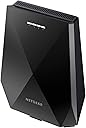
The NETGEAR EX7700 is a tri-band AC2200 WiFi range extender featuring FastLane3 technology and Smart Roaming. It boosts your home network by extending coverage up to 2000 sq ft and supports up to 40 devices with seamless connectivity under one WiFi name. With flexible setup options including Ethernet wired Access Point mode, it ensures ultra-fast, stable internet for streaming, gaming, and professional multitasking.


| ASIN | B07HM6WHYZ |
| Best Sellers Rank | 15,997 in Computers & Accessories ( See Top 100 in Computers & Accessories ) 118 in Network Repeaters |
| Box Contents | NETGEAR Tri-band Wireless Mesh WiFi Internet Booster Range Extender | Covers up to 2000 sq ft and 40 Devices with AC2200 (EX7700) |
| Brand | NETGEAR |
| Brand Name | NETGEAR |
| Colour | Black |
| Compatible Devices | Router |
| Connector Type | RJ45 |
| Customer Reviews | 3.8 out of 5 stars 4,714 Reviews |
| Data Transfer Rate | 2200 Megabits Per Second |
| Data transfer rate | 2200 Megabits Per Second |
| Frequency Band Class | Tri-Band |
| Frequency Bands Supported | 2.4 GHz, 5 GHz, 5 GHz |
| Frequency band class | Tri-Band |
| Item Dimensions D x W x H | 19.9D x 15.4W x 5.4H centimetres |
| Item Type Name | NETGEAR Nighthawk X6 AC2200 Tri-Band WiFi Mesh Extender with FastLane3 Technology, Smart Roaming, One WiFi Name with any WiFi Router (EX7700) |
| Item Weight | 1.17 Pounds |
| Manufacturer | NETGEAR |
| Manufacturer Part Number | EX7700-100UKS |
| Model Number | EX7700-100UKS |
| Product Warranty | 2 year |
| Range | 2000 Square Feet |
| Special Features | FastLane3, WiFi Mesh, Smart Roaming |
| Special feature | FastLane3, WiFi Mesh , Smart Roaming |
| UPC | 606449136517 |
| Unit Count | 1.0 count |
| Wireless Compability | 802.11ac |
| Wireless communication standard | 802.11ac |
L**S
Solved my WIFI problems, I can get great speed even on the other side of the house.
I always had WIFI troubles in my house as my router is downstairs and I do most my work upstairs, because of this set up speeds are slow and are unstable however, The Netgear Nighthawk X6S AC3000 completely resolves this. Take a look at the video for a closer look at the product. The Netgear Nighthawk X6S AC3000 was well packaged coming with the WIFI extender itself, power cable, CD installer, power cable ports and an instruction manual. As expected from a company like Netgear, the build quality was good and you get a high quality product. - Installation - The WIFI extender is very easy to set up and you have 2 ways to do this. Firstly via the app. This is the manual process so you'll have to manually enter your router credentials, however it's a pretty straight forward process. The next process is via WPS, so you'll need both your router and WIFI extender to be close together initially. Then you'd need to press the WPS button till the WPS LED starts to blink, after which you'd need to press the WPS button on your router. You'll then need to wait for both to fully pair. Once you have selected your installation method and fully paired it together the relevant LED lights will appear and become solid lights on the Netgear WIFI extender as seen in the pictures. - Features and usage - This product has an amazing feature that allows the Netgear WIFI extender to use the same connection name as your router, which is great as you don't need to connect to multi WIFI/Internet connections. You can also connect you devices directly via the Ethernet port. It has smart connection functionality which will automatically select the fastest band connection for you to get the highest speeds no matter where you go in the house. I've been using this device for a while now and no matter what connection I use whether its via Ethernet ports or WIFI it has provided me a fantastic stable connection throughout the house and day. The difference is night and day. In my room upstairs without the WIFI extender I get speeds of 2.9mbps, when I have the WIFI extender on it goes up to 24mbp. As seen in the speed test in the video. The results are substantial and this WIFI extender has completely made the difference. I can pretty much get good internet connection and speed in every part of the house now. Word of advice this product is only as good as your internet connection and speed, so don't expect it to produce miracles if you have internet similar to AOL times. Overall, this is a fantastic product. It's very pricey and I did have reservation at first however, it's well worth the money and I have not regretted making this investment. Some may say this is a bit too much but it's given me so much value and I can get great internet connection and speed throughout the house. I would highly recommend.
M**D
Updated review - much improved product - now gets 5 stars.
See update at end of review. This is a review of the NETGEAR EX8000-100EUS AC3000 Mbps Nighthawk Mesh X6S Tri-Band Wi-Fi Range Extender. I bought it to improve the WiFi signal in the house and to provide coverage to the bottom of the garden. It was easy enough to set-up but some might find it a bit too involved. When it worked it was brilliant and produced a stonking signal all the way down the garden. The problem was that some devices (Apple) would report a strong WiFi signal but would not have an Internet connection, despite the Netgear box being sited in an area with a very good signal from my router Turning the Netgear box off and on would fix it. I could see this was going to cause too much pain for the non-technical member of the family and, besides, this is not a cheap bit of kit so I expected more from it in terms of reliability. Reluctantly sent it back for a refund. Review updated after re-purchasing the same product in August/September 2019. Having returned my original purchase, I kept coming back for another look because I still needed a network extender and, on paper at least, the EX8000 looked perfect. I noticed that there had been a couple of firmware updates since my last purchase, so I decided to give it another go. I'm glad that I did. The EX8000 now performs faultlessly and my wifi signal is excellent throughout the whole house and down to the bottom of the garden. There is no sign of the connection problems that plagued the original box. I now happily give it five stars for performance and reliability. The only downside is the price - it is a fairly expensive bit of kit, but still worth it.
A**Z
Great for a month, now repeatedly drops out
At first, the device was great! My network speed was fantastic in the attic of my house and I could now upload my game projects to my remote server much faster. Now, nearly 2 months (1 month and a half) into owning this device, it has absolutely dropped. It can't pick up signal as well any more and it can't be on longer than 30 minutes to an hour otherwise devices will randomly be limited to like 20KB/s for either 1 second or until restart! The device as a whole is questionable. The web portal is severely lacking. No log (Come on, this is a basic feature from TP-Link!), You can't force the extender to be off at certain times, 5GHz Wifi is limited to DFS channels 100-128 (Why?!), You can't modify the DHCP settings, You can't set what network the Ethernet ports should use (TP-Link allows you to make it use the 2.4GHz network), and you cant make the LEDS turn off between certain times (it's ONLY on/off, which means you have to manually do this every time)! I get some of these are nitpicky but how hard is it to just make this thing consumer friendly?! I have it in a place where it's okay yet I get blinded by 4 bright LEDs at night like come on. Overall, I would have given this product 3/4 stars if it didn't deteriorate after a MONTH. Whilst I am contacting support as of writing this review, whatever they do will not change my opinion on this product, even if they replace it. The firmware of this product makes this near unusable and the fact that a product this big has specs and firmware worse than TP-Link products that were released at similar times, are smaller, and similar price, makes me less inclined to ever buy NETGEAR products again.
M**E
Easy to setup, compatible with Netgear R8000 Nighthawk X6
I have a Netgear R8000 Nighthawk X6 tri-band router attached to my cable modem, but was struggling to get a 5Ghz WiFi signal >40-50% strength to the room behind the ceramic tiled bathroom. I had previously tried a TP-Link extender but found this unreliable, and incapable of streaming between PCs. This WiFi extender has a smart setup which replicates your existing WiFi SSIDs and passwords and uses the DHCP on the router to assign an IP address (I have reserved this on the router). I have placed it in the hall next to the bathroom, halfway between the Router and the room with the devices I am trying to connect. As you can see from the image, I get good signal strength and speed (fast.com reports 190Mbps on the desktops - previously I was getting a max of 60Mbps) . I am still exploring various configurations, you can set a static IP address on the extender rather than use the DHCP, I am not sure how this affects the IP address lease duration on the router. In this scenario it will drop device connections if the IP address lease on the router connection expires, and it will take 10-15 minutes or so to reconnect. I don't know it this happens when you use DHCP. Even if DHCP changes the extender IP address you can connect to it with mywifiext.local. You can also re-name the extended SSIDs if you want to clearly identify extended connections. It will also support the X6 routers smart connect (single SSID tri-band) feature. Like the TP-link I had previously, the Nighthawk EX7700 aliases the MAC addresses of the connected devices before forwarding the connections to the router. It does it by replacing the first three OUI octets of the device MAC address with those from the EX7700. Unlike the Tp-Link extender, the Nighthawk EX7700 has had no problem streaming (Baldur's Gate) from my gaming PC in the back room to the TV media PC in the lounge at 60FPS. I got this extender in Sept 2024 for £69, which made it economically comparable with other solutions, such as putting in sufficient cabling to move the router location.
G**V
Unbelievably easy to set up, 'better' than Netgear Orbi and many high end gaming routers
I've only owned this for a day, but I think it's pretty amazing. My vodafone WiFi router was absolute rubbish in my house, signal would not even travel 5m through our solid walls. Netgear Orbi is around £250 at the moment for the RBK50 router and satellite - with this Netgear EX8000 you only need the one, it basically turns your free broadband suppliers router (Vodafone in my case) into an Orbi system. The EX8000 uses a 5GHz backhaul channel to connect with your router - even at the other side of my house it maintains full signal link with the vodafone router, it must have brilliant inbuilt aerials as most of my other WiFi equipment would struggle to hold a connection, let alone full signal! All you need to do is hold down the WPS button on the EX8000 and then same on your router, wait for it to sync and then place where you need it. That's all. Absolutely the easiest bit of networking kit I have ever had. By the way, prior to this I had an Asus RT-AC5300 - a beast of a router and very fast. But guess what? The EX800 is at least as fast and half the price. It also forms a mesh network, so everything is still managed through my Vodafone router and you work on a single network, not two - everything appears as one system. This is a lot easier than with the Asus and saves space too. So my advice, don't bother with fancy gaming routers with multiple ugly aerials - no point useless you need the additional router software functions, the EA8000 is a game changer. Netgear deserves to sell these by the bucket load!
S**F
Excellent when it works but with an annoying flaw (updated with possible fix? - NOT)
This is a review of the NETGEAR Wi-Fi Mesh Range Extender EX8000. I give it four stars (or if I could 3.5) because, when it works, it is brilliant and I would thoroughly recommend it. [Aug-21 downgraded to three stars - see below. But I would still recommend if you can live with its issues.] Twelve months ago I would have given 5 stars and an unreserved recommendation. Read on for why I still recommend it provided that you can live with the annoying flaw. I have three EX8000s all bought from Amazon over six months from March 2018. I bought the second two after being pleased with the first following using it for three months. Initially they were used with a Netgear R7000 Nighthawk router (connected to a BT hub modem) that I had been using since June 2015. Now they are used with a BT Homehub 6 and fibre broadband. Between the three extenders and the broadband hub I get fast wifi coverage over most of the house to run several computers, other devices (e.g. tablets, phones, network printers) and TV streaming. However within the last ten months or so (and I presume because of a problem introduced by Netgear in a firmware update that has persisted if not got worse through several more firmware updates to the present (September 2019)) it annoyingly and seemingly randomly drops the wifi and internet connection (on all three EX8000s but not at the same time). You will see from the negative Amazon reviews, searches online and Netgear's own forums that this is a common, universal experience. It is not limited to the EX8000s, I noticed it with the R7000 Nighthawk router (similarly after firmware updates and before this was retired when I got fibre broadband). I bought the EX8000 because it allowed PCs and other devices to be connected by ethernet direct to the extender. I was finding that Windows 10 updates were regularly disabling the USB Wifi adaptors that I was using, meaning that after an auto-update I was having to reinstall wifi for the house computers, so I thought an ethernet connection to a mesh extender would fix the problem. It did and I was entirely happy until… my Internet connection started dropping randomly, sometimes fixing itself but other times requiring all the routers and mesh devices be restarted. I am not an IT specialist but I do have a fair amount of experience. I would not agree with the other reviewers who say that the Netgear setup is poor or difficult. Although I have noticed one problem reported online that the devices can be unstable (i.e. dropping connections) after firmware updates unless they are hard-reset (after new firmware is installed). However I have spent/wasted unhappy days and hours trying to sort out what was causing the network drop-outs I was experiencing before finally determining my current solution - restart the extender with the power button or by unplugging it from the mains as soon as it drops the Internet connection. The symptoms on a Windows 10 PC are: 1) Internet browsing or email downloads fail midstream. 2) The network icon in the task tray changes from the "tv" symbol to the wire globe symbol and the pop-up message confirms no internet. I run Glasswire as well so I see an alert that the Internet connection was lost or changed. The Glasswire diagnostics indicate that the DNS has changed. 3) Any networks devices attached to the ethernet ports also drop but not necessarily immediately. This confused my for quite a while because it made me think that it was a Windows or PC fault not the mesh extender. For example, I could still see a NAS and another network drive mappings but they "vanished" from the devices control panel in Windows. 4) You cannot log into the administrator on the device even if directly connected by ethernet. 5) The IP address of the extender and any devices wired into it change from the normal internal network addresses. (Glasswire repeatedly reports that the ARP table has been changed as an event). 6) If the network still shows in Windows 10, it will have changed from a private network to a public network with no internet access. Unfortunately the Netgear administration software/interface does not have a diagnostic or event log that you can review to see what happened. When I started with the Netgear R7000 Nighthawk in 2015 I had none of these problems. It was connected by ethernet to a BT Home Hub (that was connected to the copper phone line). The Nighthawk had better wifi range and 5G network compared with the BT hub. The Internet dropout problems started with one of the firmware updates following the discovery of network security holes - I think there have been at least two holes discovered. Because my PC was connected by ethernet direct to the R7000 I did not lose internet connections (initially) but other pcs connected by wifi on my home network did. When BT fibre froadband was installed my PC was connected by wifi through one of the EX8000s rather than direct ethernet (since the broadband point was no longer near the computer/phone socket). The Internet drop-outs continued and I noticed them more because it was my PC (previously wired) that was being affected! I abandoned the R7000 because I thought that might be the problem and reconfigured my home network to use the EX8000s directly with the BT hub: which works fine, but… However, the random wifi disconnects continued and continue. I tried every solution found on the Internet but none worked. I narrowed the problem down to the EX8000s - all of them but not simultaneously - and eliminated other possibilities like bad ethernet cables, Windows 10, Realtek Ethernet adaptor drivers and the BT Hub (which I should add works flawlessly). The only solution is to reboot the EX8000 that has the problem. The restart takes about two minutes. The connection then works for anything up to five days but sooner or later, and for all three EX8000s !, it will happen again. So, if you read this far… Would I buy the EX8000 again? Yes, probably. I have not found a better solution for a high-speed wifi home network (but see below). I have some older powerline network connectors that work well but they are not fast enough for realistically working with the NAS server. I have looked at Amazon reviews and online reviews for other mesh extenders. They all seem to have similar issues to the Netgear with Internet drop-outs. I think it is a problem related to the technology rather than simply a design flaw in the EX8000 or the firmware. Having said that, we use a "professional" mesh wifi network in the offices where I work and this does not have any of the problems I see reported for Netgear and others. Would I recommend the EX8000? Yes, provided that you can live with the flaw. It is expensive but in my experience it works really well and reliably (except for the dropouts flaw of course). I live in hope that a new firmware update will materialise to fix the flaw - but I am not holding my breath. If I discover a new and more affordable solution (other than rewiring the house for Gigabyte ethernet - [and, reader, I did - for one room] I will probably write off the previous investment and move to it. [Update 15-Nov-19] Since writing the above I changed the mesh settings for the three EX8000s, which may have "fixed" (or rather avoided) the annoying flaw of dropping connections. Rather than try to make a true mesh where all the repeaters have the same SID (which would be ideal, and is surely the aim so you move seamlessly from one to another) I made the router, each band and each extender have a different SID (but all have the same password. So, for example, the main BT router is "Router", the first extender is "Router-A" and "Router-A-5" for the 5 GHz, Router-B and so on. My reasoning was that perhaps the connection drops were the extenders randomly switching connection to another extender instead of the router as they tried to make the best connection and all had the same SID. Not very scientific but… it appears so far to be working in that my wifi network is much more stable. All the extenders have been up for several weeks without dropping a connection. The downside is that you have to manually switch SID with your tablet or phone as you move around the house. That is, the existing connection persists no-matter how slow or weak until the tablet cannot connect any longer whereas a proper mesh would seamlessly switch to the stronger signal as you moved around. Static PCs and devices (e.g. smart TV) are OK, they just remain connected to the nearest extender or the router that they were connected to. [Further update Oct-20] The "fix" noted above has not solved the problem. Working from home during COVID-19 has probably increased Internet usage massively. I have to reset my (local) Extender probably at least once a week. Once the ARP table (DNS) settings on my PC start changing it is only a matter of hours before I loose Internet access! [Further update Aug-21] I now use two of the EX8000s as access points rather than extenders and drop-out problems have (all but) vanished. One access point is directly connected via ethernet to the router and the other via a powerline adapter. The two main domestic computers are wired to the router (one directly and the other via a new high-speed powerline adapter). My work computer is used entirely with wifi through the access point (still working from home because of Covid). It no-longer suffers dropouts or loses connection as described above. Nor do other devices when connected via wi-fi. I conclude that the issues with the EX8000 were/are caused by the limitations of extenders generally as I suggested above. That is, eventually, the DNS settings are "lost" or exhausted and the extender has to be restarted. The third extender is still used as an extender but it is connected by wifi to another extender in the next room that is used as an access point. It does not suffer from the disconnections as previously described. My educated guess is that it is sufficiently close for the wifi backhaul always to be 5G - I think that the DNS changes and disconnections may be related to the backhaul switching between 5G and 2.4G because the 5G signal is not quite strong enough. (Signal strength or connection distance also seems to vary with time of day or night!) So I would recommend the EX8000 used as an access point (i.e. connected via ethernet to the router) or if it is positioned close enough to the router as an extender such that it always uses 5G for the backhaul. If I were starting all over again I would always go for a direct ethernet connection (I eventually bit the bullet and paid for an ethernet connection from the BT router to be installed to my work room). If that were not possible I would buy hi-speed powerline adapters rather than this EX8000. The newer TP-link powerline adaptor I bought provides three ethernet ports and 5G wi-fi (acting as an access point). This is a better solution than the EX8000, although the cost is about the same.
M**0
PLEASE READ FIRST .. ALL "EXTENDERS" ARE BEST WIRED AS WIRELESS ACCESS POINTS
NETGEAR EX8000. This has two types of configuration. EXTENDER (WIRELESS REPEATER) OR (ETHERNET WIRED -TO ROUTER) ACCESS POINT. Could be quite problematic (for me) configured as a WIFI Extender and also takes much longer to boot whilst it negotiates with the router. Set for Wifi extender mode it uses its 2nd /higher speed 5Ghz channel as a Backbone channel to send traffic to or recive from Router. Using as an ethernet wired Access Point (AP) Mode The 2nd 5Ghz channel becomes available as a second user available Higher speed 5Ghz band so you end up with 1x 2.4Ghz and now 2x 5Ghz bands and both fast!!. I am connected to mine in same room now at 866Mbps now on higher speed 5Ghz Channel 100. IF YOU CAN WIRE ETHERNET CABLES TO EX8000 FROM ROUTER THEN CREATING ACCESS POINTS (AP) THERE ARE MAJOR BENEFITS. ADVANTAGES OF ACCESS POINT 1. Easier and fast setup 2. Much Much faster EX8000 boot up time of 2mins or so (compared to extender mode of +5mins. Ensures conflict free for router. Router in full control to allocate EX8000 address IP over ethernet.. NO MORE CONFLICTS. My Access Point connected as follows: Router connects with CAT6 or can use CAT5E etc ethernet to EX8000. Both CAT5e and CAT6 can run 1Gbps reliably. Connected EX8000 to SkyQ and networked pioneer Amplifier etc. Note Sky Q uses its own 5Ghz network between SkyQ units.. so set EX8000 on different channels. You can download a Wifi analyser App on your phone, some others are better than Netgear's own App. Had no problems at all with EX8000 since connecting to Router via ethernet. No data conflicts on Router. If wiring up ethernet between floors I recommend non adhesive backed 4 inch/ wide trunking and No5 x35mm screws to secure direct to plasterboard. CAT6 cable recommended but does not designed for sharp bends. ENSURE YOU GET CORRECT CAT sockets to match your cable. eg CAT6 cable use CAT6 sockets, if using more flexible CAT5E cable use CAT5E sockets. COLOUR CODING BETWEEN CAT5E AND CAT6 IS DIFFERENT. Connect cable to at each end then mount on wall. Same colours to same colours between sockets.. then off you go using standard network cables at each end. When wiring as Access Point connect from any of the router 4 LAN network ports (NOT WAN) to any of the 4 of EX8000 LAN Network ports via your ethernet sockets. So Access Points.. No conflicts, fast boot, 3 wifi channels incl super fast 5G, fastest connection available. GOOD PRODUCT IF SET UP IN AP MODE
D**N
Frustrating and unreliable
Setup wasn't too difficult, but required perseverance and time (a recurring theme with this device). The unit takes a long time (much longer than a router, about 5 mins I think) to boot up. Once it was ready the WPS setup didn't seem to work, so I used the app. I would advise against this (use the web interface) as it insists on you signing up for a Netgear account. This took a while, with a few retries being needed, but worked. Interestingly it finished by telling me that a software update was available - then saying that it had failed (I tried several times without success). When I logged in using the web interface it showed that the unit was using the latest software version... The app does not allow you to do much more than the initial configuration, you'll need to use the web interface to set everything up properly - so you might as well use that from the start. The web interface is quite straightforward to use, although I had to find the unit's IP address to log into it, but the options are limited. You can set up two wifi networks (2.4GHz & 5GHz) and not much else. Although the unit has two 5GHz channels one of these is reserved for communication with the router - even if it is connected via ethernet cable. Making a change to any setting results in a wait of several minutes when you hit the "save" button (did I mention that you need to be patient with this device?). It is also worth noting that the 5GHz wifi only uses channels from 100-140. Some devices (notably Amazon Firesticks) can't use these, so they would be restricted to the 2.4GHz frequency. There is supposed to be an option to set operating times, but this remained greyed out for me and I couldn't activate it. In addition to all this; - my unit rebooted, for no apparent reason, several times within hours of installation. This resulted in several minutes of disruption to any devices connected to it each time - long enough for the family members involved to find me and complain... - trying to connect Chromebooks to the unit caused a DNS issue, causing them to lose contact with the internet. I had to disconnect the unit and reboot the router to fix this. - when the unit was connected a large number of unknown entries appeared in my router's "connected devices" list. Apparently the extender creates these "virtual" MAC identities. - the unit I received from Amazon Warehouse had apparently already been registered with the manufacturer, preventing me from registering for warranty support With all of the other, cheaper, options out there and the issues above I won't be keeping the Netgear EX7700.
P**T
Excellent
All was as described and delivered
A**T
Best Range Extender Hands Down
This is the best extender I have ever tried, and believe me, I have tried alot. My job is in networks, and I know what a limitation of a network extender, this Netgear extender defeats the physics of wireless signal repeating, so I can tell you, please buy it with your hands and feet in cold water, you'll be super satisfied with the performance. Make sure you reserve 5GHz network channel for repeating, as it will maintain your full original WiFi speed.
L**E
Lo mejor para expandir red wifi
Fácil conexión,conexión vía cable llega 900mb es como tener el router a tu lado, muy contento con la compra
M**S
SO BER BIO !!!!!!!! FLI PAN DO ESTOY
Muy sencillo.... Me decanté x este producto debido a las reseñas, los análisis en webs y que lo compré en Amazon wharehouse por casi 70€. Tengo dos TP-LINK, el más caro de ellos está ahora en casi 40, dos bandas y bla bla bla.... conectado este en mitad de la vivienda llega a mí habitación al smart TV en banda de 5G unos 40 megas de 500 contratados que tengo... Pero....MADRE QUE PEPINO ES ESTE NETGEAR???????? me llega en mismas condiciones más de 250 siempre!!!! En móvil igual!!!! En portátil conectado por rj45 al netgear me da lo contratado sin estar en AP, es soberbio!!!!! Da más velocidad y cobertura que el propio router livebox de Orange (q es de muy buena calidad), pero noto hasta más fluidez conectado en la red del router también.... Y estabilidad es 100% voy a ponerlo en AP está semana pues imagino ira mejor aún o debería así q.... TREMENDO!!!! Va mejor aún, pero no tanto como pensé respecto a estar conectado en wifi o en AP, YO SOLO ESCRIBO LO QUE PUDE COMPROBAR, imagino a otras personas kizas no vaya tan fino puesto que seguro que influyen muchas cosas, incluido el propio router y tabiquería y demás, pero para mí un merecido 10! Aun valiendo 150 merece muy mucho la pena! RAPIDA CONEXIÓN, BUENISIMA COBERTURA Y ALCANCE, Y NO PIERDE TANTOS MEGAS COMO OTROS QUE PIERDEN EL 80% - Si te fue de ayuda mi reseña, házmelo saber dándole al botoncito (Útil). ¡Gracias! ;) 👌 Comprobado, con un iPhone 11 y un Mac, la velocidad por wifi estando en la misma habitación es la máxima, da 500 megas....está claro q depende y mucho también en los receptores del wifi su calidad, por lo cual no hay punto en contra de este NETGEAR, influyen muchas facetas en sacar todo el máximo de provecho, pero sin cumplir todas las facetas este aparato es más q sobresaliente.
C**N
NETGEAR WiFi 6 Mesh AX6000 EAX80
Ottimo ripetitore fa il suo lavoro in modo eccellente, per sincronizzarlo basta posizionarlo vicino al modem principale accenderlo ed aprire l'app netgear. Pochi semplici passi ben dettagliati e il ripetitore è configurato, e si può posizionare dove si preferisce per distribuire il segnale in modo ottimale. La velocità wifi è eccellente uguale (inferiore solo di pochi Mb/s) rispetto al modem di casa, passando da una stanza all'altra non ci sono discontinuità di segnale. L'ho configurato con modem FASTGate di Fastweb con linea in fibra
Trustpilot
2 weeks ago
1 month ago