Buy anything from 5,000+ international stores. One checkout price. No surprise fees. Join 2M+ shoppers on Desertcart.
Desertcart purchases this item on your behalf and handles shipping, customs, and support to Thailand.
🔥 Elevate your desk game with compact, click-free precision! 🎯
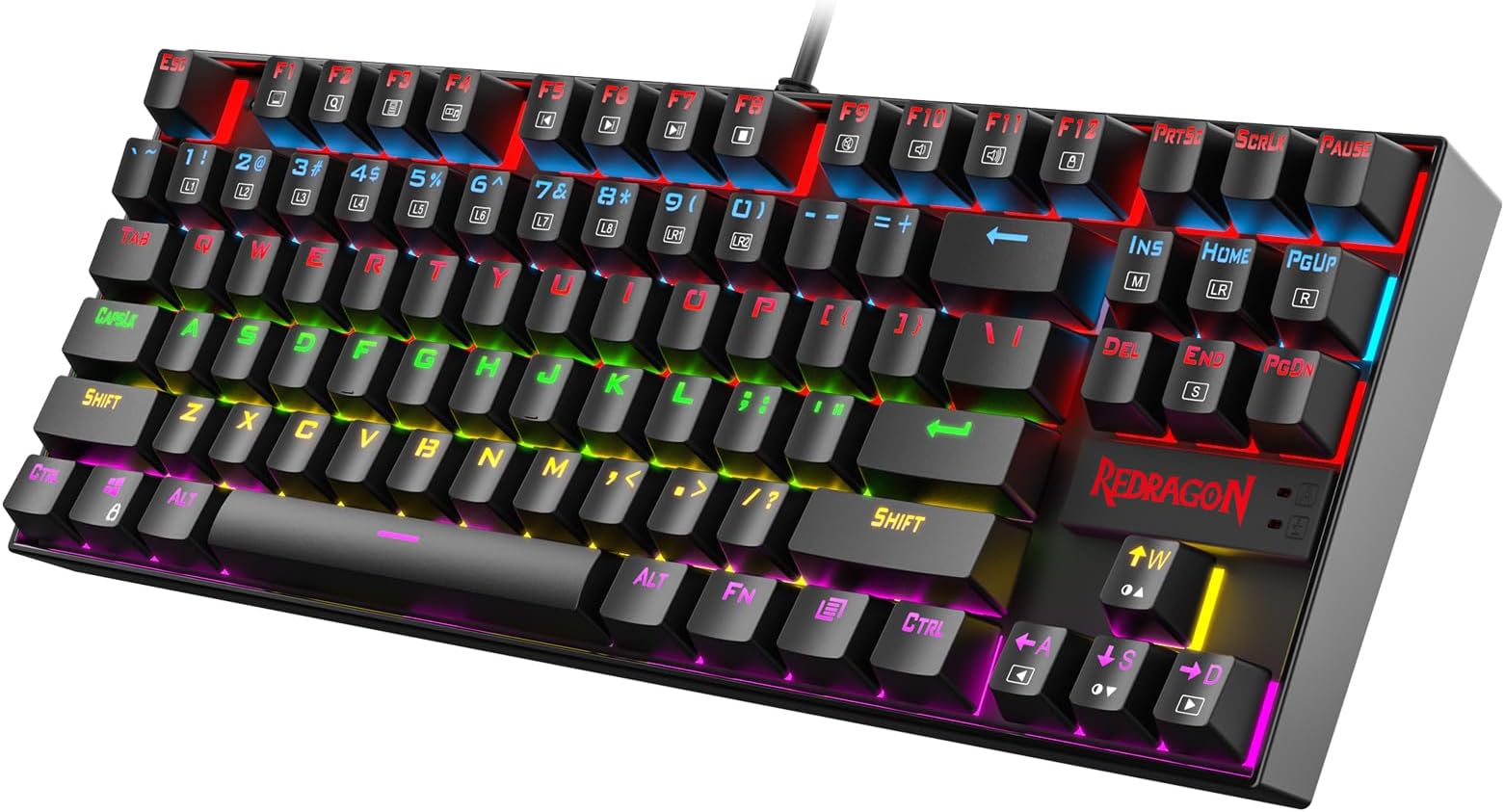
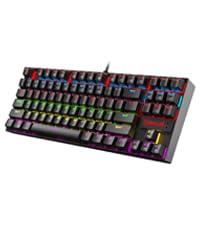
The Redragon K552 is a compact 87-key mechanical keyboard featuring linear red switches for smooth, quiet typing and gaming. It boasts a durable metal frame, vibrant rainbow LED backlighting with six preset modes, and full anti-ghosting with N-key rollover for flawless input. Designed for professionals and gamers seeking high performance in a space-saving design, it offers plug-and-play USB connectivity compatible across major OS platforms.


| ASIN | B016MAK38U |
| Additional Features | Ergonomic, Hot-Swappable Red Switch, Metal Rim, TKL Layout |
| Antenna Location | Gaming, Office, Personal |
| Best Sellers Rank | #708 in Video Games ( See Top 100 in Video Games ) #73 in PC Gaming Keyboards |
| Brand | Redragon |
| Built-In Media | USB Cable |
| Button Quantity | 87 |
| Color | Black |
| Compatible Devices | PC |
| Compatible Operating System Family | MacOS, Windows |
| Connectivity Technology | USB |
| Customer Reviews | 4.5 out of 5 stars 49,596 Reviews |
| Enclosure Material | Acrylonitrile Butadiene Styrene Metal Steel |
| Generation | 1st |
| Global Trade Identification Number | 00740002400346 |
| Hand Orientation | Ambidextrous |
| Is Electric | Yes |
| Item Dimensions L x W x H | 13.94"L x 4.86"W x 1.46"H |
| Item Weight | 875 Grams |
| Keyboard Backlighting Color Support | RGB |
| Keyboard Description | Mechanical |
| Keyboard Layout | QWERTY |
| Language | English |
| Manufacturer | Redragon |
| Mfr Part Number | B016MAK38U |
| Model Name | K552-KR |
| Model Number | K552 |
| Number of Keys | 87 |
| Number of Sections | 87 |
| Power Source | DC Power Supply |
| Recommended Uses For Product | Gaming, Office, Personal |
| Series Number | 552 |
| Special Feature | Ergonomic, Hot-Swappable Red Switch, Metal Rim, TKL Layout |
| Style Name | LED Red Switch |
| Switch Type | Linear |
| Theme | Gaming |
| Total USB 2.0 Ports | 1 |
| UPC | 740002400346 796594786894 780682638264 |
| Warranty Description | NO |
| Water Resistance Level | Water Resistant |
C**S
Good buy in 2026f
Not a bad keyboard, even in 2026. As long as the noise levels isn't a dealbreaker with you, the switches sound good and the keyboard is responsive. This keyboard is known for being a reliable tank, at a good price. The stabs aren't bad, maybe it's masked by the blue switch noise. Colors are nice and bright. It's a excellent buy for 30$, but once over 40, I'd advice looking into the Aula F75, especially if you aren't into Clicky switches, as the Aula doesn't provide anything other than Linear options but those linear options are better than the linear option for the redragon k552. Keyboard is a buy it and it just works.
J**P
I really enjoy typing on this keyboard so I ordered another for work.
I'm a software engineer and can type anywhere from 85 - 110 WPM and those who code know the challenge of hitting special characters frequently; I should never miss a ; end line now :). I use to use an apple wireless keyboard with the chiclet style keys extensively the past several years and didn't realize that was slowing down my typing. I actually purchased this keyboard for gaming at home but then bought another for work since I noticed a huge improvement in my typing speed. The reason I didn't purchase a mechanical keyboard is due to the windows vs command key. The only mechanical keyboard I've found that has the command key is a das keyboard that is > $100 which is way over budget; can get 3 of these awesome keyboards for the price of one das. I've gotten use to using the windows key as the command with my pinky rather than the left thumb on command. I use both windows and mac so the switch has been great and it took a couple days to get use to replacing the thumb for command and using pinky for it but it has also made my windows typing much better since I use my pinky for windows anyway. For those who can't give up their mac specific keyboard should look into buying one of these since you will make it work due to how awesome the keys feel. It's identical to the more expensive cherry ones. I won't feel bad if this keyboard breaks a year later since it's only $30 and the ones that have the common cherry switches cost > $50. The apple wireless keyboard is double the price of this... # Pros - Identical to cherry switch that other more expensive keyboards use such as Das. - Increased my typing speed by at least 15 WPM. - Tactile feedback you do not get with chiclet style keyboards. - Solid and quality made. It's heavy so it won't move around the desk. Has nice grippy rubber pads too. - Don't have to switch between the apple wireless keyboard and the windows keyboard since I use the same one off the KVM now. - I don't have to recharge and replace the batteries in the wireless apple keyboard since this is corded. Got so sick of replacing batteries just to have wireless when it's going to sit on the desk anyway so it was pointless. The apple keyboard would lose connection with the bluetooth too so again, it was pointless. - Compact size is better than a full size keyboard. Removing the number pad provides a better ergonomic experience which prevent strains due to widening the arms with the mouse. Research this if you don't believe me. Some ergonomic keyboards put the number pad on the left side of the keyboard. - Best bang for the buck. Amazing value so I purchased 2 of them. Perhaps all the big brands such as Das will lower their price since this one seems to own the Amazon market right now. It's 2018, people who are sane know that a mechanical keyboard shouldn't cost > $100. C'mon, the IBM Model M in the 1980's original price was around $250 but that's some dated technology! It's like paying the same price for an OLED TV for a tube tv. Who they trying to fool and that is why Redragon is here. They know the other manufacturers are price gouging. # Cons - None so far. # Neutral - My coworkers find it distracting since it's loud but they can put headphones on. A mechanical keyboard is... loud. - Noticed some sound interference with my Logitech speaker setup at home. It sounds kind of cool because the breathing effect will also output in the speaker. Breathing will make it sound like a badass intro to a sci-fi action scene (think star wars lightsaber) and the solid light will make an ongoing high pitch noise. This is probably an issue with the KVM I use to switch between mac and pc. I don't have this issue with the pc but when I switch it over to the mac the interference occurs.
D**N
I will always get my keyboards from I m red dragon
I swear by the red dragon keyboards nicely price and very good quality that last for years of active daily gaming. You cant go wrong with this keyboard. Still in great condition years after buying. Nice feel and well weighted. Built with good material. Keyboard is made with metal not cheap plastic. Nice clicky keys and feels good to use.
E**C
Excellent low-budget mechanical option
I've gone through a couple of Blue switch keyboards (Cooler Master QuickFire Rapid [Kailh switches I believe] and the Corsair K70 [Cherry MX]), but this one was by far the least expensive. I'm also the most impressed with it, primarily due to what you get for the price. As others have stated, this is an actual mechanical keyboard (not "mechanical-like"). My use-case was that I wanted something more tactile for use at work without spending a ton of money, and this keyboard fits the bill nicely. The switches definitely require a bit more force than both my QuickFire Rapid and K70, but it's not like doing finger push-ups on your keyboard or anything like that. One reviewer stated that these have a 55g actuation force and from what I've found authentic Cherry MX Blues have a 50g actuation force; without doing any measurements of my own, this feels about right. They do feel a bit cheaper than my other two keyboards and there is an audible "spring" sound on occasion when the key returns that O-rings have done little to mitigate, however this is by no means a dealbreaker for me. I cannot overstate, however, that this is a LOUD keyboard and will probably not be acceptable in most shared quiet settings. I use mine in a fairly noisy office and get the occasional good-natured ribbing from coworkers who hear my keyboard, but no one has put in a legitimate complaint. Cherry MX Blues are notoriously noisy, but these Outemu switches easily out-clack the competition in terms of volume. Some don't seem to like the design, however I think it's pretty minimalist with the small exception of the Redragon logo above the arrow keys (which doesn't bother me much and seems like it *might* be removable somehow) and the cheesy gamer-esque font. The font can be forgiven since I've seen these very keycaps on other inexpensive keyboards, and I'm guessing economy of scale is what helps keep the price as low as it is. The backlighting is fine; basic but good and easily turned off, although it will not remember your settings and will default to on. If you don't like backlighting, save yourself a few dollars and get the non-backlit version. There is no wrist-rest, but I've purchased a Grifiti Fat Wrist Pad (I was not paid, just hyperlinking for your convenience) that goes quite well with this keyboard. Some people also seem to want a detachable cable; I've always found these to be more annoying than worthwhile but I suppose it's a matter of personal preference. Some have modified the keyboard to use a detachable cable, so it's definitely possible. I'm sure this also came down to cost. The keyboard also has a very nice weight to it and quality legs with rubber stops if you want to raise it a bit. I'm deducting a star because of questionable quality control. While I really like this keyboard, it does misfire on occasion (the "e" key, specifically). It's not annoying enough to send it back, however I also purchased a Redragon Brown switch keyboard ("Devarajas") and it has more defective keys, both in functionality and quantity. It's unfortunate because the Devarajas seemed like it was going to be an equally good keyboard. I'm keeping the K552 and returning the Devarajas. Pros: Inexpensive / excellent value Other than the font, the design is fairly minimalist and doesn't look too out-of-place in an office Good weight Not specific to the keyboard, but Blue switches are wonderful for typing Cons: Extremely loud, even with O-rings and compared to other Blue switches Questionable quality control In summary: I still prefer using my Corsair K70, but if I were limited to either a Redragon mechanical keyboard or something like a "gaming" keyboard with rubber domes, the Redragon would win out every time. The value is great, as long as the quality is consistent. Other notes: I may try some different key caps out at some point. I'll be sure to update if I do.
A**1
Redragon K552
I had been contently using basic keyboards for years at work and home, without a second thought. Then, a few weeks ago, a colleague introduced me to the world of mechanical keyboards. At first I thought it was a little bit stupid that this was even a thing to be excited about. But immediately after talking to that person, I knew I needed to have one. This is why Prime exists - It was a purchase that couldn't wait. I always liked the feeling of those old school IBM keyboards. I'm not much of a gamer, but I do use a keyboard all day long for work - programming, writing documents, endlessly revising wording in controversial emails, etc - so why not invest in a keyboard that makes me a little happier during that time? I chose this keyboard because it had the clicky blue switches, looked solid, had nice RGB, was tenkeyless, and had an overall good reputation. I was not disappointed when I received it. It feels very satisfying to type on. The tenkeyless form factor is perfect for me - I had never used num pads, but would find it frustrating not to have dedicated arrows, function keys, and Insert / Home / etc they way they are here. With the RGB, I find myself sticking to the mode where all keys are one static color. The flashy effects are distracting to me, but might be inspiring to some folks. The typing angle is comfortable with or without the legs extended, but the keyboard slides around the table a bit without them. There was another very similar Redragon keyboard (Visnu) that I was also considering. I went with the Kumura because it has a more compact form factor. Now that I've been sucked into the mechanical keyboard world, here's what I think I would change. (Many other reviewers have already mentioned all of these things). The keyboard has a little bit too much of a "gamer" look to it, partly due to the font of the keycaps. It sounds like PBT keycaps have a nicer feel to them than the stock ABS ones anyway, so I would consider swapping to a custom set at some point. The raised Redragon logo is also a little bit too "gamer" looking too - I noticed that some other Redragon keyboards have a more subtle logo. A detachable cable, and maybe Bluetooth, would be nice too. I enjoy the clicky switches a lot, but am curious to try tactile but non-clicky switches which are apparently a little less obnoxious in an office environment. (Like many folks, I have been working from home during COVID). Maybe I would go with a white keyboard too. Overall, I think the Kumura succeeds in being a very nice entry into mechanical keyboards. It was under $40 when I purchased it. In retrospect, I would also have considered something like the Ajazz K870T, which is about $60 but has the features left on my wish list. But then again, $60 sounded like it was out of my price range at that point. UPDATE Here's an update after three years. This keyboard is still my daily driver, and I have modded it a bit. - Rubbed out the logo on the front of the keyboard with an eraser. - After about year one, I swapped out the stock keycaps for a set of Matcha PBT dye subs with ZDA profile (ASIN: B08QJGH5VT). These were about $38. - About 1.5 years later, I swapped out the clicky blue switches for Akko Jelly Blacks (ASIN: B09K7QX9QK). These are linear with a bit of resistance, and are compatible with the Outemu sockets in the board. It costed about $34 for two boxes of switches. - I lubed the switches and stabilizers with the lube from this kit (ASIN: B09YLLVGX4). - I added a slab of mass-loaded vinyl to the case to dampen some of the case noise. This also makes the keyboard much heavier, which I prefer. A 12" x 12" square of MLV costed about $10. I have enjoyed tinkering with the keyboard and trying various mods suggested on YouTube. One particular channel that inspired me is Consumer Tech Review. The look, sound, and feel has changed substantially from the stock setup. Especially with the clicky actuation gone, most of the sound comes from keys bottoming out and feel comes from the anticipation of them bottoming out from when they are pressed. The Matcha keycaps completely change the vibe from "gamery" to "retro" / "enthusiast". The RGB doesn't shine through these, but it does show up in the gaps between keys which is good enough for me. It's kind of stupid, but the sensory experience of the keyboard makes working just a little bit more pleasurable, and it's been interesting to vary the experience through the customizations. The budget TKL market seems competitive now, but I like this one because the case is solid and the PCB has been reliable. More recent keyboards include things like gaskets to improve the feel and layers of foam to improve the sound. I'm curious to see what kind of differences those things make in person, but I am also trying to avoid blowing too much money on this stuff. The main thing on my wish list would be a detachable USB cable. It appears possible to do that by soldering and making some alterations to the case, so that's an option.
S**Z
Glorious and epic
So I was hesitant to purchase this at first. I had read some review somewhere on another redragon product, claiming that it was not true mechanical switches, blah blah blah. I gotta say, this is probably one of the best keyboards I have owned so far. I don't usually spend a lot on keyboards with the exception of a Razer DeathStalker Ultimate that I had bought one day to use for work (and it worked out perfectly, it literally did like 30% of my job for me lol, but it was $300 so .. IT BETTER :D ). Back to the keyboard... I was how they say. FLUUSSSHH WITTHHH CASHHH. And thought what the hell I'll try one of their "Mechanical" keyboards, and if its a flop, then lesson learned... Once I had the box in my hand I was already impressed. The box it comes in is nice, and I can tell the product was heavy, which is usually a good sign. Once I pulled it out, I knew that it was meant to be (that's what she said...) It is pretty thick (doesn't bother me one bit) It is heavy, (also doesn't bother me). And because its heavy, it doesn't go sliding around the desk when I type at my nutty typing speeds. The build quality is excellent, honestly, I don't know how they are making money because this thing is solid, and I bet I can weaponize it.. There is no bend or give to this thing, its literally like a rock, its a thing of beauty and brings a tear to my eye. The red glow is intense and clearly visible even under the high-intensity interrogation style lighting they use at my office. And the ominous red glow looks amazing, it fits my offensive IT role perfectly (I deal mostly in heartbreak, and "Like A Boss" situations) The flip tabs on the bottom are heavy duty, and are super solid, like crazy solid, you flip them back and they sound like someone cocking a gun. They literally SNAP! into place, I love it, I have been known to break these things off.. That is just not happening with this keyboard.. I think I might just snap them back and forth now if someone comes to bother me in the middle of an intense keyboard bonding session. The keys themselves are beautifully designed, I love the font, it's not your typical boring look. This thing says I break all the rules, And its the type of font you want to send an email with, but know you can't because you will get fired when someone realizes that you've gone beyond their realm of times of new roman, and into a whole new dimension of professionalism... They are crystal clear, no blemishes, and the glow comes through the keys perfectly, the glow underneath the keys makes it look that much cooler. The mechanical keys are solid and work exactly as you expect, whether the actuation force is exactly what it should be, I don't know. But they do the damn job, and I like to use my keyboards, not measure them in a full-on anal manner. The click is fairly loud and obvious, and there is no volume knob on it, so that is something to consider if you buy a mechanical keyboard for the office. I feel like this really does give me confidence in my high-speed typing ability as I am no longer wondering if I hit the key I wanted or if my keyboard had a derp moment (cause I don't make mistakes! YOU HEARD ME! {ok sometimes I do}). I really do blast through my typing though, with ease and a sense of accomplishment ( cause I feel accomplished when I hammer out a memo and it literally feels like I hammered it out... That is mission accomplished right there!) I am sure there are going to be moments when someone asks me questions whilst I am typing, and I am just going to keep slamming away while staring at them as I give them the look of "I know what I am doing", while confident clicking noises radiate from the dominion that is my office. My boss came in and just immediately went wow mode on it, he loves it and stated that it makes him want to get rid of his laptop and switch to a desktop just to have a badass keyboard like this one. I didn't mention that he could just hook it up to his laptop (MUAHAHAHA) And thus my reign over awesome keyboards stays unchallenged (as planned). Overall this thing is solid, and it makes a statement. It says, now mechanical keyboards can now be owned by anyone and not just those who are less impulsive with their money. I love it and I am going to buy 2 more, one for home (or should I call it my lair o.0) and one for my coming Mad (IT) Scientist Lab. To the manufacture: good job on an excellent product! I honestly didn't have confidence in your brand when I first made this purchase, I have never used your products but now I am a believer. And don't change the price, I am still a cheap impulsive bastard and will have to panhandle if you do.
S**E
Affordable and very nice, a little noisy but can be modded
My daughter uses this keyboard, we both love it, but it's indeed loud. We've tested other keyboards including Razer, Logitech, Cosair, as well as some varieties of Chery Brown and Red, but in the end still love this Cherry-Blue clone. Tried some dampening O-rings, didn't help much, so I decided to open it up and experiment (need to remove the keycaps to access the screws holding the top plate down). Here's what I found. The noises come from: - the click of the switch itself. It is what we like over the other switches, but the keycap amplifies this click quite a lot. - the bottom-out noise when the keycap hits the switch's box. The O-ring can dampen this sound a bit, but the boxy plastic base amplifies it multiple times. Coupling with an IKEA tabletop, it sounds like hitting a drum. - the sound of the switch hitting the switch's box on the way up. You can hear this sound when you hold a key down and lift your finger up quickly (like when typing fast). Again, this sound is also amplified by the keycap. The good news is, if you take the circuit board out of its boxy plastic base, all the noises are reduced to around 25-35% (my rough estimation), the only noticeable sound is the faint click of the switch itself. If you like a really quiet keyboard, you can just make a custom base/footing (a block of foam for example). You just need to cover the exposed circuit board on the underside, the top metal plate is pretty solid and won't bend. I'm pretty sure it's even quieter than the typical Dell keyboards at my office. However, my daughter prefers the keyboard with its base, so I tried to stuff the inside with foams, hoping to muffle it, and it seemed to work. But upon tightening the screws back in, it's noisy again. So, the noise is transmitted through the screw poles to the plastic base, then the base amplifies it. Stuffing might have helped a bit, but not noticeable. To decouple the keyboard from the screw poles, I cut pieces of foam to the same height as the screw poles and double-sided taped them to the base. The poles are of different heights, shorter near the space bar, and taller near the Function keys. When putting the keyboard back, the circuit board and top plate sit on the foams, I tightened the screws very lightly, basically the screws keep the top from jumping out rather than holding it down. This significantly reduces the noise. I also filled the base with thinner foam rods, to reduce the void space in case it does act like a speaker enclosure. The keycaps were still problematic, with the switch's click, the bottoming-out, and coming-back noise. Instead of using O-rings, I stuffed cotton ball in the keycaps, just little enough to muffle the sound, and acts as a thin layer of O-ring. The more cotton, the muffler the sound, but also shorten the travel distance. I didn't want it to interfere with the great feeling of the switch so I didn't use much. I was lazy and didn't stuff the function keys as they're rarely used, also to serve as a comparison. You'll have to experiment a bit to find the right amount to your liking. The cotton does block the backlight a bit, but not much (and don't look straight into the backlights after removing the keycaps, they're blinding). One last thing, whatever the small amount of noise left, transmitted to the tabletop and got amplified. So I rolled a thin foam bag into little feet and taped them to the keyboard, no noise from the tabletop at all. Overall, I'd definitely call it a success. She was ready to compromise for a quieter keyboard, but now more than happy to keep it. I used to be able to hear her "smashing" the keyboard in her room from the living room, now I can barely hear the "light" click if I really pay attention. She wanted the RGB version, so I'll buy one to trade with her, and probably will experiment with a custom base instead. See a need, fill a need!
H**M
Good for a budget
Very clicky have had it for a few years and still holding strong
Trustpilot
2 days ago
2 weeks ago