We remain fully operational. Our teams are working around the clock to ensure your deliveries continue safely.

DOWNLOAD THE APP


Copyright © 2025 Desertcart Holdings Limited
DOWNLOAD THE APP
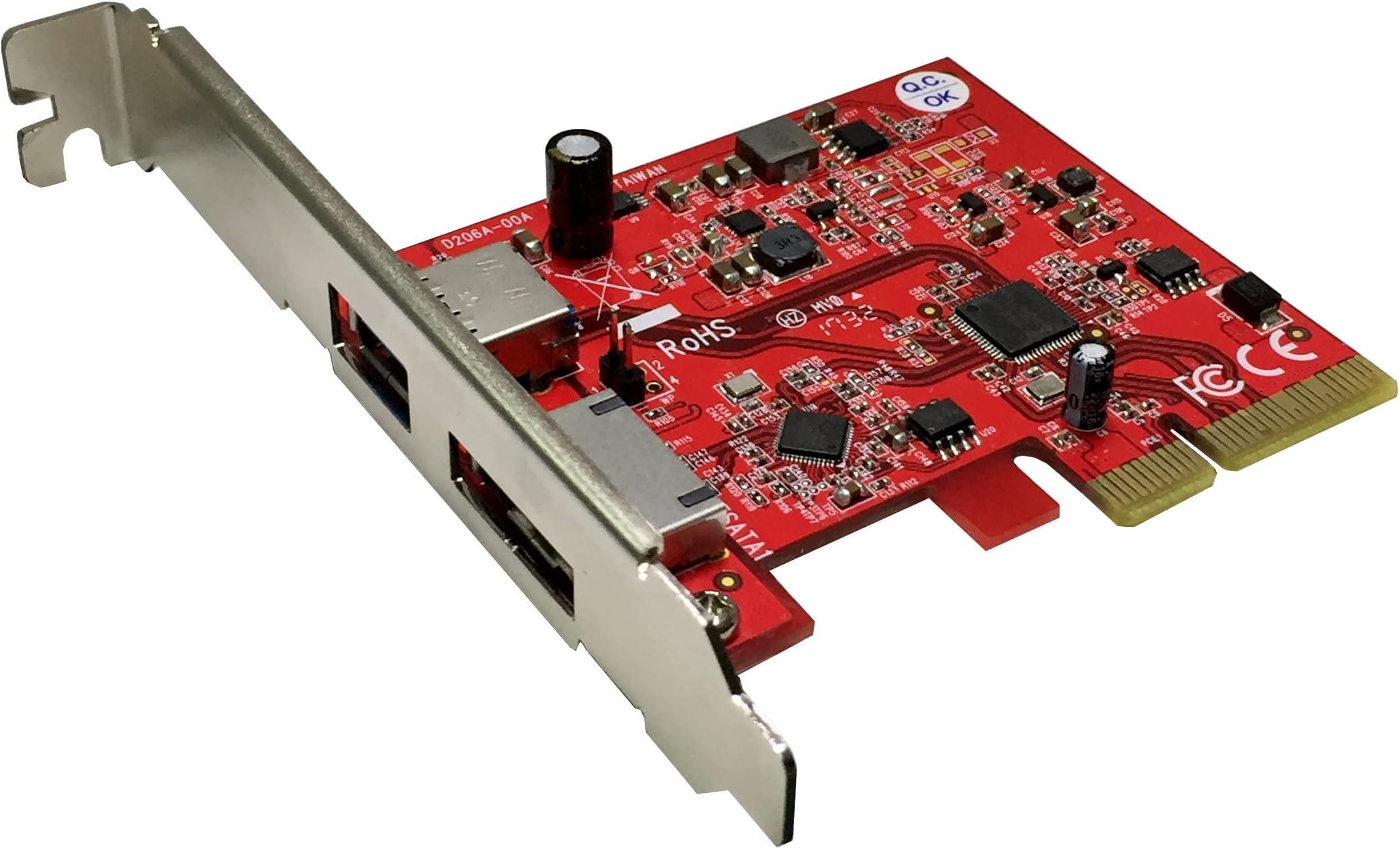



Buy anything from 5,000+ international stores. One checkout price. No surprise fees. Join 2M+ shoppers on Desertcart.
Desertcart purchases this item on your behalf and handles shipping, customs, and support to Thailand.
🚀 Elevate Your Data Game with Ableconn!
The Ableconn PU31A-ESA is a high-performance PCI Express host adapter card featuring one 10Gbps USB 3.1 port and one 6Gbps eSATA III port. Designed for versatility, it includes both low profile and regular size PCIe brackets, ensuring compatibility with various systems. With no driver installation required for major operating systems, this adapter is perfect for tech-savvy professionals looking to enhance their connectivity options while maintaining eco-friendly standards.


| ASIN | B0798JVVCP |
| Best Sellers Rank | #350 in Internal USB Port Cards |
| Brand | Ableconn |
| Compatible Devices | Personal Computer, Laptop |
| Customer Reviews | 4.2 4.2 out of 5 stars (292) |
| Hardware Interface | USB |
| Item Weight | 1.6 Ounces |
| Manufacturer | Ableconn |
| Model Number | PU31A-ESA |
| Operating System | Linux, Mac OS, Windows, Windows Server 2008 |
| Style Name | Classic |
G**B
Works in Linux!
PROs: *Very reasonable price *Installation is simple & quick (I can't provide a Tech Support rating because I didn't need any!) *Implements the fastest USB standard to date (upgraded my PC from USB3.1 Gen 1 to Gen 2) *Works "out of the box" in Linux (MX 19.2) - no driver installation required *Lots of power for USB-powered devices (2A. per port) - in my case: Port 1: Samsung T5 1TB USB SSD Port 2: Dragonfly Red USB DAC *Weekly data backup to my Samsung T5 is incredibly fast (if I blink I miss it!) *I like that this card's USB ports are powered OFF when my PC is OFF (unlike the other USB ports on my PC) *Inexplicably, my PC boots faster - maybe BIOS no longer checking for boot code in USB devices moved to PCIe? CONs: None that I can think of! Incidentally, I have no idea what "Sheerness" is, but I gave it 5 stars for good measure!
T**E
Great value
I installed this in an early 2009 MacPro that's been updated to 5,1 firmware and running Catalina. I took off a star because I could not boot off a usb stick boot drive plugged into it. Otherwise, it was plug & play and operates as advertised. Vast improvement over the built in USB-2 ports for large file transfers to a portable drive, or a high speed ADF scanner.
S**H
Works in Mac Pro 2010
This is my initial "day one" review; I might update it after some months of usage. I got this card, despite cheaper but feature-identical alternatives, because this was is known-compatible with macOS. In my case, it worked right out of the box without any driver installations or other issues. Installation wasn't trivial, but that's due to Apple, not any problem with this card. The Mac Pro Mid 2010 (5,1) has no readily accessible SATA headers and cables coming off the motherboard, but this card needs SATA power. So, I had to get into the optical drive part of the case, undo the combined SATA data/power connector from one of them; run a SATA data extension from the data half of that back to the ODD; use a SATA power Y splitter, and connect half of that back to the ODD, then run the other half into the main section of the case, and use a SATA power extension to reach my new USB 3 card. It's a bit Rube Goldberg. Put the machine back together, connected a USB-C hub/dock that I ordered to the card's C port, and connected my 5-disk external USB 3 enclosure to the USB-A port on the card. Fired up the machine, got right to desktop without any kind of delay, and every device is showing up exactly as it should (so, 6 drives total that were formerly on USB 2.0 are now through USB 3 A/C). My aging but rather over-powered 12-core, 64 MB RAM Mac just got a new lease on life, especially now that I'm booting off an SSD, and have my main game and other "monster" apps that load a lot of data on another SSD. It was painful to be using USB 2 for external storage (like several minutes to copy over a single movie). WAY faster now. I do not expect I'll get the theoretical maximum of 10 Gb/s, but am expecting over 5. Will try to set up some controlled benchmarking of random and sequential reads and writes in different circumstances (from/to my boot SSD, from/to an internal 7200 RPM HDD, from/to another external HDD drive attached to the same card, etc.). Might test some app stuff, like speed to reload a suspended VM. And I should get another SSD and see how it does when mediated by this card.
R**.
It works on my 2009 Mac Pro
So far so good! Fast! Put life to my 2009 Mac Pro. You need a SATA Power Cable Y Splitter but they are cheep and easy to install. The cable I got didn't quite fit but I shaved it down with a knife and fit in perfectly. Was very easy actually. Anybody can do it. Just make sure to use a flashlight to verify that the cable is sitting flush to the female connection. The male connection fit like a glove. Hope to get many miles out of this awesome PCI card. Note: there is just 1X 3.1 port and 1X 3.0 port.
F**9
Works great
I wanted to add a couple of USB-C ports to our desktop computer to help improve transfer speeds when unloading lots of pictures from my family's cell phones. It goes much faster than USB-A, so I'm happy. Installed without any problem and it works like a charm.
A**R
Don't Work Well on Windows 10 PC
Got this to increase data transfer speeds for both my 2018 11" 512GB and 12.9" 1TB iPad Pros. This card will not sustain a connection to these devices, immediately disconnecting them after connecting. It would have been nice if a SATA power cord was provided. Returned this Ableconn PCI-E card after replacing with the Inateck PCI-E card which was $10 less and came with a SATA power cord. The Inateck works great and as expected.
R**.
Works great, but does cause Blutooth keyboard issues. I found a workaround
I installed it into a Mac Pro 5.1 tower. It works great. The speed boost with USB 3.1 is great. Transfering 4k video from an SD card used to take hours. With a new USB 3.1 card reader, hours are now reduced to seconds. I did also experience some interference with my Blutooth keyboard. Since I only use this to transfer files via SD card reader, I solved the interference issue by simply unplugging the SD card reader when not in use.
A**.
Works with Oculus Quest
If you are like me and purchased an oculus link cable for their oculus quest to hook it to the computer but then the USB-C port on your motherboard only showed as USB 2.0 in the oculus app even though it is a 3.1 port then you have come to the right place. My motherboard only was outputting 500mA of power but the oculus quest required 900mA for for functionality at the USB 3.0 speeds apparently. For reference my motherboard's onboard USB-C chipset was the Intel Z390 chipset. I installed this card and made sure to hook it up to the SATA power and now the oculus app on my PC detects the quest at the full USB 3.0 speeds and is no longer complaining that I should plug it into a USB 3.0 for better performance.
M**O
あんまり詳しいわけではありませんが、挿すだけでデバイスマネージャーに表示され、SSD移行でちゃんと稼働しました。 特にドライバも不要でした。 今回のSSD移行以外に使う予定もないですが、とりあえず満足です。
A**R
2012以前のMacProではHDDベイがSATAIIで3Gbps。IIIの半分。SSDの速さを生かしたければRAIDカードでRAID0を組むしかない。RAIDカードは中古しかないし、バッテリーを追加購入する必要がある。SSD以前にかなりの高額出費だ。 このカードなら内部電源を使う必要があったとしても数百円のケーブルをプラスするだけで10Gbpsの性能が出せる。実際にここで購入したスーパータレントのSSD 960GB FUW960UCU0を繋いだら読み出し740MB/s、書き込み540MB/sだせた。HDDベイに単独で繋いだSSDではこの半分行けば御の字。 一つ注意しなくてはならないのはこの世代のMacProは外付けドライブで起動できるのは標準のUSB2.0ポートに繋いだものだけという事。 起動ディスクではなくてソフト開発や映像編集などドキュメントのワーキングドライブとしての活用を念頭に置いて欲しい。
佐**夫
USB3.2が2回路引き出せる点、重宝に使っています。
J**B
Mac Pro Mid 2012とiPad Air 4を接続するために購入しました。Mojaveではドライバをインストール必要がなく、取り付けるだけで使えました。データのやり取りもスムーズになり、非常に快適です。
Trustpilot
3 weeks ago
4 days ago