Buy anything from 5,000+ international stores. One checkout price. No surprise fees. Join 2M+ shoppers on Desertcart.
Desertcart purchases this item on your behalf and handles shipping, customs, and support to Thailand.
โจ Elevate your laptop gameโtouch the future now! ๐ฑ๏ธโก๏ธ๐๏ธ
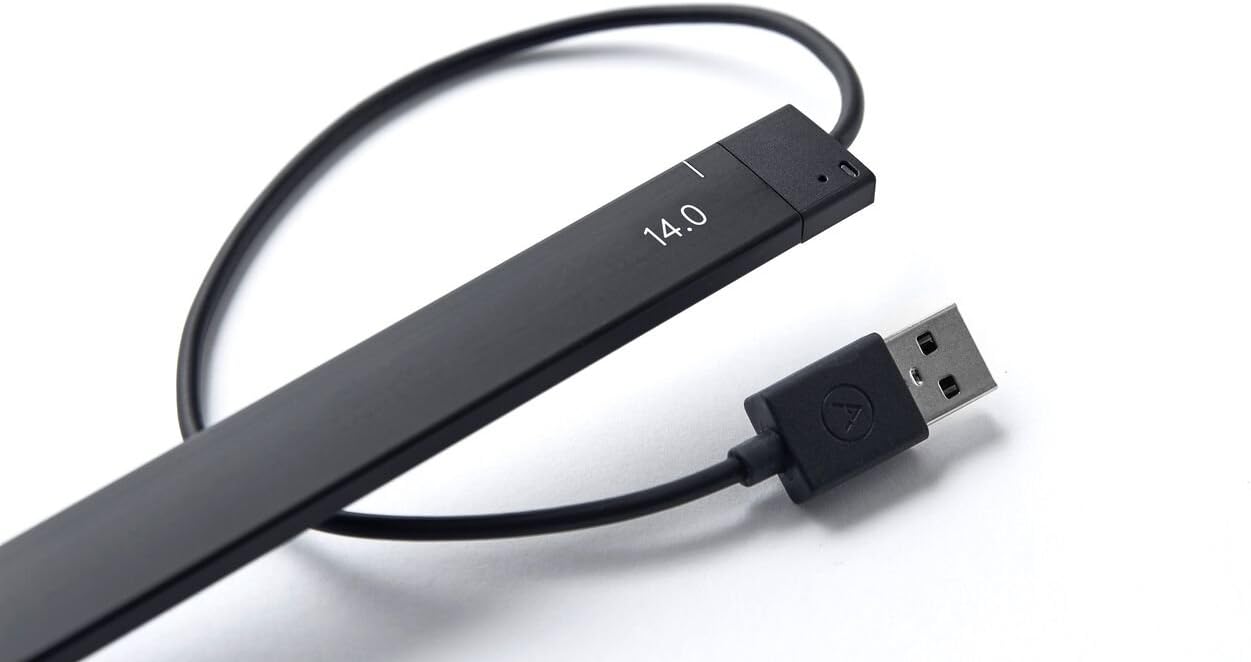
The Neonode AirBar is a lightweight, USB-powered sensor that instantly adds touchscreen functionality to most 14-inch Windows 10 laptops. Using magnetic attachment and advanced touch detection, it supports multi-touch gestures with any object, preserving your screenโs matte finish and glare-free clarity. Perfect for professionals seeking a sleek, flexible upgrade without replacing their device.
| ASIN | B06X9QVTZ9 |
| Best Sellers Rank | #121,767 in Computers & Accessories ( See Top 100 in Computers & Accessories ) #2,745 in Laptops #31,295 in Laptop Accessories |
| Brand | Neonode |
| Brand Name | Neonode |
| Cable Type | USB |
| Colour | Black |
| Compatible Devices | Laptops with 14-inch screen size running Windows 10 |
| Compatible Phone Models | No Compatible Phone Models |
| Connectivity Technology | USB |
| Connector Gender | Male-to-Male |
| Connector Type | USB Type A |
| Country of Origin | USA |
| Customer Reviews | 3.8 out of 5 stars 184 Reviews |
| Global Trade Identification Number | 00853661007037 |
| Included Components | AirBar Touchscreen Sensor, Instructions, legal folder |
| Indoor Outdoor Usage | Indoor |
| Item Weight | 0.12 Pounds |
| Manufacturer | Neonode |
| Maximum Voltage | 5 Volts (DC) |
| Model Name | AirBar 1005 |
| Model Number | NNABC3100XU01 |
| Number Of Pins | 4 |
| Number of Items | 1 |
| Other Special Features of the Product | Lightweight, Touchscreen |
| Part Number | NNABC3100XU01 |
| Recommended Uses For Product | Add touchscreen capabilities |
| Special Feature | Lightweight, Touchscreen |
| UPC | 853661007037 |
| Unit Count | 1.0 Count |
D**R
Innovative product. Value for money.
Great innovative product. Works as desired. However I was thinking that I could use pen. That's not working. You cannot write on screen. Rest all touch commands work.
W**M
Works well on laptops with a usb on the right hand side
it works well on the windows laptop but not on the MacBook as the connection is on the left hand side for the USB whereas the way it is setup - it needs a USB connection on the right hand side of the laptop. On the windows machine it works perfectly well and am very happy with the product.
P**S
Good Product but not for my work.
I bought this product mainly to make easier my designing work. But touch is not working with Adobe product as well as I found some compatibility issue with my Dell laptop with that mouse not working as well as only gestures was working with airbar. It not value for money. Its good if you want to use you pic like tablet .
A**S
not useful
This product is not particularly useful on Thinkpad T410 running Windows 7 or Ubuntu 16.04. It is not able to detect the point of touch correctly.
Y**J
superb
Initially I felt disappointed as it did not work to my speed of touch. Later day2,3 onwards I understood how touch works slightly different from mouse actions. I would say this replicated actual touch screen by upto 95%. The remaining is lag but in few days you get accustomed and understand how to make best use of touch. Recommend for Hobbyist. I now take it everyday to work and it has become an essential part of navigation. The attention and jealousy obtained from coworkers is priceless.
A**N
Awesome concept and design....Superb.
It deserves a 5 star only the pricing can be a bit more competitive. 98% of screen touch works...certain edges don't respond. I don't regret buying....
P**I
Good
Good
U**Y
lenivo laptop compitable or not?
My laptop is Lenovo 14" windows-10, without touch screen,is it compatable with this airbar ? pl reply early in this page.
L**S
No funciona
No funciona.
B**R
Wow!
Wow it works! Please send more to Canada asap.
B**E
Instructions recommend 3mm. Test then adjust as needed BEFORE sticking on the magnets.
Works good. May need some adjustment for each laptop. For example, the instructions say to mount the airbar 3 millimeters below the bottom edge of the screen, this is equal to the thickness of the cord attached to the airbar. When I did this, it works except for the top edge was off calibration, meaning I could not close windows that were full size because I could not reliably click the red X on the top right corner of the screen. Following the instructions got 95% of my screen accurate, but you should check the accuracy around all edges BEFORE mounting because the sticky magnets are difficult to remove after mounting. What worked for my laptop was mounting it very close to the bottom edge.....instead of 3 mm, it was more like a half a millimeter(see picture). Now calibration was spot on over 100% of the screen. Down side is when I touch any icons near the bottom edge, I'll end up touching the airbar. Not a big deal for me. Over all, I'm happy with the product.
E**.
good
it works like a magic , it really turn laptop or pc screen into touch screen , it works really fine. but only if the sceen size was 14.
A**H
Works, but not quite as the vid would lead you to believe. Great technology, but needs refinement.
The width of the airbar is too large to fit under the bottom edge of my laptop screen, and I think that will be the case for many smaller laptops. If you look closely at the video, you will see that the margin under the bottom edge of the screen on the laptop they use is quite large. So when I place the airbar at the bottom of my screen, it cuts off more than 1/4 inch of the bottom of the viewing area of the display. However, you don't really need to use the magnets. I leave the airbar off the laptop and just put it in place when I need to have a touch screen, which fortunately is not that often. There's no real magic to putting it in place--you just place it there, lean it against the screen, and it works fine. Then take it away when you're done. It is a bit of a hassle using it that way, because you have to unplug it from the computer when you set it aside, or you will get interference with the display. An on/off switch would sure be nice to eliminate that little irritant.
Trustpilot
3 weeks ago
2 months ago