Some deliveries may take a little longer than usual due to regional shipping conditions.

DOWNLOAD THE APP


Customer Services
Copyright © 2025 Desertcart Holdings Limited
DOWNLOAD THE APP



🛣️ Drive smarter, not harder — your ultimate road companion awaits!
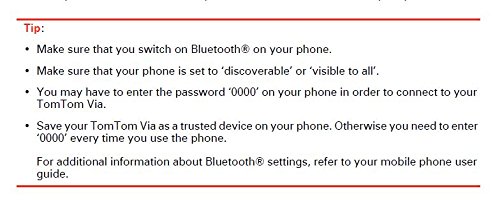
The TomTom VIA 1535TM is a 5-inch portable GPS navigator featuring a high-resolution touchscreen, preloaded maps covering the US, Canada, and Mexico, and free lifetime updates for traffic and maps. It integrates Bluetooth hands-free calling and advanced voice recognition for safe, hands-free navigation. With real-time traffic alerts, advanced lane guidance, and an easy-to-mount design, it ensures a smooth, stress-free driving experience every time.
A**I
UPDATED REVIEW------------Back Up to 5 stars from 3
I was a bit skeptical before purchasing this device from reading the other reviews. It was between the tomtom via 1535TM and the comparable Garmin that was $30.00 more expensive. I chose the tomtom because I have an older tomtom go and it has worked great for me for about 3 years now. My old tomtom still works fine, but i didn't want to pay to update the maps. I decided to get a newer much thinner gps. I love how thin it is and I also like that the suction cup is attached to the gps, just another thing that I don't have to worry about losing. So, the tomtom via 1535TM worked great right out of the box, took maybe a minute at the most to find a gps signal. I do have to agree with some of the other reviewers the when navigating through the menu it could be a bit more responsive, but it's really not that bad.Now for the Lifetime Maps Update, I have read all the story's about the bad customer service and promo codes not working, but I took my chances anyway. By the way I bought my tomtom from Amazon, not another seller, I don't know if that makes a difference when activating the promo code. I don't know why it would. So, I followed the instructions in the box very carefully, they are not very complicated but I did not want to have to call customer service. I created an account and registered the device. Then I went entered my promotional code for the free maps and it accepted it. I started downloading the maps and it took about 15 minutes at the most and about 30 - 35 minuted to install. Worked like a charm, I have the latest maps.I haven't encountered any traffic yet so I don't know how that works, I will update when use it for a bit longer. I am very happy so far. I hope this has helped. I will give it the benefit of the doubt and give it 5 stars for now.UPDATE-------------Down to 3 Stars From 5After using this for about three mounths I have mixed reviews. The actually functionality of the GPS is great, I love the display and interface. Being able to search by zip code is a great feature. The biggest problem is that the response time is incredibly slow at times, this can be an extreme nuisance especially if you need to get going quick. Other times it response is ok, but never as fast as you would expect, I can literally hit the touch screen and it does nothing for like 15 seconds then it recognizes that you touched it. If this persists, I will be contacting customer service. I have not checked to see if there are any firmware updates since I initially bought it and installed the updates. It really should be faster than it is being lately. I will update if I find any fixes for this problem.UPDATE 4/5/12-------------Back up to 5 StarsSo I got an email yesterday from TomTom saying that there was a software fix. So I updated my tomtom and it is night and day. First of all the touch screen is responding immediately when touched. Second when you navigate to a destination the it is finding your location much faster within 15 seconds of navigating.To update your go to my tomtom on the website and set-up an account if you don't have one, hook up you tomtom and download the software update. Make sure after you update your tomtom and disconnect, reset you device by holding the power button for about thirty seconds and you will hear the drum sounds. Once you restart you should notice a difference right away.I am so much happier with this device and I've only used it for a day, but I do use it all the time for work. I feel like I just got a brand new gps, that's how big of a difference this software update makes. I hope it keeps on working like it is now and I'm really glad that tomtom solved this problem because it was getting to be a real nuisance using this devise.People thinking of purchasing this gps should not hesitate now, just make sure that the first thing you do is update your maps and software to get the latest fixes. Now I would definitely recommend this product. I will update if anything changes.For directions on how to update visit [...]
C**E
A good Gizmo for someone who hates learning new stuff
I got my Via 1535TM back in Sept 2012 because I've just moved to Phoenix, AZ and I can't stand getting lost. I knew Albuquerque like the back of my hand cuz, of course, I spent the last 20 years there. When scoutng for homes here in Phx back in August I just used a regular paper map.... what I call Version 1.0 of navigation. I did my minor in college in Economics and I always scoffed at people who do "voluntary inflation" by paying way more for something when Version 1.0 is good enough. Well, I have evolved in my thinking mainly because the technology has advanced to such a point that it is way more affordable now than when nav systems used to cost $5,000 and have to be CD-ROM based in the trunk of your car. The straw that broke my back in August is when I was out trying to find a house to look at and I passed the house and had to make a U-turn. Then I passed the house again!! So I take the first right turn thinking that I can easily use the "grid" stytem common in Phoenix to get back to a major road and get to where I needed to be. WRONG. I spent the next 15 minutes making a variety of turns thinking that I knew my sense of direction and that I could course correct. But I had no **TACTICAL** way of knowing where I was relative to some other major landmark. In Albuquerque, we have the Sandia mountains, so we always know that those mountains are to the east. In Phx, the valley landscape is flat and the mountains are too far away or just plain not familiar to me to have relied on them at the time.So I convinced my honey that a GPS system would be a wise thing to buy. And I was just hooked on the voice command offered by this model so I picked it mainly for that feature. My mother-in-law has a TomTom also, so her experience with the GPS convinced me that it was a good product. Just this past Sat (Nov 10th 2012), I was follwing my friend visiting from Abq to her hotel room but I programmed it into my GPS just in case we got seperated. Her Garmin unit took us all over the place (even thru Sky Harbor airport) when my system showed me the correct route (I could have beaten her back to her own hotel if I followed my TomTom's instructions rather than have followed her car)!!!We have nicknamed our GPS "Tammy." She isn't perfect but she is a great device. I love the screen at nite. I had to make an emergency trip back to Albuquerque back in Sept and although I knew the route exactly, I loved the fact that she displays the company logo of each major gas station on I-17 and I-40 as you are driving past them: if you prefer Chevron gas, you just need to look for that logo. And like a dork, I procrasinated getting my Ford Mustang clutch repaired over the past 13 months that I have owned the car. So what do you think happened??! Yep, about 30 miles outside of Flagstaff, AZ my clutch burns out and my car is DEAD on the side of the road. But thank God that I had Tammy with me. She does **not** display miles to your next turn all the time -- but she was displaying that I was about 30 miles outside of Flsgstaff, so I could relay that to the AAA person for the tow truck to find me. She even gave me Latitude and Longitude. I wasn't familiar with all the menus, so in hindsight, I could have reset the destination to show me where the next gas station was to maybe get better information. My only gripe with this car brake down is that I was just surrounded by a mountain and lots of trees. I couldn't tell what was the last exit I passed or what was the next exit in front of me. So if TomTom is reading this: that would be a GREAT feature to add to future models.The Cons:Tammy had her first glitch the other day where she shut down accepting all voice commands because she could not tell what country I am in. Yeah, right. No matter what sub-menu I went to selecting USA or Arizona, she refused to accept voice commands. The TomTom wenb site forum was my savior. Eventually I found a post that suggested a hard reset by holding down the power button for like 60 seconds) which has appeared to fix the problem. Today I had a job interview and she claimed that the street number did not exist. I fought with her for about 15 minutes before giving up -- but since it was a job interview -- I already printed Google Maps directions from my home computer just to be sure Google maps matched the instructions I got from the company I was to meet. Always plan for Murphy's Law if you have an important meeting by having hard copy of your route, especially if it is a job interview.So far she has been great. But the above cons are the only reasons why I give this model 4 stars and not 5. There is room for improvement. She has always found the GPS signal fast and she always recalculates the route when I choose to ignore her instructions if I make a snap decision to make a detour to a gas station or something. AND considering that I am 40yrs old and kinda grumpy when I have to learn new software or gadgets, using this TomTom has been easy as pie. The interface is rather intitutive and not at all hard to learn (I hand over the iPad or iPhone back to my honey because I can't stand having to use them). Secondly, I am lucky to live in a major metro area where Amazon was able to offer me SAME DAY DELIVERY which was actually less expensive than other options (yes, I placed my order at like 3am). So I give Amazon 10 stars on a scale of 1-5 considering that Tammy arrived by 6pm the day I ordered it.If you are sick and tired of paper maps, especially if you have to move to a new city, take my advice and buy this cool GPS model. You will always have a tactical display of where you are relative to other streets or landmarks .... and in my opinion, this device can help you become a better driver because you won't have as much anxiety about getting lost. If you take the wrong exit or something, she will still guide you to where you need to go. This is SO much better than dealing with paper maps and pulling over to the side of the road to try and figure out where you are compared to where you want to go. As a bonus, Tammy has a standard menu option to "Take me to the nearest Starbucks." LOL! Now, since my honey works at Starbucks, I couldn't use that option when I wanted to surprise her with a visit when coming home from Abq (I had to call the store and hope that my honey wasn't the one answering the phone so I could get their street address). Then I just resetted the destination on-the-fly as I was driving on I-17 back to Phoenix and she was pleasantly surprised. Overall, this is a great tool to use. It is a tool so like with any tool, your skill in using it will grow as you get more confident that you can rely on it.
Trustpilot
2 weeks ago
4 days ago