
🚴♀️ Ride smarter, train harder, and never miss a beat!
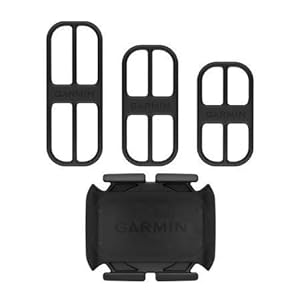
The Garmin Cadence Sensor 2 is a compact, wireless device that measures pedal strokes per minute with high accuracy. Featuring ANT+ and Bluetooth Low Energy technology, it effortlessly connects to Garmin devices, fitness apps, and Apple Watch for real-time cadence tracking. Its magnet-free design ensures easy installation on any crank arm size, making it perfect for cyclists seeking precise cadence data to enhance training indoors or outdoors.
| ASIN | B07PJKYXW5 |
| Batteries | 2 Lithium Metal batteries required. (included) |
| Best Sellers Rank | #52,756 in Sports & Outdoors ( See Top 100 in Sports & Outdoors ) #6,369 in Sports & Outdoor Recreation Accessories |
| Color | black |
| Connectivity technologies | Bluetooth, Wireless |
| Customer Reviews | 4.6 4.6 out of 5 stars (5,588) |
| Date First Available | April 30, 2019 |
| Department | unisex-adult |
| Human Interface Input | Buttons |
| Is Discontinued By Manufacturer | No |
| Item Weight | 1.72 ounces |
| Item model number | 010-12844-00 |
| Manufacturer | Garmin |
| Other display features | Wireless |
| Product Dimensions | 1.5 x 1 x 0.25 inches |
| Special features | Bluetooth |
| Whats in the box | Cadence Sensor; 3 bands |
A**R
How to Connect to Apple Watch
This device does NOT PAIR with the GARMIN CONNECT APP. The Speed Sensor does, but the Cadence Sensor does not. Continue reading if you want to connect this device to your Apple Watch for Cycling workouts: To pair the Cadence sensor to your Apple Watch so it provides data when using the Workout app for Cycling, you have to pair the sensor directly to your Apple Watch (cannot pair from iPhone) From Apple Watch > Settings > Bluetooth > Health Devices (beneath “Devices”) It will show a loading wheel as it awaits a signal from the sensor to connect via bluetooth. Keep this screen open on your watch with the device mounted on the crank arm (as close to the pedal as possible) turn the crank arm until the sensor starts to blink green. It should automatically show up under “Health Devices” in your Apple Watch Bluetooth Settings; my device showed up as “CAD-BLE0000000” Once you pair the Sensor with your watch, it will always automatically connect when the devices are near each other or until the Sensor battery dies. Down side: Not knowing how much battery life you have. After pairing the device to my Apple Watch, I immediately started a Cycling workout on my watch, began pedaling and it began reporting a Cadence measurement. It worked seamlessly, reporting RPM data as I rode and showing it on my Workout screen. When the workout was completed, I was able to see stats for Cadence (RPM) in my workout summary. Some people suggest you download a 3rd party app to connect the sensor, but most of them require paid subscriptions. I currently use the Relive app along with the Apple Workout app to track my rides. I didn’t want to download another 3rd party app and I didn’t want to purchase an expensive Garmin Bike Computer. For the Garmin Cadence Sensor 2, the reviews are tricky and Google gives a mix of information. It took me 1.5hrs to find this information on how to connect the sensor to my Apple Watch so I’m leaving it here in hopes it will help others who rely on Apple devices to track their cycling. With that being said, I am VERY happy with my purchase. It's exactly what I wanted/needed - a cadence tracker as Apple Workout already provides a good deal of metrics that a bike computer does, besides Cadence and Power. It was inexpensive, easy to mount, and connecting it to my Apple Watch was quick and easy, once I found the link above.
J**T
Perfect…
Better than expected. Easy to setup, install and pair with my Garmin Edge 530. Works great.
E**A
Greta as every Garmin product
Very good product, once connected nothing else to do. It connects really fast to the cycling computer and to MyWhoosh. Haven't changed battery yet. Very easy to use and straight forward. I use the same one in two different bikes and it's really easy to move.
G**A
Fairing Garmin Cadence Sensor 2 to Garmin Forerunner 55
It works very well. Fairing Cadence Sensor 2 with Garmin Forerunner 55. I enjoy riding my bike. I bought a Garmin Cadence Sensor 2 because I wanted to know my average cadence. However, I expected it to fair on my Forerunner 55 when I turned it by 2 revolutions as instructed in the manual for the Cadence Sensor 2, but it didn't. So I looked into the Forerunner 55 menu and found out how to fair the Sensor 2. Follow these steps to fair it: First, press the UP button on the Forenner 55 for 2 seconds. You will see 'Watch Face' on the screen. Then press the 'DOWN' button 6 times and 'Sensors & Acessories' will appear. Press the 'START STOP' button to select. Then select 'ADD NEW'. Then, turn the crank arm while it is attached to the crank arm of the bike as instructed in the manual. When you do this, it will appear on the Forerunner 55 screen and when you select it, the fairing is complete. Then, select bike as an activity on your Forerunner 55, select cadence as bike, and then ride your bike and your cadence will appear on the screen of your Forerunner 55.
D**H
It's a good sensor, but you may have Bluetooth issues if you have more than one
I have two of these sensors. The first one connected easily to my Android phone and came up on the Cadence app with no problem. I bought the second sensor later on to use on my other bike, but it will not connect to the phone or the app. Apparently the two sensors conflict. When I moved the second sensor out of range, the first one connected again with no problem. I've tried to find ways to troubleshoot this problem, including unpairing the first sensor to use the second one, but so far I haven't had any luck getting the second sensor to work. Bottom line, the sensor works great if you have only one of them, but you'll likely have conflicts trying to connect a second one to Bluetooth. I wish Garmin would come up with an easier way to install the sensor to the crank arm so I could move it from one bike to another.
M**B
Easiest to install cadence sensor. Lightweight.
This is a review of the Garmin Bike Cadence 2 Sensor My previous cadence sensor was a royal pain in the butt to install. It required nylon ties to hold a magnet to the crank arm and then the pickup/transmitter sensor had to be attached to the chainstay and positioned just so for it to work. It was easy to bump and cause it to get out of position. I hated it. This Garmin Cadence 2 sensor does away with all of that BS. Now all you have to do is easily attach the sensor to the crank using one of the 3 differently sized rubber straps and pair it to your cycling computer. That's it. Couldn't be easier. The sensor is small and lightweight. It uses a common CR2032 battery which requires no tools to replace. Just use your finger to rotate the battery cover to the unlocked position and the cover pops off for easy battery replacement. My only gripe regarding the sensor performance with my Garmin Edge 500 is that there is about a 5-second delay. When I stop pedaling, it takes about 5 seconds for the cadence reading on my Edge 500 to show "0". Similarly, any abrupt change in my pedaling cadence won't be reflected in the Edge 500 for 5 seconds. It's not necessarily a big deal once you realize that there is a delay. I assume that the delay is necessary since the computer would need a few revolutions of the crank before it can compute the RPM. This is great. I can't believe how clunky the old cadence sensor was compared to this one.
J**T
Recommended for Garmin head units
Great addition to my Garmin 530 head unit. Works wonderfully.
K**N
Works great
I’ve had this for several years now and it works great. Even in muddy wet conditions.
D**3
Facile de montage et appairage sans difficulté avec mon gps 530.
L**E
Aucunes difficultés pour l'installation sur le vélo et le couplage avec le compteur et le compte Garmin Connect. Précis, léger et apparemment solide... cinq sur cinq!
A**I
Ottimo prodotto come tutti i prodotti Garmin
S**M
J'ai d'abord acheté le cadencemètre Garmin parce que je passais d'entrainement stationnaire avec Bitgym sur iPad vers la télé... donc, je devais trouver un plan B pour mesure mon RPM lors des séance coachées. J'ai roulé sur des entrainements de plus de 25km à vitesse et résistance très variables, j'ai fait des tests en utilisant en même temps ce cadencemètre et le système Bitgym (caméra), c'est quasi identiques. A 1-2 tour prêt. Parfait! Installation super facile et le pairage Bluetooth s'est réussi sans problème. Pour les gens qui expérimentent de la difficulté au pairage d'appareil, fermez les autres qui sont à proximité, le temps d'initier la première connexion. Lorsque je sortirai mon vélo de gravel dans quelques semaines, je vais y transféré mon cadencemètre pour sûr! Bien hâte de voir mes stats de sorties.
E**A
Fácil instalación y configuración, muy buenos los productos Garmin.
Trustpilot
5 days ago
2 months ago



