
DOWNLOAD THE APP


Customer Services
Copyright © 2025 Desertcart Holdings Limited
DOWNLOAD THE APP

🚀 Unlock next-gen WiFi speeds in a tiny package—because buffering is so last decade!
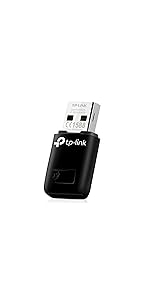
The TP-Link Archer T2U is a sleek, dual-band USB WiFi adapter delivering up to 600Mbps with 802.11ac technology. Its compact design ensures portability while supporting a wide range of Windows and Mac OS versions. Trusted globally with a 2-year warranty and 24/7 support, it’s engineered for seamless HD streaming, gaming, and hotspot creation—ideal for professionals demanding reliable, fast wireless connectivity on the go.


| ASIN | B00K11UIV4 |
| Batteries | 1 CR2 batteries required. |
| Best Sellers Rank | #288 in USB Computer Network Adapters |
| Brand | TP-Link |
| Color | Black |
| Computer Memory Type | DDR3 SDRAM |
| Customer Reviews | 4.3 4.3 out of 5 stars (11,230) |
| Date First Available | May 6, 2014 |
| Is Discontinued By Manufacturer | No |
| Item Dimensions LxWxH | 1.61 x 0.75 x 0.34 inches |
| Item Weight | 0.352 ounces |
| Item model number | Archer T2U |
| Manufacturer | TP-LINK USA |
| Number of Processors | 1 |
| Number of USB 2.0 Ports | 1 |
| Operating System | Windows, Mac OS |
| Product Dimensions | 1.61 x 0.75 x 0.34 inches |
| Voltage | 240 Volts |
| Wireless Type | 802.11a/b/g/n/ac |
S**S
Great product & Price
Easy to install. Works well.
P**.
Nice design overall, better for new computer not old.
I purchased this for my older but still going strong laptop but was met with a few problems the main being that it seemed like it was throttling my laptop's CPU which is the biggest and the included software which I liked because of the display and ease of use would be at a constant 5-25% of CPU use, you can use it without the software if you want but I figured I'd try it also it comes in slow mode I wasn't getting high speeds until I added the software though the speeds weren't much better so I had to manual adjust it from the computers networking area which too a day or 3 to figure out switching back and forth between different modes I couldn't figure out how to get it to enter AC mode so I left it in N mode so it would at least be fast of course I did accidentally get it stuck in G more which I had to fix I finally figured out how to get it into AC mode and was getting nice speeds of 30-50 or so Mbps because of the 2.4 so it took me a good while to figure out how to get it to enter 5ghz mode as well as I eventually did and was able to top out at 100-120mbps although sadly it didn't stay that way and was constantly switching on me and the speed would randomly go down do I was forced to leave it in 2.4ghz which was fine considering my computer could only max out at 20mbps although all the throttling and uninstalling reinstalling the software made me decide it wasn't for me and that this device would probably work a lot better on newer computers rather than older so I decided to return it. Other side notes the installation pamphlet and disc came in Korean if I remember correctly but that wasn't that important because you can easily understand the pictures and installation CD even if it's in a different language and or download it from their websjye. Another side side note is in the networking where you change the modes and stuff on my computer was Japanese and one in Chinese I believe which also wasn't a problem because if you've read all of the recent stuff you'll know that I was able to figure it out through trial and error over the course of like 3 days or so because I wasn't keen on wanting to mess with it at that moment. Overall I like the design and I think it'd work better on a newer computer than an older one so that's something to take into consideration if you've made it this far in it read the headline.
J**E
Get it now!!
So my laptop's wifi stopped working a while back. I need it for work and reports and email while traveling. So this wifi adapter works perfectly!! The signal is great it gets higher ranges and at a good distance. The installing portion is so easy and your computer does all the work it takes no longer than a few minutes. You don't notice it as I leave it plugged in my external USB hub, I see it flashing and currently using it now with my phone's hotspot, where before this special item I had my phone plugged in and it's just horrible when its plugged into a laptop for internet use. So go BUY it Now!!
P**S
Nice when it worked; record your serial number on packaging for probable RMAs!
I bought this USB adapter for network access since my built-in WiFi card on my laptop was no longer reliable. The adapter worked fine at first and the 802.11AC speeds were nice. After a month of occasional use I noticed the adapter would get ejected (USB function) by Windows periodically. Eventually, the adapter stopped responding altogether. I've tried reloading drivers several times but no positive results. Windows 10 now recognizes the device consistently but it does not pick up my two WiFi networks. Cellphones and other computer equipment have no problems connecting to my networks. If you buy this adapter make sure you register right away or save your packaging. You can only take advantage of the two year warranty by having the serial number available and it's not printed anywhere except on the packaging. I have a question in the the TP-Link Support group and will update here if I get positive results. Update: TP-Link assisted me with getting the product registered so I could use the 2-year warranty to replace the failed adapter. It was a fairly straight forward process but I would not bother calling 800 number support line; I was disconnected twice. I worked through the online chat feature and after about 30 minutes of chatting and providing screenshots TP-Link issued an RMA number. I received the replacement today. I will add a star for the customer service element; I was extremely skeptical. We'll see how long the replacement will last.
C**L
Working well except for an intial blue-screen crash; dual-band goodness
I just installed this in a Windows 8.1 64-bit system. Unfortunately the computer blue-screened while installing the drivers (pretty rare for Windows 8.1). Not good. It did reboot OK and I did manage to get the adapter to work.... but minus one star for the blue-screen. It makes me question the driver quality. It does see my 5GHz network and does connect at high speed to it. The device itself is surprisingly small. So, for now, 4 stars due to the blue-screen... but if it continues to work without issue for an extended period of time then I may raise it to 5 stars.
B**S
This TP-Link AC600 Wireless Adapter has never let me down! It’s been a great solution for improving my Wi-Fi connection, especially on devices that don’t have built-in dual-band capability. The adapter connects quickly, maintains a stable connection, and handles both 2.4GHz and 5GHz bands without any issues. For the price, it’s a fantastic value. The setup was easy, and it works seamlessly with my devices. I’ve been using it for a while now, and it’s always been reliable. If you’re looking for a good quality USB adapter at a reasonable price, this one is definitely worth it!
R**S
I was on usb cable connected to my phone for internet for years. This really saved me the hassle of doing that setup the whole time. I don't have Lan cables and I like that it didn't require me to install any software to work. I am on win 10 desktop.
B**I
ok
L**I
Funciona muito bem
W**Z
Tiene un tamaño de 3 centímetros, perfecto para ponerla y sacarla de una computadora. No se atora como las versiones más pequeñas, el radio de funcionamiento es muy bueno, tengo señal de mi oficina al baño (pasando por varias paredes) sin problema.
Trustpilot
2 weeks ago
1 month ago