We remain fully operational. Our teams are working around the clock to ensure your deliveries continue safely.

DOWNLOAD THE APP


Customer Services
Copyright © 2025 Desertcart Holdings Limited
DOWNLOAD THE APP
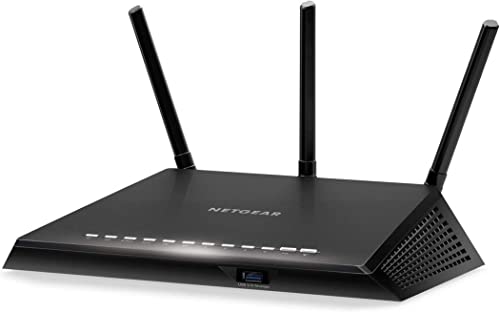
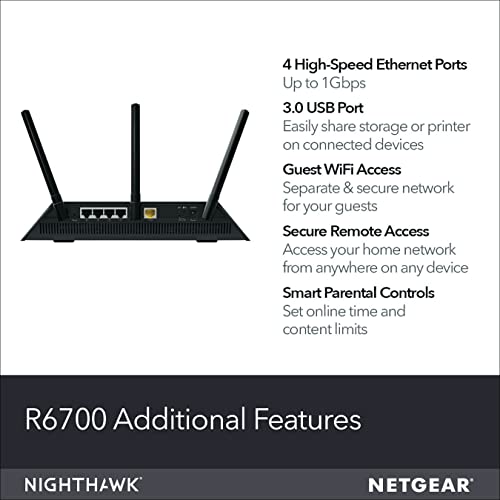
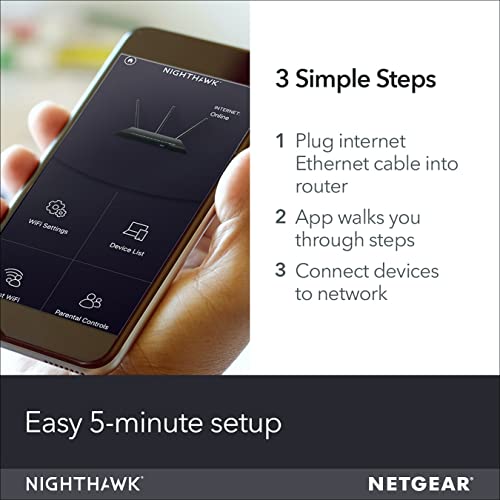
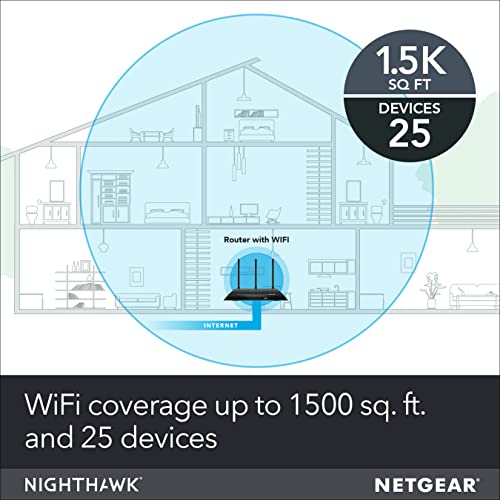

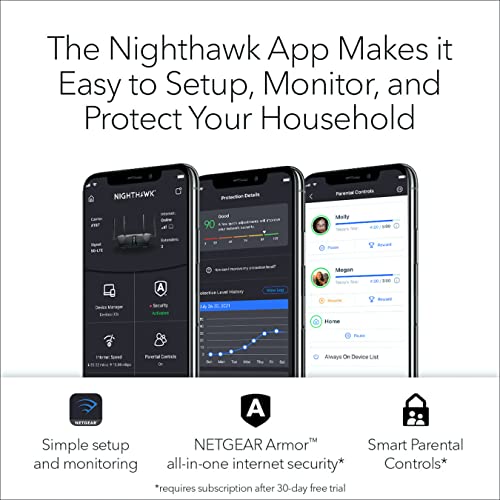


🚀 Elevate your home network to pro-level speed and security — don’t get left buffering!
The NETGEAR Nighthawk AC1750 (R6700) is a dual-band smart Wi-Fi router delivering up to 1750Mbps with a 1GHz dual-core processor and advanced features like Beamforming+, Dynamic QoS, and USB 3.0 connectivity. Designed for up to 25 devices, it offers robust wired and wireless performance, enhanced whole-home coverage, and comprehensive security including NETGEAR Armor and parental controls, making it ideal for busy millennial professionals seeking reliable, fast, and secure home networking.


| ASIN | B00R2AZLD2 |
| Are Batteries Included | No |
| Best Sellers Rank | #287,114 in Computers & Accessories ( See Top 100 in Computers & Accessories ) #949 in Routers (Computers & Accessories) |
| Brand | Netgear |
| Colour | black |
| Connectivity Type | Wi-Fi |
| Customer Reviews | 4.3 4.3 out of 5 stars (43,074) |
| Date First Available | 22 January 2015 |
| Included Components | Nighthawk AC1750 Smart WiFi Router (R6700)^Three (3) detachable antennas^Ethernet cable^Quick install guide^Power adapter |
| Item Dimensions LxWxH | 28.5 x 18.3 x 6.2 Centimeters |
| Item Height | 2.44 Inches |
| Item Weight | 748 g |
| Item Width | 7.2 Inches |
| Item model number | R6700-100NAS |
| Lithium Battery Energy Content | 4 Watt Hours |
| Lithium Battery Weight | 0.85 Grams |
| Manufacturer | Netgear |
| Number of Ethernet Ports | 5 |
| Number of Lithium Ion Cells | 1 |
| Operating System | RouterOS |
| Product Dimensions | 28.5 x 18.29 x 6.2 cm; 748.43 g |
| Series | Netgear AC1750 |
| Voltage | 100120 Volts |
| Wireless Type | 802.11ac |
F**N
Excellent Buy.
Excellent Buy. Very fast. Long range.
J**Z
Es un buen router de categoría intermedia. Desempeña excelente todas sus funciones, buen alcance y buena velocidad (400mbps en promedio por Wifi). Doble banda 2.4 y 5 Ghz. Ademas soporta una buena cantidad de dispositivos conectactos vía inalambrica. Puede exprimir la velocidad de las conexiones de fibra (menores a 400mbps). Ademas ofrece la capacidad de instalar el firmware DDRT, este firmware ofrece capacidad de personalización extrema. (También es muy fácil regresar al Firmware de fabrica). El único punto en contra es que al configurar un cliente VPN por openvpn la máxima velocidad alcanzada es de 45mbps. Esto se debe a que el proceso de cifrado lo hace el procesador del router y no le alcanza para poder realizar el proceso mas rápido, degradando la velocidad. En mi caso con una velocidad de 200mbps solo podía obtener 45mbps. En resumen: Un excelente router para usuarios normales. Un buen router para usuarios avanzados. No lo recomiendo como un RouterVPN.
N**K
This is the first time I've bought my own router. I've always used the one supplied to me by my ISP and it's terrible which is why I decided to buy a new router. This review is a comparison between my old ISP router and the NETGEAR R6700 router. Below I'll state the issues I've had with my ISP router and how my new R6700 has resolved these issues. My ISP router has many issues. My dad owns a Roku and I couldn't for the life of me get the internet to work on it. This is the main reason why I upgraded to the R6700. I tried everything including whitelisting the Roku's MAC address and making sure the necessary ports were open. I pay for Netflix mainly for my dad and he couldn't use it or any of the apps on his Roku. This connectivity issue wasn't limited to just the Roku either. My sister also couldn't connect her PS4 to the wi-fi and most phones and devices couldn't connect either. I consider myself fairly knowledgeable when it comes to configuring a router and I believe I did everything I could to fix these issues. The router just seemed faulty and I don't think even my ISP would be able to get it to work. Now that you know why I bought the R6700, I'll explain what I think about it and how it resolved my issues. The router was pretty simple to set up. I just had to plug the cords in and connect the ethernet cable from the new router to the old one. I didn't want anyone connecting to the old router, so I went into the settings and disabled the wi-fi. I was able to get the new router set up using NETGEAR's android app. It was very simple and it didn't take long. Once I messed with the settings, I tested it to see if the Roku would connect. It successfully connected and my dad hasn't had any issues watching his Netflix since. All of our devices like phones and consoles have been able to connect to the new router as well and there hasn't been any issues. The internet speed is fast too and it's probably faster than my old router. The price is good and overall I would say that this is a great router. Especially for the price. Now the minor issues I mentioned in the title was getting port forwarding to work. It wasn't an issue with the R6700 itself, but rather my setup. I have the R6700 as well as my old router set up and linked together. I couldn't get some ports to open on the R6700. I did some searching and discovered that this is a pretty common issue if you're using two routers. What I had to do was go into the firewall settings of my old router and enable DMZ. I just needed to enable it and put in the IP address of my new router, so all connections would be forwarded from the old router to the new one. After doing this and making sure I had the right ports open on the R6700, my program was able to detect that the ports were open and finally worked. Before I end my review, I want to give some advice for people setting up a new router. ALWAYS change the default login password for your router. Leaving it set as the default password is a big security risk and can lead to your router getting hacked. Use a unique password that isn't associated with any other accounts and make sure the wi-fi password isn't the same as your login password.
A**R
NETGEAR Nighthawk R6700-100NAS AC1750 Smart Dual Band Wi-Fi Gigabit Router 1.5 year update: It's been more than a year since I bought this product. As mentioned earlier, I am totally satisfied by it's reliability. No issues. 6 Month Update: It has been over 6 months since I bought and installed this amazing router. Here are my specs: 1. Number of times I had to restart the router: 0 2. Number of times the internet was dropped: 0 3. Number of times the speed was down: 0 This router has surprised me and keeps me extremely satisfied. 3 Month Update: It has been over 3 months since I bought and installed this amazing router. Here are my specs: 1. Number of times I had to restart the router: 4 times Reason: Twice because the modem had to get updated and once because the router firmware was updated. 2. Number of times the internet was dropped: 0 times 3. Number of times the speed was down: 0 times In conclusion, my purchase of this modem has been one of the wisest decision I have made. It is still going strong and I hope it continues that way. I plan on updating after another 3 months. I am from an electrical and computer engineering background. While I am certainly not an expert on networking, I am decent enough to get into the details such as advanced configuration of router. All these years, I was depending on various single band routers (TP-Link, Almond securfi etc). However, there was still these on going issues such as signal dropping, lack of coverage, decline in speed etc. Upon some research, I find that Netgear Nighthawk AC1750 router had among the highest reviews for dual band routers, in relative to other brands such as Asus or Linksys. So, I decided to give this a try and ensured that I buy an insurance from Square Trade, while ordering it over Amazon. Being a prime member, I got this product within a day. Hooking up the cables and setting up the SSID and passwords was a breeze. As several others have pointed out, simply follow the instructions that is given in the booklet that comes along with this product. While setting up the router, I recommend the following: 1. Use the CAT 5e cable that comes along with the router to connect it with your modem. 2. Hoping you have an android phone, use Wifi Analyzer to find out the channels that don't have much traffic and set that channel on your router. 3. Ensure your router is away from other electronic devices and is placed atleast couple of feet above the ground. Since I have set up the router, I have been getting close to 90 MBPS, whenever I do a speedtest. My comcast package allows me 75 MBPS. A note, I did purchase the latest Arris SB6190 surfboard modem, that allows 16 bonded channel downstream. I personally believe, the beamforming technology in this router simply makes it superior to other brands, in that, it concentrates on communicating with only connected devices, rather than worrying out emitting the signal throughout the place. The router is above average in size and looks awesome. It's been over 10 days since I purchased this router, and I have never faced any issues that I had with my previous routers. The speed is consistent even during the peak hours. I am hoping this would be the router that I have been waiting all along, which doesn't require me to spend time on restarting or reconfiguring. I intend to post updates every 3 months, moving forward. Happy streaming!!!
D**E
Amplía el rango del internet en la casa y mejora su velocidad (antes mi conexión era más rápida en la sala que en mi recámara, ahora es igual). Antes de instalar el router no podía, por ejemplo, ver clips en youtube, descargar/subir archivos y navegar al mismo tiempo. Ahora sí puedo, sin haber tenido que contratar un internet más caro con el proveedor. También ayuda a que varios aparatos estén conectados al mismo tiempo sin que le baje la velocidad a ninguno. La instalación no fue tan fácil como dice la guía, pero nada que no pudiera resolver con google y prendiendo/apagando el módem y el router. Una vez instalado, todo funciona de maravilla. Yo buscaba mejorar mi velocidad de internet y eso logré.
R**Z
I installed 2 of these routers to upgrade my home network. 1st unit as a Router and the 2nd as an Access Point. My research said the R6700 was one of the best access points also. WIRED PERFORMANCE: -- Ive installed the R6700 router with 4ea D-Link unmanaged 1G switches to reach all the locations in my home and sometimes cascaded the switches and everything works great. (I mention cascading switches because in the past I have had issue when cascading switches but not issues with this setup) -- BETTER WIRED PERFORMANCE: I have a 8 wireless camera security system that uses its own wireless Network Video Recorder and some of the cameras have poor signal so now switched them over to the wired 1G backbone. A marked improvement in the video update and even the control on the Pan Tilt Zoom (PTZ) cameras is instantly responsive -- GREAT STATUS LIGHTS: The Ethernet port activity lights are great because they have different colors depending on the speed of the network connection. This is really handy when installed a mix of 100M and 1G links so you can tell if things are connected as you planned. WiFi PERFORMANCE: -- The Nighthawk replaced a 13 year old wireless router (D-Link 605L) using only a 2.4Ghz wireless network. -- SAME 2.4G PERFORMANCE: When comparing speeds from my normal laptop wireless location I have not noticed any real improvement in the signal strength nor the connection speed for the old router to the new R6700 at 2.4G. -- GREAT 5G Performance. When comparing 2.4G to 5G there was typically at 70% improvement in throughput speed from the same laptop. -- FLEXIBLE CONFIGURATION: Once can turn off the wireless totally or just the 2.4G or the 5G. This is just a nice feature to lower your wireless risk footprint say if you only use 2.4G. ROUTER CONFIGURATION: -- EASY SETUP: It was easy to setup the router. In my case I set up the R6700 to match the configuration of the D-link it replaced so I did not have any issues with all the other devices in the house connecting. -- It went fairly smoothly, but on my laptop I did have to delete the original connection and reconnect to get it to work. -- VERY SOPHISTICATED: It has some very sophisticated configuration possibilities all of which I will never use. -- There are 3 levels of configuration with each level allowing more and more complex and detailed setups. -- I was surprised that to turn off the 5G wireless I had to drill down to the 3rd level to find that config. Seems like that would be a very basic config setting. -- I really love the display that provides several indicators to give one an instant view of the health and operation of the unit. COULD BE BETTER: -- NEEDS MOUNTING TABS: I do wish it had some mechanical mounting capability to secure to a shelf or mount vertically on a wall but its simply a shelf item. With all the cables hanging off the back there is some weight there that wants to pull the Nighthawk off the shelf. -- STATUS LIGHT ORIENTATION: The status lights are best viewed when looking down on the R6700. When straight its difficult. It would have been better if the lights were mounting at a 45 degree so they could easily be viewed straight on as well. UPDATE: I purchased a 2nd R6700 and installed in the same network above as an access point. It was easy to set up using a fixed IP and the 5G performance was better than 2X the 2.4G network. And of course the 1G Ethernets are great as I have several security cameras running over the network.
Trustpilot
3 weeks ago
2 months ago