

Desert Online General Trading LLC
Dubai, United Arab Emirates
Desert Online General Trading LLC
Dubai, United Arab Emirates


🚀 Elevate Your Workspace with Effortless Switching!
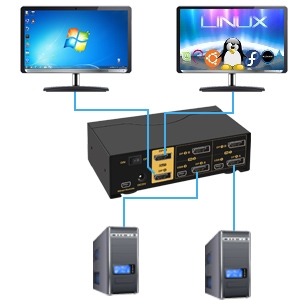
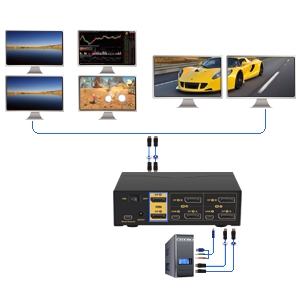
The CKLau 4K@60Hz Dual Monitor KVM Switch allows you to control two computers with one keyboard and mouse while supporting dual monitors and a variety of peripherals. With multiple switching methods and stunning 4K resolution, this KVM switch is perfect for professionals seeking efficiency and high-quality performance in their workspace.



A**R
Amazing experience with support, works!
So my story is that I received this product, and like the other reviews, I had issues with sound buzzing and flickering. However, I reached out to CKlau support and they managed to resolve all my issues; it was not a problem with the KVM switch itself, but likely because many machines output weak displayport signals which can get lost.I had a good experience with support, and I found that the KVM switch works great. Support was more than happy to help to resolve all my issues.For those of you having trouble there are two reasons (with the 4K 144Hz version):1. If you have a keyboard or mouse (e.g. like the DROP CTRL) that have LEDs, then there is coil whine or noise from LEDs. When plugged into the KVM, this is the fault of your keyboard; it can be resolved by turning off the LEDs. Note that there are reports actually for this specific keyboard of coil whine which is resolved by later editions.2. Flickering is due to weak GPU output I think. CKLau were happy to provide me with a solution to resolve this including ferrite beads and shielded DP cables. If you see flickering, your laptop or PC likely has weak DP signals.Other than that, it works great with even a gaming keyboard + mouse (HSK Pro Ace), you need to follow the youtube video to reset the KB + Mouse and disable the hotkeys on the KVM. The customization of the KVM is very nice, and I really like that the KVM itself comes with some high quality DP cables straight off the bat. I encountered no other issues, and frankly without contacting support the KVM can handle 4k 144hz with not much issue in most cases; I even tried this thing at 4k 155Hz with HDR 10 + FreeSync and it could do it.The beep can be turned off too if necessary. Overall the switch has been in use for many days, highly stable to switch between OSX and Windows environments both running at 144hz 4k. I use headset with both, and the switch delay is very short. Would highly recommend. I've tried the GREATHETEK and other brands, and CKLau has been the best.
E**N
You had ONE JOB!
KVM stands for Keyboard, Video and Mouse. In theory, it is supposed to allow you to share a monitor, mouse and keyboard across multiple devices. In theory, this is super convenient.In theory.First off, the manual is actually more confusing than helpful. (Firstly, it refers to a "Cable A", but I could not find anywhere that specified what Cable A was supposed to be, exactly. I was not expecting a mini-USB on one end and USB, audio in and audio out on the other side. I took one look at this cable and was like, oh this must be for audio. WRONG. It is the only way you will get the K and the M of the KVM to work. Also, for some reason, having the hotkeys enabled was causing issues with lag and communication of software to my keyboard and mouse. Once I disabled that I was OK.) Once THAT was done and I was able to successfully switch between my work and home computers, I rested on my laurels and called it a day.I was barely able to make it 24 hours out of initial installation of this horrible, terrible device before we had a total failure. So, I spooled up my work computer this morning and went to work. I had a bit of a sleeping issue on this device where the KVM-routed keyboard and/or mouse inputs didn't want to wake the device even when the devices were enabled in Device Manager as being allowed to wake and USB wake was enabled in the power settings. No worries, I'll just manually press the button, I said. So I went about my day and everything seemed fine.It was when I went back to my personal computer that it all went to heck. The display flashed my lock screen for less than a second, and then the ominous words "No display detected" appeared on my monitor. Panicking, I tried to use the keyboard and the mouse to try to wake it in case there was a weird sleep issue here, too. No dice. The keyboard and mouse weren't even receiving power unless that hotkey button was enabled (which as I mentioned I had to disable just yesterday), and when the hotkey was enabled, power was restored but it was all for naught. They were completely non-functional.I tried different cables, both from the computer to the KVM and from the KVM to the monitor. Different inputs (HDMI instead of DisplayPort, remembering to switch the input on the monitor accordingly). Different ports on the video card (even though this wouldn't have addressed the peripheral issue--I was desperate by this point). Making it Computer A instead of Computer B, including the funky stupid multifunction "Cable A". Toggling buttons, using hotkey functionality to supposedly "reset" the KVM per the user manual. Praying to the computer gods that my computer itself wasn't somehow b0rked and the universe wasn't playing a cruel joke on me.I gave up and put everything back directly on my computer. It worked without issue. So, reinvigorated, I set up the KVM for this device from scratch, and everything seemed fine.I switched back to my work computer to verify functionality...and the same symptoms occurred. No display, no keyboard, no mouse, same strange hotkey symptoms.I have never wanted to yeet a piece of hardware so badly in my entire life.
J**V
Does What it's Intended to Do
When I got a newer "travel sized" laptop for work, I wanted to be able to work from home without struggling over the tiny keyboard, so I looked for a solution. A docking station, by itself, wouldn't be sufficient to use all the peripherals I have on my dual monitor desktop setup, so I researched and went with this.Setup was pretty simple. I had to buy a USB-C "Thunderbolt" DP splitter for my laptop, as well as a couple extra Display Port cables. I got everything setup rather quickly (running cables under my inconveniently placed desk was the hardest part) and at first had some problems. One of my DP cables must have been defective (or too long), so the laptop wasn't displaying on both monitors. Just bought a new cable and that resolved.After using it for a couple weeks, it's a pretty solid piece of gear. The full sized Razer keyboard switches no problem, and I was able to plug my USB received for my wireless mouse into the switch and have it recognized by both computers with no problem. The detachable switch button is handy, as I keep this device far at the back of my desk, under both monitors.The only reason I didn't give this 5* is the fact that on occasion, a monitor will cycle off and then back on. Not sure if it's a bad connection or what, but it is usually fixed by unplugging the cable that runs from the switch to the monitor and plugging it back in. Given the placement of the switch, that's a pain. It's a nitpick, for sure, but since I can't give a 4.5* rating, got to go with 4.Overall, cheaper than most commercially available docking stations, more flexible and a useful piece of technology for you road warriors who find yourself working from home and are tired of leaning over a laptop all day.
Trustpilot
1 month ago
1 week ago
![VESA Certified DisplayPort Cable, iVANKY 6.6ft DP Cable 1.2, [4K@60Hz, 2K@165Hz, 2K@144Hz], High Speed Gold-Plated Display Port to Display Port Cable, for Gaming Monitor, Graphics Card, TV, PC, Laptop](https://images-na.ssl-images-amazon.com/images/I/71w-nKtHOcL._AC_UL116_SR116,116_.jpg)