🌌 Align Fast, Explore Faster: The Ultimate Telescope Upgrade for Millennial Stargazers
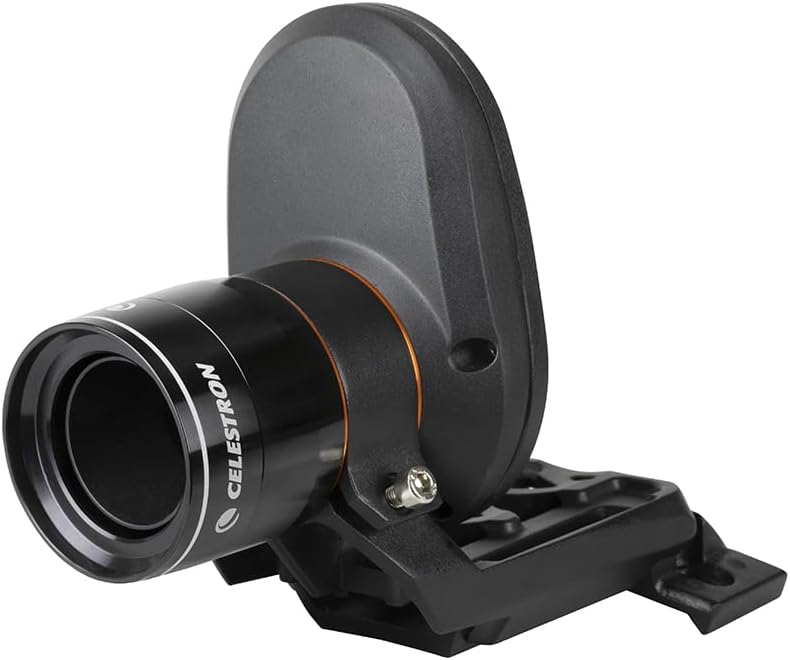
The Celestron StarSense AutoAlign accessory revolutionizes telescope setup by automatically aligning your Celestron computerized mount in just 3 minutes using patented star pattern recognition technology. Compatible with a wide range of Celestron mounts, it includes a dedicated StarSense camera and hand controller to deliver superior pointing accuracy and advanced mount modeling, making it ideal for both beginners and experienced astroimagers. With a 2-year warranty and US-based support, it ensures a seamless, hassle-free upgrade to your stargazing experience.


| ASIN | B00EZILDLS |
| Brand | Celestron |
| Built-In Media | StarSense Camera, Hand Control, Small Camera Braket, 4mm Allen Wrench, Camera to Auxiliary Port Cable and 2 Thumbscrews for Large Camera Bracket |
| Coating | StarBright XLT |
| Compatible Devices | Advanced VX, AstroFi, CG-5 Aux, splitter, CGE, CGE Pro, CGEM, CGEM DX, CGX |
| Customer Reviews | 4.1 out of 5 stars 1,034 Reviews |
| Exit Pupil Diameter | 16.04 Millimeters |
| Eye Piece Lens Description | Fiber Optic |
| Field Of View | 0.85 Degrees |
| Finderscope | Reflex |
| Focal Length Description | 1.57 inches |
| Focus Type | Manual Focus |
| Item Dimensions D x W x H | 9.84"D x 9.25"W x 4.33"H |
| Item Weight | 980 Grams |
| Manufacturer | Celestron |
| Model Name | StarSense AutoAlign |
| Mount | Fiber Optic |
| Objective Lens Diameter | 40 Millimeters |
| Optical Tube Length | 9.25 Inches |
| Optical-Tube Length | 9.25 Inches |
| Power Source | USB 2 .0 |
| Telescope Mount Description | Fiber Optic |
| UPC | 050234940054 |
| Warranty Description | 2-Year Warranty |
| Zoom Ratio | 50 |
A**8
Amazing device!
I apologize for the length of this review, but I thought the details might be helpful for folks interested in this awesome little gadget. My Celestron StarSense arrived last week, and I’ve had a couple of chances to try it out. I’ve used the device exactly twice, but I think my experience may provide some useful information to others who are thinking of purchasing this device. My focus is on astrophotography and my rig is 100% portable on a tripod, so alignment is a frequent chore. I held off buying the device because I had read that it had severe issues integrating with Celestron’s native polar alignment process, ASPA (All-Star Polar Alignment). Once those issues were corrected by Celestron and I read a positive review of the device in Sky and Telescope, I went ahead and bought it. So far, I’m very glad I did. After unboxing, I immediately updated the firmware on the StarSense camera and the included hand controller. Be sure to do this – as I mentioned, Celestron fixed some major problems with the software since the release of the device, and you’ll want to be sure to capture these. Be sure you have the appropriate cables and adapters ready for this. Once the firmware was updated, I attached the SS camera to my scope. I have a non-Celestron OTA, but a Celestron Advanced VX mount. This was one point of annoyance with Celestron. They provide two mounting methods – a super-solid one for Celestron OTAs, and a not-so solid one for everyone else. I was mounting to a dovetail plate, and it was annoying that I couldn’t use the more solid method just because Celestron had made the mounting holes too narrow. If they had just provided a couple of holes at the standard mounting sizes they could have given folks a lot more options. Left with the secondary mounting method, I was glad I had an extra mounting base available, because Celestron doesn’t provide one with the unit (they assume you’re replacing your finderscope with the SS camera). I sacrificed my mounted laser pointer in favor of the SS camera and continued. If you have a single finder\guider and no other mounting base available when the unit arrives, you’ll be waiting for Amazon to deliver before you can use the unit. After setting up outside and doing a rough polar alignment with a polar scope, I turned on the mount with the new HC and SS camera attached. The first thing the HC does is search for the SS camera, which it found with no problem. At startup, the HC gets a little “bossy” – there doesn’t seem to be a way to start up without going through the SSA (StarSense AutoAlign) process before doing anything else. I’m used to entering the Date\Time and location, but that didn’t seem to be an option at startup. You can press the Menu button to add those details, but I didn't know that at the time. I let the SSA do its thing, and it slewed to four different sections of the sky. I was in my side yard, where the house and trees block much of the horizon, and light pollution is fairly severe. I had also neglected to turn a bright flood light attached to my roof off, just to keep things interesting. I started quite early, and I could only see 5-10 stars visually. I noticed that the HC was reporting that it was finding dozens of stars in areas of the sky where I still couldn’t see any. After a couple of minutes, the SSA wrapped up and reported success. At this point, I was 90% certain that the device hadn’t actually done anything – it was just a little too quick and easy. I told the HC to find Albireo. There it was – off center, but within the FOV of my 20mm eyepiece. Not bad. I told it to find Antares in the south. There it was. Whoa. At this point, Celestron has you resolve the error between the SS camera and your telescope by performing a centering procedure. This is done in the HC’s software and doesn’t involve adjusting the camera physically, which was a relief – I think I’ve had enough “dance of the thumbscrews” for one lifetime. The HC has a process for this that involves centering the star in your eyepiece and then confirming that it is centered with the HC. This was simple enough, but the (printed) instruction manual actually has a mistake in it about the steps in the process. It's a good idea to just download the (corrected) online manual if you buy this device. After the centering procedure, the HC tells you that you will need to repeat the SSA process. At this point it was a little unclear whether it expected me to simply run the process again or actually reset my mount to the alignment marks and start over. Thankfully, the former seemed to work just fine. Now, I had done all of this before entering the date, time or my current location. It seemed wrong to move on to polar alignment without entering that data, but then again – does the HC need to know the time or location if it knows the positions of all of the stars, especially if you’re not targeting solar system objects? The HC certainly didn’t seem concerned about it – I had to go menu surfing to even find where to enter the date\time\location – I was never prompted for the information. I went ahead and entered the info and the HC told me to perform SSA again, which I did. The polar alignment process was simple. ASPA normally has two steps – the first where you center a star using the direction buttons on the HC, then the second when you’re asked to center the same star using the mount’s ALT and AZ alignment knobs. With SSA, the first step is done automatically and the user is left with the ALT and AZ adjustments. After the centering\calibration process and ASPA, any stars or objects I selected were perfectly centered in the reticle eyepiece. I spent some time selecting objects near the four points of the compass and just being amazed when they all came up dead center. I started guiding and did some test shots using the CCD – I had perfect pinpoint stars for 12 minute exposures. That night I took 14 12-minute exposures of the Pelican Nebula and had some of the sharpest, roundest stars I’ve ever imaged. Long story short - ASPA was very easy and very accurate. On the second night out, I was just doing a rough alignment so I could take pictures of the moon with my bigger scope. I simply took the device off my refractor and put it onto my SCT, put the OTA on the mount, hooked it up, turned it on and let it align. I started even earlier that night, with only a few stars visible to these middle-aged eyes. No re-centering or fine-tuning, no entry of date or location, no polar alignment. A couple of minutes later, the SSA was done and the GOTO put the moon in the FOV of my 20mm eyepiece on the first try – this is with a 10” SCT – the FOV was less than a moon-width. I also tried several stars and they were all close to center, despite a different OTA and not performing a new centering\calibration procedure. The bottom line: this device exceeded expectations on its first two nights out. I’d say if you have a portable setup this is a no-brainer purchase. Pros: Easy setup (other than the firmware update); easier telescope alignment; simplified ASPA; more accurate polar alignment (at least in my experience). Works in twilight, so you can start your alignment earlier. Works despite trees and\or buildings obstructing large parts of the sky. Fast. Cons: Mounting brackets aren’t all that they could be (see above). Finder mount base not included. New HC has small-print display by default – can be hard to read especially from a distance.
B**N
This is a great technology, but it suffers from insufficient troubleshooting documentation
This is a great technology. I attached it to a Celestron 9.25" NexStar Evolution. It works very well. However, Celestron WiFi doesn't. When I tried to set up StarSense using Celestron WiFi and the SkyPortal app on iPhone (not iPad), the StarSense alignment process would align, then lose connectivity, then need to be aligned, then lose connectivity, then freeze. I have been reading several online forums for amateur astronomy, and the Celestron WiFi combined with the SkyPortal app freezing the phone is a common problem. Some users have wireless providers that use "smart" WiFi apps to bounce back and forth between WiFi and Cellular Data, shutting off WiFi on disconnect, and thereby "improving" battery life. These apps appear to conflict with SkyPortal and Celestron WiFi. I have no such app, but I did have tethering enabled, and this probably does pretty much the same thing to SkyPortal as the smart WiFi apps. I'll give it a try again with tethering disabled, but after 5 weekends of trying to get Celestron WiFi to work with SkyPortal (I also tried with SkySafari 5 Pro, where I can save and restore all kinds of settings, but SkySafari 5 Pro is just as bad as SkyPortal with respect to losing connectivity and freezing) I am pretty fed up with SkyPortal. None of this compatibility information is available from the Sky Safari folks, who are contracted by Celestron, nor is it available from Celestron. You have to go out and dig it up yourself. Celestron should have a better knowledge base, along with better unit testing and quality assurance. I know they aren't software developers, and they don't charge for SkyPortal, but I also can't charge them for all of the time I spent trying to get SkyPortal to work with StarSense. Take a lesson from Apple: to sell your hardware, you need easy-to-use software that actually works. I have found the StarSense hand controller much easier to use than SkyPortal. StarSense will do alignment provided it can find enough stars. I have never tried to align on solar system objects, and I don't even know if that is possible with StarSense. You will still need to calibrate StarSense after you've aligned it, which essentially tells StarSense how misaligned the camera is with respect to the telescope aperture. In theory, you should be able to remove the camera from the telescope and replace it without recalibration. I have never been able to affix the camera to the telescope so that recalibration can be skipped. It only takes a few seconds, but afterward, you have to align again. With the hand set, this is about a 5 minute process: align, calibrate, align. With the SkyPortal app, you may never complete this process. If StarSense can't find enough stars, use the NexStar controller together with geolocation information, sky maps, and a star finder. I know you can solar system align NexStar, because I do that in my front and back yard several nights a month using the moon or a planet, and I can even align on the sun when I have a white light solar filter attached. StarSense just gets lost in my light polluted neighborhood, with a very busy airport located 6 miles to the south putting all kinds of lights in the evening sky. I'm not sure I would recommend this item for beginning astronomers. For one thing, it costs about as much as a kid's (really nice) starter scope. For another, learning how to read and use a sky chart - and compass - is not a bad thing. It's also a good thing to know how to align your telescope to a finder scope, and how to use the finder scope to point at objects in the sky. Since StarSense gets the information it needs directly from the telescope hardware, you also don't need to know what kind of mount you have, which means that you don't know all that you can do with your telescope. Lastly, if something doesn't go right in the connection, alignment, and calibration of StarSense, you should be able to swear very loudly, remove the StarSense camera and controller, attach the NexStar controller, cycle power on the scope, and then align it yourself.
T**W
Honest Review
Just a quick background of me, 14 year Navy Vet, worked on Jet Engines. Last 10 years I have been an IT Helpdesk Manager. So I think I have electronic and Mechanical locked down, this StarSense device, while on the outside looks great has turned out to be nothing more than ONE GIGANTIC PAIN IN TEH ARSE!! First, the other night I was out on my back deck and wanted to take some dusk pictures of the moon as well as some video. But, problem, can't StarSense stars that are not out yet, hence it's dusk. SOOOO I tried to set up with just the moon as a reference point, would not work. SOO I can't take any dusk pictures without the star or moon streak. Secondly - I have an autofocus motor on the scope as well. The StarSense device interferes with the autofocus. So now I can get to where I want to go but can't focus. I would move the focus in and the motor would turn and start to focus then stop, and reverse direction the same amount of turns that I went it, thus starting me over from the same place. Tech support told me that can't happen, well it just did so maybe you need a new profession. Lastly, it is not AT ALL ACCURATE!! Once you start to try and adjust the location and "Zone in" on the object you are using as a reference point, it is almost impossible to get the device to work right. For the money they ask this thing should ask me where I want to go and how close, it can't even get me where I need to go semi closely. So I took this 500-dollar paperweight and removed it and put back the old align by eye scope. 2 minutes later I was all aligned up with the original handheld that came with my Celestron. The best thing I ever bought was the GPS dongle, save yourself the trouble, and hassle, the dumbazz tech support people, and most importantly the MONEY. Forget this and just get the dongle and the free app it's all you really need!!
P**Y
Exceptional Product - A must for Celestron Mounts
I have been a Celestronomer for almost two decades, using a variety of their Alt/Az mounts and SCT telescopes. Up until now I've wrestled with and relied purely on manual alignment, and have become quite proficient/efficient at the process over the years. With that said, even on my best night, the manual alignment process yielded only "fair" results - with "Go To" being relative, normally getting my target in a very low power eyepiece FOV, but not always, even with the addition of 5 additional alignment stars. And, on my best night, it was a 15-20 minute proposition. Sky time is precious. Observation time is precious. This year I made the move and upgraded to a combination of the Celestron Advanced VX 6" Refractor scope and Celestron CGX GEM mount. A big scope, a big mount, a bigger PITA to align. I stumbled upon the Celestron StarSense Autoalign accessory while researching the scope itself. The reviews I read were mostly positive, but many opinions seemed to say "usually works, but why waste the money, manual alignment works just as well, just takes a little longer". Because Sky Time is precious I decided to take the plunge - I've had great luck with Celestron gear and since this is part of the Celestron ecosystem I figured what they heck. FYSA, I also use the SkyPortal Wifi module and iPhone App. This is important. I think my experience might be much different, but all of this comes together in one easy to use interface on Sky Portal. So, all of that is preamble. I've been using the StarSense for just over a month now and have 4 sessions under my belt. Important note, as soon as I got the StarSense I connected all components of my system (StarSense, StarSense hand controller, CGX mount, SkyPortal Wifi module) together and updated all the firmware using CFM. All Components needed firmware updates. I suspect that many of the frustrations described in reviews are because of incompatible or out of date firmware. Firmware update was easy (I couldn't use a hard connection, had to update over WiFi, good thing I had that, Celestron needs to figure that one out and update their manuals - quite frankly WiFi should be built in as a standard feature). After firmware update I took everything out and set it up during twilight. As darkness settled I powered up the system and opened the SkyPortal App, hit "Connect and Align". The app detected the StarSense just like it's supposed to, and immediately went to work. 3 minutes - 4 star alignment complete. I was flabberghasted - it all worked, and it was easy! I took the next step and calibrated to my scope (you only need to do this once), then re-aligned. The entire process from start to finish took me 10 minutes, maybe. And the alignment - amazing. I moved around the sky using the Sky Portal App (which is so easy, just touch the target to select, and hit "Go To". Pointing accuracy with Star Sense is orders of magnitude better than a manual align - will put your scope on target using short focal length eyepieces. I added alignment stars as I hopped around to sweeten an already superior solution - Star Sense was dead on. Since that first night I've enjoyed 3 more sessions, using StarSense every time to align. It has worked flawlessly - every time. I have found it will find stars not visible to the naked eye, so you can align during late pinkie time and be ready when true darkness arrives after CNT, again, maximizing Sky Time. It just works. It is completely automatic, fast, and easy. Alignment is now just a brief interlude, not a major chore, and the quality of the alignment is incredible. The accuracy of the alignment saves more time - puts me right on target so I can spend more time looking and less time adjusting. Where it's really made a difference is with faint DSOs. With StarSense, when I GoTo a DSO, I KNOW it's in the FOV, even if I can't see it. If I can't see it I can work on the eyepiece/focus solution and either bring it out, or not, but I don't have to spend time wondering if I'm even looking in the right piece of sky. So, if this seems like a glowing review, it's intended to. It's so refreshing to buy a piece of technology and have it completely exceed expectations. If you are on the fence, don't be, the StarSense is worth every penny and more - pure magic!
P**A
Makes a big difference
A lot of us struggle with alignment issues on go to telescopes; whether due to physical issues (neck cranning), identifying alignment stars, etc. This device resolves the issue. Mount it. Calibrate to your scope. Go through learning curve. Let it do the alignment in 5 minutes, usually. Sometimes it goes into the weeds and stray lights (passing car, inside lights, planes), vibration, seem to mess with it. It doesn't ignore trees and buildings as well as they say. Too bad celestron couldn't include a simple internal clock like most other devices so you didn't have to enter time every time you turn it on. I'm sure they'll have an add on you can pay too much for soon. The instruction book is still lacking. Price seems way too high for a camera with the software in the handset. Gave it a 4 because it makes the 8se scope actually useable. Should have been offered as part of the original package at a much lower price since the hand set would be a wash in cost.
T**Y
Don't give up, Update the Firmware.
What a wonderfull device for amateur astronomers. After many failed alignments because there were so many stars in the eyepiece and not being able to identify which was which, the StarSense was eagerly awaited. At first I would have given this device a very low rating because it failed to do its base function, it would not align the telescope. (Celestron 9.25 SCT AVX) It was very frustrating because the "Auto - Align" function would just lock up. I have an obstructed view, many trees, and the scope would just point at the willow in the west and be confounded in what to do. Even when trying to do a "Manual - Align" I would get stuck in an endless loop. I was sadly disappointed and was ready to return it. The included instruction manual is not current or correct, that's a sad statement for Celestron, even the online manual is not correct. The Menu function button on the hand controller should be explored. So now I had a new computerized scope, the Sky Portal Wi-Fi device and app and StarSense and I still couldn't "Go-To" anything because I couldn't get an accurate alignment. Being one not easily defeated I ventured into the Web and found many others who were disappointed, but no one had all the answers, bits and pieces came together and I finally came up with "It needs a Firmware Update" (Check your cable needs) so off I went to Celestrons website and after searching around I found the updates. No YouTube videos, none of the Astronomy Forums or instructions from Celestron are correct on how to do the updates, but they are easy to do, just make sure to update Java on your computer to the newest update first. The update files come with a photo of how to cable the devices before starting the update. It is correct. Once you have JAVA updated and unzip the files everything is pretty straight forward. After three failures to update (My fault, I missed a cable) I had success. A week later I was able to try out the updates. I had purchased a 10" tablet to run the Sky Portal app on as my eyes aren't as young as they used to be and the smartphone was just to small to see in the dark. I assembled the scope and let it acclimate, I powered up the scope before dark to update the time and location, remember the "Menu" function key on the StarSense Hand Controller. Then I powered down the scope and waited until the skies were dark enough to begin calibration. I powered up the scope with all devices (StarSense Camera, Hand Controller and Sky Portal Wi-Fi Module) securely attached to the mount. (Remember at this point to remove the lens cap on the StarSense Camera) I then started the Tablet and in "Settings" connected to the Scope via Wi-Fi. All of the Sky Portal documentation said that everything would recognize each other, I was skepitcal. I then chose "Connect and Align" from the app on the tablet. Sure enough the scope swung to the west and the willow. The app said it was taking a picture but couldn't resolve the plate, imagine to my surprise that the scope just swung to a different point in the sky and continued the alignment. After a few minutes and 4 "Solved Plates" I was asked to choose a calibration star to align the Starsense Camera with the OTA. I chose Vega as it is the brightest star from my location and there is no mistaking it for another in the eyepiece, it just lights up the eyepiece. I was then instructed to do another Auto alignment and Bingo, it was Magic. Finally a computerized Go To scope that does just that. It goes to everthing I ask of it, Objects pretty much centered in a 12 MM eyepiece. (195X on my scope.) I am very satisfied with how everything is finally functioning and is fully integrated. The only additional expense I incurred was the need to communicate via Serial device to the scope, I purchased a "TRENDnet TU-S9 USB to Serial Converter" cable from Amazon that facilitated that.
C**A
Works great, AFTER a firmware update.
Make sure you have the ability to update firmware on this device! It works EXACTLY as described but both the camera and the handset needed firmware updates before it would function properly. That is the reason I am only giving three stars. It’s ridiculous that someone would have to run updates on a brand new device. Not everyone who uses a telescope is a tech geek. Maybe it’s because I bought mine from Amazon instead of directly from Celestron, my unit needed updates?? I have owned a Celestron Nexstar 8SE for several years and was excited to make the alignment process quick and easy. My husband and I are both tech literate, in fact he is a programmer and engineer. When we tried to use it right out of the box it drove us crazy. On the auto align the scope never left the horizon, it just kept slewing in circles taking photos of trees. We tried doing a manual alignment per the instructions since we thought the issue might be not enough open sky for auto align. The system would go through all the image capture and plate solving but still always fail to align. I was ready to return everything but my husband convinced me to let him try updating all the firmware, which is no easy task. After all that, it finally worked as advertised! We decided to use the Sky Portal app instead of the handset since getting an accurate GPS location is much easier. It aligned perfectly within minutes, knowing to slew to open portions of sky. After calibration the accuracy was excellent. So, this can be a great addition to your scope, but be aware you may need to do updates first!
D**.
It aligned with high clouds and only planets and moon visible to naked eye. Was blown away!
I had first light use on this the first weekend I had this at our star party. Because I didn't want to use my existing finder scope mounts (already in use) and wanted to use the original Celestron bracket (designed for Celstron scopes, but I have an Orion Astrograph scope) I ended up mounting it on the front edge of my dovetail mount. This was a good place that kept it out of the way. That was the hardest part of the entire setup literally, and obviously wasn't one of their designed setups. The rest was a piece of cake. Just plug and play on this thing. I have a Celestron CGEM DX mount with the GPS addon, so I had to order the Celestron AUX port splitter to use them both. Can be found on Amazon here: https://www.amazon.com/gp/product/B00DQTYNAA/ref=oh_aui_detailpage_o07_s00?ie=UTF8&psc=1 It comes with an updated hand controller to work with the StarSense and adds a couple of features like 4 line display that now shows the RA/DEC of the object you are pointed at. Very nice. Like I said, plug and play. I also use a PoleMaster for polar alignment so that was done first, although manual for the StarSense says it only needs a rough polar alignment. Since I do Astrophotography, I went ahead and did the pole alignment with the polemaster anyway to maximize my tracking. Fired up the mount and right way it found everything, including the Celestron GPS I have on it, and the StarSense, and was asking permission to align. I gave it the ok and off it went....and went....and went. I was starting to have real doubts about it now, because it started even pointing at the ground! Holy cow that isn't right. Then it dawned on me, and I'm embarrassed to admit such a newbie mistake, but I had failed to remove the lens cap on the camera! DOH! So removed that and started it again and after about 5 minutes of slewing it announced it was done. So yeah, check your lens cap before you start. LOL Sent to GoTo over to Vega shining bright to test it, and it was within the view of a 22mm eyepiece, but not centered. Now the manual states you have to do a centering procedure at this point that should be familiar to you, and that just lets it fine tune what the camera sees with what your scope sees in the center. It's essentially and electronic collimation between the scope and the camera, rather than you having to line all that up manually. Very nice and EASY! After you do that very quick procedure, it wants to do another alignment procedure and in 5 minutes or so it was done. If you don't move your scope from site to site, you likely won't have to do that second part very often, but it's pretty quick anyway, and I recommend doing it every time if you do astrophotography. After that procedure I slewed to Vega again and it was much closer to center so I ran the centering procedure again and it was even closer still, though not completely exact, but would get just about any object in your eyepiece as long as you aren't using a 3mm or something. All in all, minus the time the fiasco of not removing the lens cap took, it was ready to start viewing in under 15 minutes with very minimal input from me and it was tracking wonderfully all night. Now, the next night even impressed me more. After a long afternoon of rain our night was plagued with high clouds. We could visually with naked eye only make out the moon, Jupiter, Mars and Saturn and the occasional Vega, and even those would come and go. We decided to give the StarSense a run, just to see what it could do for the hell of it, never expecting it to work. It took it about twice as long, but sure enough it aligned itself up! I couldn't believe it. GoTo was right on. It wasn't from the night before because I had moved the scope some because of the rain that day. We ended up being treated with some astounding views of Jupiter and Mars details with the high clouds acting as a nice filter. I was just blown away that thing aligned itself with all those clouds! I can't recommend this thing enough. Doing astrophotography, the only two things I dislike really are pole alignment and regular alignment, and of course they are absolutely critical for what I do. Between the PoleMaster (which you should also get btw) and this StarSense, it made those things actually fun! One accessory you won't regret spending money on! Be sure and read the short manual just so you have all the details of how it works in your head.
Trustpilot
3 weeks ago
2 months ago