


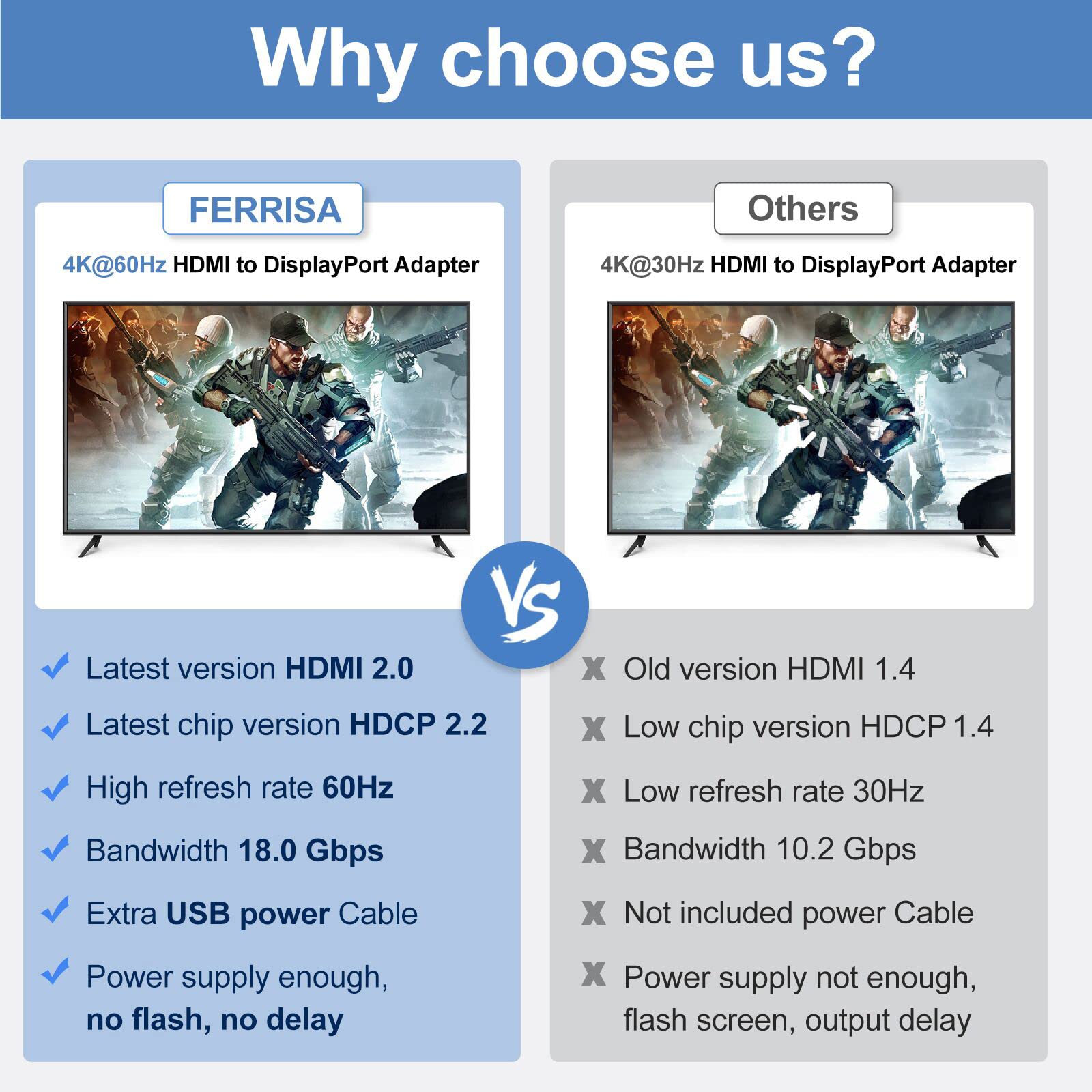


🚀 Elevate your screen game with flawless 4K power!
The FERRISA HDMI to DisplayPort Adapter delivers ultra-high-definition 4K video at 60Hz by converting HDMI 2.0 signals to DisplayPort 1.4, ensuring crisp visuals and smooth audio. Compatible with a wide range of devices including laptops, gaming consoles, and PCs, it supports both extend and mirror display modes. USB-powered for stable performance, this adapter is the perfect bridge for professionals and gamers seeking premium connectivity and seamless multi-display setups.


R**W
The right choice for HDMI to DP
I have a 4k monitor with an open drive port and two HDMI connectors and three appliances to plug in. I wanted to hook up my PC to the DP but was unsure how to do it. I bought a HDMI to DP connector but it didn't work.After researching I found that I needed a powered adapter to be able to make the connection. I purchased the FERRISA adapter, hooked it up, plugged it into a USB port and ran the DP cable to my monitor. I then re-powered my PC, set the monitor to DP and up came my desktop. I saw in the comments that you need to plug in the USB first and did so. There were no instructions on the packaging, but everything worked fine.I would recommend this product to anyone who had a similar situation.
J**F
Bought to play on the oculus rift s works
Works on the oculus rift s perfect, power cable will not work for the display if plugged into the laptop or PC directly plug it into the wall!!!! Only the wall and it will detect the display awesome item.. if you have a problem with it being to close to the plugs and won't fit I took the plastic off a d wrapped it in electrical tape very well and it works great that's just an option because I can't find anything else that works.
W**D
Purchase something that will work for more than a 2 months
Ordered 09/16, return warranty expired 10/16, stopped working 10/30. While the picture quality was tested against a direct input HDMI and a similar Displayport adapter, the quality was too flimsy and the HDMI port bent out at the slightest resistance, opening the device itself.While the other DP adapter doesn't show as bright as this one for some reason. It's of a much sturdier build, quality and very dependable. Will have to go looking again but will not be recommending or purchasing from this company in the future.
B**8
Does NOT work for Mac Mini M1 & LED Cinema Display
I purchased this adapter in order to add my 27" Apple LED Cinema Display to my Mac Mini m1 after seeing a video on YouTube where a user with the same setup was successful doing the same thing but using a similar adapter made by Cable Matters. This adapter was less expensive, appeared to have the same specs and capabilities, and certainly looks well built. However - it doesn't work as expected. It DOES actually allow the monitor to work... HOWEVER, it has an overall pink or green hue to the entire screen - like one of the color channels (R, G, or B) are just turned off completely. The first few times I tried it, I got an overall pink cast. This last time I tried it again after successfully testing the Cable Matters adapter, I got an overall green hue. I tried this adapter with 3 different DisplayPort to Mini DisplayPort adapters - which are also needed for this setup - and got the same results. So it's not the DP to Mini DP adapters causing the issue. You seem to be able to mix and match those. Hope this info is helpful to another Mac Mini m1 user considering this adapter. It probable works fine for any other setup. Just not for this one.
B**G
Great Cable but not currently compatible w/1440p120 for Series X
Great cable but not if you’re looking to use for an Xbox Series X to do 1440p @ 120hz. It’s not the cables fault either - as of 4/10/21 the Series X is unable to use any PC Monitor that does not use VESA standard timing tables (that’s almost everyone btw) meaning this cable will only work with a handful of monitors currently on the market for 1440p @ 120. It will enable: 1440p @ 60 and 1080p @ 120 but not 1440p @ 120.
K**R
Works to convert hdmi laptop to DisplayPort monitor
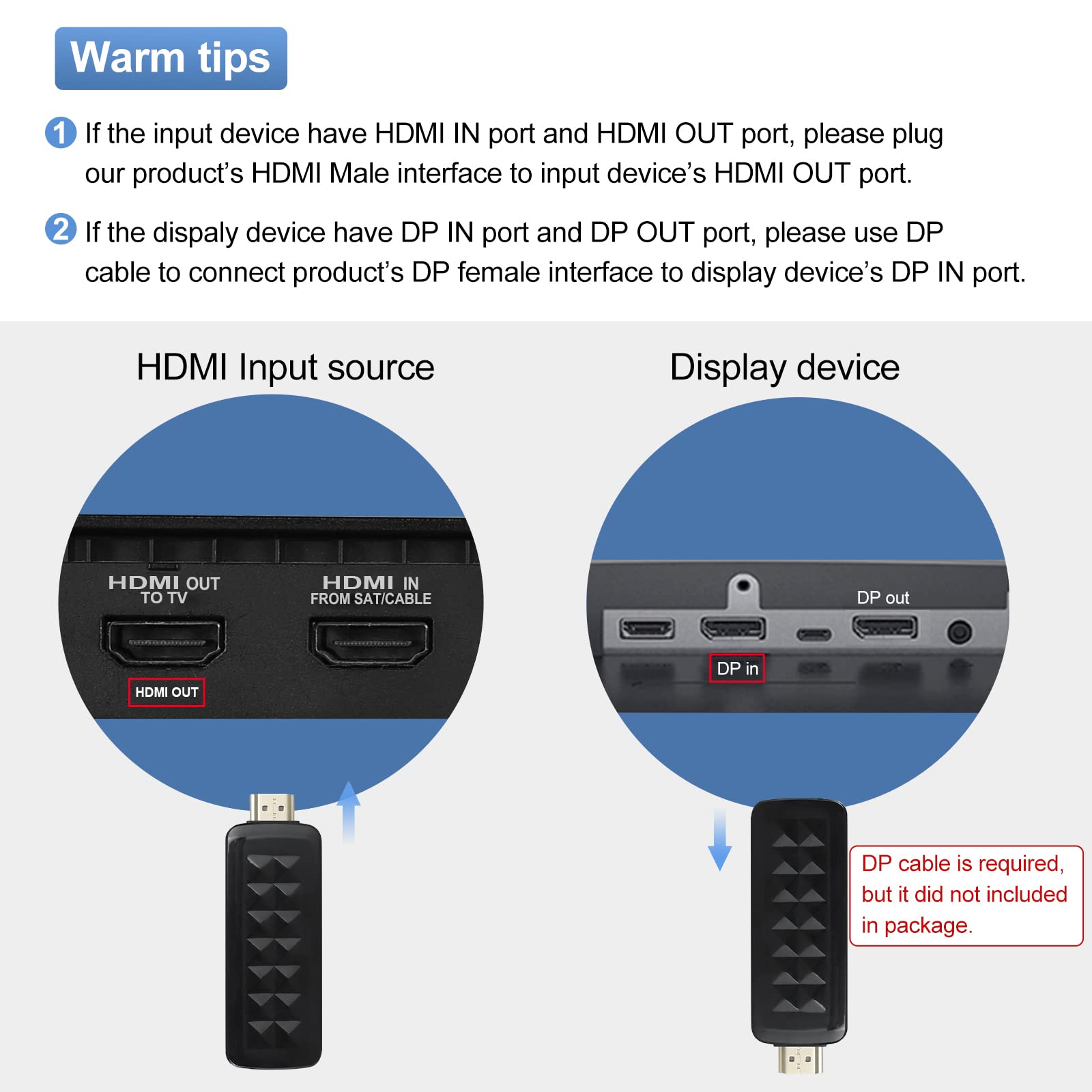
Plugs in to the laptop (input side), then accepted DisplayPort cord to monitor on Outlet end. Works great to allow me to have laptop screen & monitor at home . Only downside is you have to have an extra usb slot for the power to the converter ( little cord on side of converter).
M**A
I keep it powered - works well
First thing to know: this device runs hot, and should in my opinion, come with a beefier cooling solution beyond it's plastic construction. I purchased mini aluminum heat-sinks to help it out. Runs just warm to the touch now.I purchased this to adapt from a mini-DP from an Apple Cinema Display HD (which is originally Dual-DVI, that is then converted to mini-DP with an Apple adapter) This device goes between my laptop's HDMI out and the Cinema Display. It was a bit finicky, so I'm now supplying the power from an USB wall charger. That seems to have made it plug and play now.Other accessories I'm using in the chain include: a HDMI extension, an USB switch w/ data, and a Mini-DP to full size DP adapter.
D**S
Seems to be working great!
I have 2 PC towers & share them with 2 monitors and wanted to do that with DisplayPort switches. The issue I had was one of my PCs only has 1 DisplayPort.I had tried another adapter from HDMI to DisplayPort, however when I got it and tried it. It was actually a DisplayPort to HDMI and they are NOT reversible because of the power the DisplayPort needs. I returned that and found this one which is a true HDMI out to DisplayPort in because it provides the power needed.I've been using it for almost 2 weeks now and it's working great.
Trustpilot
2 weeks ago
1 month ago



