🚀 Upgrade your internet game with Linksys BEFCMU10 — fast, reliable, and hassle-free!
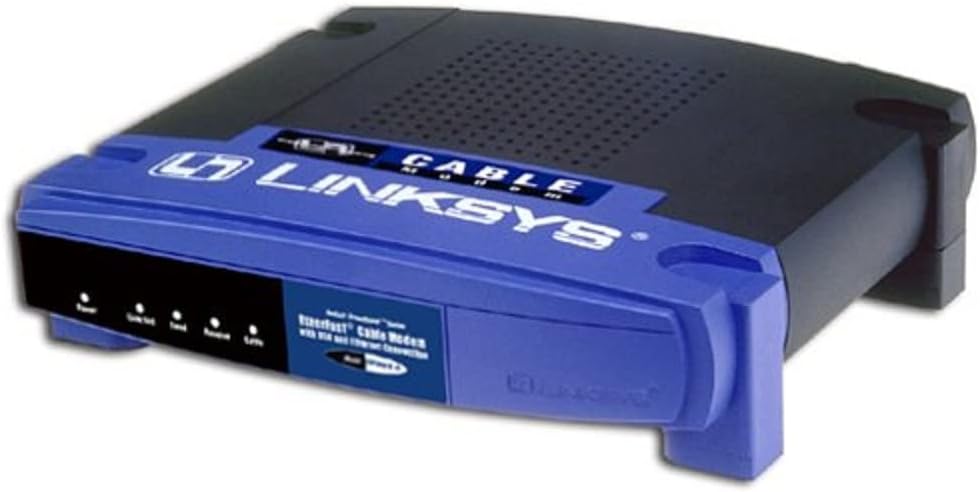
The Cisco-Linksys BEFCMU10 Ethernet Cable Modem delivers reliable broadband internet with up to 42 Mbps download and 10 Mbps upload speeds. Featuring dual USB and Ethernet connectivity, it offers easy plug-and-play installation and seamless compatibility with Linksys routers. Its compact vertical design saves space while providing an always-on connection that eliminates busy signals and timeouts, making it an ideal choice for professionals seeking fast, stable internet access.
| ASIN | B00005T6GZ |
| Best Sellers Rank | #692,014 in Electronics ( See Top 100 in Electronics ) #537 in Computer Networking Modems |
| Customer Reviews | 3.8 3.8 out of 5 stars (244) |
| Date First Available | November 1, 2001 |
| Is Discontinued By Manufacturer | No |
| Item Weight | 13.8 ounces |
| Item model number | BEFCMU10 |
| Language | English |
| Manufacturer | Linksys |
| Product Dimensions | 7.31 x 6.5 x 1.88 inches |
B**O
It works like a charm! Great value for the money!
Howdy folks! Bill the game developer back to tell you about the Cable Modem(BEFCMU10) I purchased from Amazon.com; to add Internet to my wireless network. Comcast is our cable provider here in Seattle. If you are interested in adding internet to your wired/wireless network; I suggesst the BEFCMU10 as your modem of choice. Why? Check out these features: Stackable design 5 easy to read LEDs Quick boot-up Comcast uses Linksys for the network stuff etc. Here is what I did for pain-free installation. 1) Connect the modem via RJ-45 directly to the computer, if you can. You want to make sure you don't have a dead modem. 2) Your computer should be able to see the modem and try to configure it. I have XP Pro and it saw the modem fine. 3) You can configure it with the computer OR connect the modem to your network since you know the modem is not dead. 4) If you decide to install on network, turn off the power to computers, router, etc. Install the modem with your CAT5 cable to your router. Turn on your modem, let it boot up, then fire up the router, then your computers. Make sure you watch the LEDs with each step. 5) Watch your LEDs carefully, noting that your router is picking up the signal from the modem. 6) If everything works great, you are about to enter broadband internet and loving it. All is needed now is for your cable company to create your account, put in your modem model #(serial code) and MAC address. 7) Make sure your cable installer or you(buyer of modem), tells the cable office the correct MAC address. Errors will lead to no internet. 8) Install the software given to you by your cable company on the main computer that you will use the most. I would install the software on a computer that is wired to your network, if at all possible. The software will engage the cable networks to finalize your setup per your account and MAC address on your modem. 9) This modem might take anywhere from a 30 seconds to 2 minutes to find and acquire the signal from your cable company, so don't jump to conclusions that it doesn't work or that your modem is dead. 10) Now, turn everything off again, starting with computers, router and then modem. Wait about 2 minutes and then turn everything on the reverse: MODEM(letting it bootup), then ROUTER(letting it bootup) and last, COMPUTERS. 11) Reconfigure your web browser to connect from LAN, instead of dial-up. You should now be able to connect to the internet through your cable modem and cable company. Final thoughts: If I remember correctly, I did not have to use the installation CD that came with the modem. Just follow the "Quick Installation" procedure. The boot-on and boot-off hints I picked up from other users, thanks guys; it works like a charm. The CABLE LED should remain solid when you are "registered" with your cable company. You might have to register more than once, if the first time it doesn't work. If your computer freezes in the middle of installing the cable company software; like mine did, don't panic. Just reboot the computer and start from the beginning of the install again. Although I like DSL; I was fed-up with all the DSL hype because I can't get DSL here. Our phone lines in our area are old which translates to mean "crap". Plus having DSL, you might have two(2) bills; one from phone company AND one from the ISP for your DSL broadband account. Cable broadband is just ONE bill and no-hidden fees or surprises. I would recommend the BEFCMU10 to anybody who is interested in cable broadband. No doubt in my mind you will love the speed and the ability to chit-chat on the phone while you cruise the net. Enjoy!!! Bill B, CEO/Project Lead, BabyBoy Multimedia Productions Seattle, WA USA
M**A
Hardware Version 4 will not work with Comcast in Colorado
If you live in Colorado, don't buy this product. The latest version (4) will not work with Comcast in Colorado. Version 3 will work, but unfortunately, you can't find out the version number until you look at the bottom of the modem. Linksys should at least print the version number on the outside of the box. I had to return this modem and purchase a ZOOM 5241. It works perfectly (and its cheaper)!
V**H
Review Linksys BEFCMU10 EtherFast Cable Modem
I plugged in the cable, plugged in the RJ45, the cable company acquired the mac address and it has worked perfectly, the same as the one I replaced because Vonage told me I had to update from my 2002 exact model of the same thing--so I did. Vonage techs were wrong. Their incoming fax data still would not function. The massive problems with Vonage fax line was finally located in all the protection lined up in my D-Link 108g MIMO wireless/4-port router. It took us 2 hours on the phone with supervisors to set four places in it to get incoming faxes. Linksys modem is great--so was the 2002 model. Security scanning companies still cannot get through my router. Today is 1/9/07. Due to the "warning" comment below in the lineup about Amazon's sending out older versions--I just checked my documentation of purchase 11/5/06 and it is the newest version 4.0, and not the older one he was unhappy with. Addendum: 2/13/2013: I wanted the 1 GB speed that the newer equipment affords (I have new computers or put PC cards in to use 1 GB), so bought from Amazon the Motorola Extreme modem and the Cisco 3000 wireless router in 2011. A good friend just got cable internet/tv service (very expensive here) and picked up my unit I reviewed here as her Modem plus the above mentioned D-Link for her wireless Router and a 300 MB usb wireless receiver for laptop. All work great, plug and play. She is NOT any sort of computer person - so is thrilled at zero expense internet and email!
C**A
Good overall performer
This modem works extremely reliably once set up. It does it's job, period. Negatives are that you don't know what version you are buying until you receive it (I ended up getting version 4 with the 3 internet lights), lack of support or documentation for Apple/Mac users, and risk of overheating. I like that it looks similar to and is completely stackable with most Linksys wireless routers, reducing the multiple electronics eye-sore factor. However, stacking the units increases the risk of over heating because the feet are not high enough to proprerly separate the units (can be avoided by using pushing thumbtacks through the feet). FYI: My cable provider's (Comcast) CSRs follow a set-up script for this specific model. Everything went well until the final step. No matter what they tried, their system could not recognize or communicate with this modem. The CSR, not having any technical training and whose expertise was limited to the script, finally gave up and said that they had to send a technician out to finish the set up. After hanging up, I tried fiddling aroung with different things and figured out that the setup could not be completed in FireFox. I switched to a different browser (can't recall if it was Safari or IE) and everything worked perfectly.
G**T
The price point is excellent and delivery was very quick.
Trustpilot
1 month ago
4 days ago